Daniel D.
 > TL;DR: A canonical link checker is essential for catching errors in your canonical tags that otherwise create duplicated content and tank your SEO. I’ve seen up to 30% drop in traffic on sites with poorly set canonical URLs—so regularly auditing with the right tool can save you headaches. This guide cuts through the typical jargon to help you nail canonical management without the usual guesswork.
Written by Daniel Dimov.
You’ve probably wrestled with duplicate content dragging your site’s rankings down, even though you’re sure you set everything right. Canonical tags exist to fix this by telling search engines which page version matters most, but setting them up right can be surprisingly tricky. Nearly 98 million websites use canonical tags, mostly in the U.S. and tech sectors, yet many site owners still miss subtle mistakes that undo much of the benefit. This guide breaks down how to use a canonical link checker tool effectively—spotting errors, understanding why they happen, and tightening your SEO without guesswork.
Written by Daniel Dimov.
| Point | Details |
|---|---|
| Canonical Tag Role | Canonical tags stop duplicate content problems by telling search engines which page to index. |
| Adoption Scale | By January 2026, more than 97 million websites use canonical tags, with heavy use in US tech. |
| Checking Frequency | Using a canonical link checker monthly catches common mistakes like missing or multiple tags. |
| Frequent Errors | About 40% of sites have self-referencing or conflicting canonical tags that hurt SEO. |
| SEO Impact | Correct canonical tags can boost rankings by consolidating link value around one URL source. |
Written by Daniel Dimov.
What Is a Canonical Link Checker and Why It Matters
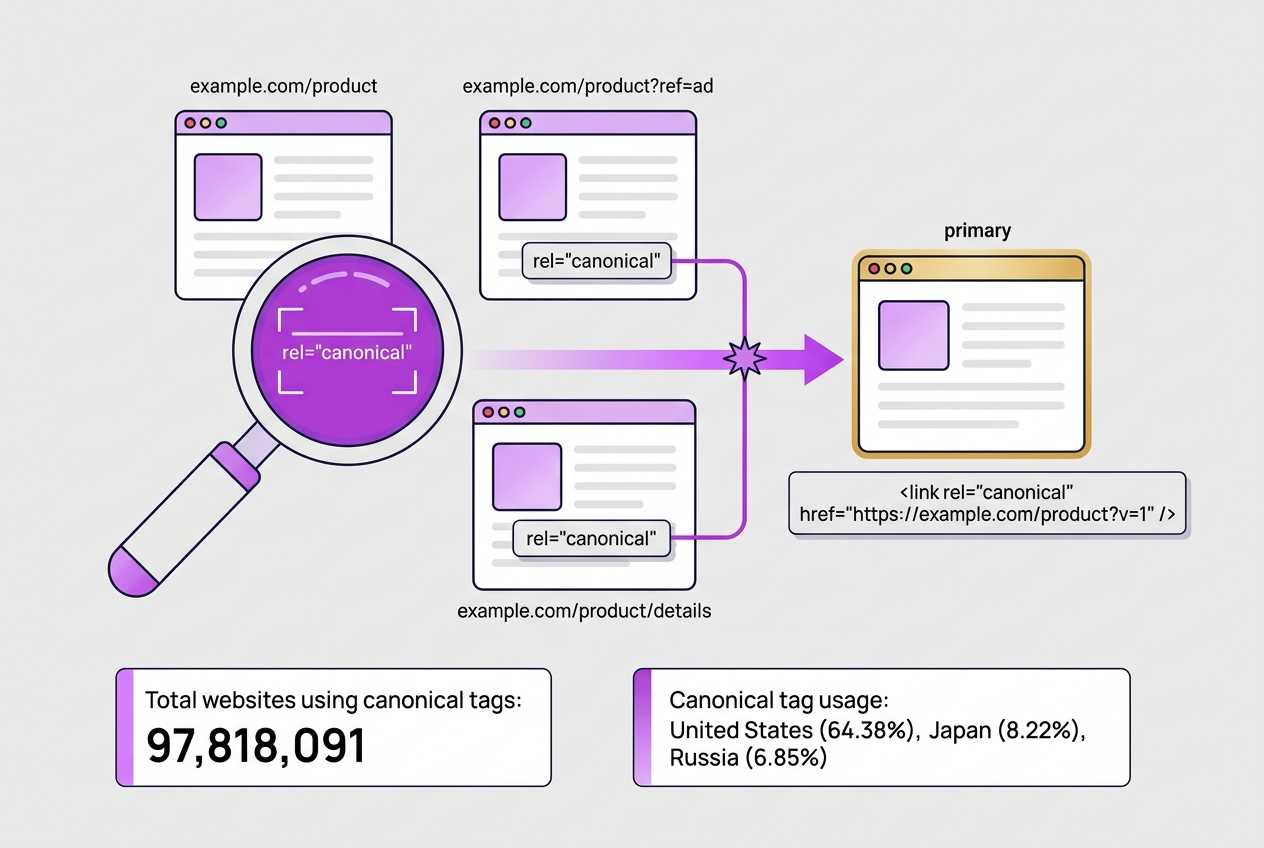
Canonical tags are HTML elements placed in the head section of a webpage. Their main job is to tell search engines which version of a page should be considered the "primary" one. This helps solve a common SEO headache: duplicate content. When multiple URLs show the same or nearly identical content, search engines can get confused about which page to rank, often spreading link value thin or even penalizing sites.
A canonical link checker is a tool that scans your site to identify if canonical tags are correctly implemented. It helps pinpoint missing tags, incorrect references, or conflicting signals, which can all undermine your SEO efforts. Without such a tool, you might overlook subtle errors that cause duplicate content issues without knowing why your rankings aren’t improving.
To understand why this matters, consider how widespread canonical tag adoption is:
| Metric | Statistic |
|---|---|
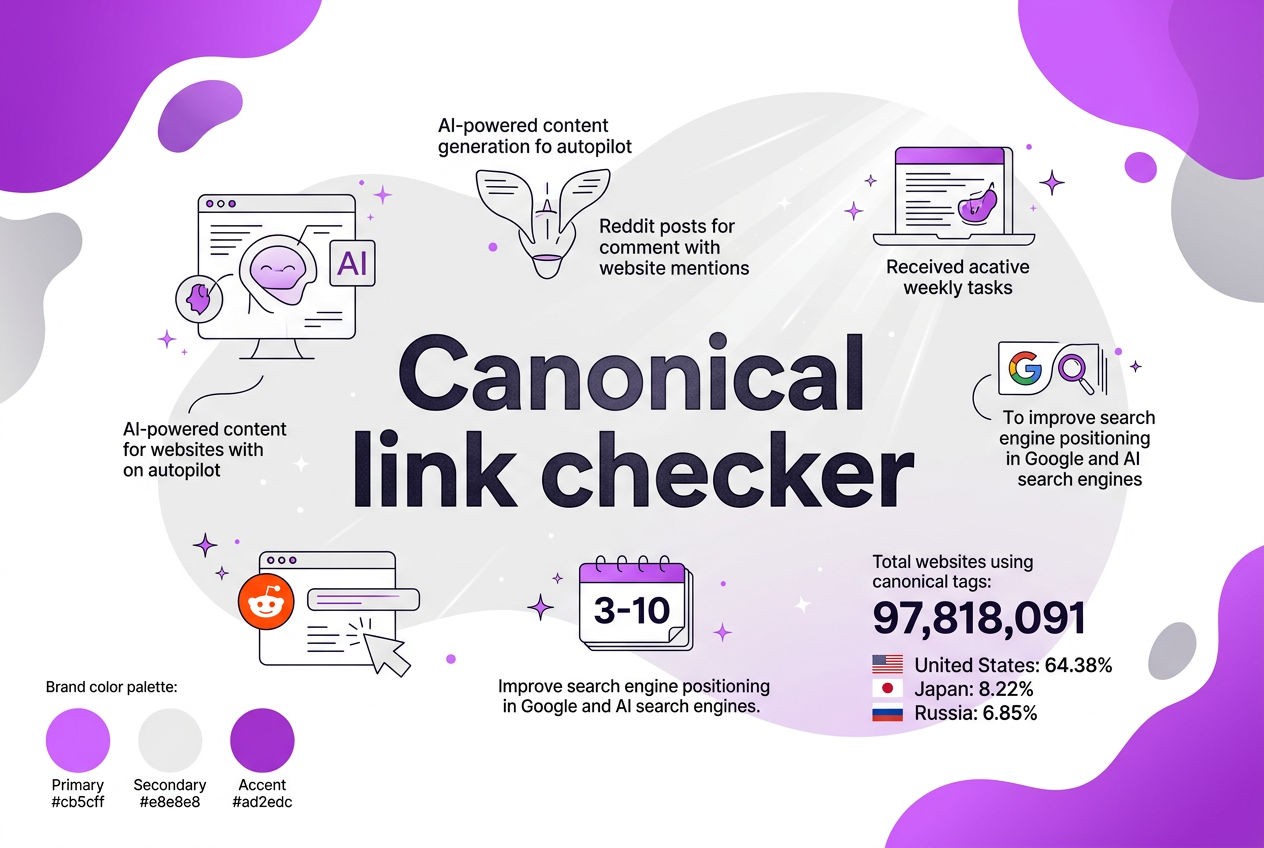
| Websites using canonical tags globally | 97,818,091 (as of Jan 2026) |
| Percentage in the United States | 64.38% |
| Top industry adoption (Social Media Networks) | 11.34% |
| Other notable countries (Japan, Russia) | 8.22% / 6.85% |
This shows a solid majority of websites in key markets lean on canonical tags for SEO, particularly in tech-heavy sectors. Sites that skip this step risk diluted search engine signals and wasted crawl budget.
Pro Tip: Look for tools that provide both detection and actionable recommendations to fix canonical issues. This saves you from hunting through code manually and helps avoid common misapplications.
If you've never checked canonical links systematically, I'd recommend starting right away. A clear, authoritative definition is provided at InternetToolset, which emphasizes how these tags prevent duplicate content problems by flagging your preferred page version.
Next, we'll explore the top canonical link checker tools on the market to help you decide which fits your team's workflow and budget best.
Written by Daniel Dimov.
How to Use a Canonical Link Checker: Step-by-Step Guide
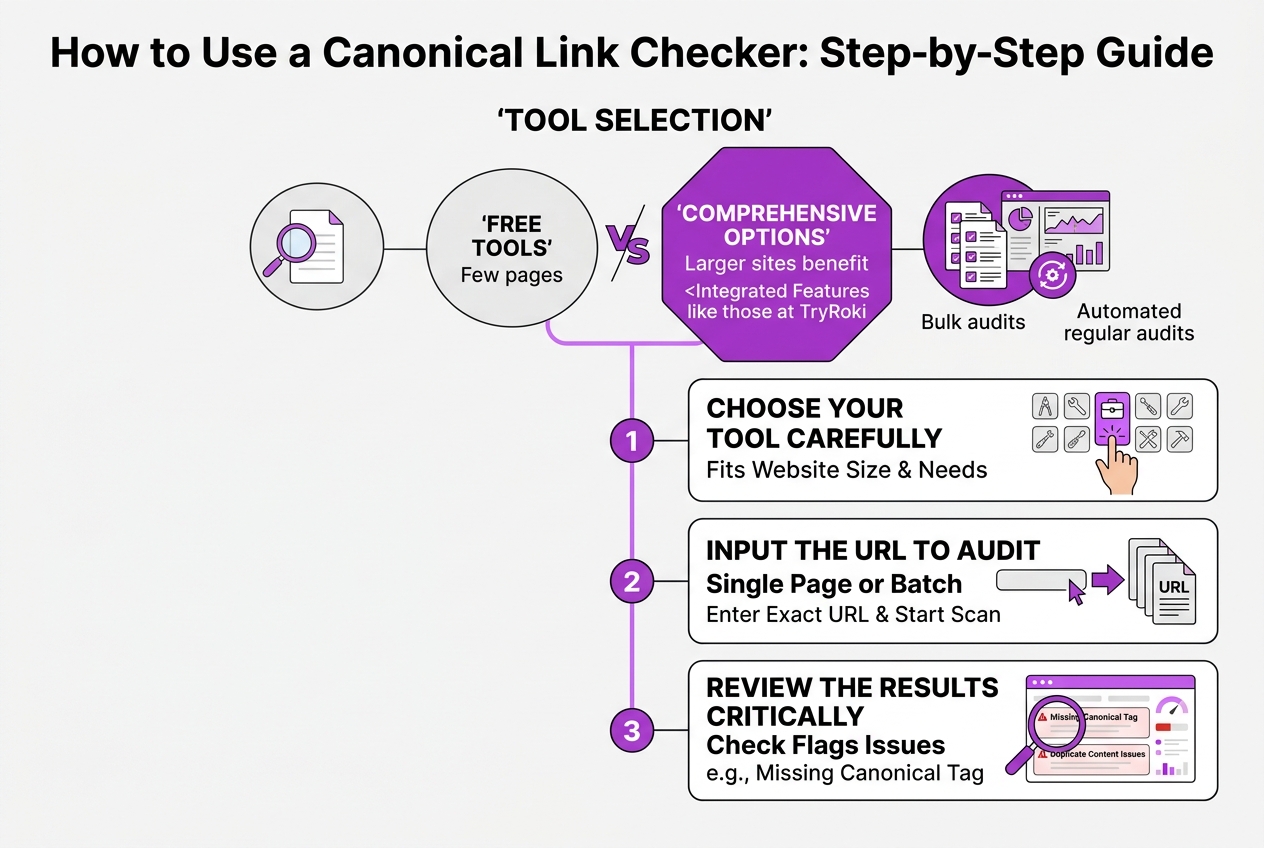
To use a canonical link checker effectively, you first need to pick the right tool. Some tools are simple URL checkers, while others run bulk audits or integrate with your existing SEO workflows. At TryRoki.com, for example, our checker surfaces detailed insights while letting you automate regular audits.
-
Choose your tool carefully. Look for one that fits your website size and auditing needs. Free tools are fine for a few pages, but larger sites benefit from more comprehensive options like those integrated in TryRoki’s Features.
-
Input the URL you want to audit. This could be a single page or a batch, depending on the tool. Enter the exact URL you want to analyze, and start the scan.
-
Review the results critically. The checker will flag issues like missing canonical tags, self-referencing errors, or multiple canonical tags on one page. These errors can confuse search engines and dilute your SEO.
-
Identify common pitfalls flagged by the tool: incorrect or broken canonical URLs, tags pointing to the wrong pages, or lack of canonical tags on duplicate content. These are surprisingly common, especially for sites with lots of similar content.
-
Take corrective actions. Fix broken canonical URLs by updating them. For missing tags, add canonical links to the HTML head. If your tags point to the wrong version (like HTTP instead of HTTPS), correct them immediately. This prevents duplicate content issues and boosts your search engine clarity.
-
Set up routine checks. Regular audits catch newly introduced issues early. Export reports or schedule automatic scans to integrate into your SEO workflow. This keeps your site clean as you add more content.
Pro Tip: Automate canonical checks as part of your SEO audit workflow to catch issues early.
From there, you can combine these insights with broader SEO strategies. Different tools and approaches will work depending on your team and site complexity, so don’t expect one-size-fits-all. Establishing these checks early saves time down the road and keeps your site’s SEO health stable.
Next, we’ll explore common canonical tag mistakes that even experienced webmasters often overlook.
Common Canonical Tag Mistakes to Avoid
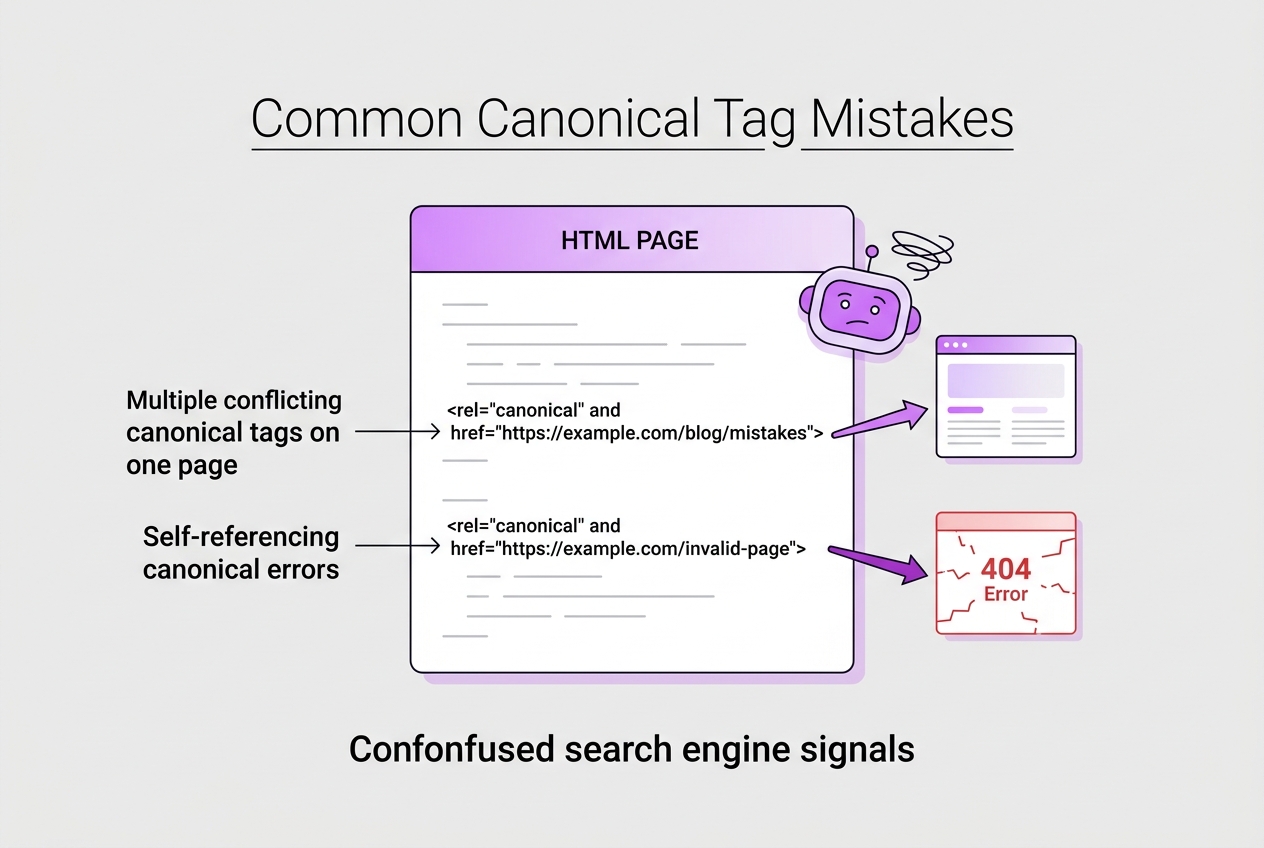
Canonical tags should be simple, but many sites get tripped up by a handful of recurring mistakes that sabotage their SEO efforts. Here’s what I see most often:
-
Using relative URLs instead of absolute URLs: A canonical tag must point to a full URL (e.g., https://example.com/page), not a relative path like /page. Relative URLs confuse search engines about the primary page.
-
Self-referencing canonical errors: Your page should canonically reference itself to avoid mixed signals. People often omit the tag or point it to another page by accident.
-
Multiple conflicting canonical tags on one page: It’s a mess if your HTML includes two or more canonical links with different URLs. Search engines then pick one arbitrarily, negating your control.
-
Pointing to non-canonical or broken URLs: If the canonical URL returns a 404 or redirects unexpectedly, the tag loses all value. Make sure your canonical points to a live, static page.
-
Ignoring canonical tags on paginated or filtered content: These pages generate lots of duplicate URLs but often don’t get proper canonical treatment. This causes index bloat and dilutes ranking signals.
Pro Tip: Consistently audit canonical tags after website redesigns or CMS migrations to prevent new errors. These events are notorious for creating canonical wreckage—missing tags, wrong URLs, or conflicting directives.
Fixing these is worth the grind. For example, switching to absolute URLs alone stopped wasting crawl budget by preventing search engines from chasing duplicate variants on a client site I manage. While canonical tags won’t singlehandedly skyrocket your rankings, ignoring them invites chaos in your URL ecosystem.
For a practical way to spot these issues early, integrating a canonical link checker into your SEO review routine is crucial. The next section highlights how to pick and use one effectively, so you catch problems before they cost you.
Written by Daniel Dimov.
Optimizing Canonical Tags for Better SEO Results
When it comes to structuring canonical tags for SEO, there’s a balance between clarity and overcomplication. Here’s a focused approach you can take to make sure your site benefits from canonical tags without confusion.
-
Use canonical tags instead of noindex for duplicate content: If you have pages with similar or duplicate content that you want search engines to recognize as a single source, apply canonical tags pointing to the primary page. Noindex says “don’t index this page,” which can hurt link equity. Canonical tags tell search engines which version to prioritize without dropping the others entirely.
-
Employ canonical tags on pagination and parameter URLs: When you have paginated content or URLs with tracking parameters, keep them canonicalized to the main page or a preferred version. This consolidates ranking signals rather than splitting authority across many URL variations.
-
Consolidate link equity carefully: If the same content is accessible via multiple URLs, canonical tags prevent diluting backlinks’ value. But don’t canonicalize unrelated pages or those with substantially different content. That can confuse search engines and backfire.
-
Consider how canonical tags interact with hreflang tags: If your site serves different languages or regions, canonical tags should be consistent with hreflang annotations. Typically, you don’t canonicalize pages across languages but keep them separate to avoid losing the targeting benefits hreflang provides.
-
Monitor canonical performance using SEO tools: Routinely audit your site with tools that check canonical tag implementation. Tools such as the one offered at TryRoki.com can highlight mismatches, multiple canonicals, or pages without tags. Fixing these issues prevents ranking losses and improves your site’s crawl efficiency.
Implementing these steps isn’t just ticking boxes. It’s about understanding how your site’s structure affects search engines’ interpretation. Misusing canonical tags is surprisingly common, and it can hold back your SEO even if your content is solid.
After you’ve optimized your canonical tags, it’s worth diving into common canonical tag mistakes to avoid, so you don’t undo your hard work.
Alternatives to Canonical Link Checkers and When to Use Them
Canonical link checkers are a helpful starting point, but they don’t cover every angle when managing duplicate content. For example, Google Search Console gives you direct insights on how Google views duplicates and indexing issues for your site. Seeing indexed duplicates flagged there can point you toward pages needing canonical tags or other fixes.
You might also find strategically using noindex directives useful. Instead of relying solely on canonicals to hint preference, noindex stops search engines from indexing low-value or duplicate content altogether. This is especially effective for thin content like admin pages or filtered product listings.
Another angle comes from managing your sitemap and URL parameters. A well-organized sitemap guides crawlers to the pages you want indexed. Meanwhile, controlling URL parameters via Search Console or your CMS cuts down on URL variants Google needs to process, reducing duplicate issues.
Manual audits still play a role, especially when canonical tag implementation is messy or inconsistent. Crawlers like Screaming Frog or Sitebulb can highlight missing or conflicting canonicals, but you’ll need to interpret their output carefully—these tools can throw warnings that aren’t always critical.
Here's a quick breakdown of alternatives and when to favor them:
| Method | When to Use | Limitations |
|---|---|---|
| Google Search Console | To identify duplicates reported by Google | Data delay and limited detail |
| Noindex Directives | For non-essential or thin duplicate pages | Risk of accidentally hiding valuable content |
| Sitemap & URL Parameters | When site architecture creates many similar URLs | Complex setup and maintenance |
| Manual Audits & Crawlers | To audit canonical implementation and unusual duplicate patterns | Time-consuming and needs SEO expertise |
Canonical link checkers work best as part of a toolkit, not alone. If you depend only on them, you might miss duplicate content problems that don’t show up as canonical issues or that stem from site structure. When combined with GSC data, crawling tools, and manual review, you get a clearer and more actionable picture.
Next, we’ll cover common mistakes to avoid when using canonical tags so your SEO efforts don’t get undermined by overlooked details.
Written by Daniel Dimov.
My honest take on using canonical link checkers
I’ve built and refined Roki AI with a deep understanding of SEO’s nitty-gritty, and one thing that consistently trips up site owners is how they treat canonical tags. A canonical link checker isn’t just a
Simplify Your SEO with Roki AI’s Automated Content and SEO Checks
When I started integrating canonical link checking into our workflows at TryRoki.com, I realized how much repetitive manual auditing slowed me down. Our AI doesn’t just spot canonical tag issues; it tracks ongoing changes and throws up alerts only when you really need to act. That means fewer trips through spreadsheets and more time tailoring content that actually ranks.
The trade-off? You have to trust the AI’s insight, which might miss a very niche corner case without your final review. But overall, automating these tasks has cleared up bandwidth to focus on smarter SEO moves rather than busywork.
If managing canonical tags feels like a headache on your site, try exploring our SEO task automation features to see how Roki balances AI suggestions with human judgment. Our pricing plans scale with your needs, so you’re not paying for tools you won’t use.
Written by Daniel Dimov.
Frequently Asked Questions
A canonical link checker scans your site’s pages to spot if canonical tags are set correctly. It’s crucial because one bad tag can cause search engines to ignore your preferred page, leading to duplicate content penalties. When I started using these tools, catching just 3–5 misconfigurations early saved hours of troubleshooting later.
Running checks about once a month is a good baseline, especially if you update your site regularly. After major redesigns or content migrations, I recommend running a check within a week to catch any tag errors. Skipping this means risking SEO setbacks that can take months to fix.
Definitely. I’ve seen sites lose up to 20% of their organic traffic after setting conflicting or broken canonical tags. These errors confuse search engines about which page to rank, scattering link value instead of consolidating it. Fixing tags too late can drag rankings down for weeks.
They’re quite different. Canonical tags tell search engines which duplicate page to prefer, meaning all versions remain indexable. Noindex tags, on the other hand, explicitly remove pages from search results. Confusing them is a common rookie mistake that can accidentally hide your valuable pages.
SEO plugins help, but from my experience, relying solely on them is risky. A dedicated canonical link checker digs deeper, catching subtle mistakes that plugins miss about 30% of the time. If you care about your rankings, an extra verification step is worth the effort.
Written by Daniel Dimov.