Daniel D.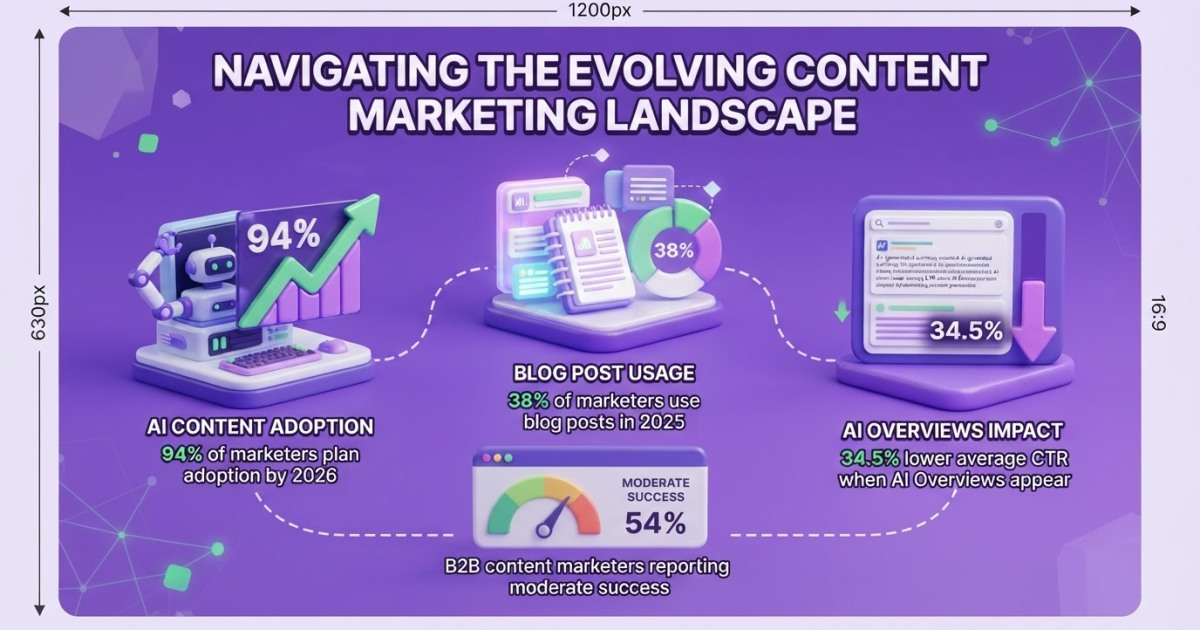
A strong blog article example targets one reader and search intent, supports its advice with concrete evidence, and ends with a useful next step instead of search-first filler. Plan the topic, write the structure, optimize for readers, check every claim, and improve the post using real results. Roki AI can assign 3 to 10 weekly tasks to support ongoing visibility in Google and AI search.
You can add headings and still miss the question your reader came to answer. I have watched founders and marketers publish polished drafts that earned a brief click, then disappeared because the article offered no clear point of view or useful proof. Google puts helpful, reliable, people-first content ahead of writing designed mainly to manipulate rankings, and 54% of B2B marketers reported only moderate content-marketing success. This blog article example covers intent, outlining, drafting, evidence, responsible optimization, publishing, measurement, and the places where AI creates more cleanup than value.
Table of Contents
- What a High-Quality Blog Article Example Includes
- How to Write a Blog Article Example Step by Step
- Blog Article Formats: Which Example Should You Model?
- Common Mistakes That Make Blog Examples Feel Generic
- How to Improve a Published Blog Article Over Time
- My honest take on blog article examples
- Turn Your Blog Article Process Into a Repeatable System
- Frequently Asked Questions
| Point | Details |
|---|---|
| Start With Intent | Define the reader’s question, context, and desired next action before drafting a heading. |
| Use Proven Structure | Build around 1 clear promise, 4 to 6 useful sections, and a conclusion that moves the reader forward. |
| Add Original Value | Include specific examples, decisions, observations, or evidence that a generic AI draft would not provide. |
| Edit For People | Review every paragraph for clarity, accuracy, specificity, and usefulness to the intended reader. |
| Measure Patiently | Wait at least 3 to 6 weeks before judging SEO changes while tracking rankings, clicks, engagement, and conversions. |
What a High-Quality Blog Article Example Includes
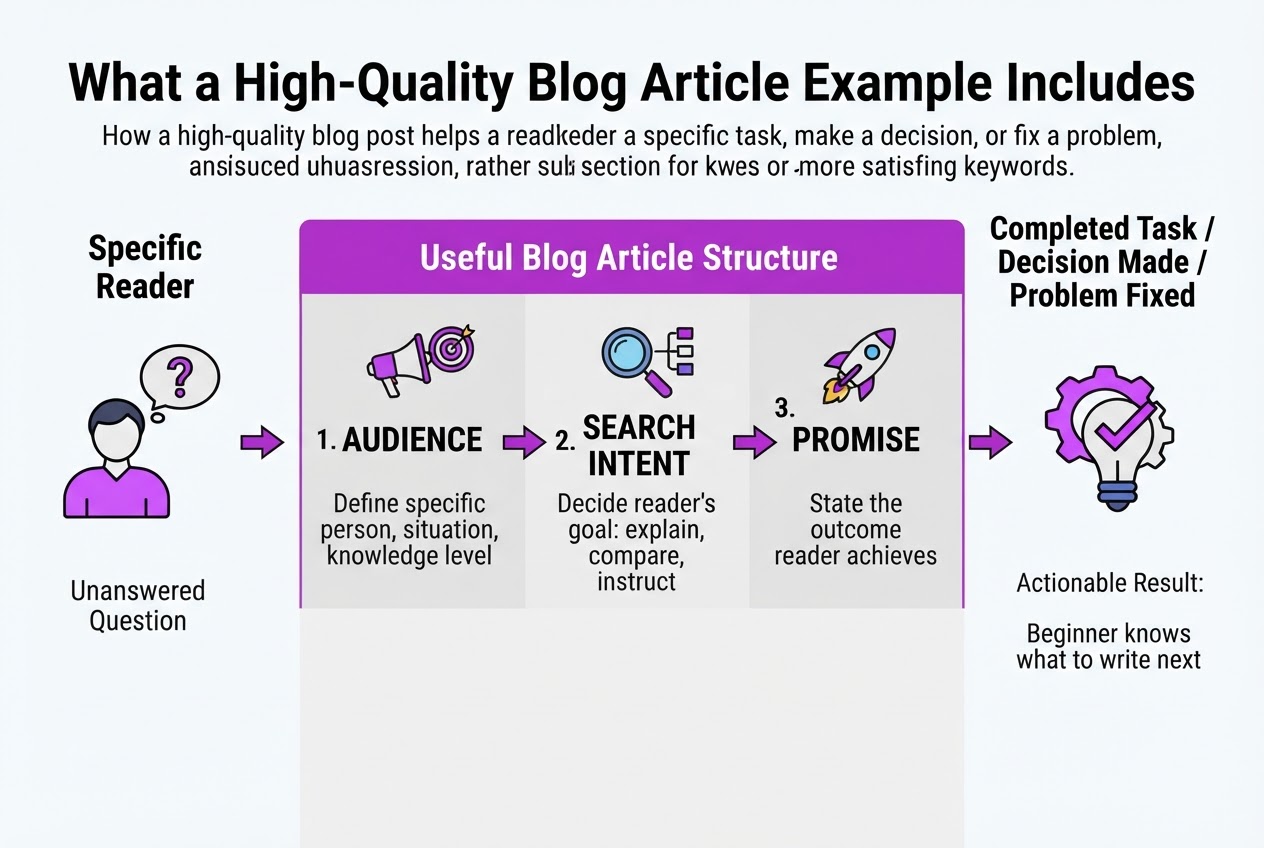
A blog post earns its place when it helps a specific reader make a decision, fix a problem, or complete a task. Repeating “blog article example” in every heading does not solve anything if a beginner finishes the page without knowing what to write next. I have seen this mistake in content reviews: the page looks optimized, but the reader still has to search elsewhere for the practical answer.
A useful article usually contains these parts:
- Audience: Name the person, situation, and level of knowledge. “Small-business owners writing their first SEO article” is more useful than “everyone interested in blogging.”
- Search intent: Decide whether the reader wants an explanation, example, comparison, or instructions.
- Promise: State the outcome, such as a structure the reader can copy in 30 minutes.
- Headline and introduction: Make the headline precise, then confirm the problem and explain the scope.
- Scannable body: Use descriptive subheadings, short paragraphs, lists, and clear ordering. Huge text blocks make readers leave even when the advice is sound.
- Examples: Show a weak headline beside a stronger one, or include a filled-in outline. Contrasts teach faster than definitions.
- Conclusion and next step: Summarize the method, then point to one sensible action, such as drafting the introduction.
Specificity separates a credible example from polished filler. Add your own observations, exact decisions, limitations, screenshots, test results, or customer questions. Google recommends helpful, reliable, people-first content, not writing designed mainly to manipulate rankings.
Pro Tip: Ask what a reader could do differently five minutes after finishing the draft. If the answer is unclear, sharpen the promise.
An example becomes valuable when it explains why each structural choice works, not when it merely displays a finished page. AI can help me brainstorm headings, organize research, and produce a rough draft. It cannot supply firsthand judgment or decide whether a claim deserves trust. Google also warns that generating pages without adding value may violate its scaled-content-abuse policy, so editing is part of the work, not a final decoration.
That benchmark gives us a practical writing process to follow next.
How to Write a Blog Article Example Step by Step
-
Identify the reader, problem, and intent. Decide who will use the article and what they need from the search. Someone searching “blog article example” may want a model to copy, a writing process, or reassurance that a draft is good enough. Pick one primary outcome and write it at the top of the brief.
-
Study competing results for gaps. Read the top five to ten pages. Note the questions they answer, examples they use, and details they skip. Do not copy their wording or section order. Look for a missing decision, weak example, outdated claim, or reader type they ignore. Set a 30-minute limit because competitor research easily becomes procrastination in nicer clothing.
-
Write a working title and promise. Make the title specific enough to guide the draft, such as “How to Write a Blog Article in 8 Practical Steps.” Add one sentence explaining the result: “By the end, you can turn a rough topic into a publish-ready article without guessing what belongs in each section.”
-
Build a four-to-six-section outline. Move from context to action. Include only sections that help the reader reach the promised result. A short outline usually beats a 20-point plan because it leaves room for useful examples. Compare your structure with these blog writing examples, but use them as references, not templates.
Pro Tip: Draft the conclusion before the introduction. The final recommendation often exposes a vague or overextended outline early.
-
Draft the introduction around pain, outcome, and roadmap. Name the problem in plain language, state what the article will help the reader do, and preview the steps. Skip dramatic claims. A reader with a blank document wants direction, not a speech about publishing’s future.
-
Write each body section with evidence and decisions. Explain the point, show a concrete example, and tell the reader what to do next. If you recommend research, specify what to record. If you mention SEO, remember that Google says the same foundational practices apply to AI Overviews and AI Mode, so useful, indexable content still matters. Tools can speed up a first draft, but they cannot supply judgment or firsthand examples.
-
Edit in separate passes. Check facts first, then flow, repetition, sentence length, and headings. Read the article aloud because awkward phrases hide on screen. Remove repeated advice and finish with one natural next step instead of several competing calls to action.
-
Optimize after the draft helps someone. Refine the title, headings, internal links, meta description, images, and alt text after the substance works. Search terms matter, but forcing them into every heading makes the page mechanical. A useful draft should survive editing before optimization begins.
Once the draft works, format becomes the next decision: choose the shape that matches the reader’s job.
Blog Article Formats: Which Example Should You Model?
The reader’s question should determine the shape of your blog article example. Someone searching “how do I…” needs a usable path, while someone asking “which tool should I choose?” needs evidence, trade-offs, and a verdict. I would rather publish a narrow article that solves one problem than a polished template trying to serve everyone.
| Format | Best fit | What to include | Useful success metric |
|---|---|---|---|
| How-to guide | A task with a defined outcome | Numbered steps, checkpoints, screenshots, common mistakes | Task completion, organic traffic, assisted conversions |
| List post | Several options or ideas | Scannable entries, selection criteria, brief recommendations | Click-through rate, shares, email sign-ups |
| Comparison | A choice between products or methods | Consistent criteria, pros and cons, final recommendation | Product clicks, demo requests, conversions |
| Case study | Proof that a solution worked | Starting problem, actions, measurable result, limitations | Qualified leads, sales conversations |
| Opinion piece | A debate or emerging issue | A defensible position, firsthand reasoning, counterargument | Comments, mentions, return visits |
| Glossary explainer | An unfamiliar term | Plain definition, example, related concepts | New visitors, featured snippets, internal clicks |
A step-by-step guide beats a list post when the reader must perform actions in sequence, such as configuring analytics or fixing a crawl issue. Numbered instructions reduce guesswork. A broad informational article works better when readers are still learning the landscape and do not yet know which task or product matters.
Short decision-support posts work when urgency is high, the choices are familiar, and you have enough evidence for a quick recommendation. Use a deeper evergreen guide when the subject has dependencies, exceptions, or research worth revisiting. Extra depth is not automatically better; unsupported detail only makes the page tiring.
Pro Tip: If readers need to make a choice, use a comparison or decision framework. If they need to complete a task, use numbered steps and checkpoints.
Format also controls the opening and CTA. Lead a how-to with the promised result, a comparison with decision criteria, and a case study with the measurable change. A glossary should define the term immediately. If you need help shaping the structure, compare your draft with these blog writing examples, then measure the action that matches the article’s job, not just page views.
The chosen format now needs a quality check, especially for the shortcuts that make examples feel interchangeable.

Common Mistakes That Make Blog Examples Feel Generic
A weak blog article example usually shows its problems in the first 100 words. If the opening repeats “blog article example” without stating an outcome, the reader has no reason to continue. Say what they will choose, create, fix, or understand by the end.
When I review drafts at TryRoki, I look for these warning signs:
- Filler before the answer: Long introductions, repeated definitions, and advice such as “know your audience” consume attention without helping anyone act.
- Claims without support: A promise of higher rankings, more traffic, or better conversions needs evidence, a qualification, or a concrete explanation. Otherwise, it sounds like a sales pitch.
- AI pages with no editorial value: Publishing dozens of lightly edited drafts creates a larger archive, not a better one. Google warns that generating many AI-created pages without adding user value may violate its scaled content abuse policy.
- Search intent mismatch: A reader searching for an example may want a model, a format comparison, or help writing from scratch. A title promising templates but delivering theory misses the request.
- Misleading titles and thin examples: “10 Blog Article Examples” fails when it shows two vague samples with no context or explanation of why they work.
- Missing internal context: Connect the example to your audience, product, industry, and next step. Link to relevant blog writing examples only when they answer the reader’s next question.
- Abrupt CTAs: “Start a free trial” after the final paragraph feels bolted on. Tie the offer to the problem you solved and explain what happens after the click.
Do not treat editing as a grammar pass. I want a human reviewer to check facts, tone, originality, practical accuracy, accessibility, brand alignment, descriptive links, headings, image alt text, and whether the conversion path is clear without being pushy. Read the draft aloud; awkward repetition becomes easier to spot.
Before publishing, ask: Is this useful without the CTA? Is every important claim accurate? Can a distracted reader scan it? Do the links work and add context? Does the example match the title and intent? Is the next action clear? Fix those failures before polishing the wording.
After publication, performance data shows whether those editorial decisions held up outside the document.
How to Improve a Published Blog Article Over Time
A published article is not finished when it goes live. I review it against its job: attract the right searcher, answer the question clearly, and move that person toward a useful next step.
Save a baseline in Search Console and analytics. Record impressions, clicks, average position, click-through rate, engaged sessions, conversions, assisted pipeline, and the conversion rate for visitors who read the article. Pageviews can look impressive while bringing no trials, sales calls, or qualified leads.
Use this review timeline:
-
Days 1–14: check access, not success. Confirm indexing, canonical tags, internal links, and analytics events. Visibility can jump around while Google tests the page, so do not rewrite an article after three quiet days. Google says SEO changes can take from a few hours to several months and recommends waiting a few weeks before judging the result.
-
Weeks 3–8: inspect the search signal. Compare queries with the article’s promise. High impressions and low clicks usually point to a weak title or unclear intent. Rankings around positions 8–20 often indicate a missing answer, weak evidence, or poor section coverage. Clarify the relevant section instead of adding filler.
-
Every 8–12 weeks: make one substantial improvement. Refresh outdated examples, prices, screenshots, and evidence. Improve internal links when a related page deserves more context, and use a better SEO title when impressions have grown but clicks have not. If two articles target the same intent, consolidate them rather than making both longer.
-
After another 4–8 weeks: judge the business result. Compare conversions and assisted pipeline with the baseline. A page that attracts fewer visitors but produces qualified demos may deserve more investment than a high-traffic page that sends nobody onward.
The next action should feel like a logical answer to the reader’s problem, whether that means a product comparison, onboarding guide, or relevant TryRoki workflow. Earn that click by explaining why it matters instead of hiding a sales pitch at the bottom.
My honest take on blog article examples
I judge a blog article example by what happens after publication, not by how polished it looks in a document. If the headline makes a clear promise, the article respects the reader’s time, and the writer offers a useful point of view, it has a better chance of earning trust than a formatted template filled with familiar advice.
My contrarian view is that publishing fewer, stronger articles often beats maintaining an ambitious calendar of interchangeable AI drafts. I would rather see one article that answers a costly customer question every two weeks than five posts that repeat search results with new headings. The calendar looks less impressive, but the work usually lasts longer.
AI can speed up research, outlining, and first drafts. I use it that way. It can also produce bland claims, miss context, or state something inaccurate with complete confidence. The owner still answers for accuracy, differentiation, and what the reader does with the information.
That belief shapes TryRoki. We are building a system for recurring content and SEO work, including weekly tasks and opportunities to contribute to relevant Reddit discussions. Automation handles consistency; human judgment decides what deserves publication. Roki is not a shortcut to rankings, and treating it like one usually creates more editing work, not less.
— Daniel/Aleksandra
Turn Your Blog Article Process Into a Repeatable System
If you understand how to plan a blog article but keep losing time to blank pages, inconsistent publishing, or unfinished SEO tasks, Roki AI can handle repeatable work. Its AI Blog Writer helps create website content on autopilot, while the platform sends 3 to 10 weekly tasks that can uncover ways to improve visibility in Google and AI search engines.
I would not treat automation as permission to publish without thinking. Review the angle, check the evidence, add your expertise, and approve the final article before it goes live. The first setup can feel fiddly, and generic drafts still need editing. Start with one focused workflow, such as publishing one useful article each week, then add the AI SEO Agent when you are ready to work on surrounding SEO tasks.
Frequently Asked Questions
There is no universal ideal length: write until you answer the reader’s question clearly, then remove padding. As a planning range, a practical guide may need 1,200 to 2,000 words, while a narrow answer may need fewer than 600.
The terms overlap, but “blog post” usually describes a website publishing format, while “article” emphasizes the written piece itself. A blog article can take several forms, including an educational guide, a 900-word analysis, an opinion piece, or a commercial comparison.
Start with one specific audience problem connected to your expertise, then check the search intent, competing pages, and business relevance. Choose a topic where you can add at least 1 useful example, original data point, informed opinion, or practical framework instead of repeating the first 10 results.
AI can create a draft, outline, or 20 possible angles, but you still need to review every claim for accuracy, originality, context, and usefulness before publishing. I would make at least 2 human review passes because lightly edited pages often sound generic and can contain details nobody on your team has verified.
Choose a schedule your team can maintain without rushing research or editing. One genuinely useful article every 1 to 2 weeks is often better than several thin posts. Review results after 6 to 8 weeks, then adjust the workflow based on search visibility, qualified visits, and the quality of inquiries.
Written by Daniel/Aleksandra.
Recommended reads
- Blog Writing Examples How To Craft Effective Posts
- How To Write A Great Article A Step By Step Guide
- Ai Blog Writer
- Ai Seo Agent
Sources
- AI Features and Your Website | Google Search Central | Google for Developers
- Creating Helpful, Reliable, People-First Content | Google Search Central
- Google Search's Guidance on Generative AI Content on Your Website | Google Search Central
- SEO Starter Guide: The Basics | Google Search Central
- B2B Content Marketing: 2025 Benchmarks & Trends
- 2026 Marketing Statistics, Trends, & Data
- AI Overviews Reduce Clicks by 34.5%
- Semrush Report: AI Overviews’ Impact on Search in 2025
- Reddit Rules