Daniel D.
A meta description generator creates concise search-result descriptions faster, usually aiming for about 150–160 characters, but you still need to check every draft for accuracy, relevance, and search intent. Use it to explain a page’s value and help Google display a useful snippet, not to guarantee higher rankings or more clicks.
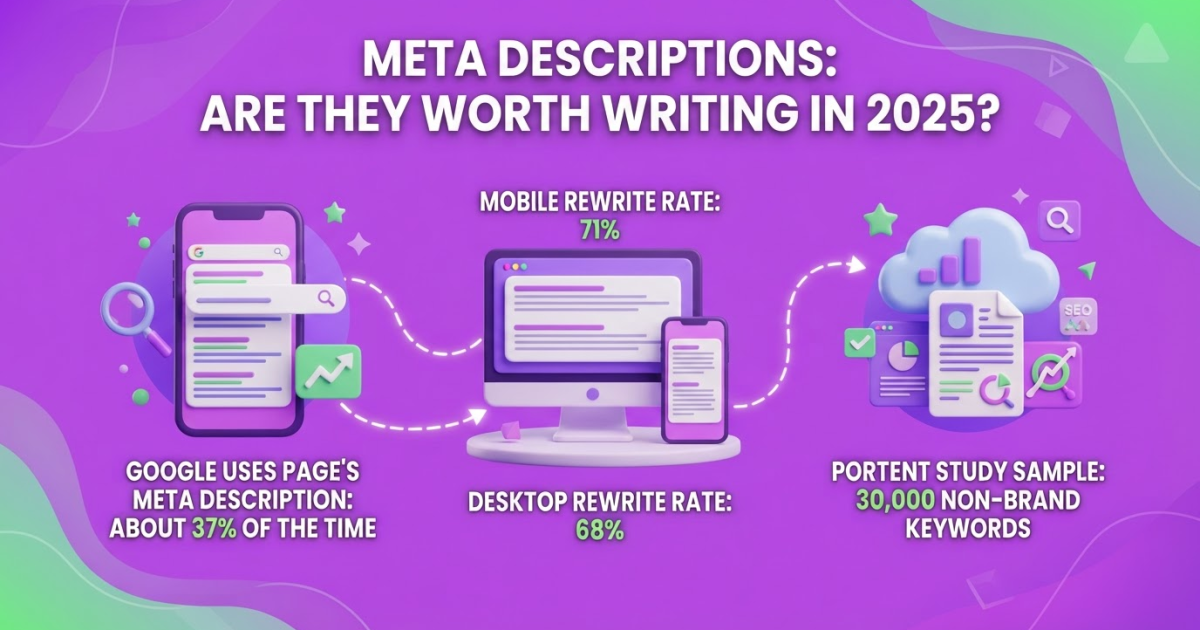
Writing unique meta descriptions for dozens or hundreds of pages is tedious, especially when you know a weak snippet can make strong content look forgettable in search results. I have seen teams spend hours polishing pages, then rush the description and lose the click before anyone reads the work. The problem is harder to control than most people think: Ahrefs reports that Google displays a page’s own meta description only about 37% of the time. This guide shows you how to provide page context, generate several options, check relevance and readability, edit for search intent, publish the strongest version, and measure CTR in Google Search Console.
| Point | Details |
|---|---|
| Start With Intent | Write for the search query and page promise first instead of forcing a keyword into a fixed character count. |
| Summarize The Page | Describe the page’s actual benefit in 1 clear sentence and add a specific reason to click when it fits. |
| Review Every Output | Generate at least 3 variants, then remove vague claims, repetition, keyword stuffing, and promises the page cannot support. |
| Expect Rewrites | Google can replace your description with page text, so the visible content must support the same search intent. |
| Measure The Results | Use Search Console CTR, calculated as clicks divided by impressions, to compare versions after meaningful search exposure over at least 28 days. |
What Is a Meta Description Generator?
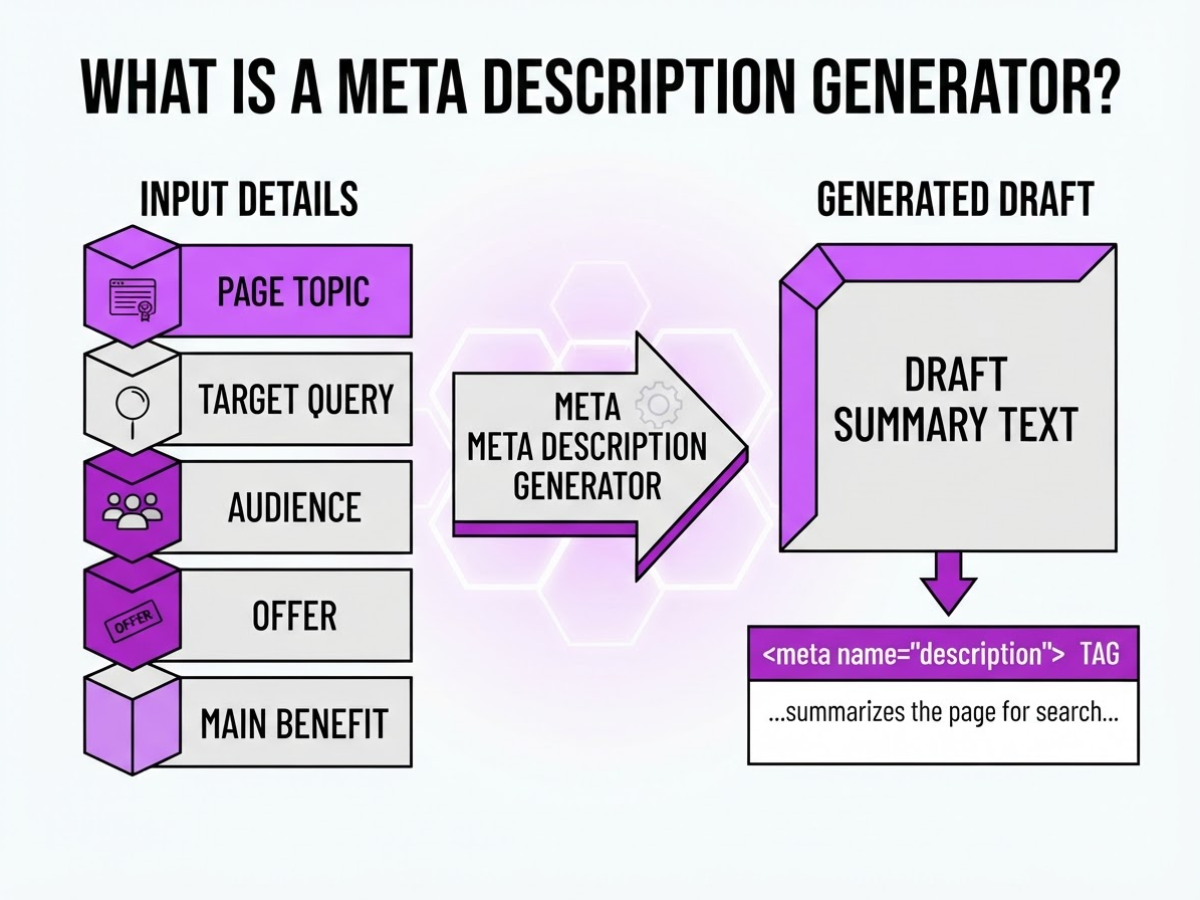
A meta description generator creates a draft summary for a web page. You give it details such as the page topic, target query, audience, offer, and main benefit, and it turns that information into text you can place in the page’s HTML, usually inside a <meta name="description"> tag.
When we review generated descriptions, the input quality matters more than the button itself. A vague keyword produces vague copy. A clear offer and audience usually produce something you can edit and publish within a few minutes.
Pro Tip: Give the generator the page’s actual heading, offer, audience, and primary query instead of supplying only a keyword.
Do not confuse the description with these related elements:
| Element | What it does |
|---|---|
| Meta description | Summarizes the page for search engines and potential visitors. |
| Title tag | Supplies the main clickable title shown in search results and browser tabs. |
| On-page introduction | Welcomes visitors after they reach the page and starts the actual content. |
| Search snippet | The result text Google chooses to display, which can come from the description or the page itself. |
That last distinction causes most of the frustration. Google primarily builds snippets from visible page content, then selects the section it considers most relevant to a particular query. It sometimes uses your meta description when that text gives a better summary, but it can also rewrite the snippet. The same page can show different snippet text for different searches.
There is no fixed character limit imposed on the meta description itself, although Google can truncate the displayed snippet to fit the device. Treat common length advice as a practical editing guide, not a guarantee that every word will appear.
A generator helps you work faster and keep descriptions consistent across a large site. It does not control rankings, indexing, or snippet selection. It also cannot rescue a misleading page, stuffed keywords, or a weak offer. For more hands-on editing guidance, see this meta description writer guide.
The next step is learning which inputs produce a useful first draft instead of generic search copy.
How to Use a Meta Description Generator Step by Step
I use a meta description generator as a drafting assistant, not as an autopilot button. The tool can produce fluent copy in seconds, but it cannot know whether a product claim is outdated or whether a blog post actually answers the query. Use this workflow for every important URL.
-
Gather the page inputs. Start with the URL or content brief, then record the primary query, target audience, offer, and desired action. For a blog post, the action might be reading a related guide. For an ecommerce page, it may be checking price or buying a specific product. If you skip these inputs, the generator usually falls back to vague copy such as “discover helpful solutions.”
-
Generate several angles. Create at least three drafts instead of accepting the first result. Ask for a benefit-led version, a problem-solution version, and a proof-led version. A landing page might highlight faster setup, address a painful manual process, or mention a concrete result you can support. I prefer comparing drafts side by side because the first one often sounds polished but says nothing distinctive.
Pro Tip: Generate one variant from the page’s strongest differentiator and another from the searcher’s main pain point; the contrast makes weak positioning obvious.
-
Check the page match. Read each draft against the actual page, not just the brief. Remove features the page does not contain, unsupported guarantees, and keywords added only to satisfy the tool. Google recommends unique, page-specific descriptions, and keyword-stuffed strings are less likely to give searchers a useful summary.
-
Edit for a human reader. Put the main topic into a natural sentence, then replace passive wording with a clear action. “Compare accounting software for small teams, see pricing, and choose a plan” is more useful than “Accounting software solutions for accounting software users.” Add a credible call to action such as “compare plans,” “see the checklist,” or “request a demo.” Do not chase an exact character count: Google says meta descriptions have no fixed length, although search snippets can be shortened to fit the device.
-
Publish the final version. Add the description in your CMS SEO field or page template. For product catalogs, a template can save time, but keep variable text specific to each product. Programmatic descriptions can suit large database-driven sites only when they remain readable, diverse, and tied to the individual page.
-
Inspect and monitor it. View the rendered HTML source and confirm the page contains one correct
<meta name="description">tag. Test the live URL in Search Console, request recrawling after meaningful updates, and check impressions and clicks later. Google can rewrite the snippet, so treat the published description as your strongest suggestion, not a guaranteed search result.
Once the workflow is in place, the next decision is how to judge whether each description earns attention in search.
How Long Should a Meta Description Be?
The right length depends less on a character counter and more on what a searcher needs to understand first. Google does not impose a fixed character limit on the meta description itself. It can truncate the snippet to fit the available width on a particular device, and it can also rewrite the text from visible page content when that better matches the search.
That makes the familiar “write 150 to 160 characters” rule useful only as a rough editing reference. I would not delete a clear, relevant sentence just to hit an arbitrary number. Put the page’s main promise, audience, or answer near the beginning because the final words are the ones most likely to disappear.
| Page type | Practical starting point | What to prioritize |
|---|---|---|
| Focused landing page | 120–160 characters | The offer, audience, and next action |
| Product or service page | 140–190 characters | The problem solved and a concrete differentiator |
| Complex guide | 160–220 characters | The subject covered, key subtopics, and intended reader |
| Category or comparison page | 150–200 characters | The options, use case, or decision the page supports |
These are editing ranges, not Google requirements. A focused landing page often benefits from a short description because one sharp promise is easier to scan. A detailed guide needs more room to explain its scope, especially when “beginner,” “pricing,” or “examples” changes the searcher’s expectations. Short is not automatically better, and long is not automatically thorough.
Pro Tip: Read the first 100–120 characters as a standalone promise; if the value is unclear there, the description is probably too slow to reach the point.
I also avoid stuffing every keyword variation into the field. Google says keyword-heavy descriptions give users little useful information and are less likely to appear as written. If you want a practical drafting workflow, this meta description writer guide covers the message before the word count.
For tighter technical control, the max-snippet directive can limit how many characters Google uses in a text snippet. It is a constraint, not a replacement for clear copy, and it cannot force Google to display your exact description. After choosing the length, check whether the opening still matches the page’s actual content and search intent.
Next, the quality of that first draft matters more than squeezing it into a supposedly perfect character total.

Meta Description Mistakes That Reduce Click Potential
I have reviewed hundreds of generated snippets, and the failures are usually obvious once you compare them with the page they describe. A description can be valid HTML, fit neatly in a preview, and still give searchers no reason to choose your result.
Watch for these common mistakes:
- Generic summaries: “Learn more about our services and solutions” could describe every competitor in the results. Name the audience, problem, product, comparison, or outcome that makes this URL different.
- Keyword stuffing: Repeating “meta description generator, SEO tool, free generator, website SEO” makes the line hard to read. Google warns that long strings of keywords do not give users a clear idea of the page and are less likely to appear as snippets.
- Duplicate descriptions: Reusing one sentence across product pages, blog posts, or location pages hides the differences between those URLs. Google recommends unique descriptions because identical or similar text across pages is not helpful.
- Title copying: Turning “Meta Description Generator” into “Meta Description Generator | Try Our Tool” adds almost no page value. Use the description to explain what the visitor can do, learn, compare, or receive after clicking.
- Unsupported claims: Remove “best,” “number one,” “guaranteed,” and similar superlatives unless the page proves them. The same applies to calls to action such as “Get instant results” when the tool requires registration or manual editing first.
- Content mismatch: Check the current offer, visible page content, language, and search intent. A description promising a free download will hurt trust if the page now sells a subscription, and a guide for beginners should not sound like technical documentation.
Do not judge the draft only by its character count. Google mainly builds snippets from visible page content and can replace your description when that content better matches the query, so the opening copy on the page must support the promise in the snippet. I also use this guide to writing effective SEO snippets when a generated draft sounds polished but vague.
Once the description passes this reality check, you can test whether it earns more clicks without confusing the searcher.
How to Test Whether Your Descriptions Work
A description is doing its job only when the right searchers choose your result more often without masking a ranking or traffic problem. I treat this as a controlled measurement exercise, not a hunt for a magic CTR number. Google defines click-through rate as clicks divided by impressions, so record both numbers instead of relying on a rounded percentage alone.
Use this testing loop:
-
Set the baseline. In Google Search Console, export the last 28 to 90 days for your priority URLs. Record impressions, clicks, CTR, average position, top queries, and device split. Save the date and the current description, too. Without this snapshot, you will forget whether a later change actually helped.
-
Find the weak opportunities. Open the Performance report’s Queries and Pages views. Look for pages with steady impressions and a reasonable average position but weaker click performance than comparable results. A product page ranking around positions 3 to 8 is usually more useful to test than a page buried at position fifty. I also compare pages serving the same intent, because a recipe page and a pricing page should not share the same CTR expectation.
-
Create a defined test group. Change descriptions on a batch of comparable URLs, then document the exact copy and publication date. Keep other major edits, such as title changes, internal-link campaigns, and content rewrites, out of the same window. A practical meta description writing process helps keep each version specific to its page instead of producing near-duplicates.
-
Wait for evidence. Give the group enough impressions to matter, usually four to eight weeks for an established site. Tiny samples produce dramatic-looking percentages that collapse the moment another ten clicks arrive. Recheck impressions, clicks, CTR, position, query mix, and conversions where available.
-
Explain the result before acting. A CTR increase can come from higher rankings, more branded searches, seasonality, or a different query mix rather than better copy. Google can also rewrite your snippet. Google primarily builds snippets from visible page content, and research from Ahrefs found that it showed the page’s own meta description only about 37% of the time.
Refresh descriptions when the page intent, offer, or search landscape changes. Constant rewriting creates noise, not insight. Once the measurement loop is clear, you can decide which generator drafts deserve a closer editorial review.
My honest take on meta description generators
I see a meta description generator as a thinking tool, not an SEO autopilot button. The most valuable part is often not the polished sentence it produces. It is the moment it forces you to name the page’s audience, search intent, and real differentiator. If your team cannot answer those questions, the problem is usually the page, not the wording of the description.
I would rather review three specific drafts than approve one fluent, generic suggestion. “Learn more about our services” may sound clean, but it tells a searcher almost nothing. Tools also frustrate people when they produce confident copy that does not match the page, or when everyone assumes Google must display every word. Google controls the final snippet, and the visible content on your page still does most of the work.
At TryRoki, I judge this process by more practical results: consistent descriptions across important URLs, faster revisions, and fewer pages filled with empty promises. Generate several options at scale, then apply editorial judgment and check Search Console evidence before keeping one. AI should remove repetitive execution while the page owner remains responsible for what gets published.
— Daniel/Aleksandra
Turn Meta Description Work Into a Repeatable SEO Workflow
If you manage several pages, a meta description generator solves only one small part of the work. You still need to create the page, check its claims, improve weak sections, and revisit older URLs when search intent changes. That repeated starting-from-zero work is where teams usually lose time.
I built TryRoki for a broader workflow. Roki AI helps create website content on autopilot and organizes recurring SEO tasks, so you can handle page creation, optimization, and ongoing improvements in one place. It does not replace your review. You should still check every description for accuracy, tone, and fit.
If you want to test the process before committing to a larger workflow, start with TryRoki’s free SEO tools. The practical benefit is consistent execution across more URLs, not a promise of guaranteed rankings or clicks.
Frequently Asked Questions
Yes, AI can create a useful first draft when you provide accurate page details, search intent, and audience information. I still review every draft for factual accuracy, tone, and whether it matches the visible page before publishing, because a polished two-sentence description can still promise the wrong thing.
A meta description is not a direct ranking guarantee, but it can influence how your page appears in search and affect clicks. Google can replace it with page text when that better matches a search query, so I treat it as a 150 to 160-character sales pitch, not a ranking shortcut.
Google can select visible text from your page when it believes that text better answers the searcher’s query, and one URL can show different snippets for different queries. Check that your description is unique, accurate, and supported by the page content, then give Google time to recrawl the URL, which can take several days.
Important indexable pages should generally have a unique, useful description, but you do not need to handwrite one for every low-value URL on a large site. Prioritize your top 20 percent of pages first, and use carefully reviewed templates for programmatic descriptions instead of repeating one vague sentence everywhere.
You can, but it usually makes search results less clear because several URLs appear to offer the same answer. Write a page-specific description for each URL, even if you change only 1 or 2 details such as the product, location, or primary benefit.
Written by Daniel/Aleksandra.
Recommended reads
- Ai Meta Description Generator Boost Your Seo Click Through Rates
- Meta Description Writer How To Craft Effective Seo Snippets
- Seo Description Generator How To Boost Your Click Through Rates
- Free Online Seo Title Generator
Sources
- How to Write Meta Descriptions | Google Search Central | Documentation | Google for Developers
- How to Write the Perfect Meta Description
- How Often Google Ignores Our Meta Descriptions - Portent
- Performance report (Search results): Overview and basic setup
- Robots Meta Tags Specifications | Google Search Central | Google for Developers