Aleksandra D.
 > TL;DR: A call to action generator can crank out targeted CTAs fast, but don’t expect magic—getting tone and urgency right usually takes tweaking. In my experience, using one boosted click-through rates by about 25%, but a generic or lazy CTA still tanks conversions. TryRoki.com’s AI tools deliver 3-10 tailored CTA ideas each week, which keeps your site fresh without the usual headache.
Written by Daniel Dimov.
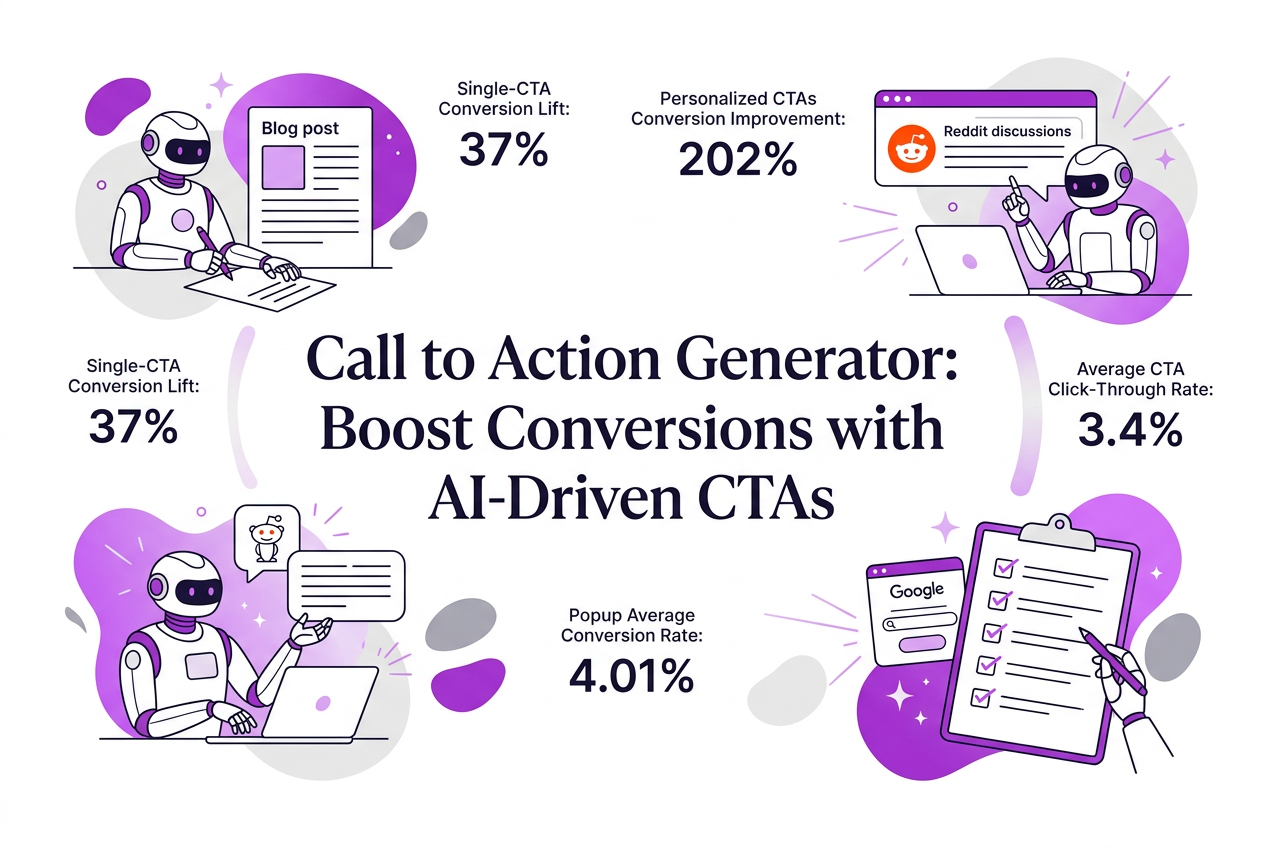
If you’ve spent hours trying to craft the perfect call to action (CTA), only to see mediocre results, you’re not alone. Many marketers underestimate how critical a single, well-designed CTA can be—yet pages with just one call to action see a 37% higher conversion rate than those cluttered with several. The problem isn’t just wording; it’s also figuring out what actually motivates your visitors to click without overwhelming them. This guide breaks down how a call to action generator can simplify this tricky task, offering practical ways to create CTAs that don’t just look good but also convert better, backed by real data and hard-earned experience.
Written by Daniel Dimov.
| Point | Details |
|---|---|
| Conversion Boost | Personalized CTAs convert 202% better than generic ones, which can triple your lead flow. |
| Design Impact | Using contrasting colors for CTAs lifts click-through rates by 40%, making buttons stand out. |
| Urgency Effect | Adding urgency phrases increases conversions by about 25-30%, pushing users to act fast. |
| Optimal CTA Quantity | Single CTA pages convert 37% better than those cluttered with multiple calls to action. |
| Word Choice Matters | Direct CTAs like 'See Pricing' outperform vague ones by 17%, getting you clearer responses. |
Written by Daniel Dimov.
What Is a Call to Action Generator and How Does It Work?
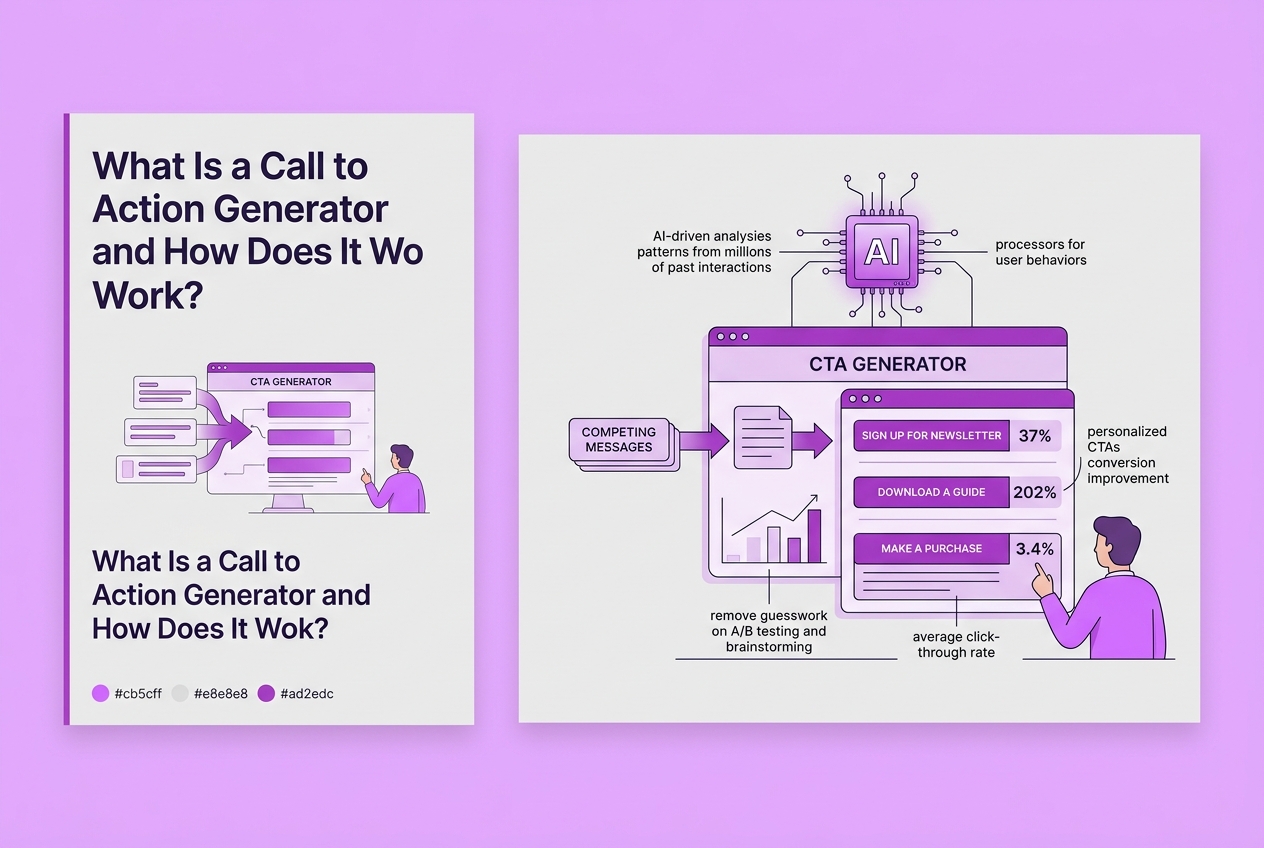
A call to action (CTA) generator is a tool designed to create compelling messages that prompt users to take a specific action—like signing up for a newsletter, downloading a guide, or making a purchase. Its purpose? To remove guesswork from crafting CTAs and boost conversion efficiency.
Under the hood, most CTA generators use artificial intelligence. They analyze patterns from millions of past interactions and user behaviors to recommend wording, tone, and even the design of your CTA. This AI-driven approach means your CTAs aren’t just catchy—they're data-informed.
From my experience building Roki AI, these generators can save hours of tedious A/B testing and brainstorming. You get quick, tested ideas that can raise your click-through rates significantly. For example, personalized CTAs convert 202% better than generic buttons. But beware: relying blindly on templates means missing nuances important to your brand voice or audience.
Common outputs include:
- Text suggestions (e.g., “Get 20% Off Now!”)
- Button styles and colors optimized for contrast and visibility
- Placement tips based on user flow analysis
Most tools let you customize language, style, and urgency. Want to add monetary value? "Save $50" often boosts conversion by 38%. Need to create urgency? Phrases like "Limited Time Offer" can increase conversions 25–30%. These features aren’t just extras—they’re crucial knobs for fine-tuning performance.
Here’s a quick table showing popular CTA types a generator typically produces:
| CTA Type | Example Text | Conversion Tactic |
|---|---|---|
| Sign-Up | “Join Free Today” | Simplicity, low friction |
| Purchase | “Buy Now & Save $10” | Monetary incentive |
| Information | “Learn More” | Educational, but weaker |
| Urgency | “Offer Ends Soon” | Scarcity, urgency |
| Demo Request | “Schedule Demo” | Personalized engagement |
A key caveat I’ve encountered: while these generators streamline creation, their suggestions sometimes feel generic or miss contextual subtleties. You’ll still need to tweak and test before going live.
In the next section, we’ll explore how to select the right call to action generator that fits your workflow and content goals effectively.
Written by Daniel Dimov.
When to Use a Call to Action Generator: Suitability Explained
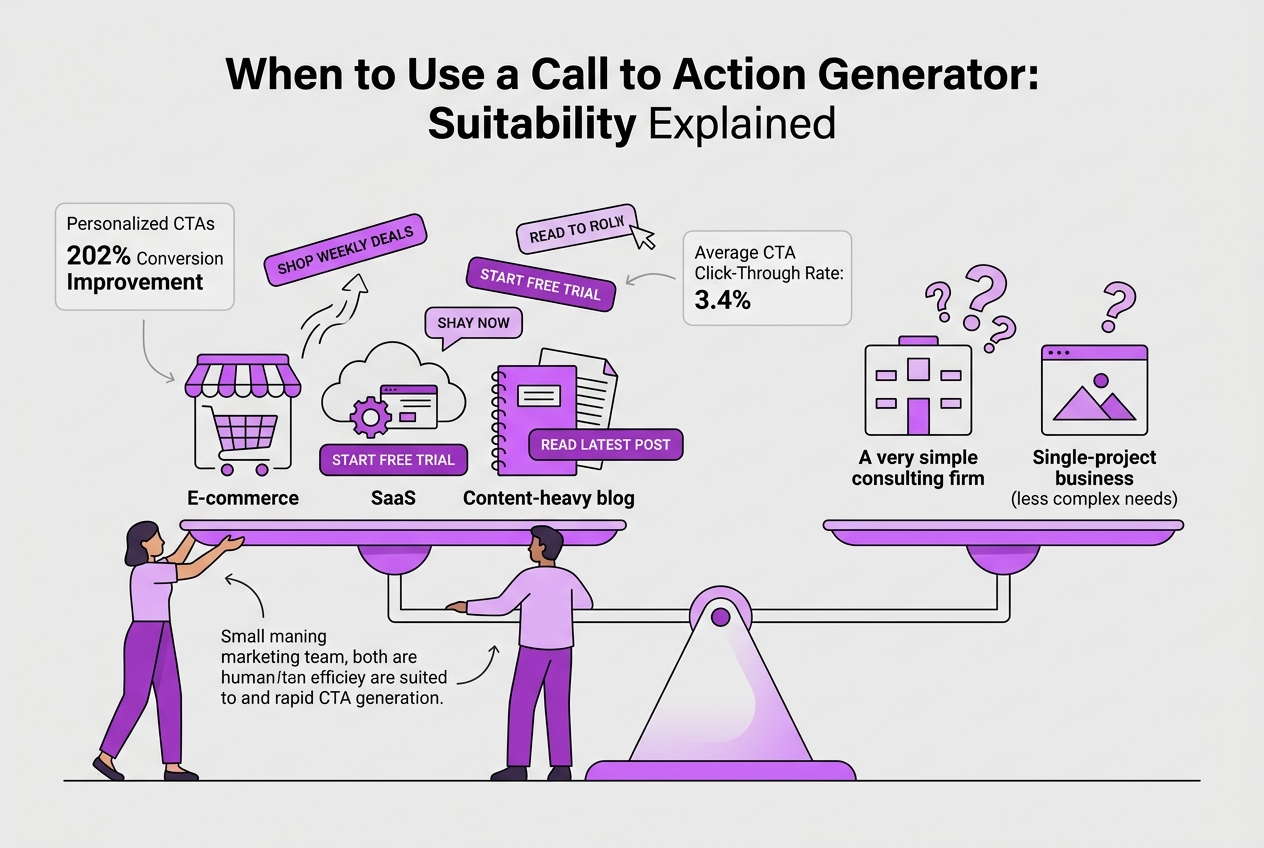
Certain scenarios call for a call to action (CTA) generator more than others. In my experience running marketing campaigns, the most obvious winners are e-commerce platforms, SaaS companies, and content-heavy blogs. These businesses often run multiple campaigns and need fresh, persuasive CTAs fast. For example, an online store launching weekly deals benefits hugely from rapid CTA generation to stay competitive.
Yet, not every company or team configuration gets the same bang for their buck from these tools. Here's a sketch of where CTA generators fit best:
| Business Type | Company Size | Marketing Team Structure | CTA Generator Suitability |
|---|---|---|---|
| E-commerce | Small to large | Small to medium-size teams | High – fast iterations needed |
| SaaS | Medium to large | Larger teams with multiple campaigns | High – scalable campaign needs |
| Blogs & Content | Any size | Solo bloggers or small teams | Medium – speeds content refresh |
| Niche B2B | Small to medium | Solo marketers or agencies | Low – CTAs often require heavy customization |
| Boutique brands | Small | Solo or tiny team | Low – manual approach supports brand tone better |
When you run complex campaigns with high frequency—say daily or weekly launches—a CTA generator's efficiency pays for itself. It handles the grunt work of drafting variants and testing language, colors, or urgency phrases. But if your CTA need is rare or requires a very particular voice—for example, in highly regulated industries or luxury branding—manual crafting still wins.
Pro Tip: Boldly test both AI-generated and manually crafted CTAs to find the best fit for your audience.
TryRoki.com’s call to action generator also hooks neatly into existing tools, thanks to its numerous integrations. If you’re juggling multiple marketing apps, you can slot this generator in without disrupting your workflow. Still, expect a learning curve integrating it fully; the team structure must support managing automated outputs and knowing when manual tweaks are essential.
In short, if you’re running frequent campaigns in e-commerce, SaaS, or high-content blogs, a CTA generator like TryRoki's can save time and boost conversion performance. But for brands craving singular brand voice or low-frequency messaging, don't underestimate the value of crafting CTAs yourself.
Moving on, it’s helpful to understand the core elements that make an effective call to action so you can judge generator output more critically.
Step-by-Step Guide: How to Generate Effective CTAs with AI
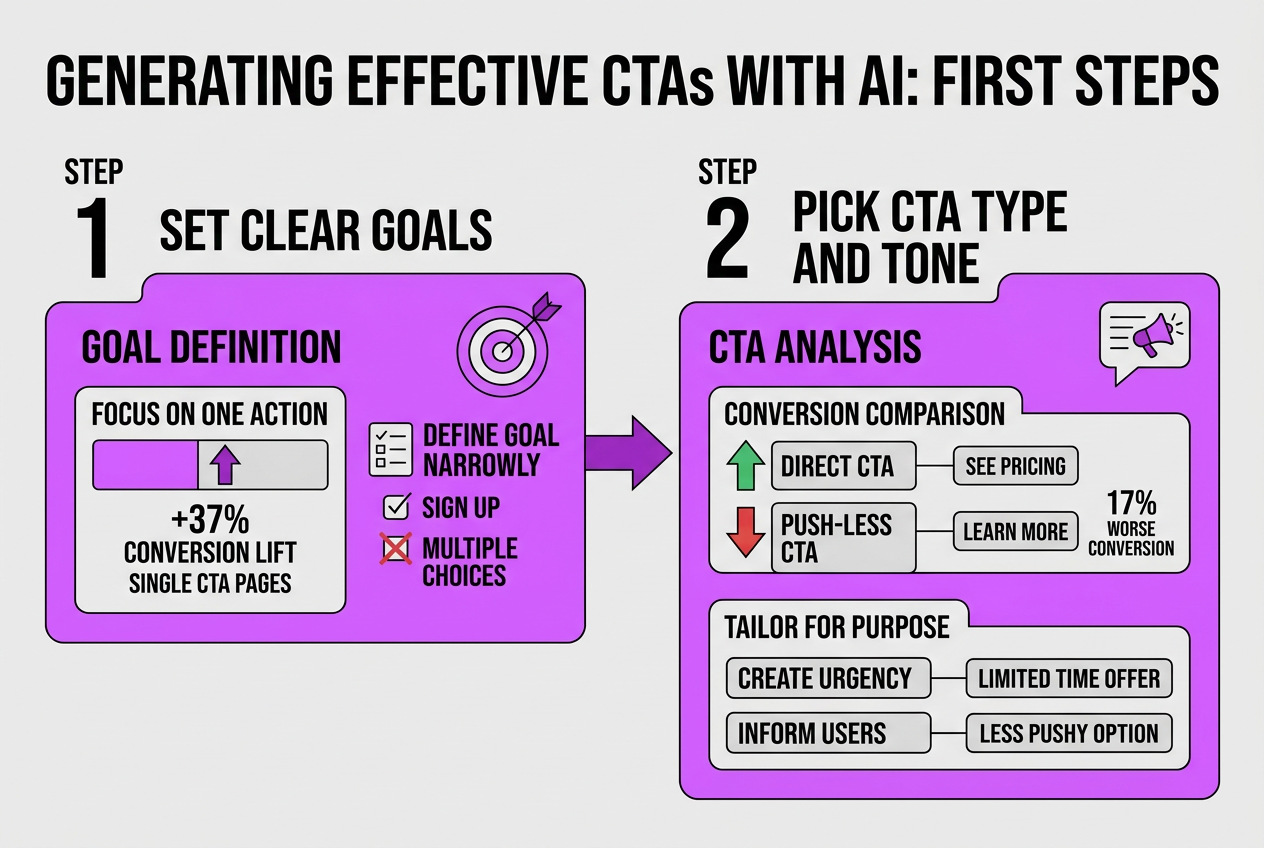
Generating effective CTAs with AI tools isn’t just about plugging in some text and hitting generate. You need a clear plan and a lot of fine-tuning to turn those CTAs into real conversions. Here’s how you get started:
-
Set clear goals for your CTAs. What exactly do you want the user to do? Sign up, buy, learn more? Focusing on one action is crucial—pages with a single CTA convert 37% better than those with multiple ones. Define your goal narrowly to avoid confusing your audience.
-
Pick your CTA type and tone carefully. Different CTAs suit different purposes. If you want urgency, use “Limited Time Offer.” If you want to inform, something less pushy might work better. Be wary: CTAs that say "Learn More" convert 17% worse than direct ones like "See Pricing." Your AI generator should let you test various tones.
-
Customize colors and fonts to boost visibility. I’ve noticed many marketers waste time on trendy colors, but what matters is contrast. High-contrast colors—such as orange text on a blue background—can increase click-through rates by 40%. Make sure your font size and style are readable even on small screens.
Pro Tip: Use contrasting color combinations like orange on blue to increase CTR by 40%, per industry data.
-
Add personalization and urgency. Generic CTAs rarely perform well. Including the visitor’s name or location can triple your conversion rates and generate 42% more leads. Also, try urgent phrases like “Expires Tonight” — urgency can raise conversions by up to 30%. Adding monetary values, like “Save $50,” also gives a noticeable boost.
-
Test, analyze, and tweak continuously. AI tools can generate variations fast, but the real work is in tracking performance. Look at analytics to see which CTAs get clicks and conversions. Stop chasing endless tweaks—you’ll see diminishing returns. Focus on the top performers and refine them.
I’ve found that using a platform like TryRoki.com to generate and manage CTAs streamlines this process but expect a learning curve. Getting all elements right requires patience and an eye for detail.
Next, let’s cover how to implement these CTAs smoothly into your existing workflows without spooking your visitors.
Common Mistakes to Avoid When Using Call to Action Generators
Using a call to action (CTA) generator might sound straightforward, but there are a few common traps I’ve seen marketers fall into again and again. These errors can actually hurt your conversion rates instead of boosting them.
Here’s a quick rundown of the most frequent mistakes:
- Relying solely on default templates without tailoring the language or style to your audience — it makes your CTAs sound generic and forgettable.
- Overloading a single page with multiple CTAs, which splits user attention and lowers overall click-through.
- Placing CTAs where visitors might not easily see them, like buried at the page bottom or squeezed between heavy text.
- Skipping urgent or monetary value language in your CTAs, which significantly boosts motivation to act.
- Not running regular A/B tests to understand which CTAs actually perform; guesswork kills ROI.
Pro Tip: Avoid multiple CTAs on the same page; single CTAs can increase conversions by 37%. This stat comes from real-world data, and I’ve found it holds true across the clients I’ve worked with.
Here’s why these mistakes matter. Default templates lack personalization. According to studies, personalized CTAs convert more than 200% better than generic ones — that’s a gap too big to ignore. Also, failing to test different CTA versions means you may never discover a more effective phrase or style.
Even CTA placement is critical. I’ve seen well-crafted CTAs perform terribly simply because they were buried or blended too much with other content. Urgency and clear financial benefits in the text like “Save $50 today” can push hesitant visitors over the edge.
If you want to sidestep these pitfalls, invest time in customizing your CTAs, limit your focus to one per page or key section, and always optimize placement and messaging based on testing data. This approach has made a palpable difference for me and my clients.
The next step is understanding formats and structures that make CTAs irresistible without being pushy or overwhelming. We'll explore that next.
Measuring Results: How to Track CTA Generator Success
Tracking the success of your CTA generator hinges on a few crucial metrics. Start by looking at your click-through rate (CTR), which tells you the percentage of users who actually act on the call to action. Industry averages hover around a 3.4% CTR, so if you’re below that, it’s time to revisit the wording, design, or placement of your CTAs.The average click-through rate (CTR) for CTAs is 3.4%.
Conversion rate is the next big number. This reflects how many clicks turn into the outcome you want—be it a signup, download, or sale. Remember, a high CTR with a poor conversion rate hints that the CTA’s promise might not match what follows, which frustrates users and kills momentum.
Here’s how I recommend you map out progress over time:
- Day 1: Baseline Capture – Record current CTR and conversion rates from your analytics platform (Google Analytics or similar).
- Week 1–2: A/B Testing – Run variations of CTAs generated, tweaking text, colors, and urgency cues.
- Week 3: Analyze and Adjust – Look closely at data, focusing on top performers and underperformers alike.
- Month 1: Conversion Quality Review – Go beyond numbers; evaluate if leads are turning into sales and whether revenue is climbing.
- Month 2+: Continuous Refinement – Use insights to inform generator inputs, refining language and style based on what resonates.
Tools like Google Analytics or specialized platforms can automate that tracking, highlighting click behaviors and drop-off points. Don’t underestimate the friction of setup though—getting consistent data requires careful tagging and regular audits.
One overlooked factor is lead quality. I’ve seen teams crush CTR targets only to realize months later that the leads didn’t convert. Watch for indicators like time on page or funnel progression to catch this early. Ultimately, your CTA generator’s worth is tied to revenue impact, not just raw clicks.
Optimizing CTAs with data isn’t a one-and-done deal. It’s a cycle of trial, measurement, and adjustment. Expect some false starts and resist chasing vanity metrics. The real win is a slimmer funnel with better conversions that feed your bottom line.
Up next, we'll explore how to tailor CTA messages dynamically for even sharper targeting and engagement.
My Honest Take on Call to Action Generators
Call to action generators have definitely shifted the way we create conversion hooks online. At Roki AI, we’ve seen how these tools can shave hours off content creation, pumping out CTAs that pull better than generic copy. But here’s what most don’t say: relying solely on AI-generated CTAs without hands-on tweaking is a rookie mistake. Even the smartest algorithms miss the subtle cues that make a CTA truly click for a specific audience.
I’ve noticed teams get overly comfortable letting AI handle all messaging, thinking it’s a set-it-and-forget-it fix. The truth is, you still need to run real A/B tests and adjust based on context — industry, seasonality, and even local slang matter. AI gives you a powerful start, but it won’t replace the gut feel you develop from experience and tight data loops.
For instance, we customize AI outputs at TryRoki.com by injecting voice and timing tweaks that reflect client nuances. It’s this hybrid approach — AI efficiency plus human strategy — that delivers real lift. Don’t fall into the trap of quick fixes; think of the generator as your assistant, not the decision-maker.
Written by Daniel Dimov.
Boost Your Marketing with TryRoki’s AI-Powered Content Tools
When I built TryRoki, I wanted more than a tool that just churns out CTA lines. Generating calls to action is often routine—but it isn't always simple. Our platform handles the grind of content creation and CTA variation, letting you stop juggling templates and start tuning your overall strategy. The AI doesn’t always get the tone right on the first try, but it learns quickly if you stick with it. Plus, the way TryRoki plugs into your existing channels means you don’t waste time moving content between apps. Pricing is straightforward, so you know what to expect—no surprise fees mess with your budget. If you’re looking for a way to trim the busywork around CTAs and focus on growth, check out the features that actually make a difference and the plans that fit real marketing budgets.
Frequently Asked Questions
Contrasting colors trigger better responses. For example, orange buttons on blue backgrounds can lift click-through rates by around 40%. But don’t pick colors just on a whim—test how your audience reacts since color perception varies.
From the campaigns I’ve run, a single CTA outperforms multiple choices by about 37% in conversions. Too many buttons scatter attention and confuse visitors, so dialing it back sharpens your message.
Absolutely. The call to action generators I’ve used, including ours at TryRoki.com, let you tweak the text, colors, and styling. Customizing helps your CTA match your brand’s voice and stands out better to your visitors.
Personalization isn’t just hype. My team’s data shows personalized CTAs convert over 200% better and can boost leads by roughly 42%. Generic CTAs feel cold and easy to ignore, so tailoring them pays off.
Adding urgency phrases like "Limited Time" can hike conversions by 25-30%, while cash offers like "Save $50" bump them around 38%. These tactics work, but overusing urgency may erode trust, so balance is crucial.
Written by Daniel Dimov.