Aleksandra D.
Wix includes tools for keyword setup, metadata, URL management, sitemaps, structured data, and reusable SEO settings, but you still need useful content, credible links, and regular measurement to improve visibility. Use the tools in the right order, let Wix handle routine technical work, and review your results as part of a weekly SEO process.
If you turned on Wix SEO tools and expected rankings to follow, you are not doing anything unusual. Many site owners find the settings easy to enable but easy to ignore, and the real advantage comes from treating them as a repeatable workflow rather than a one-time fix. Google says links are a crucial discovery resource for new pages, so polished metadata alone will not carry a site. This guide walks you through keyword selection, the Wix SEO Setup Checklist, page-level metadata, technical safeguards, publishing, internal and external links, and a weekly improvement loop supported by Roki AI, including its 3-10 weekly tasks.
| Point | Details |
|---|---|
| Start With Intent | Use up to 3 focused keyword phrases in Wix’s SEO Setup Checklist instead of forcing one page to target every query. |
| Fix Page Basics | Keep SEO title tags under 60 characters and meta descriptions between 50 and 160 characters. |
| Review Automation | Wix can update sitemaps and reuse SEO variables, but you should check automated settings before they publish mistakes across multiple pages. |
| Protect Site Changes | Wix creates 301 redirects for several page types automatically, but Wix Blog URL changes still require a manual redirect. |
| Build A Rhythm | Publish useful content, earn relevant links, review results weekly, and complete the next 3 to 10 SEO tasks as a regular operating routine. |
What Wix SEO Tools Actually Cover
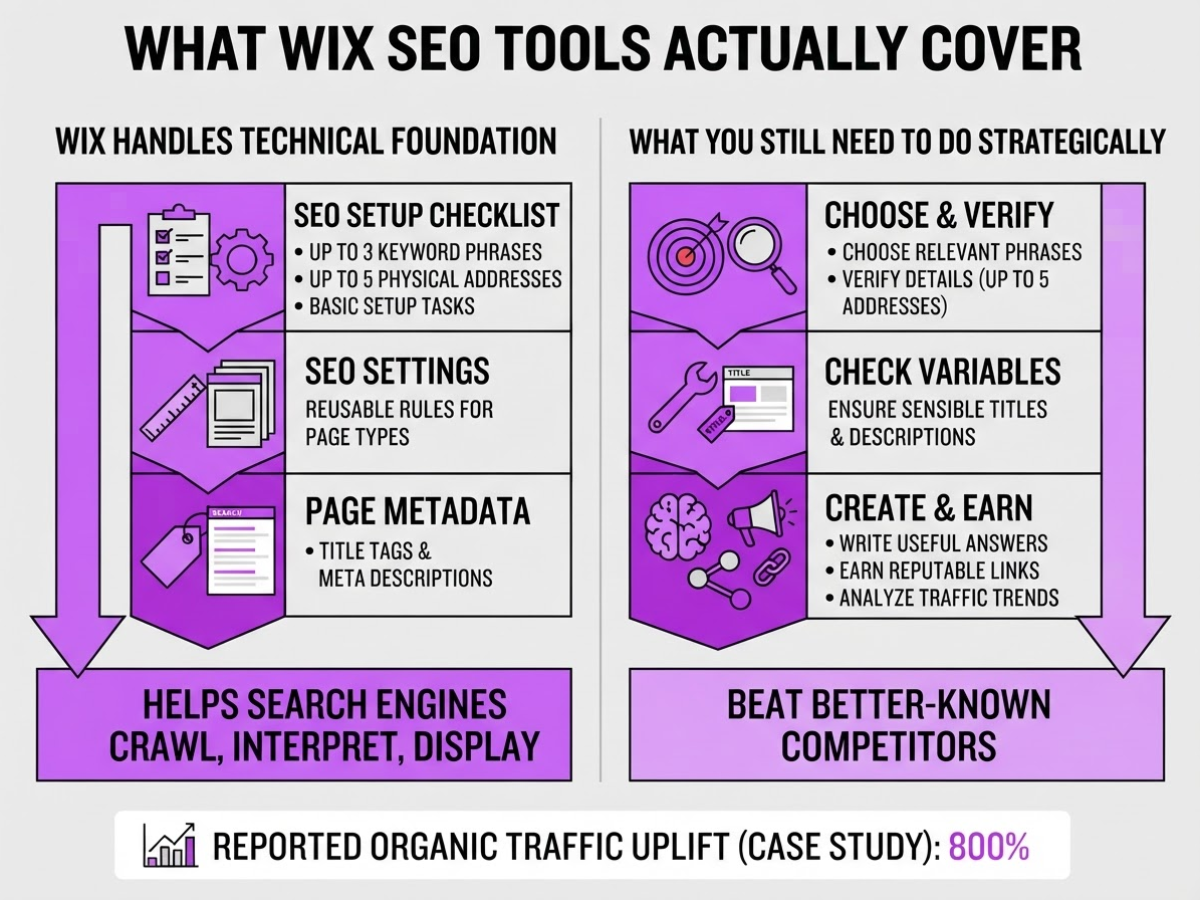
Wix SEO tools cover the technical work that helps search engines crawl, interpret, and display your site. They do not choose your market, write genuinely useful answers, earn reputable links, or explain why traffic fell last month. I have seen owners treat the checklist as a complete SEO plan, then wonder why a technically tidy site still loses to better-known competitors.
The main Wix tool groups break down like this:
| Tool group | What it handles | What you still need to do |
|---|---|---|
| SEO Setup Checklist | Business details, keyword phrases, and basic setup tasks | Choose relevant phrases and verify the details |
| SEO Settings | Reusable rules for page types and site sections | Check that variables produce sensible titles and descriptions |
| Page metadata | Title tags, meta descriptions, and social sharing details | Write specific copy that earns the click |
| URL slugs and redirects | Page addresses and redirects after many slug changes | Check old links, especially for Wix Blog pages |
| Sitemap and robots controls | Discovery and crawl access | Review exclusions instead of blocking pages by accident |
| Structured data | JSON-LD details that may clarify page content | Add accurate markup and test it |
Wix’s checklist accepts up to three keyword phrases, usually two to four words long. Eligible businesses can also add up to five physical addresses. That is useful for setup, but three phrases cannot represent every service, customer problem, and location you may target.
Wix automatically updates the sitemap when content changes, which removes one maintenance chore. It does not remove the need to inspect indexing, improve weak pages, build relevant links, or study performance. If you change a slug, redirects often appear automatically, but relying on that without checking old URLs is an avoidable mistake.
Pro Tip: Treat Wix’s SEO tools as an operating system for consistency, not as a substitute for choosing a clear market and publishing genuinely useful pages.
Roki AI sits beside Wix, not inside its settings. We use it to generate drafts, find relevant Reddit conversations, and surface 3 to 10 weekly SEO tasks. You still approve the content, edit metadata in Wix, and decide which links or pages deserve your time. Our free SEO tools can help with that supporting work, but they cannot replace judgment.
Next, the practical question is how to configure these controls without creating avoidable indexing and metadata problems.
How to Set Up Wix SEO in the Right Order
I set up Wix SEO in a fixed order because changing everything at once makes it hard to tell what actually improved. Work through these steps before you spend time chasing small ranking changes.
- Complete the Wix SEO Setup Checklist. Enter your business name, accurate contact details, audience, service area, and location data first. The checklist accepts up to three keyword phrases, ideally two to four words each, and up to five physical addresses for businesses with multiple locations. Do not guess here. A wrong city or vague service description can send every later recommendation in the wrong direction.
Pro Tip: Finish the checklist before customizing advanced settings; otherwise you risk polishing page details while foundational business and location data remains incomplete.
-
Give each important page one primary search intent. Decide whether a URL should attract someone looking to buy, compare, learn, book, or visit. Put “wedding photographer Manchester” on the relevant service page, not on five near-identical pages. Repeating the same target across URLs creates internal competition and usually produces thin, confusing content.
-
Optimize each page in the editor. Edit the title tag, meta description, H1 and supporting headings, image file names and alt text, internal links, and URL slug. Wix recommends titles under 60 characters and meta descriptions between 50 and 160 characters. Keep the wording natural. Stuffing the keyword into every heading looks careless and rarely helps.
-
Set reusable SEO variables for repeated page types. Products, services, and location pages should not require the same edit dozens of times. Wix SEO Settings can apply variables across a page type or site section, such as combining Product Name with Site Name. Check the output on several real pages, though. A variable can produce awkward titles when a product name is unusually long.
-
Validate the technical foundation. Inspect the sitemap, confirm important pages are indexable, connect Google Search Console and Google Analytics 4, and record baseline impressions, clicks, rankings, and conversions. Wix automatically updates the sitemap when content changes, but I still inspect it after major edits. Baseline data matters because publishing new content without it leaves you guessing.
-
Create a weekly maintenance queue with Roki AI. I prefer three to ten assigned tasks each week covering content, internal links, Reddit opportunities, and page improvements instead of random one-off changes. Roki AI keeps that queue visible, while its SEO content workflow helps turn recommendations into scheduled work. The tool will not fix weak offers or inaccurate pages, so review every task before acting.
Once this order is complete, you can measure whether your Wix SEO tools are improving the pages that matter most.
Wix SEO Tools vs. Separate SEO Platforms
I have seen site owners buy three SEO subscriptions before fixing a missing title tag. Wix already handles much of the implementation work, so the real question is whether you need better evidence before deciding what to change.
| Job | Wix SEO tools | Separate SEO platform |
|---|---|---|
| Page implementation | Edit titles, descriptions, URLs, redirects, and page content in the editor | Usually audits or recommends changes, but does not replace Wix editing |
| Technical maintenance | Automatic sitemap updates, structured-data controls, and reusable SEO settings | Broader crawling, issue tracking, and comparisons across sites |
| Research | Basic setup guidance and page-level SEO fields | Keyword research, competitor analysis, rank tracking, backlink discovery, and reporting |
| Execution | You still need to make and publish the changes | Often leaves you with a list of tasks rather than completed work |
Wix is particularly good at the last mile. You can edit metadata, apply variables across a page type, and create redirects without touching code. Its sitemap updates automatically when content changes, although I still check important launches manually because “automatic” does not mean every migration was planned well. Wix also supports up to five structured-data markups on one page, but its AI-generated markup currently applies only to Wix Blog posts. Other page types may need manual work.
The limitations show up when competition gets serious. Wix does not replace a research database that compares hundreds of competing pages, tracks rankings by location, or uncovers referring domains. For a five-page service site, that may be unnecessary. For a retailer with 500 products or a business fighting for crowded commercial terms, it becomes difficult to choose topics and priorities from the editor alone.
Pro Tip: Choose tools by the decision they improve—page implementation, market research, measurement, or execution—rather than collecting overlapping dashboards.
My preferred lean stack uses Wix for implementation, one measurement or research source for evidence, and Roki AI for consistent execution. Roki turns findings into content tasks and recurring action items, including opportunities to join relevant Reddit discussions with a useful comment that mentions your site only when it fits. It also helps turn a keyword brief into publishable drafts, rather than leaving research in a spreadsheet. See these free SEO tools if you need a low-cost starting point, or review how Roki streamlines SEO content workflows.
That division keeps your stack lean and makes the next decision clearer: which Wix SEO tasks deserve attention first?

Common Wix SEO Mistakes That Limit Visibility
When I review a Wix site that is “not ranking,” the tools are rarely the main problem. The usual issue is a basic strategy mistake left unchecked for months. Run through these before buying another platform or changing your entire content plan.
-
You target a broad keyword without matching its intent. A local photographer should not chase “photography” when customers search for “wedding photographer in Leeds.” Check the results page first: are people looking for a service, product, guide, comparison, or nearby business? Then add the relevant town, service, or audience instead of forcing one vague phrase onto every page.
-
You leave Wix-generated titles and descriptions untouched. Important pages should not all use the same site name, generic homepage copy, or truncated description. Write a distinct title and description for each page, keeping Wix’s guidance in mind: titles under 60 characters and descriptions between 50 and 160 characters. Wix variables help with repetitive product pages, but they do not replace editing your priority pages.
-
One page tries to answer unrelated searches. A page for “SEO services” should not also target “how to write a meta description” and “free keyword research tools.” Split those intents into separate pages and link them through a clear navigation structure. A tidy sitemap cannot fix confused page purpose.
-
You change a URL slug without checking redirects. Wix creates 301 redirects for several page types, but Wix Blog URL changes require a manual redirect. Test the old address in an incognito window before deleting anything, then update internal links.
-
Your structured data says more than the page does. Never mark up reviews, prices, events, or FAQs that visitors cannot see. Wix supports up to five markups per page, but its AI-generated structured data is currently limited to Wix Blog posts, so other page types need accurate manual markup.
-
You publish AI-assisted copy without real experience. Add customer examples, original opinions, editing, and links to related pages. Generic paragraphs rarely earn trust. I also see owners publish and stop; discovery and authority still depend on promotion, relevant mentions, and links. Use SEO backlinks software as part of outreach, not as a substitute for it.
Fixing these errors gives your Wix SEO tools a fair test before you judge their results.
How to Measure Whether Wix SEO Is Working
I start with a baseline before changing a Wix site. Record indexed pages, organic impressions, clicks, click-through rate, average rankings, conversions, and qualified leads for the previous 28 days. A ranking report can look better while sales stay flat, so connect Search Console data with Wix Analytics or your CRM wherever possible.
Use this weekly operating rhythm:
- Review the evidence. Break results down by page, query, and search intent. Look for pages gaining impressions but losing clicks, which usually points to a weak title or search snippet. Also flag pages getting clicks without enquiries, calls, purchases, or other meaningful actions.
- Choose 3 to 10 tasks. Prioritize pages close to producing results instead of rewriting the whole site. One service page moving from position 11 to page one is usually worth more than polishing five posts that attract no buyer.
- Make one clear improvement. Refresh outdated sections, write a more specific title, add a useful example, strengthen internal links, or create a supporting page for a narrower query. Wix recommends title tags under 60 characters and meta descriptions between 50 and 160, but hitting those limits alone will not fix bland copy.
- Publish, distribute, and document. Note what changed, the target page, the expected outcome, and the date you will review it. Share genuinely useful answers in relevant Reddit discussions when you have direct experience to add. Do not paste promotional links into every thread. Earned links from relevant sites are more durable, and a practical guide to SEO backlink software can help you assess outreach options without treating every link as a win.
Wix automatically updates the sitemap when content changes, and its checklist can submit the sitemap index to Google. That removes maintenance work, which I appreciate, but a sitemap does not guarantee indexing speed, rankings, or search demand. It tells search engines what exists, not why the page deserves attention.
For a lightweight second opinion, I sometimes use these free SEO tools alongside Search Console. After four to eight weeks, compare the same pages and intents rather than reacting to daily noise. A Wix case study reports an 800% organic traffic increase after a consulting business optimized weekly blog posts, but traffic only matters when the visitors fit your offer.
The next step is turning those measurements into a repeatable content and distribution plan.
My honest take on Wix SEO tools
I have watched Wix grow into a capable SEO implementation platform. If you need to edit metadata, manage redirects, check a sitemap, or keep page structure tidy, it gives you an accessible place to do that without adding unnecessary technical friction. The first setup can still be annoying, especially when page settings, templates, and app-generated elements overlap, but the basics are there.
Here is the part many teams get wrong: native SEO controls do not create growth by themselves. I would usually postpone buying another expensive SEO suite and fix the publishing process first. Decide which pages matter, assign ownership, publish useful updates, and complete the work every week. A perfectly configured dashboard cannot rescue a business that rarely ships or writes for nobody in particular.
That execution gap is why we built Roki AI at TryRoki. Each week, Roki AI gives you 3 to 10 practical tasks, helps turn strategy into website content, and surfaces relevant Reddit conversations where you may be able to contribute. You still decide what deserves publishing, whether a draft sounds like your company, and whether a response genuinely helps.
Tools should reduce operational drag, not replace customer understanding, expert review, or meaningful participation in the communities where potential customers already ask questions.
— Daniel/Aleksandra
Turn Wix SEO improvements into a weekly growth system
Once your Wix SEO tools are set up, the harder part is keeping the work moving. Wix gives you the controls to improve each page, but Roki AI helps turn that setup into a weekly routine by generating website content and surfacing 3 to 10 tasks focused on visibility in Google and AI search engines.
I built Roki AI’s weekly SEO task workflow for the frustrating stage when your priority list keeps growing and nothing gets published. Its Reddit discovery workflow finds relevant conversations where a genuinely useful answer may include a mention of your website. It is not a spam bot, and treating it like one will undermine the whole approach.
Start with your highest-priority Wix page, then use Roki AI’s onboarding flow to build a repeatable backlog of content and distribution actions. The aim is steady output, not instant rankings.
Frequently Asked Questions
Yes. Wix includes at least 6 useful SEO features, including the SEO Setup Checklist, page-level metadata controls, SEO Settings, redirects, sitemap management, and structured-data options. These cover much of the technical setup, but you still need to choose keywords, publish worthwhile content, earn relevant links, and track results.
Complete the Wix SEO Setup Checklist, give each important page one clear search purpose, publish useful content, connect measurement tools, and earn relevant links. I would make at least 3 meaningful updates before judging the site, because one setup session rarely fixes weak targeting or thin content.
Wix is a sensible choice for a small business that wants core SEO controls without maintaining a separate development stack. Your results will depend more on local relevance, useful pages, competition, and consistent promotion than on the builder, and most businesses should focus on improving 2 or 3 priority services first.
There is no fixed timeline because competition, site history, content quality, links, and search demand vary. I usually compare impressions, clicks, rankings, and qualified actions over at least 4 to 12 weeks before deciding whether an SEO change worked, since checking after a few days creates misleading conclusions.
Yes, AI can help you plan topics, draft content, spot recurring opportunities, and organize weekly work, but you must check every output for accuracy, originality, search intent, and brand fit. Wix’s AI-generated structured-data feature is currently limited to Wix Blog posts, so other page types may need manual handling, and I would review every AI draft before publishing it.
Written by Daniel/Aleksandra.
Recommended reads
- Free Seo Tools
- How Roki Ai Streamlines Your Seo Content Workflow
- Boosting Seo With Automated Content Generation Tips
- Seo Backlinks Software How To Use Tools To Boost Your Rankings
Sources
- Wix SEO Setup Checklist: Creating Your SEO Checklist | Help Center | Wix.com
- Understanding Your Site's Sitemap File | Help Center | Wix.com
- Adding SEO Title Tags and Meta Descriptions to Your Pages | Help Center | Wix.com
- Adding Structured Data Markup to Your Site's Pages | Help Center | Wix.com
- Setting Up a 301 Redirect for a Page on Your Site | Help Center | Wix.com
- Using Variables in SEO Settings | Help Center | Wix.com
- SEO Starter Guide: The Basics | Google Search Central | Documentation | Google for Developers
- Consulting business sees 800% uplift in organic traffic on Wix | Wix Studio SEO Hub