Daniel D.
A robots.txt generator creates the correctly formatted file that tells compatible crawlers which site paths they may request. Publish the single file at your domain root, test at least 2 allowed and blocked URLs, and remember that robots.txt is neither a security measure nor a guaranteed way to remove pages from search results.
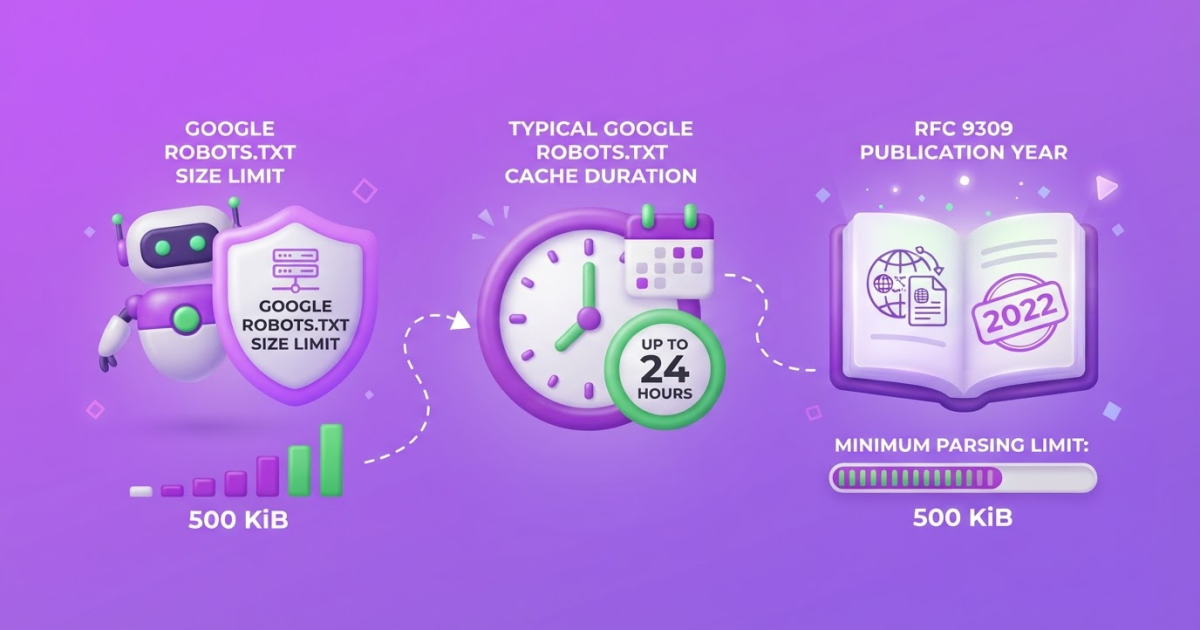
If you are trying to keep search crawlers out of a staging folder, one misplaced slash or broad Disallow rule can affect your entire site. I have seen owners find the mistake only after important pages stopped being visited, even though the syntax looked harmless. Google enforces a 500 KiB robots.txt file-size limit, so bloated files create another avoidable failure point. At TryRoki, we use Roki AI as part of a repeatable process, not as a substitute for checking the live file.
| Point | Details |
|---|---|
| Precise Rules | Start with 1 narrow rule and use specific User-agent, Allow, and Disallow directives instead of blocking broad URL patterns. |
| Publish at Root | Place the file at the top-level URL, such as https://example.com/robots.txt, so its rules apply to the intended host, protocol, and port. |
| Test Before Publishing | Check at least 2 representative allowed and blocked URLs, including wildcard and end-of-URL patterns, before deploying changes. |
| Do Not Hide Content | A robots.txt block does not reliably prevent a URL from appearing in Google Search. Use noindex or authentication when appropriate. |
| Review After Changes | Google generally caches robots.txt contents for up to 24 hours, so allow time for updated rules to be fetched and reflected. |
What a Robots.txt Generator Actually Creates
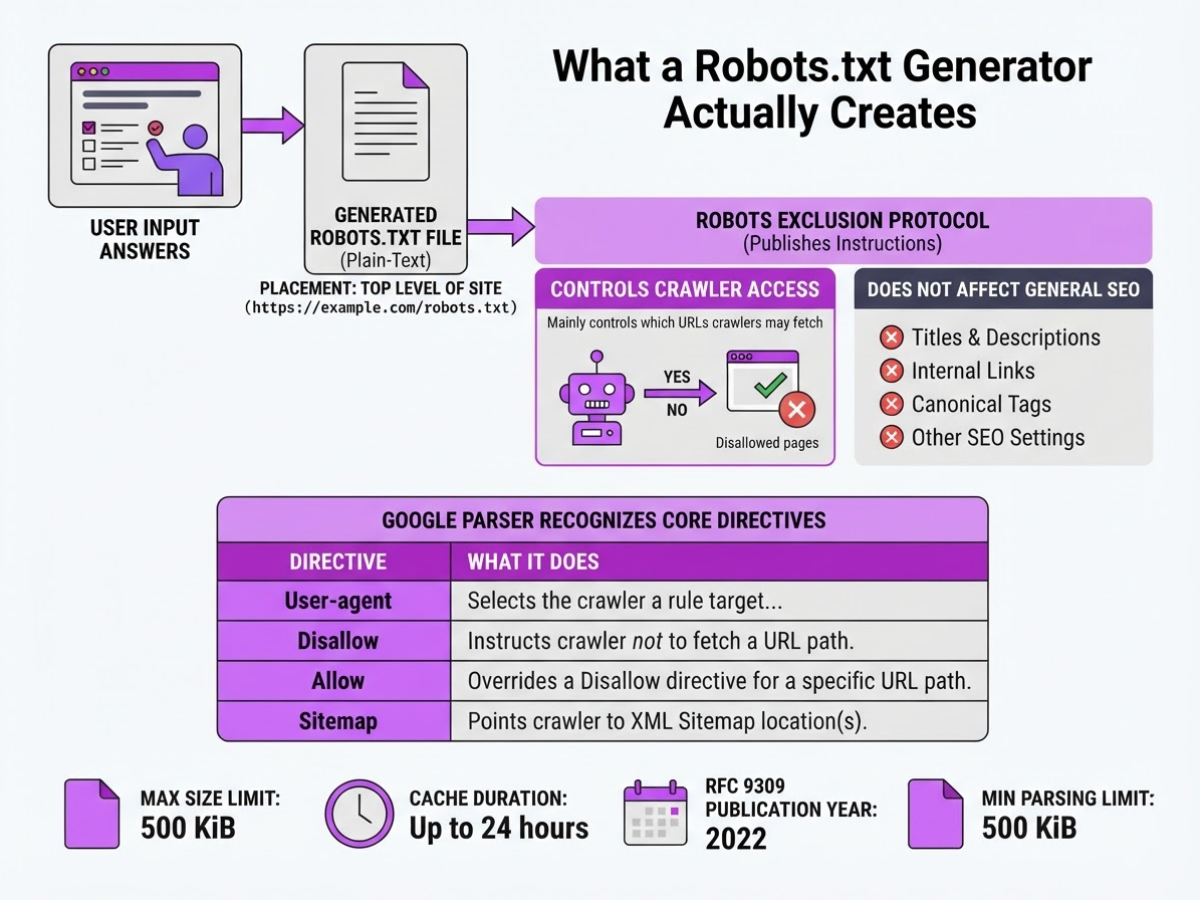
When I review a generated robots.txt file, I start with one question: what crawler behavior should this file change? A robots.txt generator creates a plain-text file from your answers. You then place it at the top level of your site, usually at https://example.com/robots.txt.
The file follows the Robots Exclusion Protocol. In plain English, it publishes instructions that compliant crawlers can read before requesting pages. It does not change titles, descriptions, internal links, canonical tags, or other SEO settings. Robots.txt mainly controls which URLs crawlers may fetch.
Google’s parser recognizes these core directives:
| Directive | What it does |
|---|---|
User-agent | Selects the crawler a rule targets, such as Googlebot or * for all crawlers |
Disallow | Tells that crawler not to request a matching path |
Allow | Creates an exception that permits a more specific path within a blocked area |
Google documents these three as the recognized crawling rules. A generator may also add a Sitemap line, such as Sitemap: https://example.com/sitemap.xml. This is a discovery reference, not a crawling rule, and it is not attached to a particular User-agent group.
Scope causes many avoidable mistakes. A robots.txt file applies only to the exact host, protocol, and port where you publish it. The file at https://www.example.com/robots.txt does not control https://example.com, an HTTP version, or a separate subdomain. I have seen teams block staging paths on one hostname and assume production inherited the rule. It did not.
Pro Tip: Start with the narrowest rule that solves the crawling problem; broad blocking is harder to diagnose than a targeted exclusion.
Robots.txt is not a security or privacy control. Blocked paths remain publicly discoverable, and a URL can still appear in search results if other pages link to it. Use authentication for private content and noindex for pages that should stay out of search. Crawlers must access a page to see a noindex directive, so a generator handles syntax, not the underlying decision.
The next step is choosing directives and patterns for the actual site.
How to Use a Robots.txt Generator Step by Step
I treat a generated robots.txt file as a change to crawler behavior, not as a box to tick. The generator saves time, but it cannot decide which parts of your site deserve attention.
- Inventory your URL paths. List pages and directories that should stay crawlable, including product pages, articles, categories, and important assets. Mark low-value or duplicate areas such as internal search results, filter combinations, staging folders, cart pages, and session URLs. Do not block a path simply because it feels unimportant. A blocked URL can still appear in Google Search if other pages link to it.
- Choose the user-agent scope. Start with
User-agent: *only when the rule should apply across crawlers. If Googlebot, a partner crawler, or another named bot needs different treatment, create a separate group and check how the groups interact. Broad rules are convenient, but they can hide an entire section by accident. - Add Disallow rules narrowly. Enter one path at a time from the domain root, such as
/search/or/checkout/. If a page inside a blocked area should remain accessible, add anAllowrule for that path. Google supports*and$wildcards, but I avoid them until a plain path cannot solve the problem. They make mistakes harder to spot.
Pro Tip: Test one URL you expect to be allowed and one you expect to be blocked for every new rule; this catches scope errors faster than reading the file alone.
- Add the sitemap reference. If your site uses an XML sitemap, enter its canonical absolute URL, such as
https://example.com/sitemap.xml. Keep the sitemap line outside user-agent groups. It supports discovery but does not override aDisallowrule. - Publish the file correctly. Copy the output into a plain-text file named
robots.txt, then place it athttps://yourdomain.com/robots.txt, not inside/blog/or another folder. Google requires robots.txt in the site’s top-level directory. For WordPress deployment details, this WordPress robots.txt guide covers common plugin and hosting pitfalls. - Test the real URLs. Check an allowed URL, a blocked URL, nested subdirectories, query-string versions, and both
/folderand/folder/forms. Test the live file over HTTPS and confirm it returns plain text with a 200 status before moving on.
Generator or Manual Editing: Which Approach Fits?
The right choice depends on how many exceptions your site has. For a small static site, I usually write 3 or 4 directives by hand. That is faster than entering every path into a tool, and I can read the whole file in under a minute.
A generator earns its place when the same rules must be recreated across environments or reviewed by several people. It reduces spelling mistakes, keeps formatting consistent, and often flags basic syntax problems. Manual editing still wins for unusual legacy-folder combinations, temporary crawl controls, or application-specific URL patterns.
| Situation | Better starting point | Why |
|---|---|---|
| Beginner setup | Generator | Get a valid baseline, then inspect every line. |
| Site migration | Manual review plus generator | Rebuild rules from the new URL map, not old assumptions. |
| Staging site | Manual configuration | Confirm the host and deployment process before blocking anything. |
| Faceted navigation | Generator for drafts, manual approval | Filters can block useful pages or leave millions of crawl paths open. |
| Multiple hosts | Separate reviewed files | Rules apply to the specific host, protocol, and port serving the file. |
Ecommerce and WordPress sites need more discipline. Product filters, search results, checkout paths, media folders, plugins, and multilingual directories often overlap. I have seen a harmless-looking pattern block product detail pages because its URL structure resembled a filter path. A generator cannot infer business intent from a URL pattern.
Pro Tip: Treat generated output as a proposed configuration, not an approval; the highest-risk errors usually come from correct syntax applied to the wrong directory.
Keep a dated copy of the previous file before publishing a replacement. In the same change record, document why each high-impact rule exists, who approved it, and which URLs you tested. Google may cache robots.txt for up to 24 hours, so a bad release can linger after you fix it.
Before deployment, test the final rules against real URLs and then check the live response.

Common Robots.txt Generator Mistakes to Catch
The most expensive robots.txt errors are usually tiny, rushed changes. I have seen a launch go live with one line blocking every crawlable URL because a staging rule survived the move to production. Check each rule against the real domain and several important URLs before publishing.
Disallow: /left on production: This blocks the entire site for compliant crawlers and can make a new domain look empty in search.- CSS, JavaScript, or image files blocked: Search engines need these resources to render pages and evaluate mobile layouts. Blocking
/assets/,/wp-content/, or image folders just to reduce crawling often creates a misleading page view. - Robots.txt treated as a privacy tool: It is not a password, firewall, or reliable de-indexing method. A blocked URL can still appear in Google Search when other pages link to it, so use
noindexor authentication when search-result inclusion is the real concern. - Sensitive paths exposed:
/admin/,/private-reports/, and/customer-exports/remain publicly discoverable when listed. RFC 9309 warns that robots.txt paths are public and should not replace application-layer access controls. Use authentication, authorization, and server-side checks. - Wrong file or location: The filename must be exactly
robots.txt, and the file belongs at the top level, such ashttps://example.com/robots.txt, not/blog/robots.txt. Rules apply only to the matching protocol, host, port, and subdomain. - Redirects and broken syntax: A redirect, HTML error page, missing newline, misspelled
User-agent, or malformed path can produce behavior you did not intend. Test the live response, not only the generator preview. - Oversized or unsupported rules: Google ignores content after its 500 KiB robots.txt limit and directives outside supported
user-agent,allow, anddisallowrules. A comment cannot turncrawl-delayinto a Google setting.
I also recommend reviewing the WordPress robots.txt guide if a plugin or theme keeps rewriting the file. Once these traps are gone, test the published rules against important URLs and each live host.
How to Validate and Maintain the File After Launch
A robots.txt generator gets you to the starting line. After I publish a file, I verify the exact HTTPS host that search engines should crawl, such as https://www.example.com/robots.txt, rather than trusting a copy in a deployment folder. The response should load at the root path, return the intended rules, and avoid redirects to another protocol, subdomain, or port.
I use this maintenance timeline:
- Immediately after launch: Open the live URL and run a command-line request to compare its content with the approved version. Check the homepage, a public article, an image path, an admin path, and every directory you meant to block. A CMS plugin can quietly rewrite the file while its dashboard still displays the rules you expected.
- After every major change: Repeat those URL tests after deployments, domain migrations, CMS or plugin updates, and URL-structure changes. Pay special attention to staging rules that might follow the site into production. My WordPress robots.txt guide covers the CMS failure points I see most often.
- Within the next crawl cycle: Review server logs and crawl diagnostics. If Googlebot requests a blocked directory, the rule may not match the real URL pattern, or cached instructions may still be active. Check the opposite problem too: important product, category, or article paths blocked when they should remain accessible.
- Every 30 days: Have a named owner review the file against the current site structure, sitemap, and launch notes. Google generally caches robots.txt contents for up to 24 hours, and it may retain them longer when a refresh fails.
I assign this review to one person, even when developers make the edits. Roki AI fits the wider weekly workflow: its 3 to 10 website-growth tasks help turn technical SEO checks into recurring actions instead of forgotten launch paperwork. The next decision is which rules deserve to stay and which should be removed.
My honest take on robots.txt generators
I see a robots.txt generator as a useful guardrail, not an SEO autopilot. It removes formatting mistakes and gives you a clean starting point, but it cannot know whether filtered category pages, checkout flows, API endpoints, or staging directories serve a real business purpose. I still need to understand the site architecture before approving a rule.
Many teams spend too much time trying to make robots.txt clever. A short, deliberate file tested against real URLs usually beats a dense list of speculative exclusions. More rules create more opportunities to block useful resources or confuse the next person who maintains the site.
I treat crawling, indexing, rendering, and security as separate checks. Blocking /admin/ does not protect it from discovery, and blocking CSS or JavaScript can interfere with rendering. I will not approve a change until I check the live file, test important URLs, and confirm that the result matches the site’s priorities.
At TryRoki, I prefer a repeatable process: identify the issue, make the smallest defensible change, validate it, and review it as the site evolves. The generator helps with the first draft. Judgment still belongs to the person responsible for the site.
— Daniel/Aleksandra
Turn Technical SEO Checks Into a Repeatable Workflow
Generating and testing a robots.txt file fixes one technical task. It does not remind you to review it after a redesign, publish content that earns visibility, or check whether pages appear in Google and AI search engines. I have seen owners finish the file, bookmark the instructions, and lose the habit within a month.
That is where TryRoki fits. Roki AI creates website content, finds relevant Reddit discussions where you can mention your site, and gives you 3 to 10 practical tasks each week. The tasks still need your judgment, especially when a technical change could block important pages, but they give you a place to keep the work moving. After you generate and test your file, explore Roki AI’s features for ongoing SEO tasks or review the pricing options. A generator handles configuration; a steady operating routine helps ensure you do not forget it.
Frequently Asked Questions
Yes. A robots.txt generator can create the directives, but confirm which plugin, theme, or hosting layer serves the live file at your domain root. Test the published URL instead of trusting only the WordPress editor.
You can add 1 canonical XML sitemap URL as a discovery reference, especially when several systems might expose different sitemap locations. It does not replace submitting or monitoring that sitemap through your usual search-visibility tools.
Google can cache robots.txt contents for up to 24 hours, and a failed fetch may delay the refresh further. Verify that the live file returns a successful response before judging the rule from an immediate crawl change.
No, not reliably. A blocked URL can still appear in Google Search if other pages link to it, so use a noindex directive or password protection when preventing search-result inclusion is the real goal.
No. It provides 0 access control because anyone can request the file and see the paths you list. Use authentication or application-layer authorization for private folders and other restricted content.
Written by Daniel/Aleksandra.
Recommended reads
- Robots Txt Wp Guide Mastering Wordpress Robots Txt File
- Free Googlebot Tester Crawler Simulator
- Ai Seo Content Generator A Practical Guide
- Features
Sources
- How Google Interprets the robots.txt Specification | Google Crawling Infrastructure | Crawling infrastructure | Google for Developers
- RFC 9309 - Robots Exclusion Protocol
- Robots.txt Introduction and Guide | Google Search Central | Google for Developers
- Useful robots.txt Rules | Google Crawling Infrastructure | Crawling infrastructure | Google for Developers