Aleksandra D.
A Joomla SEO plugin puts metadata, XML sitemaps, redirects, structured data, and indexing controls in one place, but Joomla already handles several SEO basics without an extension. Choose a plugin you can configure cleanly, then check crawlability, canonical URLs, and your sitemap before expecting ranking gains.
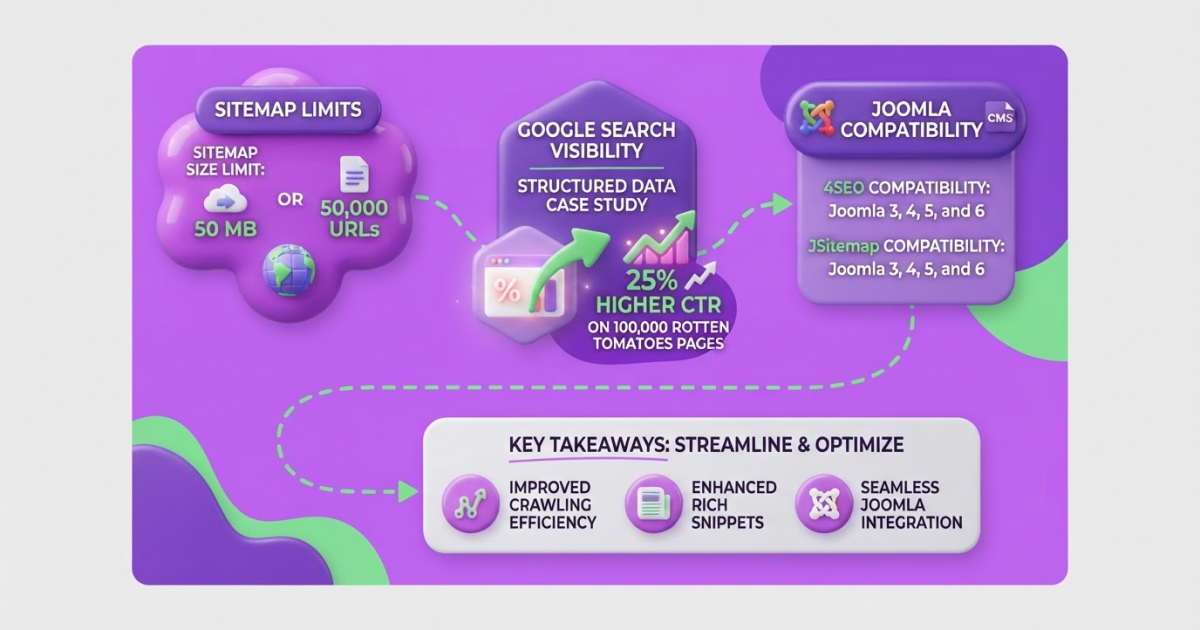
If you manage a Joomla site, you have probably seen the problem: core SEO settings work well, but metadata, sitemaps, redirects, and structured data end up scattered across extensions and admin screens. Small omissions then produce broken canonicals, stale descriptions, or pages nobody checks. I have found that installing a plugin without a measurement plan creates more noise than progress. Google’s case study reported a 25% higher click-through rate on pages with structured data. This guide covers plugin selection, native Joomla configuration, installation, verification, common mistakes, and a maintainable content workflow.
| Point | Details |
|---|---|
| Audit Joomla First | Joomla core already handles SEF URLs, URL rewriting, optional suffixes, metadata, and robots directives through native settings. |
| Match Your Scope | A small site may need metadata and redirects, while a larger site may also require 3 features: sitemaps, schema, and Search Console tools. |
| Configure URLs Carefully | Enable SEF URLs and URL rewriting only after confirming server support and testing at least 5 existing URLs. |
| Verify Every Output | Check canonical tags, robots directives, sitemap access, structured data, and the source code of at least 3 representative pages. |
| Review Monthly | Recheck SEO settings every 30 days and connect technical changes with steady content production and search-intent research. |
What does a Joomla SEO plugin actually do?
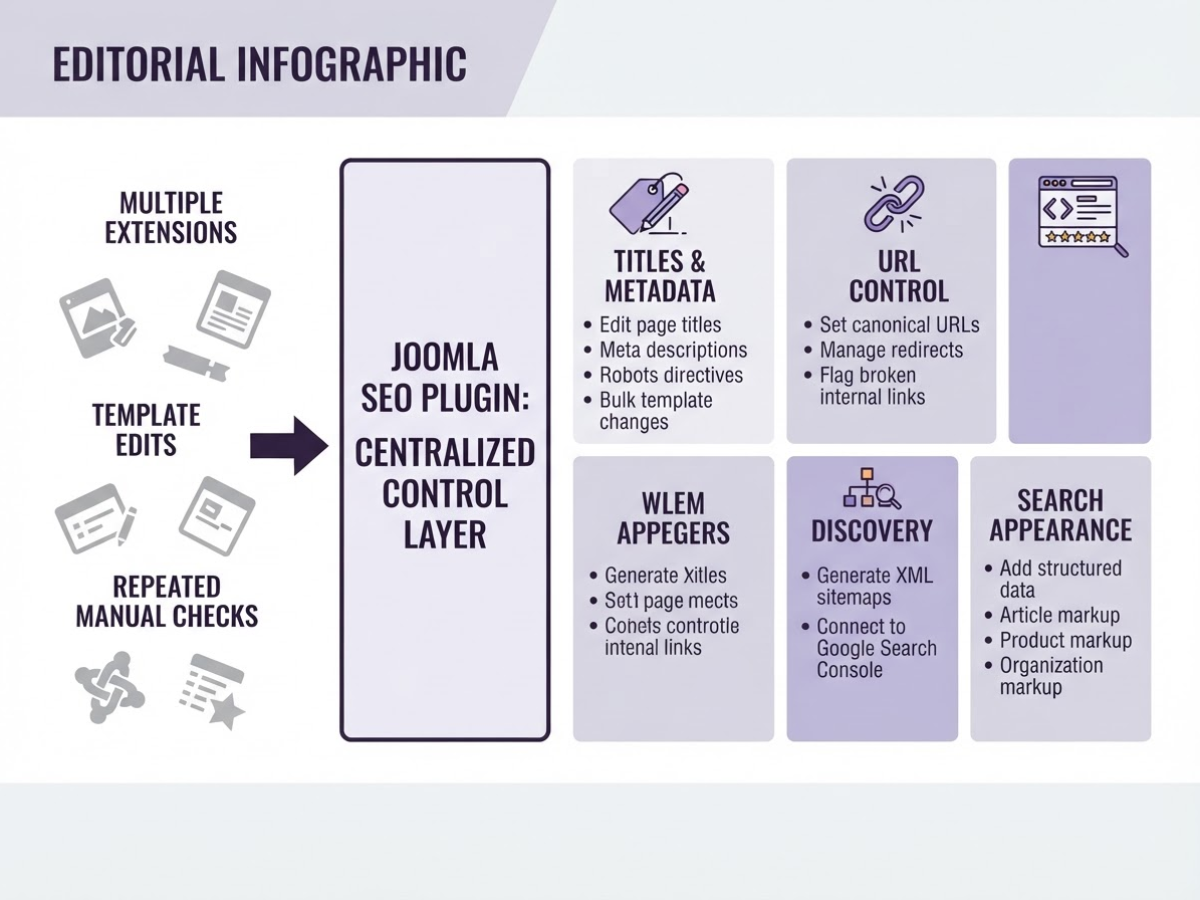
A Joomla SEO plugin is a control layer for search tasks that would otherwise require several extensions, template edits, or repeated manual checks. When I review Joomla sites, the confusion usually starts here: people expect one installation to improve rankings, while the extension mainly helps Joomla publish clearer signals.
Typical functions include:
| Function | What the extension handles |
|---|---|
| Titles and metadata | Edit page titles, meta descriptions, robots directives, and sometimes templates for bulk changes |
| URL control | Set canonical URLs, manage redirects, and flag broken internal links |
| Discovery | Generate XML sitemaps and connect the site to Google Search Console |
| Search appearance | Add structured data such as Article, Product, or Organization markup |
Some Joomla SEO suites combine all of these. A listing such as 4SEO’s Joomla feature set shows the breadth available, but breadth also creates more settings to audit. I would rather run three reliable extensions than one crowded dashboard that quietly publishes duplicate canonicals or conflicting redirects.
Joomla already covers more SEO work than many owners realise. In Global Configuration, you can set Search Engine Friendly URLs, enable URL rewriting, add an optional URL suffix, and complete the Apache .htaccess step. The official example changes index.php?option=com_content&view=category&layout=blog&id=16&Itemid=125 into /sample-layouts/articles.html when those options are enabled. Joomla’s URL guide explains these controls.
The same core settings include site metadata and robots choices such as index, follow and noindex, follow. Global Configuration documentation covers those directives. A plugin can apply them at article or category level, which helps when site-wide defaults are too blunt.
Pro Tip: Before installing an extension, export or document current metadata, robots settings, redirects, and sitemap URLs so you can identify what the plugin changes.
A plugin does not guarantee crawling, indexing, rankings, or rich results. Structured data can make a page eligible for enhanced search features, but Google still decides whether to show them. Choose a full suite for a large, frequently changing site with many redirects and schema needs. For a small brochure site, Joomla core plus a sitemap and redirect extension is usually less fragile. The next decision is which features your site actually needs.
Which Joomla SEO plugin fits your site?
Your site’s size and publishing workflow should decide which Joomla SEO plugin you install, not a feature checklist copied from a sales page. For a five-page brochure site, a focused metadata and redirect tool is often enough. A publisher, store, or multilingual site usually needs more automation and tighter control over crawl signals.
| Site situation | Sensible starting point | What to verify first |
|---|---|---|
| Brochure site | Joomla core plus metadata and redirect controls | Canonicals, page titles, redirects, and performance |
| Publisher or large content library | An all-in-one extension such as 4SEO | Sitemap rules, broken-link monitoring, schema, and Search Console |
| Ecommerce site | 4SEO or a comparable extension tested with your store component | Product schema, faceted URLs, pagination, and redirects |
| Multilingual site | JSitemap or an all-in-one tool with language support | hreflang output, translated URLs, and duplicate metadata |
For a small site, Joomla’s built-in SEF URL settings, site metadata, and robots controls cover the basics. Add a dedicated sitemap extension when you need dynamic XML output instead of maintaining URLs by hand. Joomla documentation recommends extensions that generate standards-compliant sitemaps, and JSitemap is listed for Joomla 3, 4, 5, and 6 with XML, image, video, Google News, hreflang, and HTML sitemap features. That setup is often sufficient for a brochure site or modest company blog.
A larger site can justify an all-in-one extension. 4SEO’s Joomla Extensions Directory listing covers Joomla 3, 4, 5, and 6 and describes structured data, XML sitemaps, redirects, broken-link detection, and Search Console connectivity. Those features reduce repetitive checks, but they also create more opportunities for conflicts. Schema generated by both your template and 4SEO can produce duplicate or contradictory markup. The same problem appears when two extensions publish sitemaps or rewrite redirects.
Pro Tip: The best plugin is often the one that removes the most manual work without creating competing sources of truth for canonicals, metadata, structured data, or sitemaps.
Before buying, check the extension’s latest release date, Joomla-version compatibility, documentation, support history, and effect on page generation time. Test it on staging with your template, cache, ecommerce component, language filters, and existing redirect rules. Then inspect the rendered HTML and confirm that exactly one system controls canonicals, schema, redirects, and sitemaps.
That audit shows whether your chosen Joomla SEO plugin is helping or simply adding another layer to maintain. Installation should start on staging, not production.
How to install and configure a Joomla SEO plugin
-
Back up before touching SEO settings. Export the database and copy the files, then restore that backup on staging if your hosting setup allows it. I would not test URL rewriting on a busy production site first. A small configuration mistake can turn every article into a 404 page.
-
Write down the current search behavior. Crawl or sample your homepage, categories, articles, pagination, images, and error pages. Record URL patterns, sitemap locations,
robots.txtdirectives, title and meta templates, redirects, canonical URLs, and pages markednoindex. This snapshot gives you something concrete to compare after installation, especially when an extension quietly adds its own rules. -
Set Joomla’s native URL options deliberately. In Global Configuration, enable Search Engine Friendly URLs and decide whether to enable URL rewriting. The optional suffix is a site-wide choice, not a ranking button. If you use Apache, rename
htaccess.txtto.htaccessbefore relying on rewriting, as Joomla’s official URL guide explains. Keep the existing pattern if possible. Changing/news/article-nameto/article-name.htmlcreates redirect work without guaranteeing a benefit.
Pro Tip: Change one technical layer at a time, URLs, then metadata, sitemap, and schema, so any indexing or rendering issue has a traceable cause.
-
Install the Joomla SEO plugin on staging first. Check that its release supports your Joomla version and template, then enable only the features you need: metadata, redirects, sitemap, schema, or monitoring. Do not activate three extensions that all generate canonicals or JSON-LD. Duplicate output is a common result of turning everything on.
-
Configure metadata and URL rules. Set a title template such as
{Page Title} | Brand, write a sensible default meta description, and override templates for priority pages. A product, service, or cornerstone article deserves its own title and description. You can use a free SEO title generator for first drafts, but review every suggestion against the actual page.
Set one canonical URL per indexable page. Redirect retired URLs with a permanent redirect, avoid redirect chains, and do not redirect unrelated pages merely to remove a URL. Check Joomla’s global robots setting too, since noindex, follow applied at site level can hide the entire site.
-
Generate and submit the sitemap. Confirm that it contains only preferred, indexable URLs, then submit its exact address in Google Search Console. Joomla’s sitemap documentation notes that XML sitemaps provide URLs and metadata for crawling. A sitemap helps discovery, but it does not force indexing.
-
Test before publishing production settings. Open the homepage, one category, an article, paginated results, an image URL, a real 404, a redirected URL, and a
noindexpage. Inspect the HTML for one title, one meta description, one canonical, and the intended robots directive. Validate schema separately, clear Joomla and CDN caches, then compare your original URL and indexing notes after 24 to 48 hours.
With the technical baseline stable, you can judge whether the extension improves visibility rather than merely changing page source.

Five Joomla SEO plugin mistakes that create hidden problems
A Joomla SEO plugin can report a green status while quietly publishing conflicting instructions. In site audits, these mistakes usually come from overlapping extensions rather than one broken setting.
- Running two SEO extensions at once: Two tools can output competing canonical tags, schema, redirects, or XML sitemaps. Disable duplicate features, not just the visible dashboard, then inspect rendered HTML and response headers.
- Leaving the whole site on
noindex: This often happens during troubleshooting and gets forgotten after launch. Joomla’s Global Configuration includes site-wide robots options such asindex, followandnoindex, nofollow, so check those settings, your template, and key page types such as articles, categories, tags, and search results. - Treating a submitted sitemap as an indexing guarantee: A sitemap helps Google discover URLs, but it does not guarantee that Google will crawl or index every submitted URL. Review the file itself. Thin articles, duplicate category views, filtered URLs, and automatically generated pages should not appear simply because the plugin found them. One sitemap file supports up to 50,000 URLs or 50 MB uncompressed before you need multiple files or an index (Google’s sitemap limits).
- Ignoring URL and redirect damage: Test old and new URLs after enabling SEF settings, rewriting, or suffixes. Look for redirect chains, broken internal links, duplicate HTTP, HTTPS, www, and non-www variants, accidental
.htmlchanges, and inconsistent trailing slashes. One extra redirect feels harmless until it spreads across thousands of links. - Confusing valid schema with guaranteed rich results: Run the Rich Results Test, compare the markup with the visible page, and remove fields you cannot support. Passing Google’s structured-data test only makes a page eligible; it does not guarantee a rich result.
My rule is simple: change one SEO layer at a time and crawl the site after each change. That catches hidden conflicts before they become an indexing problem. From there, measure the setup against a dated baseline.
How to measure whether the setup is working
A green score inside a Joomla SEO plugin is not proof that search performance improved. I judge the setup against a dated baseline, then look for changes in crawling, visibility, and business results rather than collecting plugin warnings.
-
Day 0: record the baseline. Export indexed pages, impressions, clicks, average position, organic conversions, and crawl errors from Google Search Console and analytics. Break the numbers down by important templates, such as articles, category pages, product pages, and landing pages. Save a sample URL from each template, including its canonical, robots directive, title, sitemap status, and response time.
-
Days 1 to 14: verify what Google sees. Inspect representative URLs in Search Console. Compare the submitted, indexed, canonical, and excluded states, because a URL can sit in your sitemap while Google selects another canonical or ignores it. Check sitemap processing, redirect errors, 404s, server failures, and unexpected
noindexdirectives. Joomla’s global robots settings can affect indexation across the site, so one careless change can create a large exclusion spike.
A sitemap helps Google discover URLs, especially on larger or more complex sites, but it does not guarantee crawling or indexing. Treat “successfully processed” as a technical status, not a ranking result.
- Days 30 to 90: connect fixes to publishing. Compare clicks and conversions by page, query, and template. Prioritize new or revised content by search intent, content gaps, internal-link opportunities, and conversion value. A page ranking at position 11 with strong commercial intent often deserves attention before a position 3 article that produces no leads.
Review structured data separately from rankings. Passing Google’s Rich Results Test only makes a page eligible, and Google does not promise to show the rich result. Track eligibility, detected enhancements, and actual appearances as different outcomes. Google has reported a 25% higher click-through rate in a Rotten Tomatoes structured-data case study, but that result is not a guarantee for your Joomla site.
Run a short review every month. Every quarter, audit the plugin for Joomla compatibility, updates, page-speed cost, duplicate features, redirects, schema output, and sitemap behavior. Once the data exposes weak templates, decide which Joomla SEO plugin tasks deserve your publishing time.
My honest take on Joomla SEO plugins
As a company owner, I treat a Joomla SEO plugin as operating infrastructure, not a ranking shortcut. That distinction matters because many site owners install too much too early. My contrarian view is simple: if your Joomla site has only a few dozen important URLs, an all-in-one extension can create more risk than value. Extra settings, overlapping metadata controls, and conflicting schema can leave you debugging the plugin instead of improving the site.
I would first establish clean URL behavior, reliable title and description fields, a focused XML sitemap, and a measurement routine. Only then would I add advanced schema, redirect management, or automation when the publishing workload justifies the maintenance. The annoying part is that these basics are easy to overlook because plugin dashboards make advanced features look urgent.
The long-term advantage is not the extension itself. It is the discipline of keeping technical signals consistent while publishing pages that answer real questions. At TryRoki, that is why we connect content planning and production with repeatable SEO tasks. Technical setup is not a one-time ceremony. You still need to check what changed, publish with intent, and fix the small issues that accumulate across a Joomla site.
— Daniel/Aleksandra
Turn Joomla SEO fixes into a consistent growth workflow
A Joomla SEO plugin can fix important technical issues, but it will not decide which pages deserve to exist or whether your content answers a realistic search query. I have seen site owners spend hours adjusting metadata while outdated articles, weak topic choices, and missing internal links quietly hold back results.
At TryRoki, we built an AI content workflow for turning SEO ideas into regular publishing work. Roki AI can help generate content, surface practical opportunities, and send you 3 to 10 weekly tasks aimed at Google and AI search visibility. It can also find relevant Reddit posts where mentioning your site makes sense, although careless comments look spammy and waste your time.
Use Roki AI after checking your Joomla plugin setup. It supports technical SEO; it does not replace QA, editing, or sound judgment.
Frequently Asked Questions
Yes. Joomla includes native controls for Search Engine Friendly URLs, URL rewriting, optional URL suffixes, metadata, and robots directives, so you can handle several core tasks without an extension. An SEO plugin adds convenience and advanced features, but it does not replace Joomla’s built-in controls.
There is no universal best choice because your needs can center on metadata, redirects, schema, sitemaps, or Search Console integration. Before choosing, check Joomla version compatibility, recent maintenance activity, feature overlap, and whether the extension has been tested on at least 1 staging copy of your site.
Install a Joomla sitemap extension that dynamically generates an XML sitemap, then submit its URL in Google Search Console. Keep only canonical, indexable URLs in it, and remember that submitting a sitemap does not guarantee indexing of every page.
Yes, Joomla can support strong search performance when you manage URL structure, metadata, robots directives, internal links, page speed, and content quality properly. The CMS alone does not determine rankings, and ignoring even 1 of those areas can create avoidable problems.
Usually not. Technical fixes can help search engines access and interpret your site, but competition, content quality, authority, site history, and user demand require a 30- to 90-day evaluation period before you can judge the effect.
Written by Daniel/Aleksandra.
Recommended reads
- Open Source Seo A Practical Setup Guide
- Ai Seo Content Generator A Practical Guide
- Seo Roadmap Template A Practical 90 Day Plan
- Amp Wordpress Plugin Setup Modes And Seo
Sources
- Search Engine Friendly URLs
- Global Configuration
- Using A Sitemap
- Build and Submit a Sitemap
- What Is a Sitemap
- Intro to structured data markup in Google Search
- General Structured Data Guidelines
- 4SEO, by Yannick Gaultier - Joomla Extension Directory
- JSitemap, by J!Extensions Store - Joomla Extension Directory