Aleksandra D.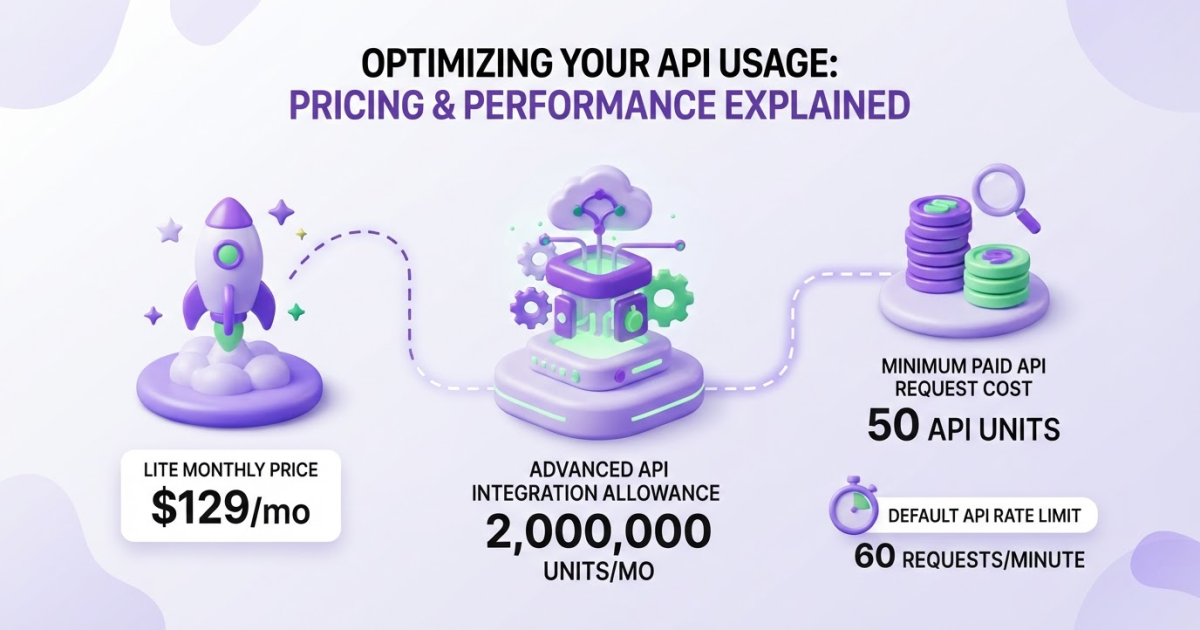
Ahrefs API access is included with the Lite, Standard, Advanced, and Enterprise plans, priced at $129, $249, $449, and $1,499 per month, respectively. Choose based on your monthly integration units, rows per request, API rate limits, and whether you need uncapped access or custom endpoints.
If you are trying to budget Ahrefs API access, the monthly plan price is only the starting point. I have seen teams choose a tier that looks affordable, then burn through units because every response row and requested field affects usage, while shared integrations quietly reduce the remaining allowance. Ahrefs lists Lite at $129 per month with 200,000 units, Standard at $249 with 800,000, Advanced at $449 with 2 million, and Enterprise at $1,499 with custom limits. This guide gives you an operator’s framework for comparing tiers, estimating consumption, checking limits before launch, avoiding billing and integration mistakes, and deciding where an automated workflow such as Roki AI can reduce manual SEO analysis.
| Point | Details |
|---|---|
| Plan prices | Monthly prices are $129 for Lite, $249 for Standard, $449 for Advanced, and $1,499 for Enterprise. |
| Unit allowances | Monthly integration allowances are 200,000 units on Lite, 800,000 on Standard, 2 million on Advanced, and custom on Enterprise. |
| Usage calculation | Each paid request costs at least 50 API units, while response rows and requested fields determine total consumption. |
| Request limits | Maximum rows per request increase from 100 on Lite to 250 on Standard, 500 on Advanced, and Unlimited on Enterprise. |
| Shared capacity | Direct API v3, Ahrefs MCP, and Ahrefs Connect all use the same integration API-unit allowance. |
What does Ahrefs API pricing include?
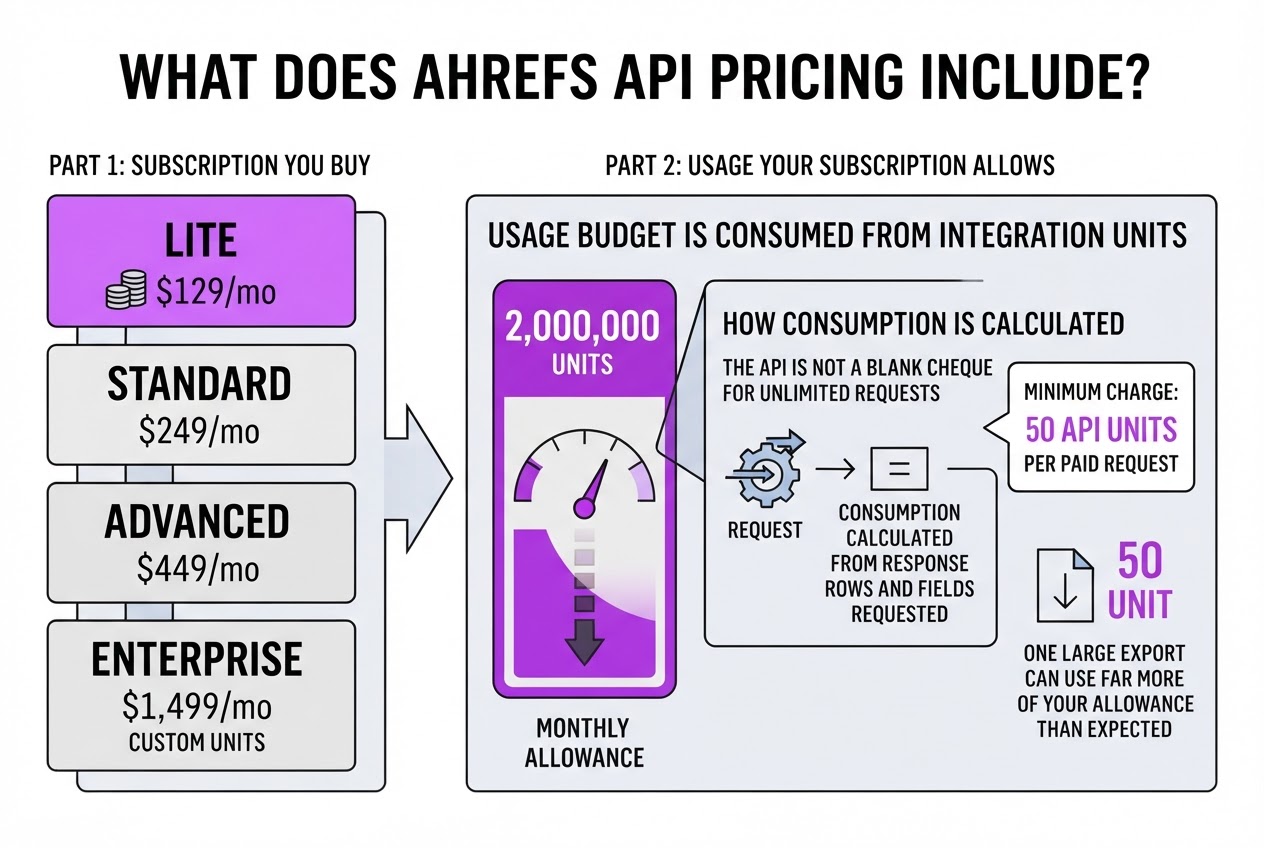
Ahrefs API pricing has two parts: the subscription you buy and the API usage that subscription allows. I have seen teams focus on the monthly fee, then get surprised when their integration consumes its allowance faster than expected. The API is not a blank cheque for unlimited requests.
The current Ahrefs pricing page lists Direct API access on four plans:
| Plan | Monthly price | API integration units per month |
|---|---|---|
| Lite | $129 | 200,000 |
| Standard | $249 | 800,000 |
| Advanced | $449 | 2,000,000 |
| Enterprise | $1,499 | Custom |
Those integration units are your usage budget. Ahrefs calculates consumption from the response rows and fields you request, with a minimum charge of 50 API units for a paid request. One large export can therefore use far more of your allowance than a small lookup. Maximum rows per request also rise from 100 on Lite to 250 on Standard, 500 on Advanced, and unlimited on Enterprise, which affects how much work you can complete per call.
Pro Tip: Treat the subscription fee and the usage allowance as two separate budget lines when comparing plans; a cheaper tier can become operationally expensive if it forces more batching or upgrades.
Enterprise works differently. Its $1,499 monthly price requires an annual commitment, and the plan includes uncapped API access plus custom API endpoints. That suits a product or data team running constant pulls, but it is excessive if you only refresh rankings or backlink data a few times each week.
Eligible paid plans provide API access. Other Ahrefs plans can use a limited number of free test queries, but that access is for checking how the API behaves, not for running a production integration. Build a small usage estimate before choosing a tier, and compare it with your broader SEO software budget, especially if your workflow also includes content and monitoring tools.
The next question is how these units are actually consumed when requests, fields, and refresh schedules meet your workload.
Which Ahrefs plan gives the best API value?
The cheapest Ahrefs API plan is not automatically the best value. When I map a client’s workflow, I look first at how many rows each job needs, how often it runs, and whether several tools will draw from the same allowance.
The current Ahrefs pricing details show this spread:
| Plan | API units per month | Maximum rows per request | Best fit |
|---|---|---|---|
| Lite | 200,000 | 100 | Small, recurring lookups |
| Standard | 800,000 | 250 | Growing reporting workflows |
| Advanced | 2,000,000 | 500 | Heavier data operations |
| Enterprise | Custom | Unlimited | Custom or uncapped requirements |
Lite works when you pull a narrow set of metrics for a modest site list, such as a weekly rank check or a small competitor report. The 100-row request ceiling is the catch. A job that needs 1,000 rows must be split into at least 10 requests before you account for retries, pagination, or additional fields.
Standard is usually the sensible middle tier for an agency or in-house team building scheduled reports. Its 800,000-unit allowance gives you room for multiple clients, while 250 rows per request reduces batching. If you already maintain keyword ranking workflows, this is often where the operational annoyance starts to ease.
Advanced suits data-heavy jobs: large keyword sets, frequent competitor checks, or exports that feed several dashboards. The 500-row limit matters almost as much as the 2 million units. Enterprise is the practical choice when you need unlimited rows per request, custom endpoints, or uncapped access rather than another fixed allowance.
Pro Tip: Compare the number of rows your largest recurring job needs, not only your average monthly volume; request-size limits can create more engineering work before you hit the unit allowance.
Do not treat those allowances as separate buckets. Ahrefs shares API units across Direct API v3, Ahrefs MCP, and Ahrefs Connect, so an MCP experiment can reduce the units available to your production integration. The shared usage rules make this easy to miss when different teams own different connections.
Use this decision rule: forecast monthly units from response rows and requested fields, check the largest batch size, then list every integration that will consume the account. Choose the lowest tier that clears all three constraints with headroom, not the lowest monthly price. Next, the actual unit calculation determines whether your forecast is realistic.
How to estimate your monthly Ahrefs API cost
Forecasting Ahrefs API cost is mostly a counting exercise, but teams often count only the first successful request. When I review an automation plan, retries, pagination, and scheduled refreshes usually create the biggest surprises. Use this process before you compare subscription costs or commit to a larger workflow.
- Count planned requests. Record the number of requests per day, week, and month for every endpoint. For example, 500 keyword checks each weekday equals about 2,500 requests per week and roughly 10,000 requests per month. Keep daily and monthly figures separate because a short campaign can create a sharp usage spike.
- Estimate rows and fields. For each endpoint, note the expected response rows and the fields you request. Ahrefs calculates paid usage from those two factors, while every non-free request has a minimum charge of 50 API units. The API documentation explains the row, field, and minimum-charge rules, so do not assume that one request always costs one unit block.
- Calculate the base forecast. Multiply your expected unit cost by monthly requests, then add separate lines for normal volume, peak volume, retries, and pagination. If one keyword query returns three pages, model it as three paid requests, not one. Apply the 50-unit minimum to each paid request, even when the requested rows and fields would otherwise produce a smaller result.
Pro Tip: Add a retry budget to your forecast. A workflow that looks affordable at one request per keyword can consume substantially more units when pagination, failed calls, and scheduled refreshes are included.
- Remove free checks from paid totals. Limits-and-usage checks do not consume API units, so keep them in your monitoring logic rather than your cost calculation. Call the free endpoint before increasing automation, after a large import, and during peak periods to see current usage and remaining limits. The limits-and-usage reference confirms that these checks cost zero units.
- Plan the queue. The default rate limit is 60 requests per minute, so throttle workers instead of releasing a large batch at once. A queue sending 120 requests should take at least two minutes under normal conditions, and longer if Ahrefs applies dynamic throttling or your retries overlap. Budget both units and elapsed time; running out of either can break a scheduled job.
Once your forecast has normal and worst-case figures, use those numbers to judge whether the current plan has enough monthly headroom.

Five Ahrefs API pricing mistakes to avoid
When I review an SEO integration budget, the expensive errors usually happen before the first request is sent. Teams see a monthly subscription price, assume the API is unlimited, and only notice the constraint after a dashboard or data pipeline starts failing.
- Mistaking a subscription for unlimited API access. Lite, Standard, and Advanced include API access, but they also include monthly allowances of 200,000, 800,000, and 2 million integration units. Enterprise is the exception: it includes uncapped API access, but the listed $1,499 monthly price requires an annual commitment. Do not treat it like a flexible month-to-month upgrade.
- Counting requests instead of units. A request returning 1,000 rows with several fields can cost far more than a small lookup. Paid requests have a 50-unit minimum, and Ahrefs calculates the final cost from response rows and requested fields. Model rows and fields in your forecast, not just the number of API calls.
- Forgetting shared usage. Direct API v3, Ahrefs MCP, and Ahrefs Connect draw from the same integration allowance. MCP does not add a separate server fee, but its calls reduce the units available to your main integration. This is easy to miss when different teams own each connection. Audit all three before choosing a plan, and review your integration setup rather than blaming the API bill later.
- Treating 60 requests per minute as a guaranteed throughput target. That is the default limit, not permission to hammer the endpoint continuously. Requests above it receive HTTP 429 errors, and Ahrefs can apply dynamic throttling based on load and request demand. Add queuing, retries with backoff, and monitoring from the start. Ahrefs documents these rate limits.
- Building on API v2 or ignoring the contract terms. Ahrefs has fully deprecated API v2, so new work belongs on API v3 and the current integration model. Check endpoint behavior before committing engineering time.
These mistakes make Ahrefs API pricing look unpredictable, but a unit-based forecast exposes the real cost before you choose a plan.
A practical Ahrefs API setup for SEO teams
Before you open an API key, decide what the team must produce every week. Rank monitoring, competitor research, content briefs, and client reporting require different queries, fields, and refresh schedules. I prefer one measurable output, such as “deliver 50 ranking opportunities to editors every Monday,” over a vague goal like “collect SEO data.”
- Week 1: define the output and estimate demand. List the endpoints, keywords, domains, locations, refresh frequency, response rows, and fields each workflow needs. Since paid requests cost at least 50 API units and the final charge depends on response rows and requested fields, a request that looks small can still consume more allowance than expected. Keep the first version narrow, then compare the result with your keyword ranking API workflow.
- Week 1: select a tier with headroom. Choose the smallest plan that covers your forecast without running at the limit. The current allowances are 200,000 units for Lite, 800,000 for Standard, and 2 million for Advanced, with maximum request sizes of 100, 250, and 500 rows respectively. Those figures are listed on the Ahrefs pricing page. I would leave at least 20% unused for retries, seasonal campaigns, and estimates that turn out to be wrong. Enterprise is a different budget decision at $1,499 per month, with uncapped API access and custom endpoints.
- Week 2: build the queue before adding volume. Run no more than 60 requests per minute by default, add backoff for HTTP 429 responses, and split large jobs into predictable batches. Store the request ID, timestamp, endpoint, response rows, selected fields, status, and units consumed. This logging feels tedious until someone asks why the monthly allowance disappeared in three days.
- Week 2: monitor usage daily. Poll the free limits-and-usage endpoint, which reports subscription, key, workspace, and current unit usage without consuming API units. Set alerts at 70%, 85%, and 95%, then pause nonessential competitor crawls before the allowance runs out.
- Week 3 onward: connect findings to work. Turn ranking drops into content updates, near-page-one terms into assigned optimization tickets, and competitor wins into brief requests. Roki AI can help turn those priorities into ongoing content and visibility tasks, including its weekly SEO actions, but it is not an Ahrefs API replacement. Keep Ahrefs as the data source and let Roki AI help your team decide what to do next.
That operating sequence makes the subscription cost easier to defend because each API unit ends in a visible SEO action, not another unused export.
My honest take on Ahrefs API pricing
I would not choose an Ahrefs API plan by staring at the headline monthly price. After looking at how teams actually use SEO data in production, I care more about the largest job you need to run and the spare capacity left for retries, scheduled reports, MCP, and other integrations. A plan that looks cheap can become expensive when one failed batch consumes your remaining units.
Lite can be a sensible choice for one focused workflow, such as checking keyword or backlink data for a content pipeline. Standard becomes easier to defend when several people or automated jobs share the allowance. Advanced is not automatically the right move just because it includes more units. My contrarian view is that many teams should simplify their requests before upgrading. Narrower fields, better batching, and a queue often create more usable capacity than buying a larger plan too early.
I would treat API usage as a production budget. Each month, I would track units per completed SEO action, not just total units consumed. That exposes waste from duplicate requests and oversized responses. Enterprise only makes sense when uncapped access or custom endpoints are a real operating requirement, rather than an attractive line on a pricing page. Those distinctions matter when every tool in your stack has to justify its cost.
— Daniel
Turn SEO data into consistent growth work
Once you know how much Ahrefs API capacity your workflow needs, the harder question is what your team will do with the data. I built Roki AI’s content and visibility workflow for that gap: it can generate website content, find relevant Reddit posts where a useful comment can mention your site, and assign 3 to 10 weekly tasks aimed at improving visibility in Google and AI search engines.
It is not a replacement for Ahrefs or its API. You still need reliable research, and Roki will not fix unclear goals or weak content on its own. The value comes after you define your success metrics and decide who owns execution. When that workflow is clear, review Roki’s pricing and capabilities to see whether it fits the work your team actually plans to complete.
Frequently Asked Questions
Ahrefs offers limited free test-query access on plans that do not qualify for paid API access. Paid requests require a minimum charge of 50 API units, while the limits-and-usage endpoint costs 0 API units.
There is no fixed call allowance because Ahrefs counts factors such as response rows and requested fields. The default rate limit is 60 requests per minute, and your monthly integration-unit allowance depends on your subscription tier.
Yes. Ahrefs currently lists Direct API access for Lite, Standard, Advanced, and Enterprise plans, priced at $129, $249, $449, and $1,499 per month, respectively.
An API integration unit is usage credit consumed by eligible API and integration activity. Direct API v3, Ahrefs MCP, and Ahrefs Connect share the same allowance, so activity through 1 method leaves fewer units for the other 2.
- Ahrefs has fully deprecated API v2, and you can no longer use it directly or through Integrations. New implementations should use API v3 and the current integration system instead.
Written by Daniel/Aleksandra.
Recommended reads
- Keyword Ranking Api Guide How To Track Optimize Rankings
- Google Rank Tracker Api How To Use It For Seo Success
- Ai Seo Agent
- Pricing