Daniel D.
 > TL;DR: Checking keyword difficulty isn't about chasing every low-hanging fruit but figuring out where you actually stand against competitors. Most useful tools score difficulty out of 100, where 30-50 usually signals doable keywords for mid-level sites. Ignoring this means wasting time on impossibly tough keywords or missing out on easier wins.
Written by Daniel Dimov.
If you’ve tried picking keywords to boost your website but ended up chasing ones that never rank, you’re not alone. Even seasoned marketers underestimate how fierce the competition can be for certain phrases. The keyword difficulty (KD) score isn't just a number—it's a reality check on whether your site stands a chance. For instance, the average keyword difficulty lies mostly between 20 and 60, and beyond that, your chances of ranking drop sharply. This guide will break down how to check keyword difficulty accurately, what those numbers actually mean for your efforts, and how to set realistic SEO targets tailored to your website’s strength.
Written by Daniel Dimov.
| Point | Details |
|---|---|
| Definition Basics | Keyword difficulty scores run from 0 to 100, showing how hard it is to rank for a keyword. |
| Use Reliable Tools | Tools like Ahrefs and Semrush rank keywords with scores that reflect real competition levels. |
| Authority Matters | Sites ranking for mid to high difficulty keywords usually have domain authority above 50. |
| Strategic Targeting | New sites see success up to 68% on keywords with difficulty 0-20 but under 3% on 50+. |
| Timeline Expectations | Ranking times jump by about 2-3 months for every 10 points increase in difficulty score. |
Written by Daniel Dimov.
What Is Keyword Difficulty and Why It Matters
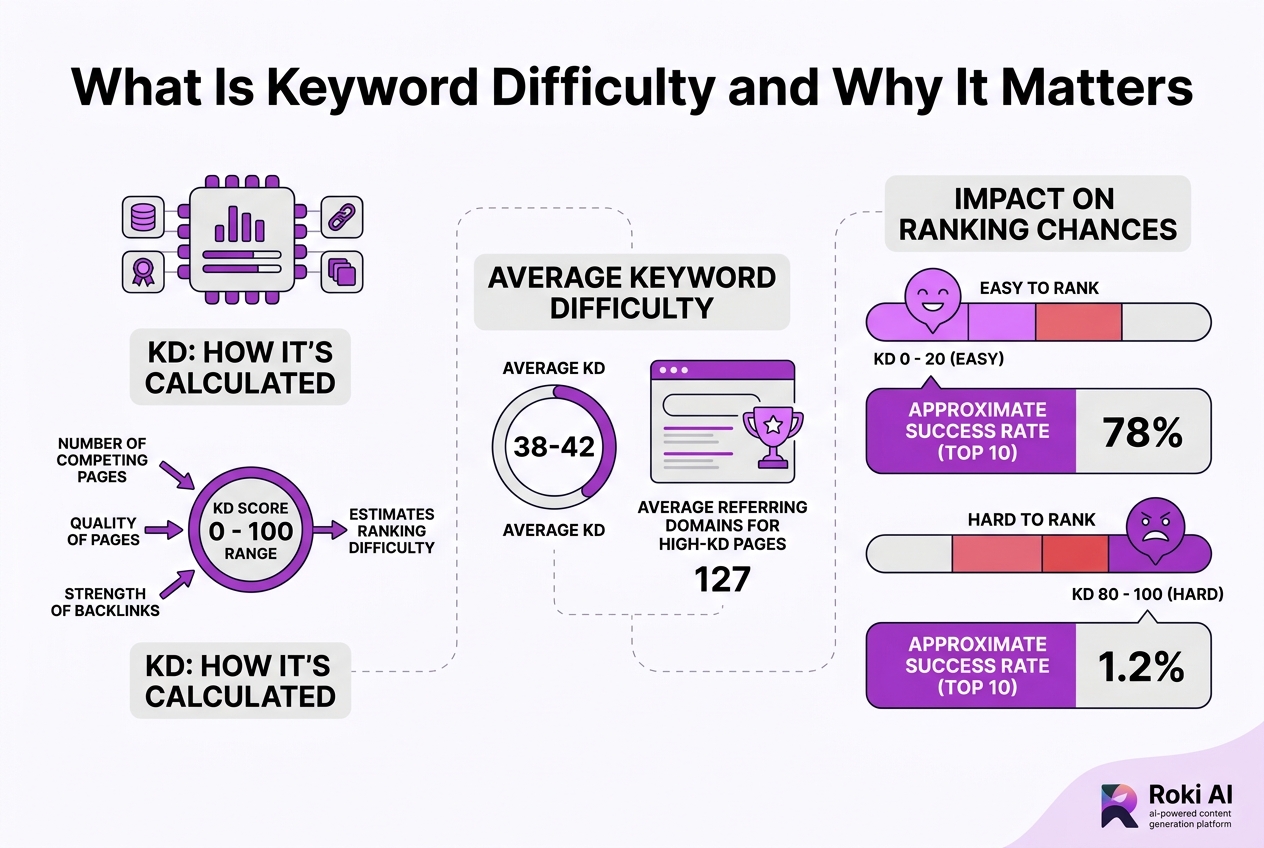
Keyword difficulty, often abbreviated as KD, is a score ranging from 0 to 100 that estimates how hard it is to rank on Google’s first page for a particular keyword. It’s not just a guess — it’s calculated using some heavy lifting behind the scenes. Factors like the number of competing pages, the quality of those pages, and the strength of their backlinks all feed into this number.
You’ll want to think of KD as an indicator of your chances to break into the top 10 search results. A higher score means tougher competition, making it harder for your content to rank well.
Here’s a quick breakdown of average KD ranges and what they imply:
| KD Range | Description | Approximate Success Rate (Top 10) |
|---|---|---|
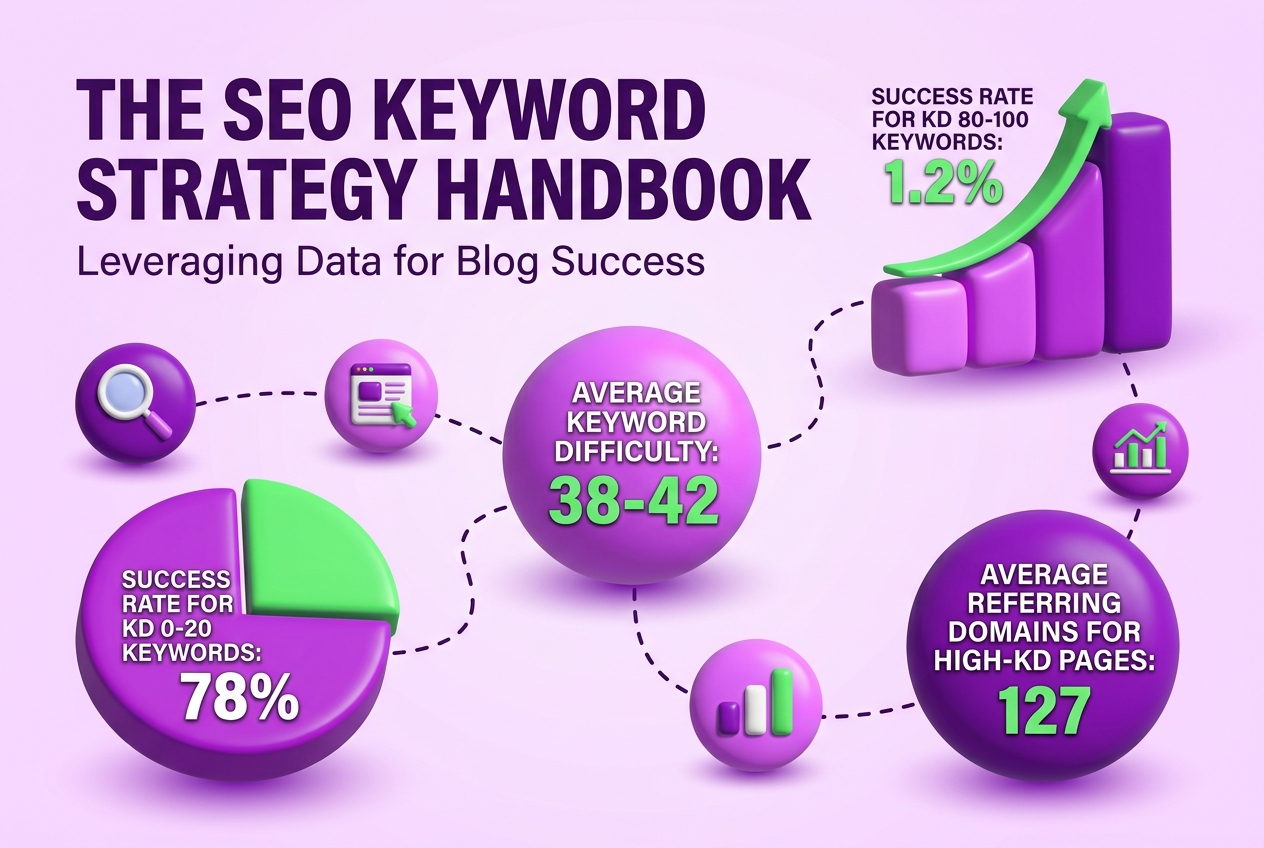
| 0 - 20 | Low difficulty; easiest to rank | 78% |
| 21 - 40 | Moderate difficulty | 42% |
| 41 - 60 | High difficulty; competitive | 18% |
| 61 - 80 | Very high difficulty | 6% |
| 81 - 100 | Extremely hard; elite competition | 1.2% |
These numbers come from recent research by SEO experts like Backlinko and Ahrefs, reflecting the steep drop in ranking chances as difficulty increases.
Pro Tip: Bold-labelled: When interpreting KD, focus on difficulty relative to your site’s domain authority for realistic targeting. Matching your site’s strength to the competition level makes your SEO efforts more practical.
Different tools offer their own KD metrics, but Ahrefs is often praised for its accurate estimation of ranking potential within the top 10 results. Similarweb also defines keyword difficulty similarly, emphasizing its reliance on competitor analysis and backlink quality.
The majority of keywords fall into the 20-60 difficulty range, while low-difficulty keywords (0-20) dominate roughly one-third of all keywords. These low KD keywords are ideal entry points if you’re getting started or have a smaller website authority.
If you’re diving into keyword research, understanding keyword difficulty is critical for prioritizing your targets. In practice, chasing ultra-competitive keywords without matching site authority wastes time and budget.
Next, we’ll look at practical methods you can use to accurately check keyword difficulty and apply it to your SEO strategy for better results.
Written by Daniel Dimov.
How to Check Keyword Difficulty Using Top Tools
Checking keyword difficulty (KD) is one of those SEO tasks that feels simple but often trips people up. Here’s how you actually do it with two leading tools—and what to watch out for.
-
Open Ahrefs’ Keywords Explorer and enter your keyword.
- Ahrefs assigns a KD score from 0 to 100 that estimates your chance to rank in the top 10 results. This score relies heavily on backlink profiles of the top ranking pages, so it’s pretty backlink-focused.
- You’ll see the KD score right next to the keyword. A 0–20 score suggests low competition, which is usually your best target, especially if your site is new or has a low domain authority.
-
Try Semrush’s Keyword Overview tool with the same keyword.
- Unlike Ahrefs, Semrush expresses KD as a percentage (0-100%) indicating the difficulty.
- The metric considers multiple ranking factors beyond backlinks, including domain authority, page authority, and traffic, so it feels broader but can sometimes overestimate difficulty for niche sites.
-
Compare the two sets of scores.
- Don’t expect them to match exactly; Ahrefs KD tends to be more precise for backlink-heavy niches, while Semrush might be more conservative.
- Use scores as guides—not absolutes. A keyword with a 40 Ahrefs KD is realistically easier for some niches than others.
-
Consider your niche and competition context.
- A KD of 30 might be manageable in a less crowded category but far harder in a saturated one.
- Brainstorm your site’s authority level. New sites usually want keywords under 20 or 25 KD to avoid wasting months chasing impossible ranks.
-
Take note of the tool differences in pricing and limits.
- Both Ahrefs and Semrush require paid subscriptions for deep KD analysis, though each offers limited free trials or reports.
- Free tools are tempting but often give fuzzy or outdated difficulty scores, so weigh those trade-offs.
-
Beware common pitfalls.
- Don’t fixate on the KD number alone.
- High KD keywords need strong backlinks and quality content, but sometimes lower KD keywords can be deceptive if the search intent doesn’t match your offering.
Familiarity with both tools lets you triangulate a more realistic picture of keyword difficulty. The key is balancing your site’s strength with what the KD score is actually measuring, not just chasing low numbers blindly.
Next, we’ll explore how to build a keyword strategy that respects these difficulty nuances while maximizing your chances to rank.
Written by Daniel Dimov.
Matching Keyword Difficulty to Your Website’s Authority
Your website’s domain authority (DA) is the backbone when deciding which keyword difficulty (KD) to chase. DA measures how strong and trustworthy your site appears to search engines, based on factors like backlinks, content quality, and overall SEO history. If your DA is low, trying to rank for difficult keywords is like running a race where everyone else has a head start.
Here’s a rough guide to matching DA with KD, based on broad success rates:
| Domain Authority (DA) | Target Keyword Difficulty (KD) | Expected Success Rate for Ranking in Top 10 |
|---|---|---|
| New/Low (DA < 20) | Low (KD 0-20) | ~68% success |
| Medium-High (KD 50+) | ~2.3% success | |
| Medium (DA 20-40) | Medium (KD 20-40) | 3.7x higher success than high KD |
| High (KD 60+) | Much lower success | |
| High (DA > 40) | High (KD 60+) | Competitive, but possible with effort |
It’s tempting to go after those flashy high KD keywords, but if you’re starting out or your site hasn’t built much authority yet, you’re mostly wasting time and resources. New or small sites must focus on low KD keywords (0-20), which represent about 32% of all keywords and are actually easier to rank for. This isn’t the glamorous path, but it’s realistic and pays off faster.
For medium DA sites, the sweet spot is mid-difficulty keywords (20-40 KD). These opportunities offer better traffic and visibility without requiring the backlinks and brand power huge competitors have. That said, this calls for solid on-page SEO and regular content updates to keep your rankings stable.
High keyword difficulty targets are generally for sites with strong authority or ones willing to invest heavily in promotion and link building. Even then, expect a long haul. Ranking for KD 60+ keywords might take 12-24 months and significant effort to outrank established pages.
Pro Tip: Bold-labelled: Regularly assess your domain authority growth to update your keyword targeting strategy accordingly.
By keeping a clear eye on where your site stands in DA and choosing targets accordingly, you’ll avoid chasing impractical keywords and instead build a sustainable SEO climb. That foundation also helps you understand when it’s time to move up to tougher targets.
From here, we'll explore practical ways to check keyword difficulty using trusted tools, so you know exactly where to focus your energy next.
Written by Daniel Dimov.
Common Mistakes When Checking Keyword Difficulty
Checking keyword difficulty (KD) might sound straightforward, but several common mistakes trip marketers up—and they can waste a lot of time and effort.
Here’s what I see too often:
-
Relying solely on KD without assessing competitor quality. Not all competitors are created equal. A high KD might reflect sites with strong backlinks and authority, but if you dig deeper, you may find competitors with outdated or thin content that you can outrank.
-
Ignoring the impact of timeframe. Higher KD scores mean it usually takes much longer to rank. For example, a keyword with KD 60 might take 12-18 months to rank, while KD 20 can take just a few months. If you expect quick results from a tough keyword, you’re setting yourself up for frustration.
-
Misinterpreting KD as a guarantee rather than probability. A 70 KD doesn’t mean you won’t rank; it means your chances are low, not zero. Success plummets sharply as KD increases, so it’s a game of odds, not certainties.
-
Targeting unrealistic KD for new websites. New sites with low domain authority (DA) rarely rank for keywords over KD 50. Chasing those is often wasted effort; instead, target lower KD where success rates are much higher.
-
Confusing KD scales between tools. Each tool calculates KD differently, so a 40 KD on one platform might equal 60 on another. Mixing them up leads to bad targeting decisions.
Avoiding these mistakes starts with deeper research and realistic goal-setting. If you're managing keyword difficulty, it's crucial to interpret it correctly within the broader competitive landscape.
The next step is matching keyword difficulty to your site’s actual authority and capacity, which we'll cover shortly.
Written by Daniel Dimov.
How Keyword Difficulty Influences Your Content Planning and Ranking Timeline
The higher the keyword difficulty (KD), the longer you'll likely wait before seeing your content rank. Expect a rough increase of 2 to 3 months in ranking time for every 10-point rise in KD. For example:
- KD 20 keywords usually rank within 3 to 4 months.
- KD 40 keywords take about 6 to 9 months.
- KD 60 keywords stretch up to 12 to 18 months.
- KD 80+ keywords can demand 24 months or more.
These timeframes aren't guarantees but good baseline expectations based on observed data.
But it's not just about time. Your chances of cracking the top 10 search results drop sharply as KD climbs. At KD 0-20, your site’s success rate can hover around 78%. When you move into KD 40-60 territory, that plummets to about 18%. Beyond 60, success rates slip below 6%. This means targeting high-difficulty keywords without strong domain authority is a steep uphill battle.
Backlink requirements mirror this challenge. Pages ranking well for KD 60+ keywords average around 127 referring domains, compared to only about 8 for low-difficulty KD 10-30 terms. More competitive keywords demand not just quality content but a serious backlink investment.
Here’s a quick rundown to frame your planning:
- Milestone 1: Early wins with low difficulty (KD 0-20). These keywords bring faster ranking boosts and are critical for building baseline authority.
- Milestone 2: Medium difficulty (KD 20-40) demands stronger backlinks and a longer timeline but opens a valuable audience segment.
- Milestone 3: Navigating high difficulty (KD 40+) requires significant resources and patience. Success here means solid long-term growth.
Resource allocation hinges on balancing these groups. Ignoring low and medium KD keywords in favor of chasing only the hardest ones risks wasted effort and minimal ranking returns, especially if your site’s authority is still budding. That said, focusing solely on low KD keywords limits growth potential once those initial wins taper off.
Pro Tip: Bold-labelled: Prioritize content around low to medium KD keywords to build quick ranking momentum early on.
This balanced approach helps you see quicker wins while steadily building the backlink profile and authority necessary for tougher keywords down the line. It’s a strategic trade-off that can prevent frustration and wasted budgets.
Understanding these timelines and probabilities clarified my own strategy when scaling TryRoki’s organic growth. The critical part is managing expectations and matching effort to the keyword opportunities that realistically fit your current site power.
Next, let’s explore how to align keyword difficulty with your site’s domain authority to sharpen targeting even further.
Written by Daniel Dimov.
Alternatives and Complementary Metrics to Keyword Difficulty
Keyword difficulty (KD) is a cornerstone metric, but it’s far from the whole story when choosing which keywords to target. Most marketers miss the nuances that come from looking beyond KD scores and considering additional metrics that paint a fuller picture of opportunity and competition.
Here are some alternatives and complements to keyword difficulty you should know:
- Search Volume: High search volume means more potential visitors, but it’s often tied to higher KD. Sometimes it’s better to go for moderate volume with manageable competition.
- Click Potential: Not every search results in a click. Featured snippets, ads, and local packs can siphon clicks away from organic results, so evaluate how many clicks top-ranking pages actually get.
- Traffic Potential: This looks beyond a single keyword to the cumulative traffic from related searches and topic clusters.
- Backlink Profile: The number and quality of backlinks pointing to top-ranking pages signal how strong their SEO foundation is.
- Competitor Domain Authority (DA): Your own site’s DA versus your competitors’ can help you gauge whether it’s realistic to win a keyword.
- Trend Analysis and Seasonality: Some keywords spike at specific times of year. Targeting a keyword with steady interest might provide a better ROI over time.
- Semantic Keyword Research: Go beyond strict keyword matching and explore related terms and latent semantic indexing (LSI) keywords to diversify your content and widen organic reach.
| Metric | What It Tells You | Why It Matters |
|---|---|---|
| Keyword Difficulty | How hard it is to rank based on competitors’ strength | Sets initial expectations for effort required |
| Search Volume | Average monthly searches | Potential audience size |
| Click Potential | Likelihood of a search result leading to clicks | Realistic traffic from ranking |
| Backlink Profile | Authority of pages ranking | Indicates SEO investment needed |
| Competitor DA | Strength of domain authority of top sites | Helps match your domain strength to targets |
| Trend & Seasonality | Interest fluctuations over time | Timing your campaigns better |
| Semantic Keywords | Related terms and topics | Broaden your keyword ecosystem |
Relying only on KD is like judging a book by its cover. You might avoid a keyword that’s tough but lucrative or waste time chasing one that looks easy but offers little traffic. When we set up SEO strategies at TryRoki, we always triangulate these metrics. It helps us avoid chasing impossible rankings and instead zero in on opportunities that fit our current authority and resources.
Combining KD with other insights also helps forecast how long results will take to appear and what effort they demand. If you’re curious how to keep track of these together effectively, there are tools that automate much of this data gathering and scoring.
Next, let's look at common mistakes people make when checking keyword difficulty and how to avoid them for smarter keyword choices.
Written by Daniel Dimov.
My honest take on checking keyword difficulty
I’ve seen many marketers jump straight to targeting high-volume, high-difficulty keywords because they think that’s the fast track to success. The truth is, that path often wastes budget and time, especially if your domain authority isn’t ready. At TryRoki, we emphasize a more grounded approach: start with low- to medium-difficulty keywords that fit your current site strength. This builds momentum and credibility without burning through resources.
Here’s the catch—keyword difficulty isn’t just a static number you pull from a tool. It has a lot to do with your niche, your competitors’ content quality, and how your site is positioned. Sometimes those "easy" keywords are a mess because the intent is unclear or the ranking pages are all over the place.
I’m also upfront about relying heavily on tools—they help but aren’t infallible. You have to keep monitoring your results and tweak your strategy accordingly. I’ve managed clients who got stuck chasing shiny keywords with huge search volumes but saw no ROI because their backlink profile and content depth weren’t there yet.
Scratching the surface with manageable keyword difficulty pays off better over time. It’s about making your SEO sustainable, not a quick gamble.
— Daniel Dimov
Use TryRoki to Simplify Keyword Difficulty Analysis and Boost Your Rankings
Trying to figure out keyword difficulty manually quickly turns into guesswork, especially when balancing your site's current standing and your content goals. With TryRoki, I pushed past that frustration by automating keyword difficulty checks tailored to my website's actual authority. It’s not perfect—there’s still some tuning needed to match your unique niche—but it shaves hours off my research time every week.
What I found most useful is how TryRoki assigns weekly tasks based on those insights, making progress tangible rather than theoretical. The addition of Reddit insights surfaces keyword niches I would have missed otherwise. If you want to know exactly which keywords you should target and why, exploring TryRoki’s features is worth it. Their pricing structure is straightforward, making it easy to test the platform without a big upfront commitment.
Written by Daniel Dimov.
Frequently Asked Questions
You can use free trials from platforms like Ahrefs, Semrush, or Ubersuggest to get keyword difficulty reports. These free versions usually limit you to about 10-20 searches per day, and the data tends to be less detailed than paid plans. It’s a good starting point, but expect to hit walls if you need deeper or more frequent analysis.
New sites usually do best aiming for keywords with a difficulty score between 0 and 20. In my experience, targeting these low-difficulty keywords can yield success rates up to 68%, mostly because you aren’t constantly battling well-established players. Going higher too soon often means wasting resources without results.
No, higher difficulty just means you have to work harder and smarter. Keywords with a difficulty above 50 often require months of quality content, stronger backlinks, and consistent SEO efforts. While the climb is tougher, it’s not impossible if you have a solid strategy—and sometimes those keywords bring higher rewards.
Your domain authority acts like your SEO credit score. Sites with authority scores over 40 can realistically target keywords with medium to high difficulty, while weaker domains—say below 20—should stick to easier targets. Trying to rank for tough keywords without the authority is usually a dead end or a very slow process.
Absolutely. Each tool uses its own formulas and data sets, so a keyword scored 30 on Ahrefs might look like a 45 on Semrush. This inconsistency means you should pick one tool and stick with it for tracking progress instead of hopping around and getting confused by different numbers.
Written by Daniel Dimov.
Recommended reads
- Etsy Keyword Tool How To Boost Your Shop S Visibility
- Keyword Ranking Api Guide How To Track Optimize Rankings
- Features
- Pricing