Daniel D.
An SEO template is a repeatable checklist or worksheet for planning, writing, optimizing, and promoting a page around search intent, titles, on-page structure, technical checks, internal links, and post-publishing tasks. Use it to keep your process consistent without producing keyword-stuffed boilerplate, then schedule 3–10 improvement tasks each week to keep pages moving after publication.
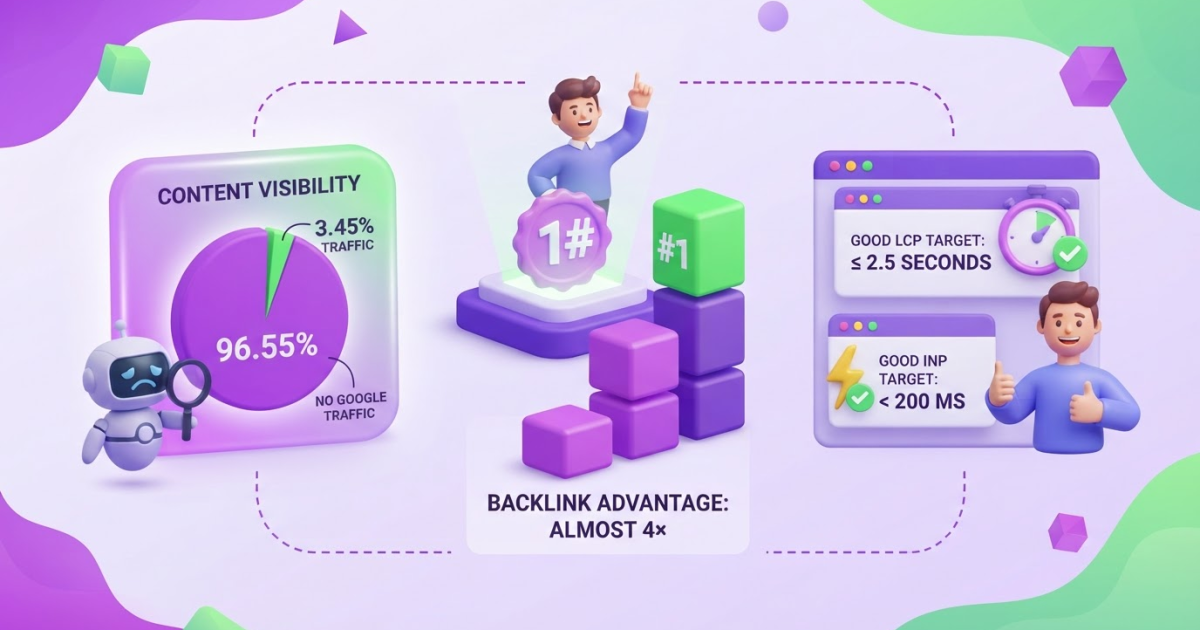
Most teams do not lack SEO advice; they lack a dependable way to turn scattered recommendations into finished pages. You may have keyword notes, half-written briefs, and technical fixes waiting in three different tools, yet still struggle to publish work that earns attention. That gap is expensive: Ahrefs reported that 96.55% of analyzed content received no traffic from Google. A useful SEO template should cut repetitive planning without flattening your judgment, originality, or reader value. This guide shows you how to adapt one template to a target keyword, build the page brief, draft and review the content, add internal links, and promote it over time.
| Point | Details |
|---|---|
| Define the target | Choose 1 primary keyword, 1 search intent, and 1 clear page outcome before you draft. |
| Structure the page | Use a repeatable brief that covers the title, headings, answer format, internal links, and conversion goal. |
| Check quality | Review 5 areas before publishing: helpfulness, originality, factual accuracy, mobile usability, and Core Web Vitals. |
| Build discovery paths | Add relevant internal links and promotion tasks because links remain a major way Google discovers new pages. |
| Improve after launch | Track impressions, clicks, rankings, and conversions for at least 30 days before revising the page. |
What an SEO Template Should Include
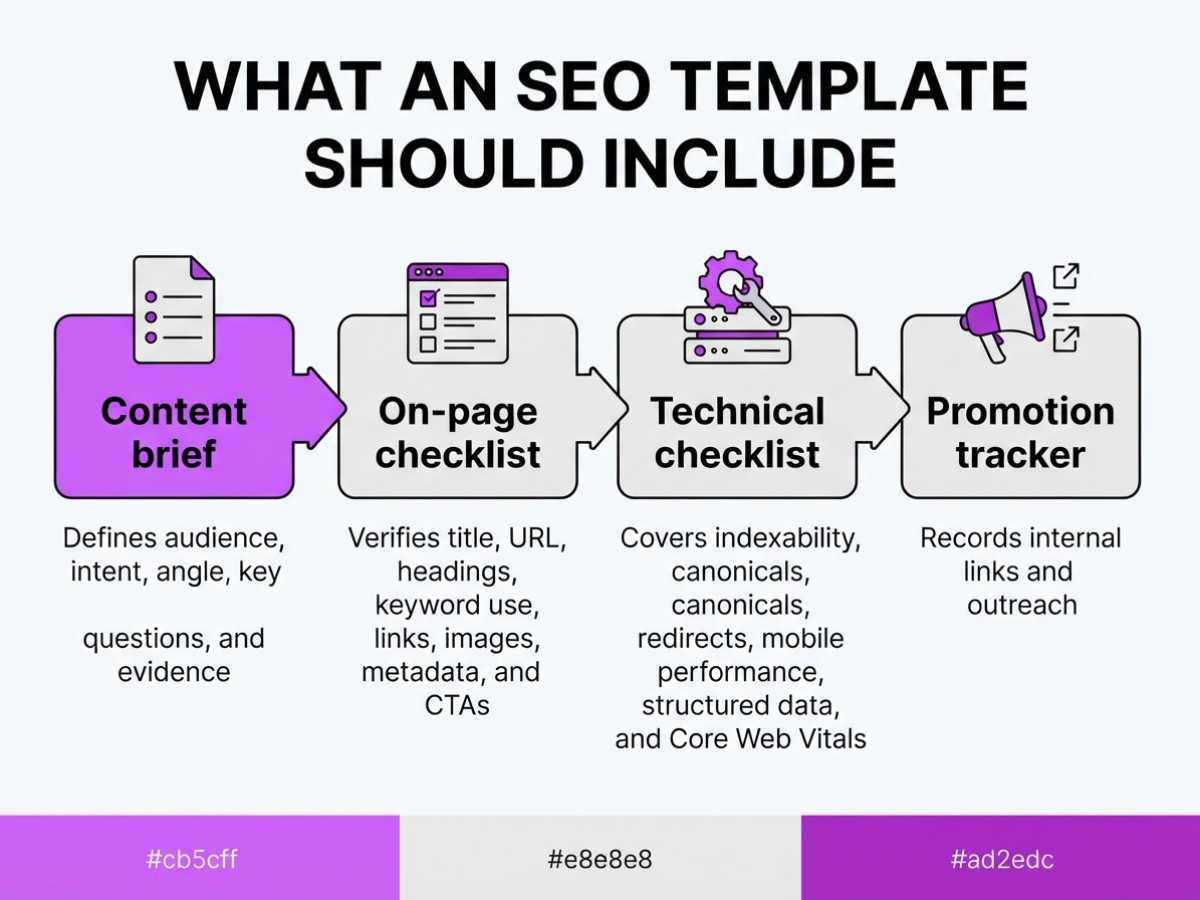
An SEO template is the working document you use to move a page from an idea to a measurable search asset. When I review content workflows, the biggest problem is rarely a missing keyword. It is the handoff: research sits in one file, the draft in another, and nobody knows whether the page has been optimized or merely written.
Do not confuse four documents that serve different jobs:
- Content brief: defines the audience, search intent, angle, key questions, and evidence the writer needs.
- On-page checklist: verifies the title, URL, headings, keyword use, links, images, metadata, and calls to action.
- Technical checklist: covers indexability, canonicals, redirects, mobile performance, structured data, and Core Web Vitals.
- Promotion tracker: records internal links, outreach, mentions, updates, and performance after publication.
A useful SEO template connects these jobs without pretending they are the same task. I usually organize it around the page lifecycle: research, planning, drafting, optimization, publishing, and iteration. That makes ownership visible and gives you a place to record what changed after launch. A 90-day SEO roadmap template can help when several pages share the same publishing schedule.
At minimum, include these fields:
| Area | Fields to capture |
|---|---|
| Direction | Primary keyword, search intent, audience, competing page type |
| Page plan | Working title, URL, headings, entities, supporting questions |
| Conversion | Internal links, CTA, offer, next action |
| Search details | Meta description, schema type, image requirements |
| Measurement | Baseline rankings, clicks, conversions, review date, owner, status |
Keep titles specific rather than stuffing them with repeated phrases. Google recommends unique, descriptive, concise titles, and its systems may use more than the HTML title when generating the result.
Pro Tip: Keep the template in one working document with an owner and status field so unfinished SEO tasks cannot disappear between research and publication.
The structure should stay consistent, but the wording should not. A service page for “emergency roof repair” needs local proof, response time, service areas, and a quote CTA. A blog post for “how to repair a leaking roof” needs explanatory headings, safety limits, tools, and perhaps a softer consultation link. Same template, different intent. Forcing both into identical sections produces awkward copy and usually disappoints readers.
Next, use those fields to build a repeatable workflow without turning every page into the same mold.
Is an SEO Template Right for Your Workflow?
I use an SEO template when a page has to pass through more than one set of hands. It earns its keep when you publish several pages each month, brief freelancers, manage local service areas, build ecommerce category pages, or coordinate copy changes with developers fixing indexing, speed, or internal-link issues.
A solo founder usually needs less than a marketing department thinks. For a routine update, record the search intent, target query, page owner, key customer question, title, internal links, and publishing date. That compact checklist takes about 10 minutes and prevents the usual mistakes, such as forgetting a canonical URL or asking a writer to guess what “make it SEO-friendly” means.
Pro Tip: Create two versions: a 10-minute minimum checklist for routine updates and a full brief for important pages competing in crowded search results.
Use a detailed brief and approval workflow when the page affects revenue, represents a location, or requires input from several specialists. I would add these fields:
| Situation | Add to the template |
|---|---|
| Freelancer writing | Sources, examples, deadline, editor, revision limit |
| Local SEO | Service area, address details, local proof, call tracking owner |
| Ecommerce | Product facts, variants, inventory notes, buying objections |
| Technical coordination | Developer ticket, acceptance criteria, QA reviewer, launch date |
The risk is over-templating. I have seen writers fill every heading with a keyword, repeat the same introduction across city pages, and answer questions customers never asked. The result may look tidy in a spreadsheet while feeling generic to a person comparing providers or products. Google recommends people-first content, so use the template to surface real customer questions, firsthand evidence, and useful decisions, not to force rankings.
For larger teams, assign an owner, reviewer, deadline, and evidence requirement for each important claim. A roadmap template can also help connect individual page briefs to a 90-day SEO plan. Keep the structure flexible enough for judgment. The next step is choosing the fields that belong in your own SEO template.
How to Build and Use an SEO Template
I build an SEO template as a production brief, not a keyword dump. The test is simple: another writer should understand the page, its audience, and its success criteria without booking a meeting to decode your notes.
- Define the search and the reader. Record the primary keyword, related questions, search intent, audience, funnel stage, and desired action. For example, someone searching “SEO template” may need a downloadable brief at the consideration stage, while someone searching “buy accounting software” is closer to a purchase. Write the intended action plainly: subscribe, request a demo, compare options, or buy.
Pro Tip: Write the intended answer to the main query in one sentence before outlining; it prevents the template from becoming a collection of disconnected SEO tasks.
-
Review the competing results. Check the top pages for content type, depth, subtopics, freshness, and obvious gaps. Note whether searchers see guides, category pages, videos, tools, or product pages. Do not copy their wording. I care more about what they fail to explain than about matching their paragraph count, because imitation produces a page with no reason to exist.
-
Draft the page plan. Set the working title, readable URL, meta description, H1, H2 and H3 hierarchy, direct-answer sections, media needs, and CTA. Keep the title descriptive and concise rather than forcing the keyword into every field. Google explains that title links can come from several page signals, including the title element, visible title, headings, anchor text, and structured data. If titles slow you down, use a free online SEO title generator for rough options, then edit them for accuracy.
-
Run the page checks. Confirm the title describes the page, the URL is readable, the canonical points to the preferred version, and indexability is not blocked by robots directives or a noindex tag. Check image alt text, mobile layout, loading behavior, and structured data where the page type qualifies. Mark these as checkboxes, not vague reminders. A missed canonical can waste an otherwise good launch.
-
Plan links and promotion. Add contextual internal links from relevant existing pages and list the pages that should link back after publication. Google says links help it discover new pages, so do not leave the URL isolated. Add realistic promotion tasks, such as an email mention, partner outreach, a community answer, or a social post. “Promote everywhere” is not a task.
-
Publish and measure. Record the launch date, owner, target query, and review date, usually 30 to 45 days after publication. Track impressions, clicks, click-through rate, ranking movement, conversions, and engagement in the page’s intended funnel stage. Annotate major edits so you can separate an algorithm change from your own rewrite.
Use this sequence for every brief, then adjust the template when a recurring failure appears. The next step is deciding which fields belong in the template itself and which should stay in your wider SEO workflow.

SEO Template Mistakes That Reduce Performance
The fastest way to damage an SEO template is to treat it like a publishing machine. I have seen teams hit every field in a brief while producing pages that answer nobody’s real question. A template should reduce missed details, not replace judgment.
Common mistakes include:
- Keyword stuffing: Repeating the target phrase in every paragraph, title, and subheading makes the copy awkward and can make the result look spammy. Use the topic naturally, then cover the related questions a reader actually has.
- Duplicate titles: Copying the same title pattern across product, location, or service pages gives searchers no useful distinction. Google recommends unique, descriptive titles and warns against repeated boilerplate and keyword stuffing.
- Forced exact-match headings: A heading such as “SEO Template for Small Business SEO Template” serves the template, not the reader. Write a clear heading that describes the section’s answer.
- Algorithm-first writing: If the introduction exists only to place a phrase in the first sentence, rewrite it. People-first content matters more than satisfying a checklist.
- Intent mismatch: Do not publish an informational guide when the searcher wants a comparison, calculator, service, or product page. Add original evidence, examples, screenshots, or experience, and give the reader a useful next step.
- Markup as a shortcut: Structured data can describe a page, but Google does not guarantee correctly implemented markup will produce a rich result. It cannot rescue thin or inaccurate content.
- Technical neglect: A shared template can introduce slow scripts, layout shifts, broken internal links, missing canonicals, or an accidental
noindextag across hundreds of URLs. Check that important pages load quickly. Google’s recommended targets are LCP within 2.5 seconds, INP below 200 milliseconds, and CLS below 0.1. - Unedited AI output: Scaled drafts often contain wrong facts, generic openings, unsupported claims, and no first-hand perspective. I use automation for briefs and task tracking, but I will not publish without a human checking sources, examples, tone, links, and the promised next step. Our AI content mistake checklist is useful here.
Build a human quality gate into the workflow, even when software assigns tasks automatically. The next section looks at how to keep that review practical as your publishing volume grows.
How to Measure an SEO Template’s Results
A template earns its place when it helps you connect production work to business results. I separate the scorecard into leading indicators and outcomes, because a ranking report cannot explain whether the team actually completed the work needed to earn traffic.
Leading indicators show whether the system is moving: completed briefs, published pages, internal links added, title and description updates, and technical fixes closed. Outcome metrics show whether that work mattered: impressions, clicks, click-through rate, average position, indexed status, organic conversions, assisted conversions, and qualified leads when your analytics setup can identify them.
Use a fixed review rhythm rather than reacting to every daily fluctuation:
- Days 1 to 14: Check indexing, canonical errors, redirects, crawl issues, and whether important internal links exist. Google says most new pages are discovered through links, so a published URL that nobody links to deserves attention before you blame the copy.
- Weeks 3 to 8: Review impressions, clicks, CTR, and average position after enough impressions accumulate to show a pattern. A page with low impressions may target the wrong intent, use terms nobody searches, or remain poorly discovered. Impressions without clicks usually point to a weak title or search snippet, although position and SERP features can distort the comparison.
- Every week after that: Choose one response, assign it, and record the result. Update the title, improve the opening answer, add an internal link, strengthen a missing section, fix a technical issue, or promote the page where your audience already participates.
Keep a page log with the URL, target terms, publication date, change made, change date, impressions, clicks, CTR, position, conversions, and notes about qualified leads. I also record assisted conversions because organic search often introduces a buyer who returns through email or direct traffic later. Without that history, teams repeatedly rewrite pages that needed links, or celebrate ranking movement that produced no commercial value.
A 90-day SEO roadmap helps turn these weekly findings into assigned work instead of a forgotten spreadsheet. The next step is deciding which template mistakes can quietly undermine those measurements.
My honest take on SEO templates
I treat an SEO template as an operating system for judgment, not a shortcut around it. At TryRoki, I use one to make the important work visible: which keyword we target, what the searcher actually needs, what evidence we can add, how the page fits the site, and what we will check after publication. That sounds basic, but teams routinely skip the last two items and then wonder why a polished article goes nowhere.
Here is the contrarian part: the best SEO template is deliberately incomplete. It should standardize the decisions people forget, while leaving room for customer language, original research, expert experience, and a different structure when the query calls for it. A rigid template can produce 50 tidy pages that all sound alike and answer nobody particularly well.
AI can handle repetitive work, but I keep ownership with the person responsible for accuracy and usefulness. The friction is real: reviewing AI drafts takes judgment, adding credible evidence takes time, and changing the structure can feel inefficient when a deadline is close. Still, if a template helps a small team publish consistently, catch missing technical work, and learn from results, it is doing its job. If it only increases page volume, the team is measuring the wrong victory.
— Daniel/Aleksandra
Turn your SEO template into a weekly growth workflow
Your SEO template becomes useful when it leads to the next action, not when it sits in a document. At TryRoki, we built Roki AI to help you turn that workflow into a repeatable weekly rhythm: it can generate website content, surface Reddit discussions where a relevant mention may genuinely help, and assign 3 to 10 tasks aimed at improving visibility in Google and AI search engines.
It will not decide what deserves publishing, and it can suggest work that needs a closer look. That trade-off matters. Start with one target page, use Roki’s SEO workflow to identify the next actions, then keep your judgment over every article, edit, and Reddit reply. If the process fits your team, try Roki AI and build from there.
Frequently Asked Questions
The best starting template has at least 10 fields: target keyword, search intent, audience, title, outline, internal links, technical checks, CTA, measurement date, and page owner. I recommend using it for one page type first, because adding fields too early creates busywork instead of better pages.
Record the query, reader, intent, competing page patterns, required sections, evidence, internal links, title direction, and conversion goal before drafting. For a straightforward page, you can usually finish this brief in 20 to 30 minutes, although unfamiliar topics take longer when you need to verify claims.
Use one core checklist, but change the structure for each query because a definition, comparison, tutorial, and product page answer different questions. Keep the shared quality and technical checks, then customize the evidence, media, internal links, and CTA instead of forcing every post into the same shape.
Yes, but the drafting method is less important than usefulness, originality, accuracy, intent alignment, and site quality. Before publishing, review every AI-assisted page for at least 3 problems: unsupported claims, generic wording, and missing first-hand experience, which are common reasons a page feels thin.
Check indexing and obvious technical problems within the first few days, but wait about 30 days before making major judgments about performance. The right window depends on site authority, query demand, publishing frequency, and impressions, so a page with little data needs more time than one receiving hundreds of impressions.
Written by Daniel/Aleksandra.
Recommended reads
- Seo Roadmap Template A Practical 90 Day Plan
- Free Seo Tools
- Creating High Quality Seo Content With Roki Ai
- How Roki Ai Streamlines Your Seo Content Workflow
Sources
- Influencing Title Links in Google Search | Google Search Central | Documentation | Google for Developers
- SEO Starter Guide: The Basics | Google Search Central | Documentation | Google for Developers
- General Structured Data Guidelines | Google Search Central | Documentation | Google for Developers
- Understanding Core Web Vitals and Google search results | Google Search Central | Documentation | Google for Developers
- Creating Helpful, Reliable, People-First Content | Google Search Central | Documentation | Google for Developers
- AI Features and Your Website | Google Search Central | Documentation | Google for Developers
- 96.55% of Content Gets No Traffic From Google. Here's How to Be in the Other 3.45% [New Research for 2023]
- We Analyzed 11.8 Million Google Search Results. Here’s What We Learned About SEO
- Semrush & The Smokies SEO case study