Daniel D.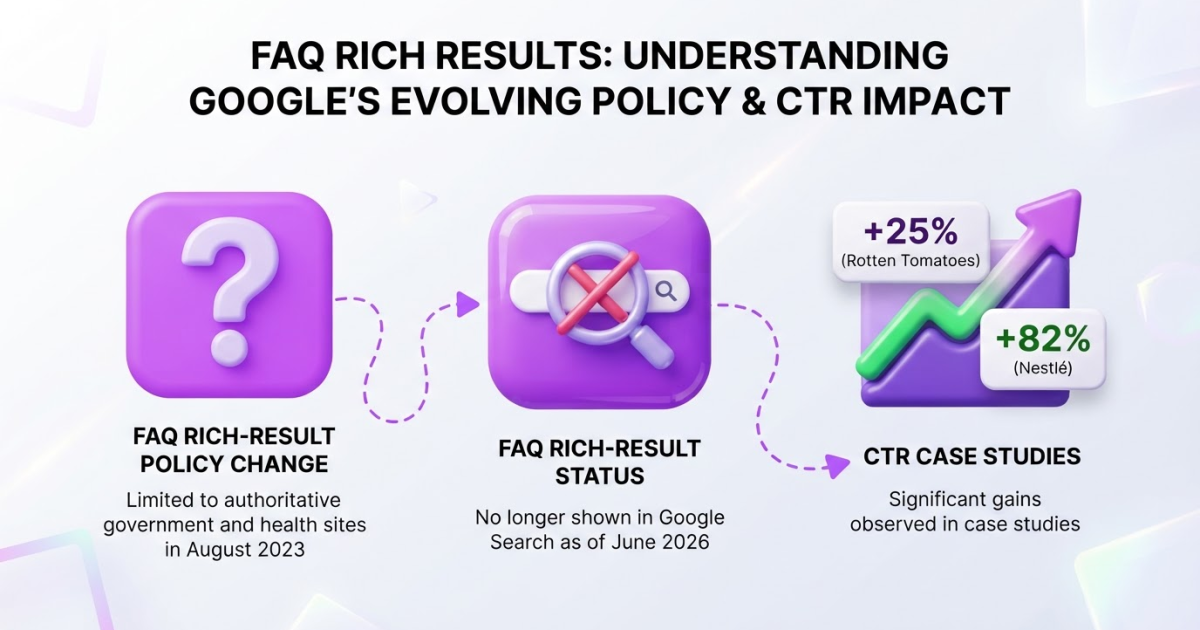
An FAQ schema generator turns visible questions and answers into structured data, usually JSON-LD, so you do not have to write every property by hand. In 2026, use it to help search engines interpret FAQ content, not to chase rich results: Google removed the FAQ rich-result feature from its documentation in June 2026.
If you have generated FAQ schema, added it to a page, and wondered why Google ignored it, you are not alone. I have seen valid markup become a frustrating checkbox when the visible page and the code drift apart. Google’s June 2026 documentation update confirmed that FAQ rich results were removed because they were no longer shown in Search. Google supports three structured-data formats, with JSON-LD generally recommended, but format choice is only the easy part. You still need eligible content, accurate implementation, and a live-page validation check.
| Point | Details |
|---|---|
| Show Visible Content | Mark up only questions and answers readers can see on the page. Hidden FAQ text can violate Google’s structured-data guidelines. |
| Choose JSON-LD | Google supports 3 formats, but generally recommends JSON-LD because it is easier to maintain. |
| Expect No Guarantee | Passing a validator makes your page eligible for search features, but does not guarantee a rich result. |
| Note 2026 Limits | Google removed its FAQ rich-result documentation in June 2026 after the feature stopped appearing in Search. |
| Validate Before Publishing | Run Google’s Rich Results Test on a publicly accessible page to check what its structured data may generate. |
What an FAQ Schema Generator Actually Creates
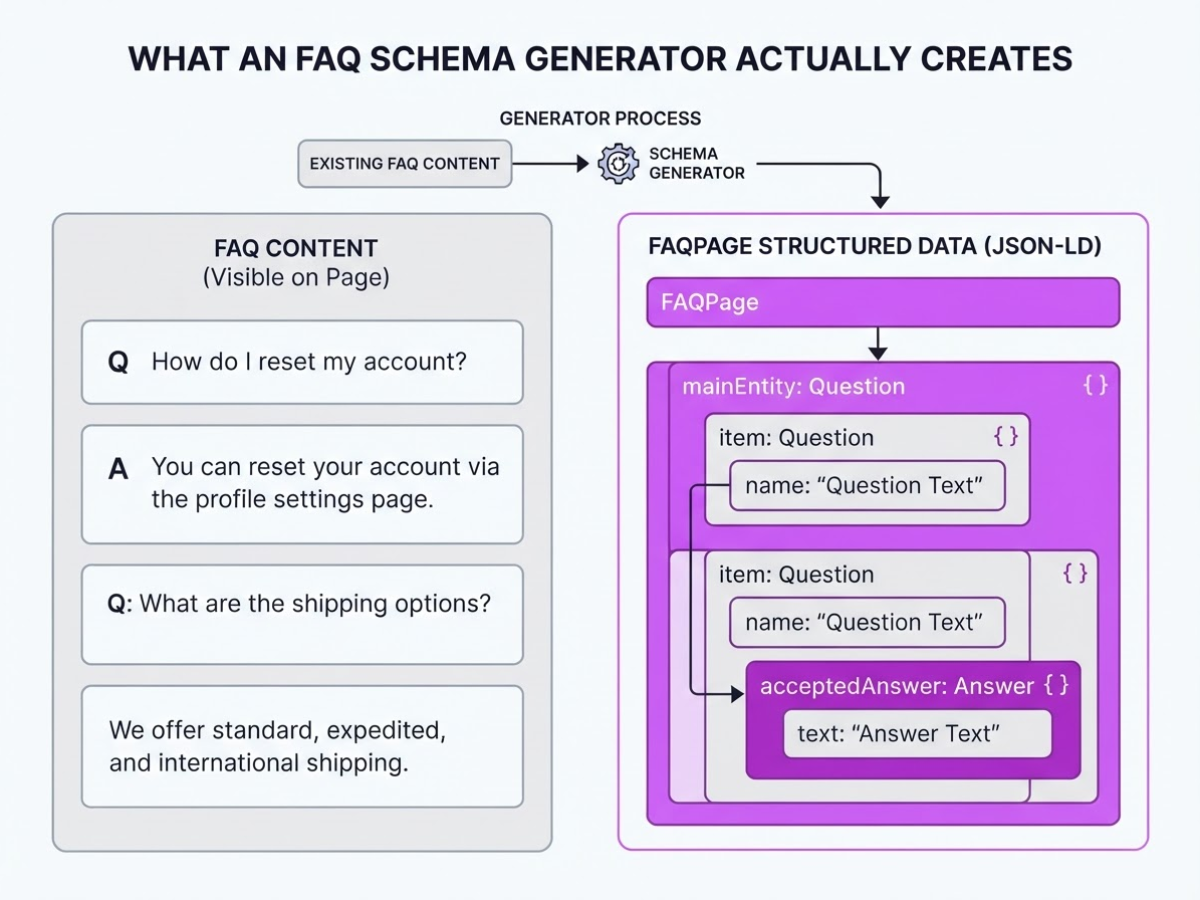
FAQ content is the questions and answers visitors can read. FAQPage structured data is the machine-readable description of that content. I have seen teams confuse the two, paste markup into a template, and later discover that the visible page says something different. That mismatch creates maintenance work, not an SEO win.
An FAQ schema generator turns existing questions and answers into JSON-LD, usually the format Google recommends. Its output describes an FAQPage containing mainEntity items of type Question; each question has a name and an acceptedAnswer, and that answer has a text property.
| Part | What it describes |
|---|---|
FAQPage | The page containing the FAQ content |
Question | One question shown to readers |
acceptedAnswer | The answer selected for that question |
Answer | The answer text itself |
The relationship matters. acceptedAnswer belongs to a Question, and Schema.org defines it as accepting either an Answer or an ItemList value. A generator handles brackets, property names, and repeated entries. It cannot decide whether your answer is accurate, complete, or useful.
Check every generated field against the visible page. Do not mark up hidden answers, placeholder text, or five near-identical questions created only to include keywords. My practical FAQ schema markup guide for 2026 covers the checks I use before publishing.
Pro Tip: Treat the generator as an accuracy and consistency tool, not as a shortcut for creating thin FAQ content.
Structured data helps search systems interpret relationships on a page. It is not a generic ranking factor, and valid markup does not force a search feature to appear. Google removed its FAQ rich-result documentation in June 2026 because FAQ rich results were no longer shown in Google Search, so do not promise a dropdown, extra visibility, or more clicks after adding the code.
Is FAQ Schema Still Worth Using for Your Website?
When I review FAQ implementations for our pages and customer sites, I separate two questions: does the markup describe the page accurately, and will Google show a special result? The first can still be worthwhile. The second is no longer a sensible reason to build an FAQ section.
Google limited FAQ rich results in August 2023 to well-known, authoritative government and health websites. By June 2026, its documentation changelog said FAQ rich results were removed because they were no longer shown in Search. Treat any rich-snippet promise from a generator as outdated.
The markup can still help search engines understand how visible questions and answers relate to the rest of the page. It does not improve rankings by itself. Google states that structured data is not a generic ranking factor, and valid code never guarantees a search enhancement.
Consider FAQ schema when your page contains answers people need before taking action:
- Support documentation for setup, billing, returns, or troubleshooting
- Product education explaining compatibility, limits, or implementation
- Service pages answering recurring questions about timelines, pricing, or deliverables
- Questions your support team hears repeatedly and answers consistently
Skip it when you are inventing questions for target keywords, copying the same answer across ten URLs, or hiding the FAQ from visitors. Those shortcuts create maintenance work and make the page feel assembled. A generator formats JSON-LD; it cannot decide whether an answer is accurate six months later.
Pro Tip: Prioritize FAQs that remove purchase or implementation friction; their on-page usefulness remains valuable even without a search enhancement.
For an implementation reference, see this FAQ schema markup guide for 2026. Next, assess which questions deserve markup before generating the code.
How to Use an FAQ Schema Generator Step by Step
Start with evidence, not a blank generator form. The cleanest FAQ markup I have published began with questions customers were already asking, not keywords invented in a spreadsheet.
-
Collect the questions people actually ask. Search your support inbox, sales-call notes, chat transcripts, internal search reports, and Search Console query data. Scan the page for questions hidden in headings or product copy. Group duplicates, remove questions the page cannot answer, and keep the wording close to customer language. Five to ten useful questions beats 30 thin variations.
-
Write answers that finish the job. Answer each question directly, then add the qualification a buyer needs to act. For shipping, include the delivery window, location or product limits, and where to check an order. Keep answers concise, but do not remove the detail that prevents a follow-up question.
Every marked-up answer must appear as readable content on that same URL. Google’s structured-data policies require markup to describe content visible to users, so hidden answers tucked into a script or accordion that never renders are a bad shortcut.
-
Enter the pairs into your FAQ schema generator. Paste one question and its complete answer into each field. Review the output instead of copying it blindly. Check that each
Questionhas anacceptedAnswer, that the text matches the page, and that the generator has not added placeholders, empty properties, or incorrectly escaped characters. Choose JSON-LD when available. Google generally recommends JSON-LD because it is easier to maintain than attributes embedded throughout HTML. -
Publish it on the relevant page. Add the script through your CMS, theme, or custom HTML block. Search the source and plugin settings for another
FAQPageblock first. Two plugins can quietly create duplicate or conflicting markup, which is annoying because the page can look fine while the structured data fails.
Pro Tip: Run validation after publishing, not only against a local preview, because Google’s Rich Results Test checks publicly accessible pages.
-
Test the live URL. Run the public page through Google’s Rich Results Test, fix missing fields or syntax errors, and test again. Open the rendered page on desktop and mobile. Confirm that questions and answers remain visible and attached to the right page after caching or JavaScript runs.
-
Monitor the result without overpromising. Structured data can clarify content, but it does not guarantee a search enhancement. Review indexing and search performance over the following weeks, remembering that Google removed FAQ rich-result documentation in June 2026 because those results were no longer shown in Search. Compare your output with this practical FAQ schema markup guide.

Common FAQ Schema Generator Mistakes to Avoid
A generator can produce valid JSON-LD and still leave you with a misleading implementation. I have seen teams focus on passing a test while the page itself tells a different story. That is the expensive mistake: search engines may ignore the markup, and visitors may lose trust when the result does not match what they can read.
Common mistakes include:
- Marking up invisible content. Do not include questions hidden with CSS, loaded only after a click, or added after an interaction if readers cannot access them in the normal page experience. Google’s structured-data policy says markup should describe content visible to users.
- Using
FAQPagefor a discussion forum. If visitors can submit multiple answers to one question, you are not describing a simple publisher-controlled FAQ. ReviewQAPageor another suitable type instead. - Copying one FAQ block everywhere. A shipping FAQ may fit a product page, but it looks careless on a services page or local landing page. Rewrite questions and answers for that page’s subject, customer, and offer.
- Leaving broken properties behind. Check malformed JSON, missing
acceptedAnswervalues, incorrect nesting, and invalid quotation marks.acceptedAnswerexpects anAnswerorItemList, not loose text. A CMS plugin may also create a duplicate schema block. - Treating validation as a guarantee. The Rich Results Test can identify what your markup may generate, but valid code does not promise a rich result. Google removed its FAQ rich-result documentation in June 2026 because those results were no longer shown in Search.
Check the rendered page, view the source, and test the public URL after publishing. Compare the result with this FAQ schema markup guide, then fix the page instead of blindly regenerating the code.
The useful question is not whether a generator can output code. It is whether that code accurately represents a page customers can use.
FAQ Schema Alternatives When Rich Results Are Not the Goal
The markup is only one layer of the job. When I review pages for TryRoki, I start with what Google and visitors can actually use: clear HTML headings, short answers, descriptive copy, and internal links to the next relevant page. Those basics still matter when FAQ rich results are unavailable or unlikely.
Build the page in this order:
- Use one clear H1, then H2 or H3 headings for each topic.
- Answer each question directly in the first one or two sentences.
- Link to product pages, documentation, pricing, or contact options where readers need more detail.
- Write a useful title and description that set an accurate expectation in search. A free SEO title generator can speed up the first draft, but you still need to check whether it matches the page.
Choose other structured data only when the page genuinely fits the type. Article schema can describe a report or blog post. Product markup fits a product detail page with visible price, availability, and review information. Breadcrumb markup can clarify a page’s position in the site hierarchy. HowTo markup is a poor reason to restructure ordinary advice, especially because Google stopped showing How-to rich results on desktop Search on September 13, 2023.
FAQ schema deserves the same restraint. Google limited FAQ rich results to authoritative government and health sites in August 2023, and its documentation later removed the feature because it was no longer shown in Search. Valid JSON-LD can describe visible content, but it cannot force Google to display anything.
I judge the decision with business data, not a screenshot of a search result:
- Do visitors read the answers and continue to another page?
- Do qualified leads, purchases, or sign-ups increase?
- Do support tickets fall after publication?
- Does the page attract more relevant organic queries?
That measurement keeps FAQ schema in its proper place: a technical detail inside a wider content and SEO workflow. The checklist above gives you the implementation baseline; the next section explains where a generator fits and where it does not.
My honest take on FAQ schema generators
I have become more cautious about FAQ schema over the past few years. The strongest reason to generate it in 2026 is not the promise of an FAQ rich result. Google’s treatment keeps changing, so anyone selling FAQ markup as a reliable ranking lever is overselling it.
A generator earns its place when it prevents small implementation mistakes, keeps JSON-LD aligned with answers visitors can read, and gives your team a repeatable publishing routine. I have seen useful pages fail because markup included hidden answers, copied outdated wording, or broke after someone edited the visible FAQ. Those errors are boring, but they waste more time than writing the original answers.
My process is deliberately unglamorous: write visible FAQs first, generate clean JSON-LD second, validate the live page third, then measure leads, sales, support deflection, and qualified visits. I would rather see three relevant enquiries than win a screenshot-worthy search feature. At TryRoki, I treat structured data as supporting infrastructure inside a broader content system, not a shortcut around useful writing or sound promotion.
— Daniel/Aleksandra
Turn FAQ Content Into a Repeatable SEO Workflow
FAQ schema is worth adding only when questions are specific, accurate, and useful. I have seen site owners fix markup while the underlying answers stayed vague, outdated, or written for search engines instead of customers. Validation matters, but no tool replaces editorial judgment.
Once the initial implementation is done, the harder job is maintaining that standard across the site. Roki AI helps you create content consistently, spot opportunities for new posts, and organize recurring SEO tasks, including weekly actions aimed at Google and AI search visibility. It can help with the familiar problem of having ten good ideas and no follow-through, although you still need to review its suggestions before publishing. You can explore Roki AI’s workflow if you want a more systematic way to produce and improve useful content.
Frequently Asked Questions
Does FAQ schema still work in Google in 2026?
FAQ schema can still describe visible question-and-answer content, but Google removed its FAQ rich-result documentation in June 2026 because the feature was no longer shown in Search. Treat it as semantic markup, not a guaranteed search enhancement.
How do I create FAQ schema without coding?
Use an FAQ schema generator to enter each visible question and answer, select JSON-LD, and copy the generated script into the relevant page. Validate the published URL with Google’s testing tools before relying on the markup, since one typo or outdated answer can invalidate the setup.
Can FAQ schema improve my website ranking?
Structured data alone is not a generic Google ranking factor, so adding FAQ schema does not automatically improve rankings. Its practical value is helping search engines interpret content and supporting eligible search experiences when Google chooses to show them.
Where should FAQ schema be placed on a webpage?
Place the generated JSON-LD in the page’s HTML, commonly in the head or body, and make sure every marked-up question and answer is visible to users on that same page. Avoid adding duplicate FAQPage markup through two plugins or systems.
What is the difference between FAQ schema and Q&A schema?
FAQPage is intended for a page where your site provides answers to frequently asked questions, while QAPage is designed around one question with user-submitted answers. Choose the type that matches the page’s actual structure, not the keyword you want to target.
Written by Daniel/Aleksandra.
Recommended reads
- Faqs Schema Markup Practical Guide For 2026
- Free Googlebot Tester Crawler Simulator
- Seo Ai Generator How To Automate Content Creation Effectively
- Integrating Seo A Practical Guide
Sources
- Latest Google Search Documentation Updates | Google Search Central | Google for Developers
- Changes to HowTo and FAQ rich results | Google Search Central Blog | Google for Developers
- Intro to How Structured Data Markup Works | Google Search Central | Documentation | Google for Developers
- Rich Results Test - Google Search Console
- Rich Results and Search Console Webmaster Conference Lightning Talk | Google Search Central Blog | Google for Developers
- General Structured Data Guidelines | Google Search Central | Documentation | Google for Developers
- acceptedAnswer - Schema.org Property
- Question - Schema.org Type