Daniel D.
FAQs schema markup uses structured data, usually JSON-LD, to describe a page’s official questions and answers for search systems. As of May 7, 2026, Google no longer shows FAQ rich results in Search, so use it to clarify your content and support machine understanding, not to promise enhanced snippets.
If you are deciding whether FAQs schema markup still deserves developer time, the conflicting advice is understandable. The biggest misconception is that it has become useless: the markup can still describe visible answers, but Google’s rich-result incentive changed when Google stopped showing FAQ rich results in Search on May 7, 2026. I have seen teams waste hours chasing a preview Google no longer promises. The practical question is whether your page has accurate, visible answers that benefit from clearer machine-readable context.
| Point | Details |
|---|---|
| Rich results changed | Google stopped showing FAQ rich results in Search on May 7, 2026, so treat this markup as structured data rather than a guaranteed SERP enhancement. |
| Use FAQPage correctly | Use FAQPage for official questions and answers published by your organization, not pages where users submit their own answers. |
| Prefer JSON-LD | Google supports JSON-LD, Microdata, and RDFa, but generally recommends JSON-LD because teams can maintain it more easily across large sites. |
| Match visible content | Every marked-up question and answer should appear on the page and accurately reflect its main content, without hidden or unrelated text. |
| Validate after launch | Run the Rich Results Test before publishing and use URL Inspection after deployment to check how Google sees the implementation. |
What Is FAQs Schema Markup in 2026?
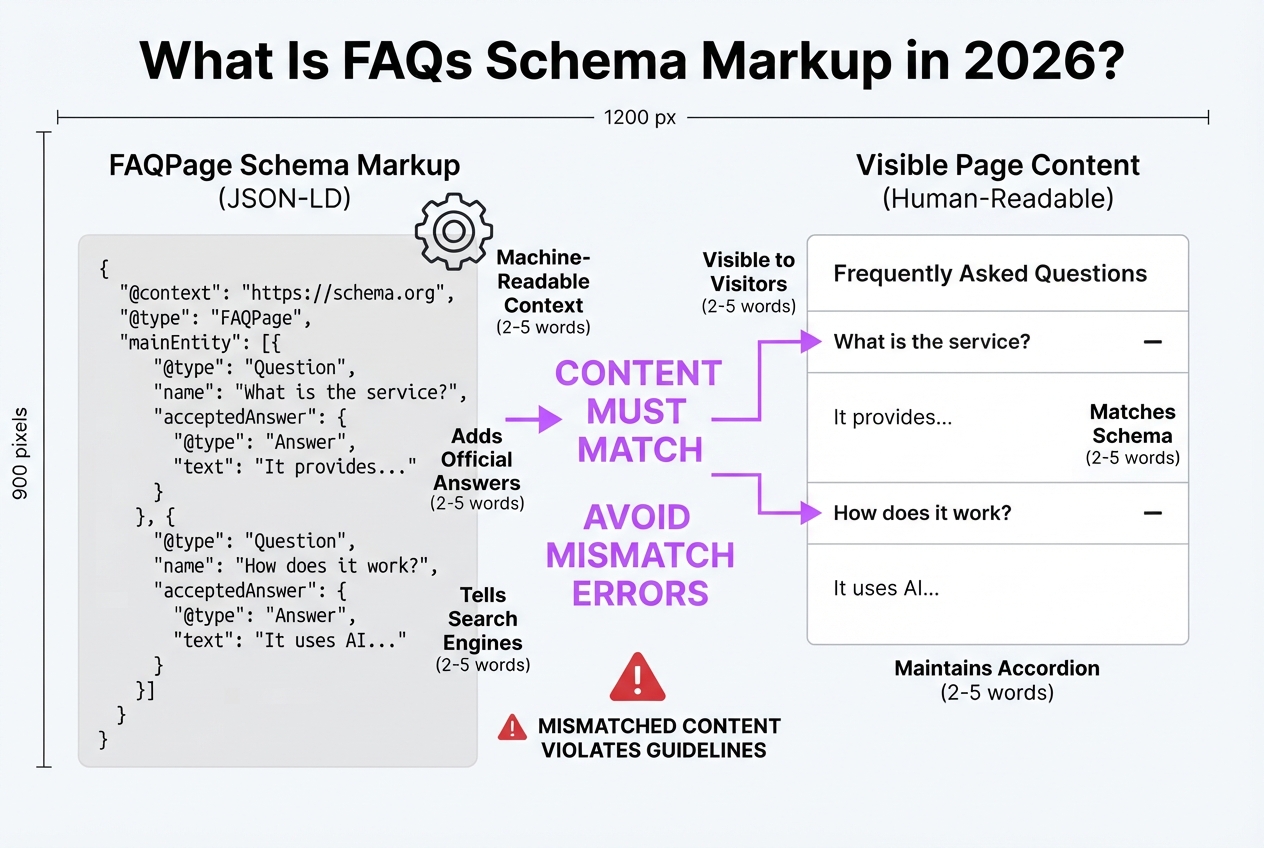
FAQPage schema markup is machine-readable context added to a page’s code. It tells search engines which questions belong to the page and which answers represent the publisher’s official response. It does not replace the FAQ visitors see on the page.
Your questions and answers still need to appear visibly in the page content. Marking up hidden text, copied questions, or answers that no longer match the page creates a maintenance problem and can violate Google’s structured-data guidelines. During implementation reviews, I see this mismatch often: the JSON-LD looks tidy, but someone edited the visible accordion months earlier.
Schema.org’s Question type covers a specific question, including questions collected in a Frequently Asked Questions document. An FAQPage commonly connects each Question with an accepted answer, but that does not make every question page an FAQPage.
| Markup type | Use it when | Answer source |
|---|---|---|
FAQPage | Your organization publishes a fixed FAQ | Official answer from the site owner or publisher |
QAPage | Users can submit answers to a question | User-generated answers, often with voting or moderation |
That distinction matters for forums, product communities, and support portals. If customers can post competing answers, QAPage is usually the more accurate model. Choosing FAQPage because the name sounds familiar is a shortcut that describes the page incorrectly.
Google Search stopped showing FAQ rich results on May 7, 2026. Before that date, Google had already limited the feature mainly to authoritative government and health sites. Do not add FAQ schema expecting expandable search-result listings, extra visual space, or a guaranteed click-through increase.
Pro Tip: Treat FAQ schema as a semantic layer for content you already maintain, not as a shortcut for creating thin questions solely to target long-tail queries.
The useful work now is less flashy: keep the visible copy, structured data, and answer ownership consistent so search systems do not have to guess. The next decision is whether your site has the right kind of FAQ content in the first place.
Should Your Website Still Implement FAQPage Schema?
FAQPage markup is worth considering when your company owns the answers and can keep them accurate. I use it on product documentation, service pages, refund or privacy policies, onboarding guides, and editorial FAQ pages that publish official answers rather than opinions collected from visitors.
The content matters more than the code. Google requires structured data to represent information people can see on the page, so do not hide keyword-stuffed answers inside JSON-LD. Write useful answers first, place them visibly on the page, then add markup if the page benefits from clearer machine-readable structure.
| Page situation | Recommendation |
|---|---|
| Product docs or onboarding guide | Use FAQPage when your team controls the answers |
| Service page or company policy | Use it if the questions address real buyer concerns |
| Community forum or support thread | Do not use FAQPage; assess QAPage instead |
| Visitor-submitted questions and answers | Use QAPage when users can provide competing answers |
Google’s guidance distinguishes FAQPage from QAPage: FAQPage describes official answers, while QAPage fits pages where users can submit answers. That distinction is easy to miss, especially when a support forum looks like a normal FAQ page.
Search visibility should not drive the decision by itself. Before the 2026 deprecation, Google had already restricted regular FAQ rich-result eligibility to well-known, authoritative government and health sites. Google Search stopped showing FAQ rich results on May 7, 2026, so most commercial sites should treat FAQPage as a content-clarity choice, not a guaranteed traffic tactic.
Use this four-part filter before implementation:
- Your organization provides the official answers.
- The same answers appear visibly on the page.
- The page has a stable purpose, not a temporary campaign role.
- A named person or team owns updates.
Pro Tip: Assign an owner and review date to every FAQ block; stale answers create more trust risk than missing markup.
If any answer is “no,” fix the page or skip the markup. Before writing JSON-LD, check that each proposed question belongs on this page and has a complete answer.
How to Add FAQs Schema Markup With JSON-LD
Start with the content, not the code. Each question should appear visibly on the page, use wording a customer might actually search, and have one clear answer from your business. FAQPage describes official answers you control, not a forum where visitors submit competing replies. If users can add answers, QAPage is the more appropriate type.
-
Draft the visible FAQ. Write concise questions and authoritative answers. Remove vague replies such as “it depends” unless you explain exactly what it depends on. Keep the wording and meaning aligned between the page and the structured data, because hidden or mismatched content can make the markup ineligible.
-
Create the JSON-LD structure. Use
FAQPageas the top-level type and place every question insidemainEntity. Each entry usesQuestion,name, andacceptedAnswer, with the response represented byAnswerand itstext:
<script type="application/ld+json">
{
  "@context": "https://schema.org",
  "@type": "FAQPage",
  "mainEntity": [
    {
      "@type": "Question",
      "name": "How long does delivery take?",
      "acceptedAnswer": {
        "@type": "Answer",
        "text": "Standard delivery takes three to five business days."
      }
    }
  ]
}
</script>
The acceptedAnswer property expects an Answer or ItemList and is used on Question. Do not place it directly on FAQPage.
Pro Tip: Generate the markup from the same content source as the visible FAQ so edits cannot silently update one version while leaving the other outdated.
- Insert it once. A CMS user can add the script through the SEO or schema field for that specific page. A developer can place it in the HTML
<head>or page output, while an SEO platform can inject it through its template. Choose one owner. Running a plugin, theme snippet, and platform integration together is a common way to create duplicate or conflictingFAQPageblocks.
Google supports JSON-LD, Microdata, and RDFa, but generally recommends JSON-LD for easier implementation and maintenance. I prefer it because changing visible HTML does not require scattering schema attributes throughout your template.
- Test and deploy. Before launch, check the exact page URL, its canonical version, visible question-and-answer copy, escaped quotation marks and ampersands, and one authoritative answer per question. Run the Rich Results Test, publish the page, then use URL Inspection to confirm Google can access the deployed version. Valid markup does not guarantee a rich result, and Google stopped showing FAQ rich results on May 7, 2026, so treat this as machine-readable page context rather than a traffic promise.
The code is only half the job. The next check is whether Google can fetch, index, and interpret the version you actually deployed.

Validation, Visibility, and Post-Deployment Checks
A green test result is useful, but it is not proof that your FAQ markup will appear in search. I treat validation as a technical checkpoint, then investigate indexing and presentation separately. That distinction prevents a common waste of time: rewriting valid JSON-LD because a Google result looks unchanged.
-
Before publishing: Paste the page or code into Google’s Rich Results Test. Fix syntax errors, missing required properties, and warnings you can reasonably address. Compare each
QuestionandacceptedAnswerwith the words a visitor can see on the page. Hidden accordion text, truncated answers, or stale markup cause problems when rendered content no longer matches the schema. -
Immediately after deployment: Open Search Console’s URL Inspection tool and test the live URL, not a staging copy or an old cached result. Google recommends validating structured data before launch and using URL Inspection afterward to check how it sees the deployed page. If you want to inspect crawl access before launch, Googlebot Crawler Simulator can expose practical issues, but it does not replace Google’s own inspection data.
-
Over the following days and weeks: Check whether Google can crawl and index the URL, then watch Search Console for relevant enhancement issues, affected URLs, and coverage changes. Track organic impressions and clicks across the page group rather than judging the work from one search screenshot. Search results vary by query, device, location, and time, and a result can disappear without any code change.
Here is the uncomfortable part: valid structured data only makes a page eligible for a supported rich result. It does not force Google to show one, as Google’s structured-data policies explain. More importantly, as of May 7, 2026, Google no longer shows FAQ rich results in Search, so do not measure FAQPage markup by expecting an expanded FAQ listing.
When results disappoint, classify the cause first: markup error, crawl or indexing problem, content quality, or Google’s presentation choice. That diagnosis is more useful than repeatedly refreshing the search results.
Common FAQs Schema Markup Mistakes to Avoid
FAQPage mistakes usually start with a content decision, not a JSON-LD typo. During implementation reviews, I see the same problem repeatedly: markup describes what the site owner wishes visitors could read rather than what visitors can actually see and use.
Common errors include:
- Marking up hidden answers. Do not include answers buried in source code, blocked behind a collapsed control that gives users no way to open it, or loaded only for search engines. Google’s structured-data policies require markup to represent visible content accurately.
- Using FAQPage for community questions. If customers, members, or visitors can submit answers, the page is an open discussion. FAQPage is intended for official answers from the site owner. Use QAPage for a genuine user-submitted question-and-answer page instead.
- Publishing duplicate entities. A theme, SEO plugin, and tag manager can each output FAQPage markup. The result may contain conflicting questions, answers, or page identifiers. Keep one source of truth, then inspect the rendered HTML after every plugin or template change.
- Adding unrelated questions. A question about your refund policy does not belong on a page about installation just because it might attract another query. Every answer should support the page and match what your business actually offers.
- Treating valid markup as a ranking promise. Valid syntax only means the code meets technical requirements. It does not guarantee a rich result, and Google Search stopped showing FAQ rich results on May 7, 2026. Markup can still help machines interpret your content, but rich-result expectations should not drive the whole implementation.
- Letting answers go stale. Keep pricing, timelines, eligibility rules, and product details complete and accurate. If the visible answer says one thing while the schema says another, remove or update the schema immediately.
A structured-data manual action removes eligibility for rich-result appearances, but Google says it does not affect regular web-search rankings. That distinction matters when diagnosing a traffic drop: fix the markup issue, but do not assume it explains a fall in ordinary rankings.
Check the live page, rendered source, and Search Console status together rather than trusting a plugin’s green badge. The technical cleanup then becomes a publishing habit instead of a recurring emergency.
My honest take on FAQs schema markup
I still implement FAQ schema markup when a page contains a genuine, visible set of official questions and answers. I would not prioritize it because someone expects a larger Google snippet. That expectation is where teams waste time.
After Google’s 2026 FAQ rich-result change, many sites should spend their first hour improving the FAQ itself. Answer the objections customers actually raise. Add evidence, state limits plainly, and remove answers that merely repeat sales copy. Markup cannot rescue a thin or evasive FAQ, and it creates an annoying maintenance task when the visible copy changes but the structured data does not.
My contrarian view is simple: FAQ schema is not a ranking lever by itself. It is a precision layer that helps search systems interpret a well-built page. Usefulness, accuracy, and authority still do the real work.
For TryRoki, the practical opportunity is operational. We can create useful FAQ sections consistently, keep each one aligned with its page, and validate the markup during a repeatable publishing workflow. That discipline matters more than chasing a possible SERP enhancement. I would rather publish five precise answers that remove buying friction than twenty vague questions written for a crawler.
My working rules are straightforward:
- Build the visible answers before writing the schema.
- Assign ownership and a review date.
- Measure page quality and organic performance, not a discontinued rich-result format.
— Daniel/Aleksandra
Make FAQ markup part of a repeatable SEO workflow
FAQ schema markup works best when it reflects questions real customers already ask, not a list invented to chase search features. The tedious part is finding those questions, writing clear visible answers, reviewing them with subject experts, and keeping the surrounding page current. A markup validator cannot fix thin or misleading answers.
That is where I use TryRoki as the execution layer, not as a promise of automatic schema results. Roki AI’s SEO Agent gives your team weekly SEO tasks, typically 3 to 10, so technical checks and content updates become a working rhythm rather than a one-time cleanup. When you need supporting articles, the AI Blog Writer can help draft them from the questions your customers actually raise. You still review the claims, add the right expertise, and publish only useful answers. The tool handles repetition, while your team keeps editorial control.
Frequently Asked Questions
FAQ schema markup does not directly guarantee higher rankings or a rich result, even when the code passes validation. Google uses structured data to determine eligibility for search features, but it can choose a different presentation based on factors such as device, context, and query intent.
It can be worthwhile when a page includes visible, official questions and answers that accurately reflect its content. In 2026, judge its value by whether it clarifies the page for users and search systems, not by expecting Google to display 5 FAQ rich results below your listing.
FAQPage describes a fixed set of official questions and answers published by the site owner, such as 8 support questions on a product page. QAPage is intended for user-generated discussions where people can submit answers, including community forums and public question threads.
There is no universal required number, but each question needs a genuine purpose and a complete answer that visitors can see on the page. A focused group of 5 to 10 questions is usually easier to maintain than 40 repetitive variations that frustrate readers and create content-governance work.
Valid FAQ schema is not normally a direct negative ranking factor, but misleading, hidden, or policy-violating markup can remove eligibility for search features and may lead to a manual action. Google states that a structured-data manual action does not affect regular web-search rankings, although fixing the issue can still take several days or weeks.
Written by Daniel/Aleksandra.
Recommended reads
- Ai Seo Agent
- Free Seo Tools
- Google Crawler Simulator A Step By Step Howto Guide
- Organic Traffic Growth A Strategic How To Guide
Sources
- Latest Google Search Documentation Updates | Google Search Central | What's new | Google for Developers
- Changes to HowTo and FAQ rich results | Google Search Central Blog | Google for Developers
- New in structured data: FAQ and How-to | Google Search Central Blog | Google for Developers
- Question - Schema.org Type
- acceptedAnswer - Schema.org Property
- Intro to How Structured Data Markup Works | Google Search Central | Documentation | Google for Developers
- General Structured Data Guidelines | Google Search Central | Documentation | Google for Developers
- Schema for Q&A Pages (QAPage) | Google Search Central | Documentation | Google for Developers