Daniel D.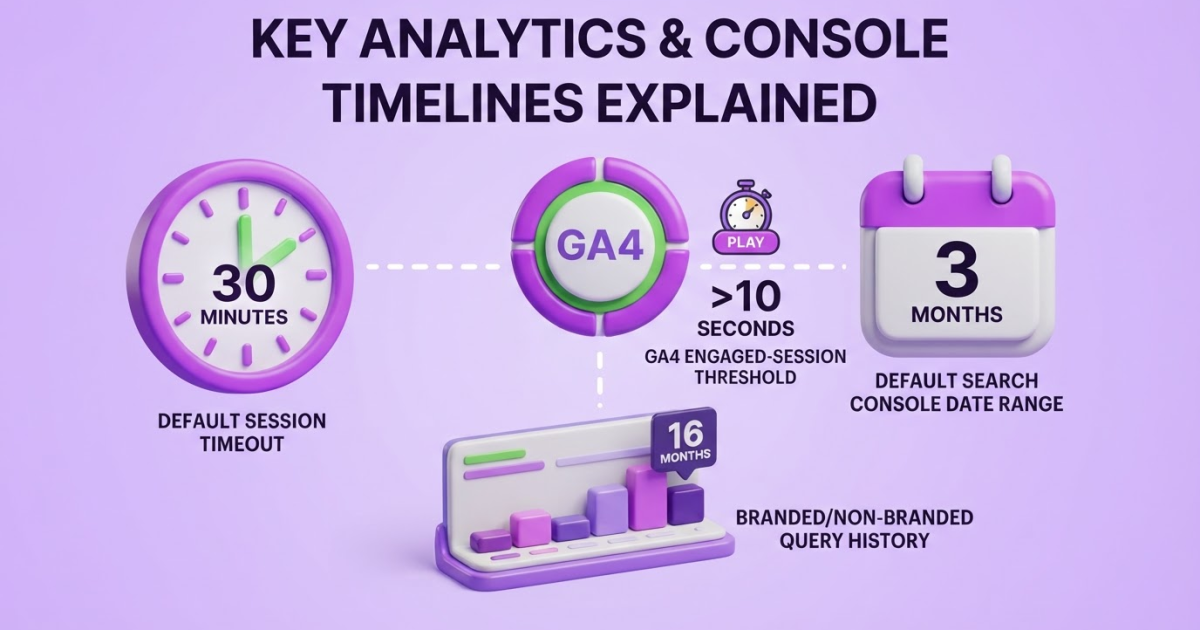
Monitor website traffic with 2 tools: use Google Analytics 4 to track sessions, engaged sessions, landing pages, acquisition sources, and conversions, and Google Search Console to track clicks and impressions from Google Search. Review the data every 7 or 30 days, compare trends rather than isolated spikes, and use the results to decide which content and distribution channels deserve more attention.
You can collect traffic numbers in minutes, then spend hours wondering why Google Search Console, GA4, and your sales reports disagree. That confusion is frustrating when you need to decide which page to fix, which channel deserves budget, or whether a campaign produced anything useful. GA4 counts a session as engaged when it lasts more than 10 seconds, includes a key event, or records at least two pageviews or screenviews (Google Analytics). As a site owner, I treat monitoring as useful only when it improves content, strengthens acquisition, and connects visits to business results. This guide gives you a practical workflow for setup, tool selection, channel analysis, SEO diagnosis, reporting cadence, and action planning.
| Point | Details |
|---|---|
| Pair the core tools | Use 2 tools, GA4 to study on-site behavior and Search Console to track Google Search performance instead of trusting one dashboard. |
| Measure traffic quality | Review at least 4 signals, including engaged sessions, engagement rate, landing pages, and conversions, alongside total sessions each week. |
| Separate acquisition views | Compare session-scoped traffic sources with first-user sources to distinguish current channels from the original discovery path. |
| Review trends consistently | Run a weekly pulse check and a deeper monthly review so a 7-day spike does not distract you from meaningful 30-day changes. |
| Turn data into action | Prioritize pages with high impressions and low CTR, weak engagement, or strong traffic but missed conversion opportunities, then test 1 change at a time. |
What Website Traffic Monitoring Actually Measures
Website traffic is not one number. It is a set of signals that show how people discover your site, what they do after arriving, and whether their visit produces a business result. I use four layers: visibility, acquisition, behavior, and outcomes.
Search data belongs mostly to the visibility and acquisition layers. An impression means your page appeared in Google Search, while a click means someone selected it. A session happens on your site after that visit begins. These figures will not match because Google Search Console and Google Analytics measure different stages of the visitor journey.
In GA4, an engaged session lasts more than 10 seconds, includes a key event, or contains at least two pageviews or screenviews. That definition is useful, but it is not proof that a visitor liked your offer. Someone can leave after reading one answer, while a qualified buyer can convert in under 10 seconds.
Before I open a report, I want this minimum scorecard:
| Layer | Metrics to monitor | Decision it supports |
|---|---|---|
| Visibility | Impressions, average position | Should you improve search coverage or page titles? |
| Acquisition | Users, sessions, traffic source | Which channel brings people to the site? |
| Behavior | Engaged sessions, landing pages | Do visitors find relevant content? |
| Outcomes | Conversions, revenue, or leads | Which traffic deserves more investment? |
Users count people or devices according to the platform’s identity rules. Sessions count visits, so one person can create several. Landing pages show where visits begin, and traffic sources explain whether they came from search, referrals, ads, email, or direct entry. If you need the mechanics, this GA4 setup guide for tracking website traffic covers the practical starting point.
Pro Tip: Create one primary conversion event before comparing channels; otherwise, your report can reward traffic that never contributes to the business.
Raw volume is overrated. A thousand visits from people looking for free templates may matter less than 80 visits from buyers comparing your service. For every metric, ask: what decision will this number help me make? Next, you can map these measurements to the tools that collect them.
How to Set Up a Reliable Traffic Monitoring Workflow
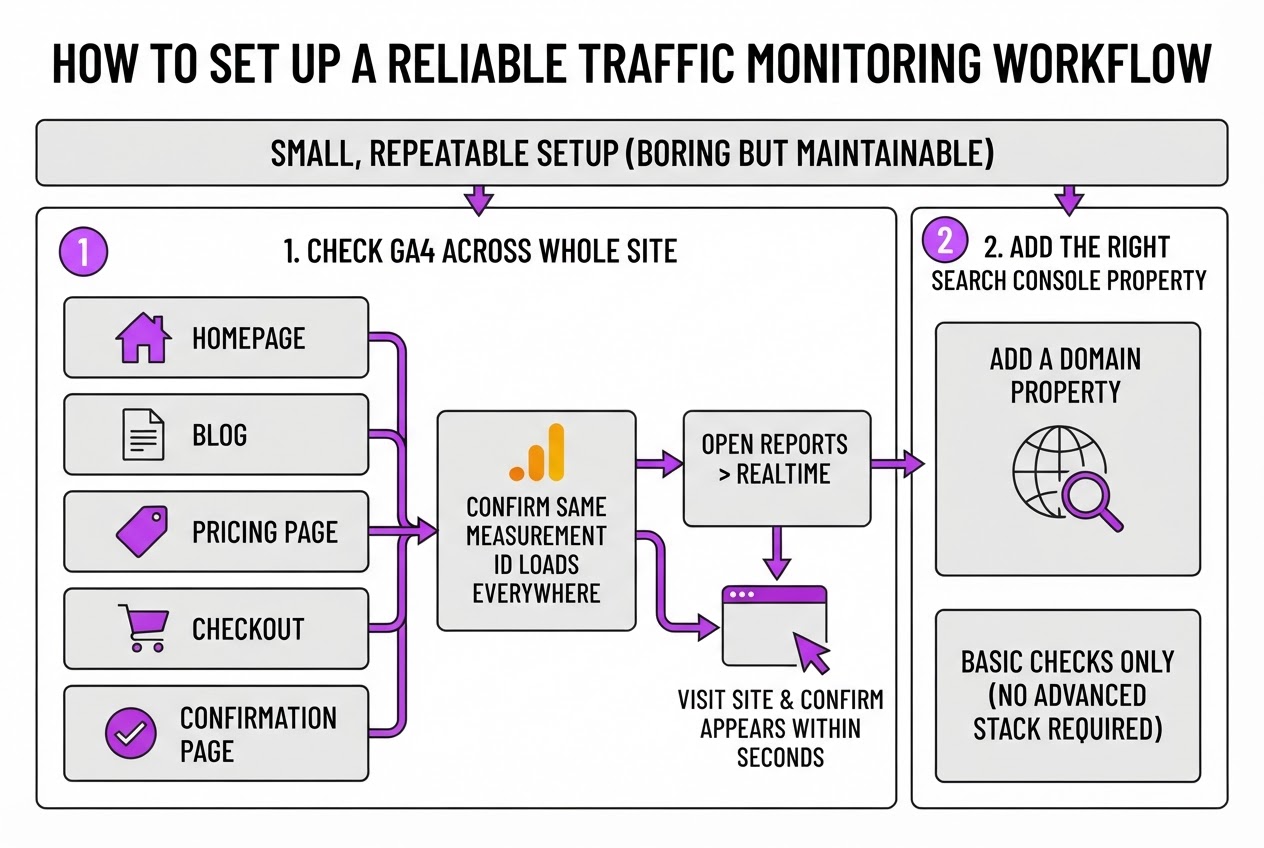
I use a small, repeatable setup rather than asking a site owner to buy another analytics tool. The first version should be boring enough to maintain, because a complicated dashboard usually becomes stale within a month.
-
Check GA4 across the whole site. Open the source or tag manager setup on the homepage, blog, pricing page, checkout, and confirmation page. Confirm that the same GA4 measurement ID loads everywhere, then open Reports > Realtime and visit the site in a private browser window. Your visit should appear within a few seconds. If only the homepage records traffic, stop here and fix the installation before reading trends. This GA4 setup guide covers the basic checks without requiring an advanced stack.
-
Add the right Search Console property. Add a Domain property when you control the whole domain, including subdomains and protocol versions. Also add URL-prefix properties for important variations such as
https://www.example.com/andhttps://example.com/when your reporting or verification process needs them. Complete verification, submit the XML sitemap, and confirm that the correct canonical host is receiving indexed pages. Search Console’s Performance report shows clicks, impressions, average CTR, and average position for the selected range, so it gives you the search-side view that GA4 cannot. -
Define the events that represent value. Mark form submissions, purchases, demo requests, newsletter signups, and meaningful content actions as key events in GA4. “Page view” is not a business outcome. Test each event with a real submission or transaction, then check the event in Realtime and DebugView. The setup is annoying when consent banners, redirects, or payment providers interrupt the path, but ignoring those gaps creates much worse reporting.
Pro Tip: Test one conversion path manually after every tracking change; a dashboard can look healthy while a broken event quietly removes the business outcome you care about.
-
Create your baseline. Choose a date range with enough activity, such as the previous 28 or 90 days. Record users, sessions, engaged sessions, key events, conversion rate, revenue, and top landing pages. Add dated notes for launches, campaigns, site migrations, tracking changes, outages, and publishing pushes. Without those annotations, you can mistake a campaign spike for normal growth.
-
Build one recurring dashboard or spreadsheet. Show the current period beside the previous period and year-over-year data where it exists. Keep GA4 and Search Console figures in separate columns because their totals will not match exactly. This step-by-step traffic guide helps when you need to validate individual reports.
-
Assign the review cadence. Give one named owner a 15-minute weekly check and another owner, or the same person, a 45-minute monthly analysis. Record the decision, owner, deadline, and evidence for every action. The weekly review catches broken tracking; the monthly review decides what to publish, fix, or stop.
Once this workflow is stable, you can interpret traffic changes without confusing measurement errors with real audience behavior.
GA4 vs Search Console: Which Traffic Data Should You Trust?
I treat Search Console and GA4 as two views of the same journey, not competing scoreboards. Search Console tells you what happened on Google before someone visited. GA4 tells you what that visitor did after the page loaded.
| Platform | Best for | Metrics to watch |
|---|---|---|
| Search Console | Search demand and visibility | Queries, impressions, clicks, CTR, average position, and landing pages |
| GA4 | On-site behavior and business results | Sessions, engaged sessions, engagement rate, events, conversions, revenue, and leads |
Search Console’s Performance report is where I look for queries producing impressions, clicks, CTR, and average position. I also check landing pages. A page with 12,000 impressions and a 1.4% CTR needs a better title or description, even if its rankings look acceptable.
GA4 starts after the click. I use it to see whether those visitors stayed, viewed another page, submitted a form, bought something, or left immediately. An engaged session lasts longer than 10 seconds, includes a key event, or contains at least two pageviews or screenviews, so do not confuse raw sessions with useful visits.
One GA4 detail causes repeated reporting mistakes. Traffic acquisition uses session-scoped source data, while User acquisition uses first-user-scoped source data. Traffic acquisition answers, “Where did this session come from?” User acquisition answers, “Where did we first acquire this person?” Those answers can differ when someone discovers you through Google, returns through an email link, and then converts.
Pro Tip: When a channel looks weak, compare the same landing page across both tools before changing strategy; the problem may be attribution scope rather than traffic quality.
My working sequence is simple: diagnose demand in Search Console, then test on-site quality in GA4. Compare the same date range, country, device, and landing page where possible. Do not add Search Console clicks to GA4 sessions or expect matching totals. Search Console measures the pre-visit search action; GA4 measures what its tracking code records on your site, and consent settings, redirects, blockers, and timing can widen the gap.
For a small site, I would start with GA4, Search Console, a spreadsheet for weekly snapshots, and optional rank monitoring. I keep the spreadsheet because interfaces change and old comparisons become surprisingly hard to reconstruct. A free GA4 setup guide can help you avoid the usual tagging mistakes before you judge campaign performance.
With those roles separated, the next step is turning traffic patterns into decisions about pages, channels, and conversions.

How to Turn Traffic Reports Into SEO and Content Decisions
A traffic report earns its keep only when it changes what you do next. I review the numbers as a set of decisions, not as a monthly scorecard. Search Console gives me clicks, impressions, CTR, and average position, while GA4 shows what visitors do after arrival, so I expect the totals to differ.
I use this weekly sequence:
-
Improve visible but ignored pages. Filter for pages with rising impressions, stable rankings, and weak CTR. Google specifically recommends using high-impression, low-CTR queries to find title and description opportunities. Rewrite the snippet around the exact problem and outcome, then test a more specific title instead of stuffing in another keyword. Changes rarely show a clean result immediately, so I compare the next 28 days with the previous 28, not the next morning.
-
Investigate clicks that go nowhere. If clicks rise but engagement stays weak, I inspect the search intent, first screen, page speed, and navigation. A visitor looking for pricing should not land above 900 words of background explanation. GA4 counts a session as engaged when it lasts more than 10 seconds, includes a key event, or has at least two pageviews or screens, but that definition still cannot tell me whether the visitor found the answer. I read recordings, test the page on a phone, and fix the first obvious mismatch.
-
Separate discovery from existing demand. Compare branded and non-branded queries rather than celebrating total clicks alone. Search Console’s branded and non-branded filter offers up to 16 months of history from March 2025, which helps me see whether content is reaching new searchers or merely serving people who already know the company. A rising branded line is useful, but it is not proof that SEO is expanding the market.
-
Promote pages that already satisfy readers. Strong engagement with low visibility points to a distribution or authority problem. I add internal links, refresh stale examples, pitch the page to relevant sites, or share it through the channels where its audience already gathers. This practical guide to growing organic traffic is useful when that decision needs a broader plan.
-
Prioritize outcomes, not crowds. Join landing-page data to sign-ups, sales calls, or key events. A page attracting 500 qualified visitors can deserve more attention than one attracting 10,000 curious readers who leave immediately.
By Friday, every recurring pattern becomes one action: publish, refresh, improve the snippet, fix a technical issue, or distribute. That short list keeps monitoring tied to execution, which is where the next stage of growth begins.
Traffic Monitoring Mistakes That Distort Your Decisions
The fastest way to make a bad traffic decision is to trust a clean-looking number. I have seen teams celebrate rising sessions while qualified leads fell because visitors bounced, ignored key events, or arrived through accidental refreshes. Sessions are a starting point, not proof that your marketing worked.
Watch for these mistakes:
- Reading total sessions alone. Pair sessions with engagement rate, engaged sessions, key events, revenue, and landing-page performance. In GA4, an engaged session lasts longer than 10 seconds, includes a key event, or has at least two pageviews or screenviews, so that context matters.
- Comparing mismatched periods. A Tuesday-to-Tuesday comparison can mislead when one period includes a product launch, holiday, outage, publishing gap, or seasonal buying spike. Compare equivalent weekdays and label unusual events before you explain the change.
- Treating the newest Search Console data as final. Recent figures can remain preliminary for several hours, especially for today and sometimes yesterday. Google identifies this data as subject to change, so do not rewrite a title or pause a campaign based on an unfinished line.
- Ignoring tracking damage. Check internal-traffic exclusions, consent-banner effects, filters, duplicate tags, referral spam, and missing event tracking. A tag firing twice can inflate sessions, while blocked consent can make a healthy page look invisible.
- Changing everything at once. If you revise a title, refresh the article, and launch paid promotion in the same week, you cannot tell which change caused the result. Hold other variables steady long enough to compare a meaningful window.
- Mixing definitions between reports. Search Console clicks and GA4 sessions measure different stages of the journey, so they will not match exactly. Google recommends comparing overall trends rather than identical totals. Document date ranges, filters, attribution settings, and metric definitions in the dashboard itself.
For a practical audit, use this step-by-step website traffic checking guide before presenting results to a client or leadership team. Once the numbers survive these checks, you can move from reporting errors to making defensible growth decisions.
My honest take on monitoring website traffic
I have found that most site owners do not need a more complicated analytics stack. They need a tighter operating rhythm. Start with Google Search Console and GA4, choose one or two business outcomes, then review the same small group of metrics long enough to recognize patterns. The setup can be annoying, especially when GA4 events are missing or Search Console data arrives late, so I would rather see a smaller trustworthy dataset than a dashboard full of questionable numbers.
My contrarian view is that checking traffic every day is usually counterproductive for content-led websites. Daily changes often reflect noise, delayed attribution, or normal fluctuations, yet they trigger rushed decisions about headlines, publishing volume, or SEO strategy. A weekly pulse is enough for most teams. Add a monthly review that connects search visibility, engagement, and conversions.
I would rather see a founder improve three pages based on clear evidence than produce a beautiful report nobody acts on. Your monitoring should answer three questions: what changed, why might it have changed, and what will we do next? At TryRoki, that final question matters most. Publishing, improving, and distributing content should form a visible growth loop, not sit in separate tools and meetings.
— Daniel/Aleksandra
Turn Traffic Insights Into Your Next Growth Actions
Once your traffic reports show which pages, topics, and channels deserve attention, execution becomes the harder part. You may know that a comparison page needs updating or that Reddit discussions are sending qualified visitors, yet the work still gets pushed aside by routine tasks.
That is where I built Roki AI’s weekly SEO tasks to help. Roki reviews practical opportunities, finds relevant Reddit posts where you can contribute and mention your website, and gives you 3 to 10 tasks each week aimed at improving visibility in Google and AI search engines. It can also help you create website content with AI.
It will not decide which traffic matters to your business, and you still need to check its suggestions. Review Roki after identifying your highest-priority opportunities, then use it to keep the follow-through moving.
Frequently Asked Questions
Yes, Google Analytics 4 provides a free measurement platform for most websites and can report users, sessions, engagement, events, and conversions. The setup is not completely painless: define at least 3 meaningful events and test the tracking code before trusting the reports.
A weekly review works for most small or content-led websites, while a monthly review gives you a better view of durable trends. Check daily during a launch, campaign, technical incident, or major content update, but do not overreact to one unusual spike.
The tools measure different stages: Search Console reports activity from Google Search before the visit, while Analytics measures behavior after users arrive. Their totals will not match exactly, so compare trends across at least 28 days and investigate large directional changes instead of expecting identical counts.
There is no universal single metric, but engaged sessions combined with a relevant key event or conversion usually tell you more than sessions alone. Review that combination by landing page and acquisition source, and allow at least 2 weeks of data before judging a change.
Yes, Google Analytics 4 and Google Search Console cover essential behavior and Google Search visibility reports at no software cost. Start with those 2 tools, a recurring spreadsheet or dashboard, and 1 clearly defined conversion before adding paid platforms.
Written by Daniel/Aleksandra.
Recommended reads
- Best Web Traffic Analyzer Free Tools In 2026
- Organic Traffic Insights A Guide To Boost Your Website Visitors
- Organic Traffic Growth A Strategic How To Guide
- Ai Seo Agent
Sources
- Performance report (Search results): Overview and basic setup
- [GA4] Session
- User acquisition report vs. Traffic acquisition report - Analytics Help
- Using Search Console and Google Analytics Data for SEO | Google Search Central
- Performance report (Search results): Dimensions and data groupings
- Performance report (Search results): About the data