Daniel D.
An LSI keywords generator helps you find related terms, subtopics, entities, and real search language so your content covers a topic more completely. Use its suggestions as a research shortlist, then validate each one against 3 signals: search intent, competing pages, and what your audience actually needs, rather than repeating keywords mechanically.
If you have searched for an LSI keywords generator, you may be expecting a secret list of terms that unlocks higher rankings. After reviewing content with our customers, I have found that this idea creates more clutter than clarity: related keywords are useful for understanding a topic, not for stuffing every variation into a page. Google said BERT would help Search better understand one in 10 searches in U.S. English, which shows why unfamiliar query language deserves attention. This guide gives you a repeatable workflow to generate related terms, reject weak suggestions, map useful phrases to headings, use them naturally, and measure impressions and clicks.
| Point | Details |
|---|---|
| Think Beyond Synonyms | Use an LSI keywords generator to uncover related concepts, entities, questions, and terminology, not just alternate spellings of your main keyword. |
| Start With Intent | Classify suggestions as informational, commercial, navigational, or transactional before adding them to your content brief. |
| Filter Aggressively | Keep the 10 to 20 terms that improve topical coverage or answer realistic reader questions instead of accepting 100 random suggestions. |
| Write Naturally | Place relevant concepts in headings, explanations, examples, and FAQs rather than repeating keyword variations for their own sake. |
| Measure Outcomes | Review impressions, clicks, CTR, and query changes in Search Console for at least 28 days after publication instead of judging success by keyword frequency alone. |
What an LSI Keywords Generator Actually Finds
Most tools marketed as an LSI keywords generator do not perform latent semantic indexing. They collect terms that appear related to your topic, then organize them into possible subtopics, questions, entities, and phrases. That makes them useful for research, but the name is usually SEO shorthand rather than a precise technical description.
Latent semantic indexing is an information-retrieval method designed to identify relationships between words and documents. Scott Deerwester and colleagues introduced the technique in a 1990 research paper on latent semantic analysis. It is not a Google keyword-placement checklist, and you should not assume Google Search uses classic LSI as a direct ranking system.
Here is the distinction I use when reviewing content plans:
| Term | What it means in practice |
|---|---|
| True LSI | A mathematical method for finding hidden relationships in document collections |
| Related keywords | Phrases closely associated with the main search topic |
| Entities | Recognizable people, products, companies, places, or concepts |
| Co-occurring terms | Words that frequently appear together across relevant pages |
| Subtopics and questions | The problems, comparisons, and concerns a complete article should address |
| Autocomplete suggestions | Search predictions that reflect common query patterns, not guaranteed relevance |
For example, enter project management software into a modern generator. A useful output might include task dependencies, team collaboration, Gantt charts, resource allocation, project templates, and questions such as “How does project management software help remote teams?” Those suggestions help you decide what the reader expects to find. They do not mean you should force every phrase into the page.
The old advice to sprinkle “LSI keywords” into every paragraph is overrated and often produces stiff copy. Worse, it can distract you from search intent. I have seen drafts mention Gantt charts in an article aimed at freelancers who only needed simple task tracking. The terms were related, but the page still answered the wrong question.
Pro Tip: Pro Tip: Treat the generator’s output as a discovery index. The most valuable terms may be concepts or entities that never contain a word from the primary keyword.
Review each suggestion for relevance, intent, and factual accuracy before using it. A generator can surface a promising angle, but it cannot know whether a claim fits your product, audience, or evidence. The next step is turning that raw list into a focused content brief.
When Should You Use One—and When Should You Skip It?
The first question is not “Which related terms should I add?” It is “What does the searcher need to accomplish?” I use that intent check before opening any LSI keywords generator, because a long suggestion list cannot rescue a page aimed at the wrong task.
| Page situation | Use a semantic keyword generator? | Why |
|---|---|---|
| Broad informational guide | Yes | It can expose subtopics, questions, and vocabulary you may overlook. |
| Competitive comparison or strategy page | Yes | It helps you cover the subject fully, alongside competitor and difficulty research. See this guide to competitive keywords for the other half of that analysis. |
| Content refresh | Usually | Suggestions can reveal missing explanations in an aging article. |
| Brief shared by several writers | Yes | A common topic vocabulary keeps contributors from producing disconnected sections. |
| Branded query | Rarely | Your company name, products, and official resources usually define the topic already. |
| Narrow navigational query | No | The visitor normally wants one known page, not a broad explanation. |
| Product-action page | Usually no | The page needs clear proof, pricing, and a direct next step more than extra terminology. |
The tool adds less value when the answer is deliberately narrow. For example, someone searching for “Acme Cloud login” needs the login route, not a guide containing “account access,” “secure sign in,” and six other variations. On a checkout or demo page, forced semantic phrases often make the copy sound awkward and distract from the action.
Google’s language systems can interpret different wording and unfamiliar queries. Its BERT announcement said the system would help Search understand one in 10 U.S. English searches. That supports a sensible use of generated terms: improve clarity, cover legitimate subtopics, and write naturally. It does not guarantee rankings, and repeating every suggestion can become keyword stuffing.
Pro Tip: Pro Tip: If two suggested terms would lead to the same answer, keep them on one strong page instead of splitting them into thin, overlapping URLs.
Do not create a new URL for every wording variation. Google warns that producing separate content for query variations mainly to influence rankings or AI responses can violate its scaled-content-abuse policy. First choose the intent, then decide whether one complete page can satisfy it. The next step is turning the useful suggestions into a focused content brief.
How to Generate and Cluster Related Keywords in 7 Steps
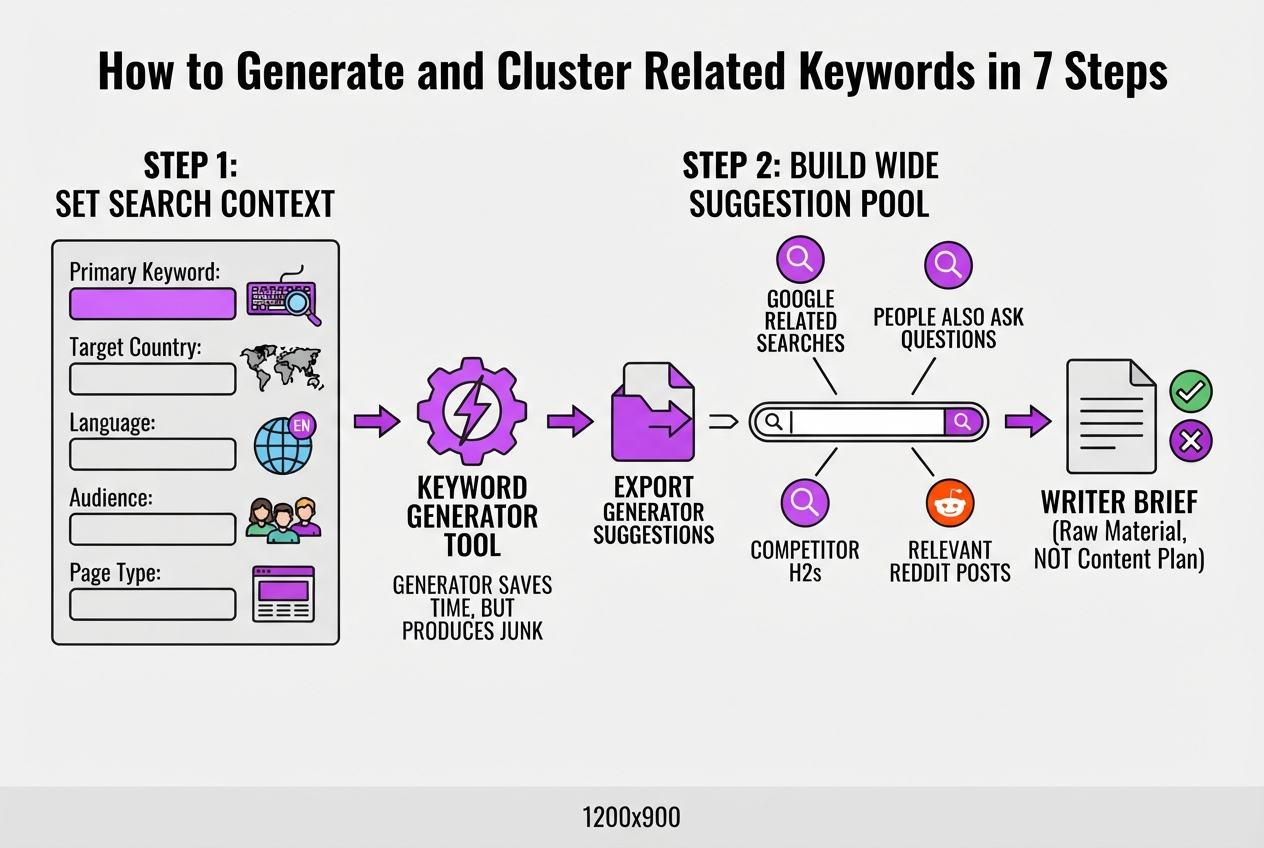
I use this workflow when turning a vague keyword into a brief another writer can actually follow. The generator saves time, but it also produces junk, so treat its list as raw material, not as your content plan.
-
Set the search context. Enter the primary keyword, target country, language, audience, and page type whenever the tool supports those fields. “LSI keywords generator” for a U.S. beginner seeking a tutorial should not produce the same brief as the phrase for an agency comparing software. If the tool lacks these settings, record them in your own sheet before collecting results.
-
Build a wide suggestion pool. Export the generator’s suggestions, then search the keyword yourself. Capture Google’s related searches, People Also Ask questions, competitor H2s, relevant Reddit discussions, and questions customers send to sales or support. I also use Roki’s Reddit and content workflow when I need real phrasing from active discussions, although I still review every suggested topic manually.
-
Clean the list. Delete terms from the wrong country, industry, or audience. Merge duplicates such as “related keyword generator” and “related keywords generator,” remove terms that are too broad to answer on one page, and reject commercial phrases when the page is clearly informational. This is the tedious part, but skipping it leaves you with a bloated brief.
-
Label the intent. Give each remaining term one or more useful labels: search intent, subtopic, entity, question, comparison, or action. A query such as “how to use an LSI keywords generator” belongs with instructions, while “best LSI keywords generator” signals comparison. Do not create a separate page for every wording variation. Google warns that mass-producing pages for query variations can violate its scaled-content-abuse policy.
-
Check what searchers expect. Compare the top results and note their format, depth, examples, and unanswered questions. Language matters because search systems interpret meaning, not just exact strings. Google said BERT would help Search understand one in 10 U.S. English searches, which is another reason to write naturally instead of repeating a phrase.
-
Assign terms to the page. Choose one primary term for the page, then select secondary and optional terms for each section. Put the strongest clusters in the title and H2s, related details in the body, concrete terms in examples, definitions in a glossary, and direct questions in the FAQ. Document why each term belongs, such as “answers setup concern” or “defines an unfamiliar entity.”
Pro Tip: Pro Tip: Add a “reader outcome” column beside each cluster. If you cannot describe what the reader will understand or do after seeing a term, it probably does not belong in the brief.
- Outline before drafting. Give every major user question a clear destination on the page, then check for overlap between H2s. Your final brief should show the title, section purpose, assigned keywords, required examples, and missing evidence. Only after that check should you write, because forcing every term into the draft makes the article awkward and repetitive.
With the clusters assigned, you can judge whether one article is enough or a wider content map is needed.

Where Related Terms Belong Inside the Article
A useful editorial test is simple: can you explain why a reader needs the term at that exact spot? When I review content briefs at TryRoki, I keep suggestions only when they sharpen the answer, clarify a task, or point to the reader’s next action. Search volume alone is a poor reason to force a phrase into a page.
| Article location | Natural semantic coverage | Keyword stuffing signal |
|---|---|---|
| Title | Name the main task, such as “How to Use an LSI Keywords Generator” | Add three awkward variations after the primary phrase |
| Introduction | State the problem and naturally mention “related terms” or “topic coverage” | Repeat the target phrase in every sentence |
| H2s | Use a term only when it represents a real section, such as “How to Group Related Keywords” | Turn every high-volume variation into a heading |
| Definitions | Explain “semantic relevance” in plain language | Paste a glossary of near-synonyms with no context |
| Examples | Show wording changes, such as “keyword suggestions,” “related queries,” and “supporting phrases” | Reuse the same phrase even when the sentence sounds unnatural |
| Image context | Describe what the image shows in useful alt text or a caption | Hide keyword lists in alt attributes |
| Internal-link anchors | Tell readers what they will find, such as a guide to competitive keywords | Use an exact-match anchor on every internal link |
| FAQ answers | Answer the specific question directly, then add a relevant term if it fits | Write separate answers for trivial wording changes |
A heading earns its place by promising a meaningful chunk of information. If “LSI keyword tool” and “LSI keywords generator” lead to the same paragraph, choose the clearer heading and use the other wording once in the body, if it reads well. That small change gives readers variety without pretending the page covers two different topics.
Do not send generated suggestions to the keywords meta tag. Google says that tag has no effect on web-search ranking, so it is a dead end. Likewise, Google defines keyword stuffing as filling a page with keywords or numbers to manipulate rankings. Put useful terms where they help someone understand, compare, decide, or act.
The next section turns that editorial judgment into a practical checklist for reviewing generated suggestions.
How to Tell Whether Semantic Optimization Worked
Results show up in the data, not in the number of related phrases you added. When I review a page after an optimization update, I first compare it with a saved baseline: impressions, clicks, CTR, average position, indexed status, and conversions. Without that snapshot, seasonal demand or a sitewide change can make a weak update look successful.
I use this review timeline:
- Before publication: Export the page’s last 28 to 90 days from Search Console and analytics. Record the target query, existing query variations, landing-page conversions, and whether Google has indexed the current URL.
- After 7 days: Check indexing and technical problems only. Do not judge rankings yet. A page can be crawled quickly while its search performance remains noisy.
- After 28 to 42 days: Compare impressions, clicks, average position, CTR, and conversions with the same baseline period. Google calculates CTR as clicks divided by impressions, so a rising impression count with falling CTR may mean your title or snippet attracts the wrong expectation.
- After 60 to 90 days: Inspect the query report for newly surfaced terms, unanswered questions, and phrases that expose an intent mismatch. For example, a page about choosing an LSI keywords generator may appear for “free keyword tool,” while never earning clicks for the commercial comparison queries that matter to your business.
Do not celebrate a broader query footprint by itself. I have seen pages rank for dozens of new variations and produce fewer qualified leads because the added visibility came from irrelevant searches. Review engaged sessions, scroll depth, qualified enquiries, sales, and revenue alongside rankings. Position five for a buyer query can matter more than position two for a vague informational phrase.
Use those findings to revise the brief. Add missing explanations, replace outdated examples, or make the next step unmistakable. Do not force a word count or target a fixed number of related terms: Google says it has no preferred word count for pages. The useful question is whether the page resolves the important task better than it did before.
Once the measurement tells you what readers still need, turn those gaps into a tighter content brief.
My honest take on LSI keywords generators
I see an LSI keywords generator as a research assistant, not an SEO strategy. When I review content briefs at TryRoki, I use these tools to widen the vocabulary around a seed term and spot related questions, entities, and industry language. That can save time when a team is preparing dozens of briefs, but I still decide which ideas belong in the article and which are noise.
Here is my contrarian view: teams often overuse LSI tools because their output looks measurable. A list of 50 related phrases can create the feeling of progress while the page still targets the wrong audience, provides weak evidence, or says nothing distinctive. I would choose a focused article that solves one searcher's problem over a bloated page that awkwardly mentions every adjacent term.
At TryRoki, we use automation to speed up research and execution, including content production and weekly tasks for improving visibility in Google and AI search. The friction is real: generated suggestions can be repetitive, loosely related, or tempting to force into headings. I keep intent, judgment, and editorial standards with the content owner. That balance, not keyword volume, makes semantic optimization last.
— Daniel/Aleksandra
Turn keyword research into a consistent content workflow
An LSI keywords generator can show you related terms, but a list alone will not improve a page. I have seen teams spend an afternoon collecting variations and still avoid the harder work: choosing a search intent, writing a useful brief, and updating the page when results stall.
That is where Roki AI’s guided content workflow fits. Roki can help create website content on autopilot, then assigns 3 to 10 weekly tasks tied to improving visibility in Google and AI search engines. The setup takes judgment, and you still need to review the writing, especially for important pages. That trade-off is intentional. Roki handles the repeated work without pretending it should make every strategic decision for you.
Start with one important topic, turn your keyword research into a useful page, and use the weekly tasks to decide what deserves attention next.
Frequently Asked Questions
The original Latent Semantic Indexing method comes from a 1990 research paper, but “LSI keywords” now usually means related topics, phrases, and entities. I use the modern meaning for research, not as proof that Google gives a special ranking boost to a particular term.
The right tool depends on whether you need related phrases, questions, entities, or competitor subtopics, so the tool with the longest list is rarely the best choice. Start with one generator, then check its suggestions against Google results, People Also Ask, customer wording, and the page’s actual intent in at least 4 places.
There is no fixed number that guarantees better performance, and forcing a quota usually produces awkward copy. A narrow page may need only 5 useful concepts, while a broad guide could require dozens to explain the subject properly.
Related terms can help you cover a subject clearly and answer more relevant questions, but they cannot guarantee rankings on their own. Google weighs many signals, including intent alignment, content quality, authority, and technical accessibility, so treat semantic terms as one part of a larger SEO job.
AI can suggest related concepts and cluster ideas in seconds, but it may also return irrelevant, repetitive, or factually wrong terms. Review every suggestion against search intent and real customer language, and remove anything that does not support the page’s main purpose before adding it to your plan.
Written by Daniel/Aleksandra.
Recommended reads
- Competitive Keywords: A Strategic Guide to Win in SEO
- Automated Backlinks Generator: How to Boost SEO Efficiently
- SEO Title Generator: How to Create Effective Titles That Rank
- Auto Backlink Generator Guide: How to Boost Your SEO Easily
Sources
- Indexing by Latent Semantic
- Understanding searches better than ever before
- Google does not use the keywords meta tag in web ranking
- Spam Policies for Google Web Search
- Creating Helpful, Reliable, People-First Content
- In-Depth Guide to How Google Search Works
- How are you performing on Google?
- General Structured Data Guidelines
- Google's Guide to Optimizing for Generative AI Features on Google Search
- TryRoki2