Aleksandra D.
You can measure site traffic free with 3 tools: Google Analytics 4 for visitors and on-site actions, Google Search Console for Google Search visibility and clicks, and Cloudflare Web Analytics for a lighter, privacy-first view of page views and visitors. Start with GA4 for behavior, use Search Console to check discoverability, and add Cloudflare when you want simpler reporting.
A traffic number in your dashboard does not explain itself. It might represent search impressions, clicks, sessions, or people who leave before doing anything useful. Google Analytics is available free of charge to help you understand the customer journey and improve marketing performance, but setup and reporting feel unnecessarily confusing at first. This guide covers a free measurement setup, the metrics worth watching, and the actions to take when the numbers disagree.
| Point | Details |
|---|---|
| Start With GA4 | Google Analytics 4 is free and shows sessions, users, landing pages, engagement, and conversions after visitors reach your site. |
| Add Search Console | Search Console stores up to 16 months of Google Search data, including impressions, clicks, CTR, and average position. |
| Compare Traffic Trends | Search Console clicks and GA4 sessions use different calculations, so compare direction over time rather than identical totals. |
| Check Real Visitors | Cloudflare Web Analytics reports page views and visitors and lets you exclude bot traffic from the dataset. |
| Act On Patterns | Review traffic by page, source, and conversion action every 30 days, then update the content tied to the clearest opportunity. |
What “free site traffic measurement” actually means
Free measurement answers three separate questions: where visitors came from, what they did after arriving, and whether those visits produced a useful result. A large visitor total can hide weak search visibility, accidental clicks, or pages that fail to move people forward.
| Question | Metrics to use | What it tells you |
|---|---|---|
| How did people find you? | Source, medium, users, sessions | Whether search, referrals, social, email, or direct visits bring people in |
| What happened on the site? | Page views, landing pages, engaged sessions | Which pages attract attention and where visitors begin or leave |
| Did the visit matter? | Conversions, revenue, sign-ups, leads | Whether traffic supports a business outcome |
A user is an individual visitor, while a session is a period of activity on your site. One user can create several sessions. Page views count page loads, so repeated views can make that total much larger than your user count. A landing page is the first page in a session. Source names the origin, such as Google or a newsletter; medium describes the channel type, such as organic, referral, or email. A conversion is the action you care about, such as a purchase, form submission, or trial signup.
The timing matters. Search Console measures activity before a Google Search visitor arrives, including impressions, clicks, click-through rate, and average position. GA4 measures behavior after arrival, such as pages viewed, events, and conversions. Their totals will not match because clicks and sessions use different calculations.
My basic stack is GA4 for behavior, Search Console for search visibility, and Cloudflare Web Analytics as a privacy-first alternative or secondary check. Cloudflare reports visitors and page views with a snippet, but it is less useful for detailed campaign attribution. For setup detail, see this GA4 traffic tracker guide.
Pro Tip: Write down the business action each metric should influence before opening a dashboard. Otherwise, free analytics tools create more reporting noise than insight.
Track quality and direction over four weeks, not one unusually good Tuesday. The next step is choosing the tool that matches the question you need to answer.
How to measure website traffic free with GA4
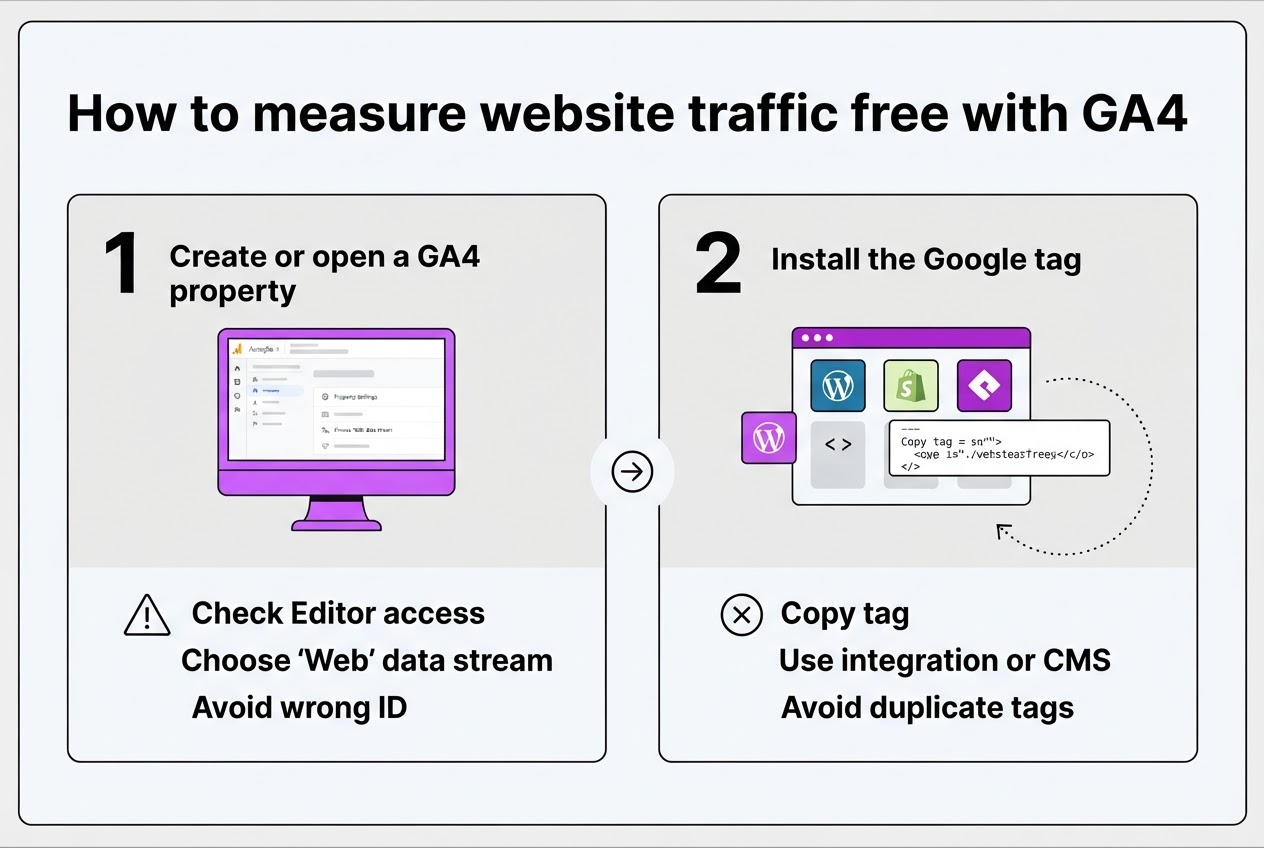
GA4 is my starting point for a repeatable view of site traffic. The setup is manageable, but one wrong property or measurement ID can leave you staring at empty reports for days.
- Create or open a GA4 property. Sign in at Google Analytics, create a property for the site, and choose Web when adding a data stream. If the property already exists, check that you have Editor access before changing anything.
- Install the Google tag. Add the tag through your CMS, site platform, or tag manager, or use an integration such as WordPress or Shopify. Follow a GA4 setup guide for a free website traffic tracker if your platform hides the setting. Do not install the tag twice. Duplicate tags inflate page views and corrupt later comparisons.
- Check the stream. Open Admin > Data collection and modification > Data streams, select the web stream, and confirm the URL matches the domain you intend to measure. Copy the measurement ID beginning with
G-and compare it with the installed ID. A staging domain, old property, or typo commonly explains missing traffic. - Verify Realtime. Google says data collection can take up to 30 minutes to begin. Open Reports > Realtime, visit the site in another browser, and look for the active user, page title, and source.
Pro Tip: Test one visit from a separate browser or device and confirm the page, source, and event appear in Realtime before trusting a month of reports.
- Open useful reports. Start with Reports snapshot, then check Acquisition for sources, Engagement for activity, Landing page for entry pages, and Events for forms or purchases. GA4 records a
page_viewwhen a page loads or browser history changes, while events can measure page loads, link clicks, and purchases. - Record a baseline. Save the date range and note users, sessions, engagement rate, and conversions. Export the report or take a screenshot before changing campaigns, SEO pages, or tracking settings. The snapshot will not explain every business result, but it gives you a fair before-and-after comparison.
Review consent settings, privacy notices, retention choices, and internal-traffic filtering before treating the data as settled. Then use the baseline to decide which sources deserve closer inspection.
GA4 vs Search Console vs Cloudflare: which free tool fits?
The right tool depends on which part of the visitor journey you need to see. Small site owners often blame a tool when the real issue is comparing numbers that were never designed to match.
| Tool | Purpose | Core metrics | Setup effort | Data scope | Best use case |
|---|---|---|---|---|---|
| GA4 | Analyze behavior after arrival | Users, sessions, events, engagement, conversions | Moderate | Your site and tagged campaigns | Finding pages and actions that produce results |
| Search Console | Measure Google Search performance | Impressions, clicks, CTR, average position | Low | Google Search results | Choosing pages and queries for SEO work |
| Cloudflare Web Analytics | Track basic site usage with less detail | Page views, visitors, referrers, top pages | Low to moderate | Your site, using a JavaScript snippet | Checking traffic without a crowded interface |
GA4 is free and should be your main post-click tool. It records page views, while events can track link clicks, forms, purchases, and other actions. The trade-off is setup: events need extra configuration, and a bad tag leaves you studying incomplete data. Standard properties retain data for up to 14 months, so export longer comparisons.
Search Console shows Google Search impressions, clicks, click-through rate, and average position. It answers whether Google showed your page and whether searchers chose it. Its 16-month history helps with seasonal comparisons, but it does not show what visitors did after clicking. Treating the difference between Search Console clicks and GA4 sessions as an error wastes time.
Pro Tip: Use Search Console to choose pages for SEO work, then use GA4 to check whether those pages help visitors take the next step.
Cloudflare Web Analytics is free and privacy-first, with a simpler dashboard for page views and visitors. I choose it when privacy concerns rule out heavier tracking or a client needs only a weekly check. You give up much of GA4’s event detail, and the snippet still needs correct installation.
For a small site, start with GA4 plus Search Console. Add Cloudflare when privacy or simplicity matters more than conversion analysis. Three partial views are usually more useful than one universal winner. The next section turns those measurements into a monthly review.

Turn free traffic data into a monthly growth plan
A traffic number matters only when it changes what you do next. I review performance in 30-day blocks because daily figures are noisy, especially on smaller sites where one mention or bot spike distorts the picture.
- Days 1–2: Build the comparison. Compare the latest 30 days with the previous 30 for traffic, landing pages, sources, engagement, and conversions. Search Console offers a 16-month performance history, while GA4 shows post-arrival behavior. Do not expect clicks and sessions to match.
- Days 3–5: Follow the diagnostic path.
- High impressions, low CTR: Rewrite the title and meta description around the query’s actual promise. A ranking page with a vague title is usually a packaging problem.
- High traffic, low engagement: Inspect the landing page on mobile, then review scrolls, outbound clicks, and key events. Slow openings and weak next steps waste attention.
- Rising traffic, no conversions: Find where visitors stop in GA4. Add a relevant internal link, clearer call to action, or shorter form before chasing more visitors.
- Declining traffic: Compare queries, positions, sources, and the page’s last meaningful update. A lost ranking, seasonal demand, technical change, or stronger competitor needs a different response.
- Days 6–10: Turn evidence into edits. Export high-impression Search Console queries and map each to the title, meta description, page intent, and missing content. I prefer two or three focused improvements over ten shallow ones. A free SEO title generator can provide variations, but it cannot decide whether the page answers the query.
- Days 11–30: Record the bet. Write down the expected change, such as a 1.5% CTR increase, more engaged sessions, or five additional demo events. Then connect the findings to TryRoki’s weekly tasks: create content for observed demand, improve pages with evidence, and pursue relevant Reddit opportunities instead of posting at random. This is where weekly SEO task planning earns its place.
A monthly pattern gives you a better basis for ongoing checks than a single traffic spike. The next section covers the tracking errors that can still mislead you.
Common mistakes when tracking site traffic for free
Small websites often collect accurate numbers and still reach the wrong conclusion. The problem starts when every traffic metric gets treated as the same thing, then decisions rely on a report nobody can reproduce.
- Calling page views, users, sessions, clicks, and impressions “traffic” interchangeably. Search Console impressions show appearances in Google Search, not visits to your site.
- Comparing Search Console clicks directly with GA4 sessions. The tools measure different stages of the journey, so totals can differ while trends agree. Google explains why clicks and sessions do not match.
- Installing the tag twice, leaving it off a template, or checking the wrong property. Duplicate tags inflate views, while a missing checkout tag makes a healthy site look broken. Use Realtime and allow up to 30 minutes for collection to begin.
- Leaving internal visits, referral spam, or unwanted payment-provider referrals in the data. Check referral exclusions, consent settings, ad blockers, bot traffic, and the property time zone.
- Judging a page from one day of data. A new installation, email mention, publishing change, or weekend can distort results. Wait for a consistent comparison period.
- Reporting only a headline number. Record the date range, tool, property, filters, campaign changes, and launches in a baseline log. Search Console offers up to 16 months of history, but your notes explain why the line moved.
Pair the setup with a free web traffic tracker and weekly SEO workflow. Once the data passes these checks, you can act without mistaking tracking noise for growth.
My honest take on measuring site traffic free
I have found that most small website owners do not need another analytics product. They need fewer, more trustworthy questions. A dashboard can show 1,842 visits last week, but that number means little if nobody signed up, sent an inquiry, or visited a product page.
My default setup is GA4 alongside Google Search Console, configured carefully and reviewed on the same day each week. GA4 shows post-arrival behavior. Search Console shows how Google presents your pages, including the queries, impressions, and clicks behind that traffic. The setup is not pleasant, and GA4 feels unnecessarily complicated when you need only three reports.
Here is my contrarian advice: do not begin by measuring total traffic. Start with one commercially meaningful action, then work backward to the pages and queries that influence it. That approach often exposes an uncomfortable truth: rising traffic can still attract the wrong people.
- Best starting point: GA4 plus Search Console.
- Best simpler option: Cloudflare Web Analytics when privacy outweighs event detail.
- What no tool fixes: unclear goals, duplicate tags, or weak pages.
At TryRoki, I would rather help a team improve one high-intent page using evidence than publish ten disconnected posts because a traffic graph looked flat.
— Daniel/Aleksandra
Use traffic insights to guide your next SEO actions
Free traffic data tells you where to look, but it does not decide what to publish next. I built TryRoki for that gap. After you identify pages with declining clicks, promising queries, or unanswered topics, Roki turns those signals into 3 to 10 practical weekly tasks for Google and AI search visibility.
The workflow can generate website content and surface relevant Reddit discussions where mentioning your site genuinely fits. It is not a replacement for analytics, and you still need to review the suggestions, particularly when a discussion is sensitive or a topic needs firsthand expertise.
If you want to keep execution moving after you measure site traffic for free, explore Roki’s AI content workflow. Use your data to choose the priority, then let the platform help you work through the backlog.
Frequently Asked Questions
Install Google Analytics 4 to track visitors, sessions, landing pages, and events, then use Google Search Console to check Google Search traffic. Both are free, but missing tags can leave you with zero recorded visits while people browse your site.
Yes. Cloudflare Web Analytics provides free, privacy-focused reports for page views and visitors after you add its JavaScript snippet. Search Console covers Google Search performance, not every visit from email, social media, or other sources.
Visitors usually represent people or devices identified by an analytics system, while sessions represent periods of activity. One visitor can create 3 sessions in a week, so the figures are not interchangeable.
Google says GA4 data collection can take up to 30 minutes to begin after you install the Google tag. Open Realtime and make one test visit before waiting for standard reports.
The tools use different definitions, attribution rules, processing methods, and reporting windows. Compare both reports over the same 28-day period, then investigate large gaps instead of forcing identical totals.
Written by Daniel/Aleksandra.
Recommended reads
- Best Web Traffic Analyzer Free Tools In 2026
- How To Monitor Website Traffic Practical Guide
- Free Seo Tools
- Boost Organic Site Traffic Proven Growth Strategies For
Sources
- Analytics Tools & Solutions for Your Business - Google Analytics
- [GA4] Configuration limits - Analytics Help
- [GA4] Set up Analytics for a website and/or app - Analytics Help
- Measure pageviews - Google Analytics | Google for Developers
- Set up events | Google Analytics | Google for Developers
- Performance report (Search results): Dimensions and data groupings - Search Console Help
- A deep dive into Search Console performance data filtering and limits
- Using Search Console and Google Analytics Data for SEO | Google Search Central | Documentation | Google for Developers
- Cloudflare Web Analytics · Cloudflare Web Analytics docs
- Dimensions · Cloudflare Web Analytics docs