Daniel D.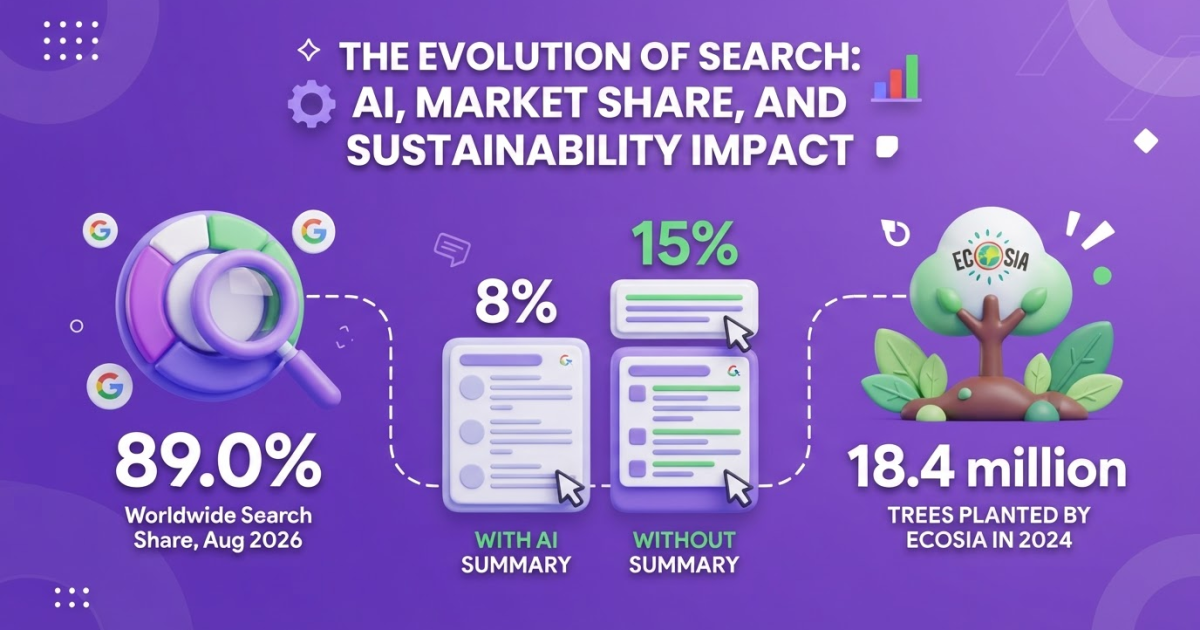
No single search engine is better than Google for everyone: DuckDuckGo is the strongest privacy pick, Brave and Mojeek favor independent results, Ecosia suits climate-focused users, and Bing stands out for Microsoft-powered AI features. Compare these 5 alternatives across 10 to 20 real searches because each brings trade-offs in coverage, relevance, or convenience.
Searching for what search engine is better than Google usually starts with a practical frustration: you want more privacy, fewer personalized results, better AI answers, an independent index, or a way to support climate action. No alternative wins on every query, and switching can expose gaps you did not expect. Google still handled 89.8% of worldwide searches in August 2026, compared with 4.5% for Bing and 0.7% for DuckDuckGo. The choice below gives you a way to compare leading alternatives, test them on real searches, and understand what website owners should do to appear in traditional results and AI search.
In this article:
- How priorities change the answer
- Which Google alternatives fit different use cases
- How to test search engines yourself
- What the change means for website owners
- Common switching mistakes
- Practical answers to five common questions
| Point | Details |
|---|---|
| Best overall alternative | Bing is the broadest Google alternative if you want familiar web search plus integrated generative AI features. |
| Best for privacy | DuckDuckGo says it does not save or share your search or browsing history when you use its search products. |
| Best for independence | Brave Search says its independent index reached 100% independence from Bing for its results. |
| Best for climate action | Ecosia reported planting 18.4 million trees in 2024 while dedicating its profits to climate action. |
| Best testing method | Run the same 10 to 20 searches across several engines and score relevance, source quality, privacy, and useful features. |
The better search engine depends on your priority
“Better” does not describe one search engine for everyone. It describes the engine that handles your usual searches while respecting the trade-offs you care about. A student checking a citation, a parent looking for a local plumber, and a developer debugging an error may reasonably choose different tools.
When I compare search engines, I separate the decision into six questions:
| Priority | What to look for | Best fit |
|---|---|---|
| Relevance | Useful results for your actual query | Google or Bing |
| Privacy | Little or no search-history tracking | DuckDuckGo |
| Independent indexing | Results not built mainly from a rival’s index | Brave Search or Mojeek |
| AI assistance | Direct explanations and follow-up questions | Bing with Copilot Search |
| Speed | Fast loading and quick answers | Usually Google or Bing |
| Climate impact | A business model that funds environmental work | Ecosia |
These labels are not absolute. DuckDuckGo is a sensible privacy choice, but its results can feel less complete for obscure technical searches. Brave Search and Mojeek offer more independent indexing, yet you may need a second engine when a niche page does not appear. Ecosia fits climate-focused users, although its organic results come from Bing and Google partners rather than a wholly independent index.
Google remains the practical default because its index, local listings, maps, shopping data, and speed cover many everyday tasks. StatCounter’s August 2026 figures show Google far ahead worldwide, but market share measures habit and distribution, not whether it matches your values. The dominant option can still be the wrong personal choice if you dislike profiling, clutter, or answers shaped by one company’s ecosystem.
AI also changes the meaning of “search quality.” In Pew Research Center’s March 2025 sample, about 18% of Google searches displayed an AI summary. Users clicked a traditional result on only 8% of those visits, compared with 15% when no summary appeared. That convenience can save time, but it can also keep you from visiting the source or checking its context.
Pro Tip: Judge an engine by the searches you actually perform, such as local services, product research, technical questions, and news, rather than by one impressive demo query.
For a broader comparison, see our practical guide to search engines beyond Google, then match the winner to your own search habits.
Compare the leading Google alternatives by use case
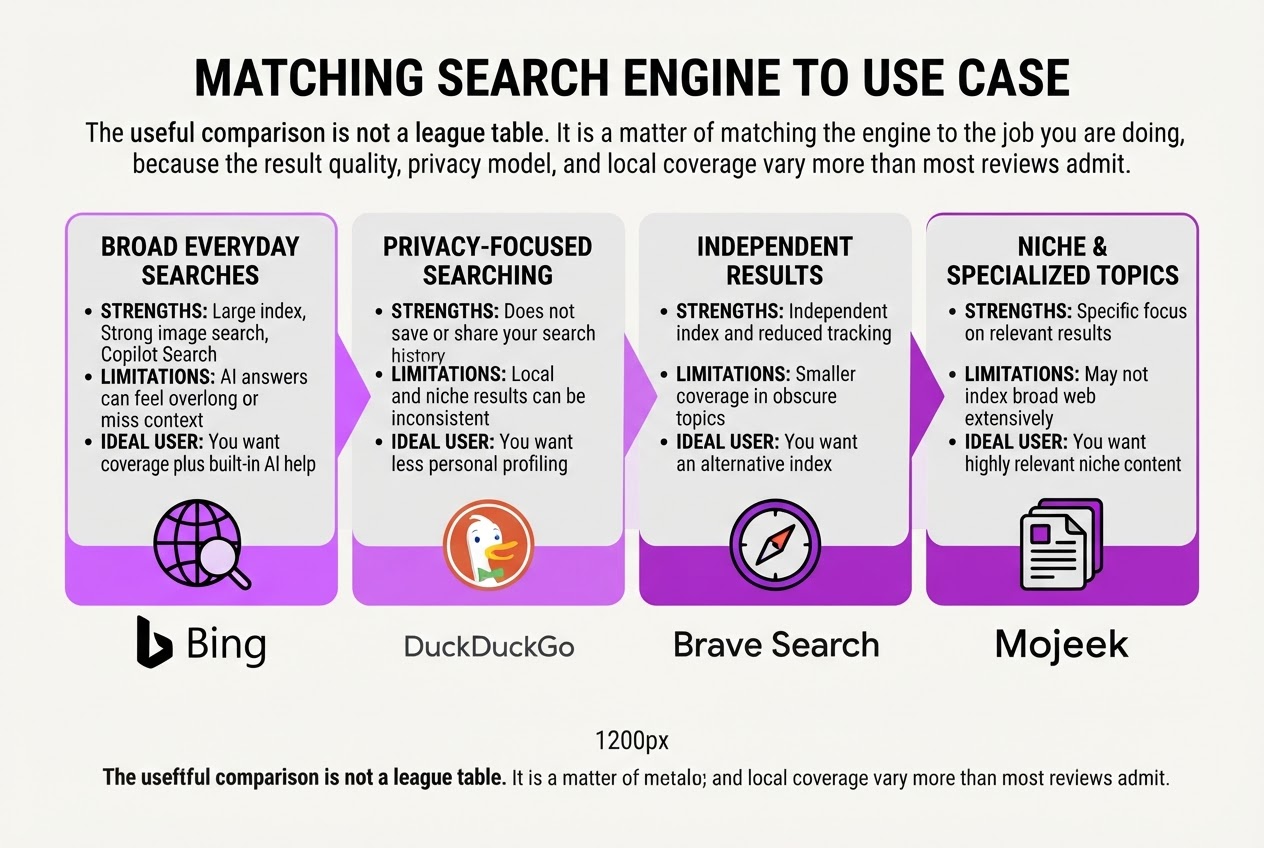
The useful comparison is not a league table. It is a matter of matching the engine to the job because result quality, privacy models, and local coverage vary more than most reviews admit.
| Search engine | Best use | Strengths | Limitations | Ideal user |
|---|---|---|---|---|
| Bing | Broad everyday searches | Large index, strong image search, Copilot Search | AI answers can feel overlong or miss context | You want coverage plus built-in AI help |
| DuckDuckGo | Privacy-focused searching | Does not save or share your search history | Local and niche results can be inconsistent | You want less personal profiling |
| Brave Search | Independent results | Independent index and reduced tracking | Smaller coverage in obscure topics | You want an alternative index |
| Mojeek | Private, independent searching | Own crawler and index, no user tracking | Weaker local and commercial results | You value independence over convenience |
| Ecosia | Climate-minded searches | Funds climate projects through search revenue | Results rely on search partners | You want a greener default |
| Local and ecosystem-heavy tasks | Excellent maps, shopping, language, and broad coverage | Extensive data collection and crowded result pages | You need maximum coverage or Google integrations |
Bing is the practical first alternative for most people. Its index covers common searches well, and Copilot Search combines traditional web results with generative AI answers. I find it useful for comparing products or getting a quick starting brief, but I still open the cited pages. The summary sometimes sounds certain while skipping an important qualification.
DuckDuckGo is the cleaner choice when you do not want every query folded into a personal profile. The trade-off is noticeable when you search for a nearby service, a very small company, or a country-specific result. Privacy is not the same as perfect relevance, and advertising and result partnerships still shape what you see.
Brave Search and Mojeek suit users who care about who builds the index. Brave says its results now operate with 100% independence from Bing, while Mojeek crawls and ranks pages through its own system. That independence is refreshing, but obscure searches can return thinner results, especially outside English-speaking markets.
Ecosia makes sense when your search habit supports climate projects. It reported planting 18.4 million trees in 2024, yet its results are not created entirely from an independent Ecosia index. It uses partnerships that include Microsoft Bing and Google syndication, so you gain a climate-focused business model, not necessarily a different answer set.
Pro Tip: An “independent index” is not the same as universally better results; test whether it covers your niche, country, and language well.
Stay with Google when local intent, Google Maps, YouTube, Gmail, Android, shopping data, or maximum worldwide coverage outweigh privacy concerns. For a broader shortlist, compare these options in this practical guide to search engines beyond Google. Your final choice should come from testing the searches you actually make, not from a generic ranking.
The privacy differences become clearer once you examine how each engine handles your searches and personal data.
How to find the right search engine for your own searches
A fair comparison starts with your own searches, not a popularity chart. When I test a search engine, I use the same queries I would enter during a normal workweek. The answer to “what search engine is better than Google” changes when you search for a recipe, a nearby plumber, or a specific product.
- Build a 10 to 20-query test set. Include informational searches such as “how to repair a leaking tap,” commercial searches such as “best accounting software for freelancers,” local searches with your town or postcode, and navigational searches for sites you already use. Add three queries where you know the correct answer.
Pro Tip: Include three searches where you already know the correct answer; they reveal ranking quality faster than browsing unfamiliar topics.
-
Run the same set on each engine. Use private windows or stay logged out where practical, and keep your location, language, and device consistent. Private browsing does not make you invisible, but it reduces the influence of your account history. Record the date because rankings change quickly.
-
Score the first page instead of trusting your first impression. Give each query a score from 1 to 5 for relevance, source quality, freshness, advertising clutter, AI summaries, and how quickly you found the answer. An attractive answer box can still be annoying if it hides the original source or gives you no reason to click. Note wrong results, outdated pages, repeated domains, and searches that require three reformulations.
-
Log the controls you would actually use. Record whether the engine offers useful region settings, date filters, safe-search controls, language choices, bangs, custom settings, or separate image and news searches. An engine can look good in one country but provide weaker local results or fewer features in yours.
-
Repeat the test seven days later. Calculate the average score by intent and inspect the misses, not just the winner. Choose one primary engine for everyday searches and one backup for privacy, independent results, local searches, or awkward queries that your primary engine handles badly.
You do not need to abandon your existing accounts. Install another browser, open its settings, choose Search Engine, and select your preferred provider. In Chrome, Edge, Firefox, and Safari, you can usually add a search engine manually or use its search page to make it available. Keep your current browser for work if changing defaults feels disruptive, then test the new engine for a week before committing.
Once you have your scores, compare the engines by the type of search where each one earns its place.

What changing search engines means for website owners
For a website owner, changing search engines does not mean abandoning Google. Google still handles the overwhelming majority of searches worldwide, while Bing sits at about 4.5% and DuckDuckGo at roughly 0.7% in August 2026. I would still make Google the main technical and editorial priority for most sites. Ignoring every other source, however, is a needless risk.
The bigger shift is happening inside the results page. In Pew Research Center’s study of 68,879 Google searches, an AI summary appeared on about 18% of searches. Users clicked a traditional result on 8% of visits when a summary appeared, versus 15% when it did not. Only 1% clicked a link cited inside the summary. Ranking well can therefore produce fewer visits than the position report suggests.
That changes what I want from a page. Chasing a single keyword position is overrated. Build assets that can be understood, quoted, and trusted across several systems:
- Answer the main question early, then cover practical details and limitations.
- Add original research, first-hand observations, examples, or useful data that competitors cannot simply rephrase.
- Use clear titles, descriptive headings, short sections, and structured page elements.
- Cite trustworthy sources and keep claims current, especially for prices, regulations, and product details.
- Check indexing, redirects, internal links, schema, and mobile rendering instead of assuming the crawler sees what you see.
I also monitor Bing, AI search experiences, and privacy-focused alternatives because they expose opportunities Google reports can hide. A page may attract little traffic from Bing but still earn citations in an AI answer, appear for different wording, or reach an audience that avoids Google. The numbers will not match, and that is fine. The goal is not equal traffic from every engine.
| What to monitor | Why it matters |
|---|---|
| Google Search Console and analytics | Core visibility and actual organic visits |
| Bing Webmaster Tools | Additional indexing and query data |
| AI answer citations | Whether your content is being referenced |
| Technical crawls | Problems that suppress every channel |
I review organic traffic growth, landing-page conversions, branded searches, and assisted leads alongside rankings. Consistent publishing matters, but publishing more articles will not repair broken canonicals or thin answers. That measurement habit gives you a better basis for comparing engines against audience and business goals.
Common mistakes when switching away from Google
The most expensive mistakes happen when a promising first impression becomes a permanent decision. After helping users compare search tools, I have found that the “best” alternative depends on the query, your location, and how much convenience you are willing to lose.
- Assuming one engine wins every time. An independent engine may handle technical searches well but return weaker local businesses, shopping pages, maps, news, or results in your language. Test the engine where you live, not only on English-language searches from a major US city.
- Confusing private search with anonymous browsing. DuckDuckGo says it does not save or share your search or browsing history when you use its search engine, apps, or extensions. Your browser, device, internet provider, logged-in accounts, and visited websites can still identify or profile you.
- Ignoring the index behind the results. Mojeek says its results come from its own crawler and index and that it does not track users. That independence is useful, but a smaller or different index can mean missing pages, stale listings, or fewer product results.
- Trusting AI answers automatically. A fluent summary can omit a qualification or misread the source. Open cited pages and compare claims, especially for health, money, legal, and current-events searches.
- Judging from one afternoon. Use 20 to 30 queries across local services, shopping, news, research, obscure facts, and navigational searches. Record relevance, freshness, citations, result variety, and how often you need to reformulate the query. A practical comparison of Google alternatives can help you build that list.
- Removing Google immediately. Keep a backup engine for weak or missing results. Changing your default is reversible, but wasting ten minutes on a poor result is still friction.
A measured test gives you a better answer than a privacy slogan or a single impressive result, and it leaves room to refine your setup as your search habits change.
My honest take on the best Google alternative
I have tested enough search tools to stop treating this as a winner-takes-all decision. Most people do not need to replace Google completely. It remains the practical default for broad coverage, local searches, maps, shopping, and the services people already use every day. That does not make it the best answer for every query or every person.
My contrarian view is simple: choosing one “best” search engine is usually the wrong decision. I use DuckDuckGo when privacy matters more than personalization, Brave when an independent index matters, Ecosia when climate impact influences the choice, and Bing when built-in AI assistance saves me a separate step. Each has weak spots. Results can feel thinner, local listings may be less reliable, and switching engines adds friction when your bookmarks and habits are tied to Google.
I would keep a second engine ready rather than make the choice permanent. Search needs change by task.
For website owners, the bigger shift is fragmentation. Google still deserves attention, but visitors now arrive through AI summaries, alternative indexes, and answer interfaces. I would build content that earns trust and remains useful outside one platform, then measure which sources produce qualified visits. Traffic volume alone can hide a poor result.
- Use Google for broad coverage, local intent, and ecosystem features.
- Use DuckDuckGo or Mojeek when reducing tracking matters most.
- Use Brave when an independent index is worth some coverage gaps.
- Use Bing when integrated AI research saves time.
— Daniel
Build visibility beyond one search engine with Roki AI
Choosing a search engine beyond Google is only half the job if you run a website. You still need useful pages, regular updates, and a way to turn SEO work into actions you can finish each week. At TryRoki, I built an AI SEO workflow that turns improvement ideas into practical weekly tasks, including relevant Reddit discussions where a thoughtful website mention may fit.
You can also use Roki’s AI blog writer for consistent website content, though it still needs your judgment. Generic posts will not help, and forcing links into Reddit comments can damage trust. Review the suggested 3 to 10 tasks each week, keep the ones that match your goals, and decide whether a more repeatable process can improve your visibility across Google and AI search engines.
Frequently Asked Questions
DuckDuckGo is often better if you want fewer search records tied to your identity, since it says it does not save or share your search or browsing history. Google can still win for local businesses, personalized recommendations, and specialized research, so compare both engines across at least 10 searches you regularly make before switching.
No search engine can make every part of your browsing anonymous, but DuckDuckGo and Mojeek are reasonable choices if you want less search tracking. Check your browser, account, device, and website settings too, because search-engine privacy covers only 1 part of your online activity.
Bing can produce better results for some searches, especially if you use Microsoft services or prefer its integrated AI features. Google remains the larger global search platform, so run 10 to 20 work-related searches in both engines and judge the results for your location.
No search engine can promise completely unbiased results because its rankings reflect factors such as location, language, index coverage, and personalization. Brave, Mojeek, and DuckDuckGo may suit you better when independence or privacy matters, but test each one against at least 5 recurring searches before deciding.
Yes. Use one primary engine and a second for verification, privacy-sensitive searches, or queries that return weak results, which gives you a practical 2-engine setup without juggling 5 different defaults. The extra check takes longer, but it can expose missing sources or regional bias in important answers.
Written by Daniel/Aleksandra.
Recommended reads
- Other Search Engines Better Than Google A Practical Guide
- Organic Traffic Growth A Strategic How To Guide
- Ai Seo Agent
- Ai Blog Writer
Sources
- Monthly Search Engine Market Share Worldwide - Statcounter Global Stats
- Google users are less likely to click on links when an AI summary appears in the results
- Does DuckDuckGo share my search and browsing history with governments?
- Brave Search removes last remnant of Bing from search results page, achieving 100% independence and providing real alternative to Big Tech search
- Why is Mojeek?
- Ecosia's 2024 roundup
- Transparency at Ecosia - Ecosia Help Center
- Introducing Copilot Search in Bing