Aleksandra D.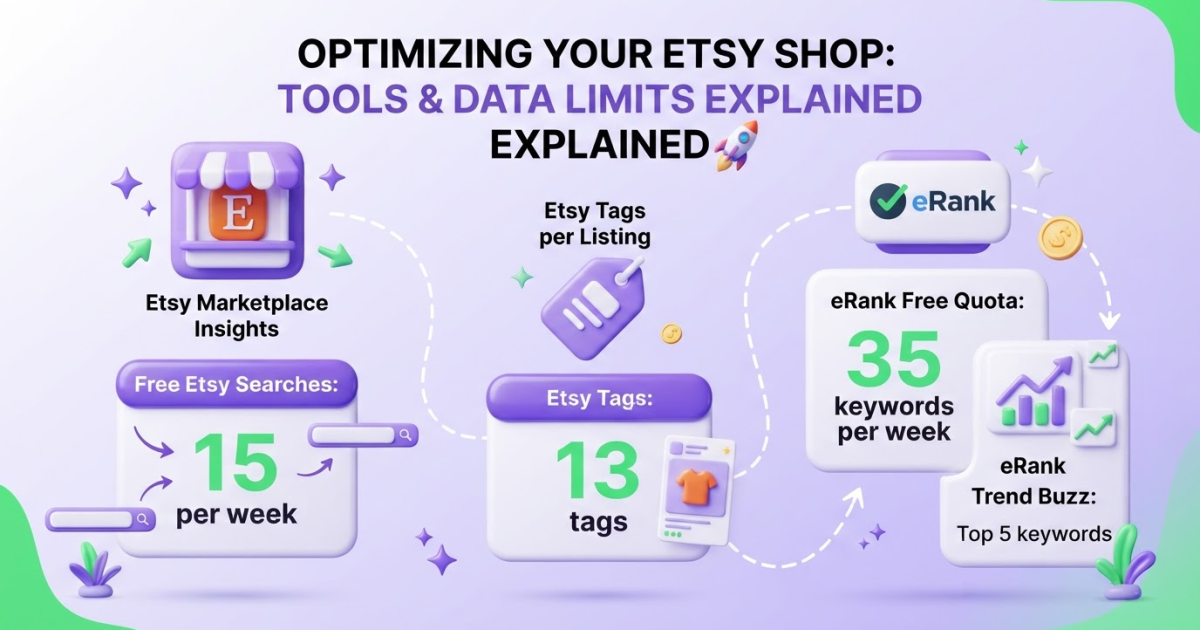
The best free Etsy keyword tool depends on what you need: Etsy Marketplace Insights is the strongest starting point for Etsy-native search data, while eRank is better for deeper metrics and listing analysis. Start with Marketplace Insights, then use eRank’s limited free plan when you need a second opinion on keyword demand or competitor listings.
Choosing keywords on Etsy is frustrating when you want to avoid paying for a full SEO suite but still refuse to guess which phrases shoppers use. The free options also impose limits: Etsy Marketplace Insights gives standard sellers 15 keyword searches per week, so wasting searches on vague ideas quickly becomes a headache. I have found that the real work is comparing Marketplace Insights with eRank, then checking whether your choices bring visits instead of trusting estimates. This guide compares both tools, matches them to different sellers, turns research into 13 listing tags, and shows how Shop Stats can validate each decision.
| Point | Details |
|---|---|
| Best starting tool | Etsy Marketplace Insights is the strongest first choice for Etsy-native research because free seller accounts receive 15 searches per week. |
| Best free depth | eRank’s free plan gives you 35 keyword searches per week, keyword lists, listing audits, Trend Buzz, and category reports. |
| Useful metrics | eRank shows average monthly searches, clicks, click-through rate, and estimated Etsy competition in its keyword statistics. |
| Tag limit | Etsy allows up to 13 tags per listing, and each tag can contain no more than 20 characters. |
| Validate with results | Etsy Shop Stats shows which keywords sent shoppers to a listing, so you can replace guesses with observed traffic data. |
What Makes a Free Etsy Keyword Tool Useful?
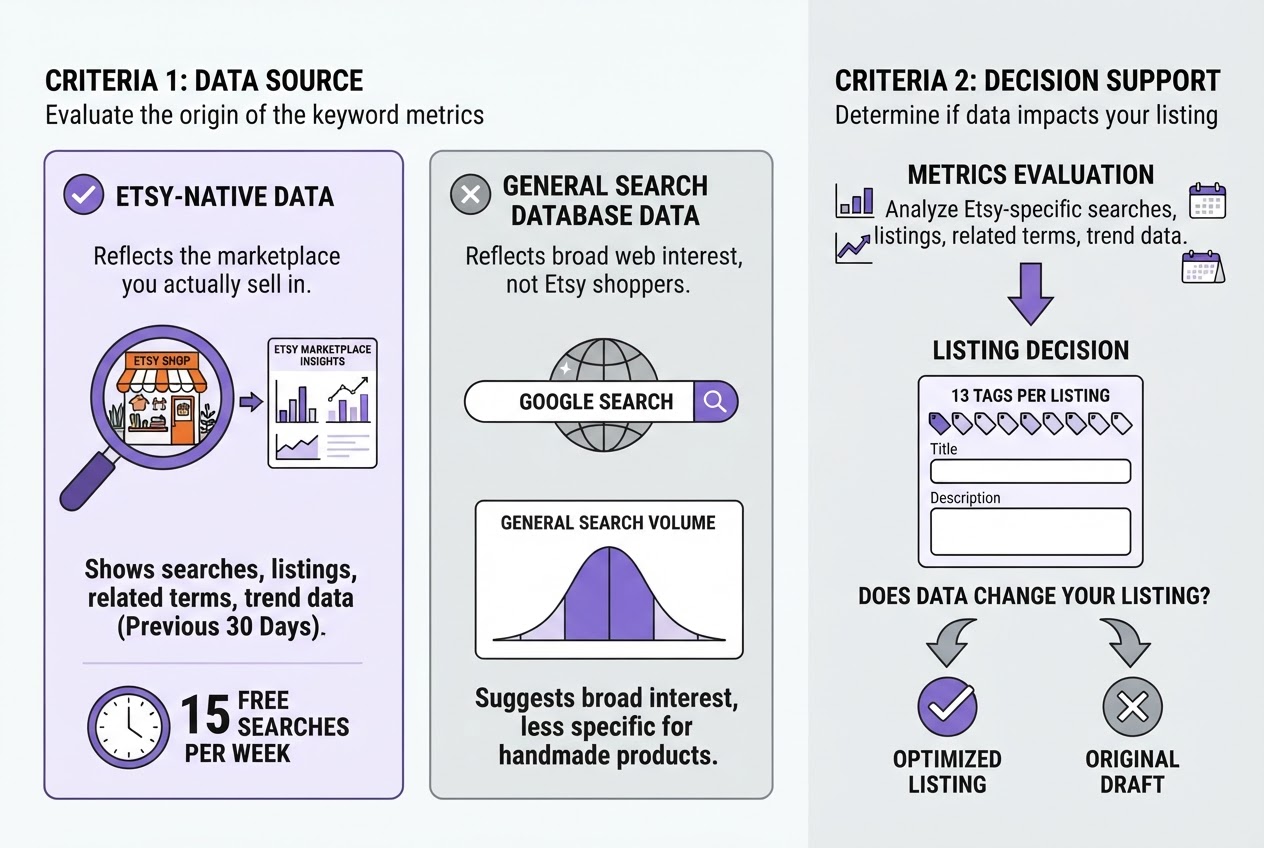
A good free Etsy keyword tool should help you make a listing decision, not bury you in charts. When we evaluate tools for shop owners, we first ask whether the data comes from Etsy or from a general search database. Google search volume can suggest broad interest, but it may say little about shoppers searching Etsy for a specific handmade product.
Etsy-native data matters because it reflects the marketplace you actually sell in. Etsy Marketplace Insights shows searches, listings, related terms, and trend data from the previous 30 days, although standard sellers get only 15 free keyword searches per week. That short window is useful for current demand, but it is not a complete history of seasonal behavior.
Look for these metrics, then judge whether they change what you would put in a listing:
- Search volume: How often shoppers use a phrase. High volume is not automatically good if the phrase is too broad.
- Clicks and CTR: Whether searches lead to listing visits. A lower-volume term with a stronger click rate may be more practical.
- Competition: An estimate of how many listings target the phrase. Treat it as directional, not a guaranteed ranking difficulty score.
- Related terms: Useful for finding specific variations, gift occasions, materials, and buyer intent.
- Trend data: Helps you spot rising interest, but delayed or short-range data can make a temporary spike look like a durable market.
Also separate three jobs. Keyword discovery finds phrases. Listing optimization helps you place a primary phrase and supporting tags in your title, tags, and description. Post-publish measurement tells you which terms actually bring shoppers. Etsy Shop Stats can show the keywords that sent visitors to a listing, so no tool should replace your own shop data.
Pro Tip: Pro Tip: Score tools by how quickly they help you choose one defensible primary phrase and several supporting tags—not by how many dashboard features they display.
Use this five-part score: relevance to Etsy, data quality, usability, free-plan limits, and validation potential. A tool with fewer features can win if its estimates are clear and its workflow is quick. Expect quotas, delayed reporting, and estimated competition, especially on free plans. For broader context, compare this process with an Etsy SEO tools guide, then test promising phrases in your own listings.
With those standards set, the next section can compare the free tools by what each one actually gives you.
The Best Free Etsy Keyword Tools Compared
After testing these tools against real listing decisions, I would not choose one universal winner. Etsy Marketplace Insights is the right starting point for most sellers because it uses Etsy’s own search data, while eRank gives you more room to investigate. A manual workflow still matters when the tools disagree or your product is too specific for clean data.
Marketplace Insights should be your first stop for a new product idea. It shows searches, listings, related terms, and trend information from the previous 30 days, so you can check whether shoppers currently use language like “birth flower necklace” rather than guessing from memory. Free Etsy seller accounts get 15 keyword searches per week, which sounds reasonable until you spend three searches testing minor wording variations.
eRank’s free plan is better for deeper research. It adds keyword discovery, statistics such as average monthly searches and estimated competition, listing audits, Trend Buzz, and category reports. Its free quota is 35 keyword searches per week, but the interface takes longer to learn and some reports expose only limited results. Trend Buzz is particularly restricted: free users see the first five Etsy keywords, not the full top 100.
A manual Etsy workflow is less exciting but often more honest. Search your phrase in a private browser window, inspect the first page, record repeated tags and product angles, then compare those observations with your own Shop Stats. You will not get polished competition scores, and copying popular tags blindly is a common mistake, but you can spot weak thumbnails, underserved styles, or seasonal wording that a dashboard misses.
Pro Tip: Pro Tip: Reserve Etsy Marketplace Insights searches for high-value product hypotheses, then use eRank for broader expansion so one narrow idea does not consume your entire weekly quota.
| Tool | Best for | Strengths | Limitations | Recommended workflow |
|---|---|---|---|---|
| Marketplace Insights | New sellers | Etsy-native trends and related terms | 15 weekly searches | Validate the product phrase first |
| eRank | Research-heavy and established shops | Statistics, audits, Trend Buzz, categories | More friction and limited free reports | Expand and compare candidate keywords |
| Manual Etsy workflow | Seasonal sellers and niche products | Real search-page context | Slow, subjective, no reliable volume data | Confirm tags, competition, and presentation |
For a new shop, start with Marketplace Insights, then use eRank to expand the winning idea. Established shops should add audits and category reports to a repeatable monthly review. Seasonal sellers should combine trend checks with manual searches two to three months before demand peaks. This approach also fits the wider Etsy SEO tools guide, where keyword data supports decisions rather than replacing judgment. Next, use the strongest phrases to build a focused keyword list for each listing.
How to Find and Prioritize Etsy Keywords for Free
I begin with the item in front of me, not with a keyword dashboard. Write down what you sell, who buys it, why they need it, and what makes it distinct. Add modifiers for the occasion, style, material, and use case. For a handmade ceramic mug, that might produce “personalized wedding mug,” “stoneware coffee cup,” and “gift for new home,” rather than the vague “ceramic mug.”
-
Build a seed list. Choose five to eight phrases with clear buying intent. Avoid stuffing every idea into Etsy at once. Free sellers get 15 Marketplace Insights searches per week, so spend those searches on your strongest phrases, not on synonyms you can predict yourself.
-
Check the seeds in Marketplace Insights. Record recent search and listing data, related terms, and trend direction. Etsy reports this information from the previous 30 days, so treat it as a current snapshot rather than a permanent market truth. A phrase with fewer searches can still deserve priority if the listings match your product closely.
-
Expand the winners in eRank. Use its free Keyword Tool on the phrases that showed genuine demand. Log average monthly searches, clicks, click-through rate, estimated competition, and relevance. eRank’s Keyword Tool reports these search, click, CTR, and competition signals, but do not let one impressive number make the decision for you. High volume with poor relevance usually creates disappointing traffic.
Pro Tip: Pro Tip: Prioritize phrases that describe the buyer’s intended product precisely; a smaller relevant audience usually beats a broad phrase that attracts clicks from shoppers seeking something else.
-
Inspect related terms and competing listings. Look for repeated product attributes, occasions, and buyer language in the results. Use those observations to improve your wording, not to copy another seller’s title or tags. I have seen sellers imitate a top listing so closely that their own product details become unclear. That is a fast way to attract the wrong shopper.
-
Choose the listing terms. Select one primary phrase for the title and the clearest opening description. Add supporting phrases for material, recipient, occasion, style, or use case. Then fill the tag set with distinct, relevant phrases. Etsy allows 13 tags per listing, with up to 20 characters per tag, so skip awkward duplicates and do not force every spare idea into the listing.
-
Save the decision. Create a spreadsheet with the phrase, source, date, searches, clicks, CTR, competition, relevance score, selected role, and listing URL. Review it after the listing has earned data, then compare changes against the same baseline. A simple record beats relying on memory when you test the next batch of keywords.
Once your keyword set is documented, the next step is comparing the free tools by how much useful research each one provides.

Free Etsy Keyword Research Mistakes That Waste Time
The fastest way to make a free Etsy keyword tool look useless is to treat one number as a verdict. Search volume shows interest, not purchase intent, and it never guarantees a sale. “Wedding invitation” may attract more searches than “editable beach wedding invitation,” but the longer phrase can describe a shopper who is much closer to buying.
Watch for these mistakes:
- Chasing volume alone: High-volume terms often bring broad, impatient traffic. Compare the phrase with your actual product, price, style, and buyer problem before using it.
- Filling all 13 tags with near-duplicates: Etsy allows 13 tags, but repeating tiny variations of the same phrase wastes space. Use related terms that describe different details, such as recipient, material, occasion, size, or use case.
- Treating competition as a precise difficulty score: Estimated competition is directional. It does not account perfectly for listing quality, reviews, conversion history, photos, or personalization, so do not read “low” as an easy ranking guarantee. For a second opinion, check keyword difficulty with a broader evaluation process.
- Trusting a short data window: Etsy Marketplace Insights uses searches and listings from the previous 30 days. That is useful for current demand, but it can overstate Christmas, graduation, or Valentine’s interest and miss a slower annual pattern.
- Copying competitor tags blindly: A rival’s “linen bridesmaid robe” tag will not help if your item is satin, sold separately, or aimed at a different buyer. Match the keyword to what you actually deliver.
I refresh research when I change the product, target customer, or selling season, rather than forcing old tags onto a new listing. I also compare tool data with Etsy Shop Stats after publishing, because real shopper queries matter more than a dashboard estimate. That discipline makes the next round of keyword choices far less speculative.
How to Measure Whether Your Etsy Keywords Work
Keyword tools give you hypotheses. Shop Stats tells you what shoppers actually did. I check it weekly, then use a longer window before making a second change, because a quiet Tuesday can make a good listing look broken.
Etsy Shop Stats shows views by traffic source and the keywords that sent shoppers to a listing. Its listing keyword reports reach back to the previous month, so record the date range before comparing results. Look for four signals: views, search terms, favorites, and orders or revenue. If Etsy reports impressions or clicks in the view you use, compare those with listing visits and purchases rather than treating visibility as success.
I use this four-part test cycle for every meaningful keyword change:
- Day 0, set a baseline. Record the listing’s current title, tags, views, visits, favorites, orders, and top shopper search terms. Note the previous 30 days, not just yesterday.
- Day 1, change one thing. Keep the photos and price steady while rewriting the title or replacing one weak tag. Etsy allows up to 13 tags, but filling every slot with near-duplicates is not a strategy.
- Days 14 to 30, observe. Check weekly for new search phrases, rising views, visits from Etsy search, and conversion behavior. A phrase that brings 40 visits and no orders deserves more scrutiny than one that brings 10 visits and two sales.
- Day 30, decide. Keep a keyword when it attracts relevant shoppers and supports favorites, messages, or sales. Rewrite the title when views remain low despite a clear product and strong photos. Replace a tag when it attracts irrelevant traffic or never appears in the listing report.
Do not keep changing keywords when shoppers arrive but refuse the offer. That pattern points to price, photos, shipping, or product-market fit, not necessarily search visibility. I treat Etsy data as one part of a wider content and visibility process, similar to how I review free SEO tools: useful evidence, never a promise of rankings.
Once the numbers show where the friction sits, you can make the next listing decision with less guesswork.
My honest take on the best free Etsy keyword tool
I usually tell Etsy sellers to start with Etsy Marketplace Insights. It keeps your research close to the place where the purchase happens, so you can compare phrases against real marketplace demand instead of guessing from a giant list. The interface is not especially elegant, and you may need to record useful findings manually, but that small annoyance is preferable to drowning in irrelevant suggestions.
I use eRank as the second tool when a seller needs clearer metrics, listing analysis, or more ideas within its free quota. It can save time, although the free limits and occasional temptation to keep researching can become distractions.
Here is the contrarian part: the tool with the largest keyword database is not automatically the best Etsy keyword tool. I would rather test five precise product phrases, improve one relevant listing, and track the result for 30 days than export 500 loosely related terms and change nothing. More data often gives sellers the comfortable feeling of progress without producing a better listing.
Free tools are enough for a serious starting workflow. The usual constraint is not access to keyword software. It is execution: choosing a phrase, writing a listing that matches it, measuring impressions and visits, then making one informed adjustment instead of starting over.
— Daniel/Aleksandra
Turn Etsy keyword research into a consistent visibility workflow
Once you have chosen a free Etsy keyword tool and settled on a workable research routine, the harder part is usually execution. You still need to turn buyer language into product guides, sizing advice, care instructions, and answers to questions people ask before buying. For sellers with a connected website, that supporting content can bring in visitors from Google and AI search, but keeping it moving is difficult when listing updates already take most of your week.
I built Roki AI’s content workflow to help with that surrounding work. Roki gives you 3 to 10 practical tasks each week, including content opportunities and relevant Reddit discussions where a useful, non-spammy comment may fit. It is not a replacement for keyword judgment, and automated volume is usually a poor trade. Use the Roki features to create a steadier publishing habit after you decide how Etsy keyword research fits your shop.
Frequently Asked Questions
Yes. Etsy Marketplace Insights is available to free Etsy sellers, with a limit of 15 keyword searches per week. eRank also has a $0 plan, although its free account comes with a separate weekly keyword-search quota that you should check before relying on it for a large shop.
Etsy allows up to 13 tags per listing, and each tag can contain up to 20 characters. Fill those slots with distinct, relevant phrases instead of repeating small variations that give you little additional reach.
Neither is automatically better, because the right choice depends on current pricing, features, data freshness, and how you work. Compare them across 5 practical points: Etsy relevance, search quota, competitor data, recommendation quality, and whether the results actually change your listing decisions.
Do not replace your tags every week without evidence, since constant changes make performance harder to interpret. Review a listing after a consistent period such as 30 days, then change one meaningful group of keywords at a time so you can connect the result to the update.
Etsy Shop Stats shows the search terms that sent shoppers to your listings, and listing keyword reports can reach back to the previous month. Use those observed queries to test the assumptions from your initial research instead of guessing from impressions alone.
Written by Daniel/Aleksandra.
Recommended reads
- Etsy Keyword Tool How To Boost Your Shop S Visibility
- Etsy Seo Tools Guide Boost Your Shop Visibility Effectively
- Free Seo Tools
- Check Keyword Difficulty How To Evaluate And Use It Strategically
Sources
- How Do I Use Etsy's Marketplace Insights Tool?
- How to Use Tags to Get Found in Search
- Shop Stats: How Shoppers Find Your Listings
- Choose the Best eRank Plan for Your Business
- Etsy’s Marketplace Insights: What It Means For Your SEO Strategy
- Use eRank to Find Tags for Your Etsy Listings
- Etsy SEO Using the Scientific Method
- How to Find Keywords: Trend Buzz!