Aleksandra D.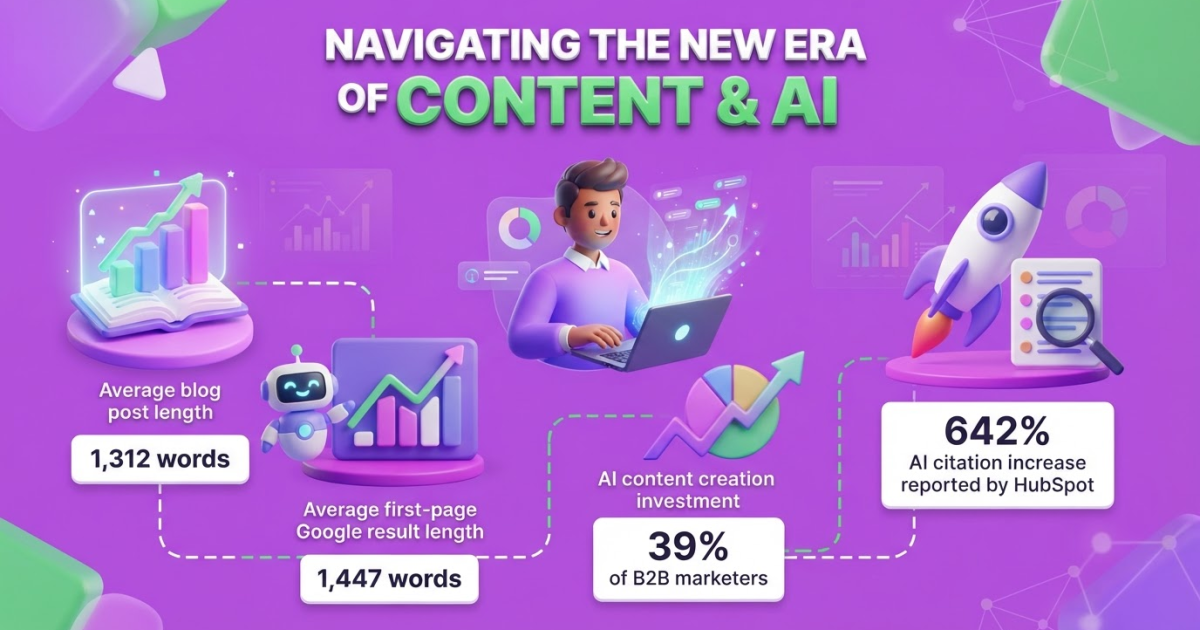
The best blog post examples are useful, specific, and built around a clear reader intent, not a generic topic. This guide covers 15 proven blog formats and a practical workflow for choosing, outlining, and improving your next post.
Having plenty of topics but no dependable way to shape them into useful posts is a familiar frustration for content teams. You can spend an hour choosing between a listicle, guide, case study, or comparison and still end up with a draft that feels thin or unfocused. Orbit Media’s 2026 research found that the average blog post contained 1,312 words, but usefulness matters more than reaching an arbitrary word count. This guide walks through 15 blog post examples, explains when each format works, shows the structure to use, and helps you turn your choice into a search-focused brief.
| Point | Details |
|---|---|
| Match Reader Intent | Choose a format based on whether readers need education, comparison, instructions, proof, or inspiration. |
| Show Complete Examples | Include the headline, target audience, structure, and practical use case so readers can see how the example works. |
| Outline Before Writing | Define the introduction, 3–7 main points, examples, and conclusion before drafting to reduce rewrites. |
| Design for Scanning | Use descriptive headings, short paragraphs, lists, and visual hierarchy because many readers scan for 10–20 seconds before committing. |
| Publish and Review | Create a steadier improvement loop by publishing and reviewing 1–3 useful posts per week instead of chasing volume. |
What Makes a Blog Post Example Actually Useful?
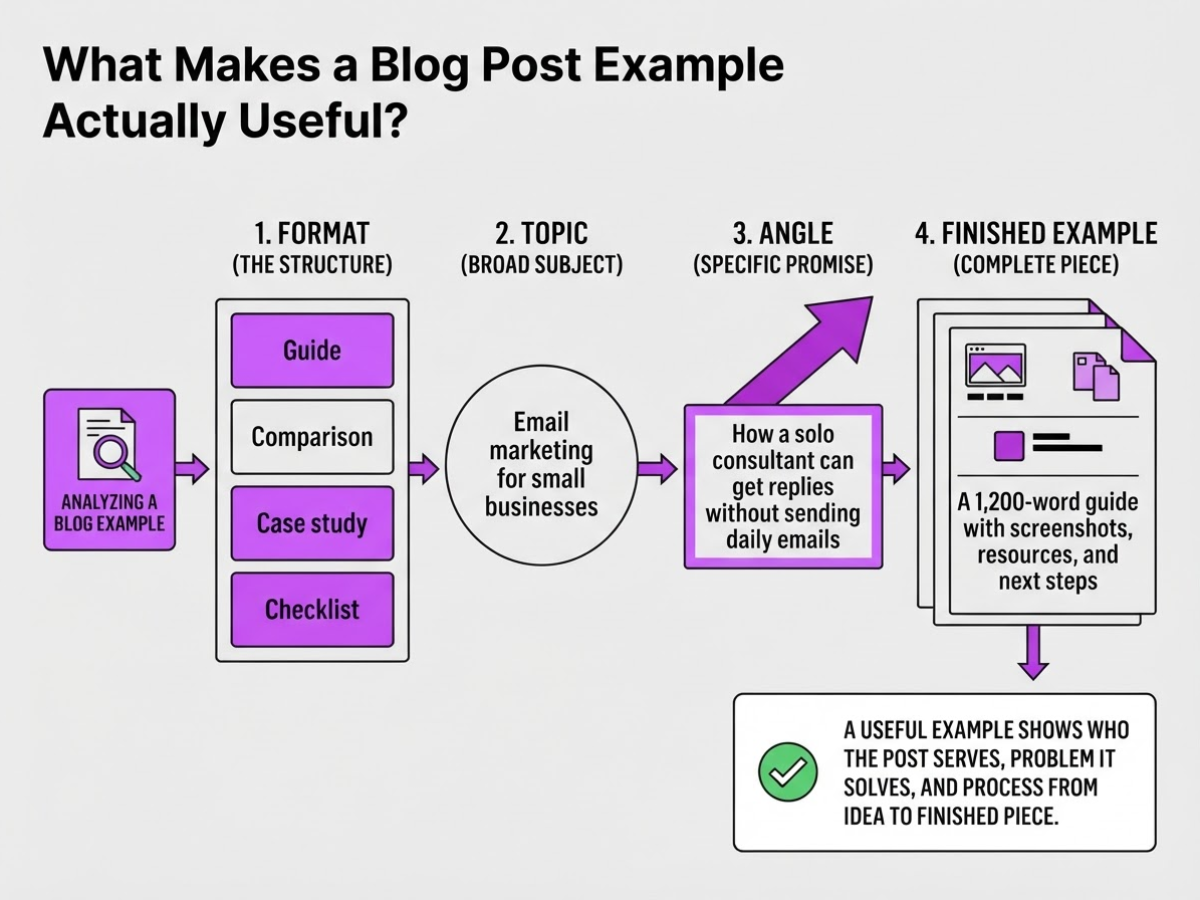
When I review a blog post example, I look for something you can use to make a better publishing decision, not a headline that merely looks clever. A useful example shows who the post serves, what problem it solves, and how the writer moved from an idea to a finished piece. A list of formats rarely gives you that practical view.
Keep these four terms separate:
| Term | What it means | Example |
|---|---|---|
| Format | The structure of the post | Guide, comparison, case study, or checklist |
| Topic | The broad subject | Email marketing for small businesses |
| Angle | The specific promise or viewpoint | How a solo consultant can get replies without sending daily emails |
| Finished example | The complete piece, including evidence and next steps | A 1,200-word guide with screenshots, results, and an action plan |
The same topic can produce very different posts. “Email marketing for small businesses” could become a beginner’s guide, a comparison of Mailchimp and ConvertKit, a case study showing how one consultant increased replies, or a checklist for sending a first campaign. The topic stays similar, but the reader’s question changes.
I judge each example against five criteria:
- Audience fit: Does it address a real reader with a recognizable situation?
- Search intent: Does it answer what someone typing the query actually wants?
- Specificity: Does it include steps, examples, constraints, or numbers instead of broad advice?
- Evidence: Does it use firsthand experience, demonstrations, customer results, or trustworthy research?
- Next-step clarity: Can the reader tell what to do after finishing the post?
Pro Tip: Evaluate an example by asking what decision it helps the reader make, not by judging how impressive the headline sounds.
This matters because Google recommends people-first content, including content that demonstrates firsthand expertise and helps an intended audience achieve its goal. Writing primarily to satisfy rankings often produces thin sections, forced keywords, and advice nobody can apply. I would rather publish a narrower post with a real example than pad a broad article to chase a word count.
The 15 examples that follow are adaptable patterns, not scripts to copy line by line. Use blog writing examples to study the decisions behind each structure, then adapt the audience, evidence, and action to your own subject. Next, we’ll start with examples that show how different reader goals shape the post.
15 Blog Post Examples to Borrow for Your Next Topic
At TryRoki, I choose a post format from the reader’s decision, not from whatever headline is popular that week. A searcher who wants instructions needs a process; a buyer needs evidence, trade-offs, or proof. Clear headings also matter because Nielsen Norman Group’s eye-tracking research found that people often scan web pages in an F-shaped pattern.
| # | Format and role | Best use case | Reader intent | Core structure | Representative topic |
|---|---|---|---|---|---|
| 1 | How-to guide, Process | Teach a repeatable task | “How do I do this?” | Steps, screenshots, mistakes | How to set up SEO for a local business |
| 2 | Listicle, Discovery | Offer quick options | Browse ideas | Numbered items, short verdicts | 11 content ideas for SaaS teams |
| 3 | Beginner explainer, Education | Define an unfamiliar concept | Build basic understanding | Plain definition, example, next step | What is API monitoring? |
| 4 | Checklist, Process | Prevent missed steps | Confirm readiness | Action boxes, order, sign-off | Small-business website launch checklist |
| 5 | Case study, Trust | Prove a method worked | Assess credibility | Problem, actions, results, limits | How a creator gained email subscribers |
| 6 | Tutorial, Process | Guide tool-based work | Follow along precisely | Setup, workflow, troubleshooting | Build a lead form in HubSpot |
| 7 | Comparison, Decision | Help shortlist alternatives | Weigh trade-offs | Criteria, side-by-side results, verdict | Webflow vs. WordPress for a startup |
| 8 | Review, Decision | Evaluate one product | Decide whether to buy | Testing method, pros, cons, price | Roki AI review for a two-person team |
| 9 | Roundup, Discovery | Curate trusted resources | Find several options | Selection criteria, entries, caveats | nine SEO tools for Etsy sellers |
| 10 | Opinion post, Trust | Take a defensible position | Test agreement | Claim, experience, counterpoint | Why most founder-led blogs publish too often |
| 11 | Original research, Trust | Earn citations and links | Find evidence | Method, data, findings, limitations | SaaS landing-page conversion survey |
| 12 | Trend analysis, Trust | Explain market movement | Understand what changes next | Signals, context, implications | AI search changes for small businesses |
| 13 | FAQ post, Decision | Resolve objections | Get specific answers | Question-led sections, concise answers | SEO questions from local service owners |
| 14 | Glossary post, Education | Capture definition searches | Clarify terminology | Term, meaning, example, related terms | SaaS metrics glossary |
| 15 | Expert interview, Trust | Add lived experience | Borrow expert judgment | Questions, direct answers, takeaways | A creator’s audience-growth playbook |
Pro Tip: Choose the format that reduces the reader’s uncertainty fastest; that is often a comparison or checklist rather than a broad listicle.
For more structure ideas, compare these formats with practical blog writing examples. The right choice should make the next content decision obvious, not force every keyword into the same template.
How to Turn One Example Into a Search-Focused Outline
A useful outline starts with a reader, not a keyword. Before I choose headings, I write down the question that brought someone to the page, the result they want, and what they already understand. A beginner needs definitions and a worked example; an experienced reader usually wants comparisons, constraints, or a faster process.
-
Study the search results. Open the top-ranking pages, related questions, forums, and product pages. Note what they explain clearly, then mark the gaps: missing steps, weak examples, outdated proof, or objections nobody answers. Do not copy the common structure blindly. Search results often reward the same angle until one useful explanation breaks the pattern.
-
Choose the format and promise. Decide whether the topic needs a how-to, list, comparison, case study, or another format. Then write a specific working title, such as “How to Turn Customer Questions Into 10 Blog Topics,” and one primary promise: what will the reader be able to do by the end?
-
Draft the skeleton. Put the direct answer near the opening, then arrange H2s in the order a reader needs them. Add a concrete example under each important idea, one section for likely objections, and a concise next step. A post does not need to be long for its own sake. Orbit Media’s 2026 research found an average post length of 1,312 words, but your topic may need 700 words or 2,000.
Pro Tip: Draft the answer to the reader’s main question before writing the introduction; it prevents the post from burying its value under scene-setting.
-
Add evidence and pathways. Link to two or three relevant pages on your site, including practical blog writing examples, and identify the sources you will cite. Add your own point of view, such as a warning about a format that looks attractive but fails when readers need a decision. Google’s guidance favors people-first content that serves a real audience and demonstrates first-hand expertise, so do not pad the outline with keywords.
-
Use AI, then inspect every claim. At TryRoki, I use an AI content platform to turn the brief into possible headings, examples, and a first draft. That removes the blank-page delay, but it can still invent statistics, flatten expert judgment, or recommend an irrelevant section. I review facts, links, tone, examples, and search intent before anything goes live.
-
Run a pre-draft check. Confirm that every H2 supports the promise, every example teaches something, objections receive a direct answer, and the next step is obvious. Only then hand the outline to a writer or start drafting.
With that outline in place, you can judge which blog post format fits the next topic before you commit time to writing it.

Common Mistakes Behind Weak Blog Post Examples
A polished layout can still hide a weak idea. I have seen posts with attractive screenshots, tidy headings, and almost nothing a reader could use after closing the tab. The failure usually starts before the first sentence: the writer chooses a format before figuring out what the reader needs to decide or do.
Common mistakes include:
- Choosing the format first. A listicle cannot answer every question. If readers need a comparison, a personal walkthrough or decision guide may serve them better than “10 tips.”
- Opening with generic filler. “In today’s digital world” delays the answer. Start with the reader’s problem, such as “Your first blog post should prove one useful point, not cover an entire industry.”
- Making unsupported claims. Numbers without a source, confident advice without testing, and vague references to “experts” weaken trust quickly.
- Recycling familiar advice. “Know your audience” and “use strong headlines” add little unless you explain what to do, show a real example, or identify a trade-off.
- Using vague examples. “A business improved conversions” tells readers nothing. Name the situation, change, timeframe, and result when you can.
- Forcing length or headings. A 1,312-word average from Orbit Media’s 2026 blogging research is not a quota. Extra sections often bury the answer, frustrate scanners, and make the post feel padded.
- Publishing AI output untouched. AI can invent facts, repeat the same phrasing, miss firsthand experience, and recommend tools or tactics without checking whether they still work. I treat its draft as raw material, not editorial judgment.
Google’s people-first content guidance also emphasizes firsthand expertise and helping readers achieve a clear goal. That standard exposes weak posts fast.
Repair one by narrowing the promise to a single reader problem, adding evidence for important claims, and replacing generic advice with a specific scenario. Then make the ending actionable: give the reader a choice, checklist, template, or next step they can use today. A practical blog article example should leave less work for the reader, not create another research task.
The next step is to test whether your finished post satisfies the searcher’s intent from the first line to the final action.
How Strong Examples Become a Repeatable Content System
A publishing system starts when you stop treating each post as a one-time asset. I group every idea by the reader’s stage: awareness content answers a broad problem, consideration content compares approaches or products, and decision content handles objections, use cases, pricing, or implementation. A beginner-friendly guide belongs near awareness; a detailed comparison belongs closer to a buying decision. My blog writing examples help make those format choices less abstract.
I judge the system by useful signals, not pageviews alone. Track qualified organic visits, engaged sessions, conversions, and assisted signups in one dashboard. A post can attract plenty of casual readers and still contribute nothing to the business. Buffer reported that one search-focused article about the Instagram algorithm reached 600 to 800 views per day after reaching Google’s first page, but volume only matters when the audience matches what you sell.
When a post works, I do not immediately write another article on the same topic. I pull out smaller jobs for the same idea:
- After publication: Record the target audience, funnel stage, primary conversion, and baseline metrics.
- After 30 days: Check qualified visits, engaged sessions, conversions, and assisted signups. Note where readers leave or fail to click.
- After 60 to 90 days: Turn the strongest material into a checklist, comparison, FAQ, social post, or useful Reddit discussion contribution. Do not paste a sales pitch into Reddit; answer the question first and mention your resource only when it genuinely adds detail.
- Every quarter: Rewrite weak sections, refresh statistics and examples, remove outdated claims, and add internal links from newer relevant posts.
The annoying part is that this review work rarely feels urgent, so teams skip it and publish more mediocre pages instead. Automation can keep briefs, task reminders, repurposing drafts, and reporting moving, but it cannot decide what customers actually misunderstand. At TryRoki, I use automation to support consistent execution while strategy, editorial judgment, and customer insight stay with people.
That review trail gives you a clearer basis for choosing the next format, topic, and improvement to make.
My honest take on blog post examples
I judge blog post examples by the decisions behind them, not by how polished the finished page looks. A useful example tells me who the post serves, which question it answers, what evidence supports it, and why the structure fits that reader. A list post for a beginner choosing accounting software should not read like a technical guide for finance managers, even if both target the same broad topic.
Here is my contrarian view: 15 blog formats do not make a content strategy. Publishing a new format every week can create variety while quietly weakening your authority. I would choose three closely related posts that solve real customer problems over a large catalog of disconnected listicles. Most companies need sharper topic selection, not more templates.
I have also seen teams use AI to produce articles before deciding what customers actually need. That reverses the order. AI can speed up outlining and drafting, including workflows we build at Roki, but it cannot invent firsthand experience or decide which business problem deserves attention. The durable advantage comes from a clear editorial opinion, specific examples, careful human review, and watching what readers do next: subscribe, compare options, ask support questions, or leave. That is the test I use before borrowing any blog post example.
— Daniel
Turn Blog Post Examples Into a Consistent Workflow
A good blog post example gives you a direction, but turning ideas into a steady publishing habit is where most teams get stuck. I built Roki AI to reduce that operational friction, not to replace your judgment. It can generate website content, support an autopilot publishing workflow, and surface Reddit posts where a useful, non-spammy contribution could mention your website. You still need to check the facts, tone, and whether the post says anything worth publishing. That review is not optional.
Each week, Roki AI gives you 3 to 10 tasks across content and visibility work. That rhythm is more practical than chasing every marketing tactic at once, though the first setup can feel fiddly. Start with one format, review the output carefully, then turn what works into a repeatable process with features built for ongoing content work. The aim is fewer loose ends, not guaranteed rankings or traffic.
Frequently Asked Questions
Start with how-to guides, checklists, simple explainers, or curated lists because each format gives you a clear structure to follow. Choose one narrow question and answer it with at least 3 to 5 concrete steps, examples, or recommendations rather than trying to cover an entire subject.
There is no universal ideal length, so write until you satisfy the reader’s goal without padding the page with repetition. As a reference point, Orbit Media’s 2026 research reported an average blog post length of 1,312 words, but a useful 700-word answer can outperform a repetitive 2,000-word article.
In everyday publishing, the terms usually mean the same thing: one piece of content published on a blog. “Blog article” sounds more formal, but the real distinctions come from the topic, reader intent, format, depth, and the 1 action you want the reader to take.
Begin with one specific problem for a defined audience, then check whether people ask about it in search results, communities, customer conversations, or sales calls. Compare at least 3 existing answers and choose a topic where you can add stronger evidence, firsthand experience, clearer examples, or a more practical process.
Yes, AI can help with research organization, outlines, drafts, content variations, and publishing workflows, but a person should review at least 5 areas before publication: facts, claims, originality, brand fit, and firsthand expertise. At RokiAI, I treat AI as a production assistant rather than a final editor because unchecked drafts can sound generic or include details nobody verified.
Written by Daniel/Aleksandra.
Recommended reads
- Blog Writing Examples How To Craft Effective Posts
- Blog Article Example How To Write One That Works
- What Are Examples Of Blogs 15 Formats To Try
- Boosting Seo With Automated Content Generation Tips
Sources
- 2026 Blogging Statistics: Blogger Data Shows Trends and Insights Into Blogging
- Creating Helpful, Reliable, People-First Content | Google Search Central
- F-Shaped Pattern For Reading Web Content (original eyetracking research)
- We Analyzed 11.8 Million Google Search Results. Here’s What We Learned About SEO
- B2B Content Marketing: 2025 Benchmarks & Trends
- How We Increased the Readership of Buffer’s Blog to Over 1.5 Million Visits
- How We Built the Buffer Guest Posting Program
- How HubSpot creates quality content in the age of AI: Tips from our content strategists