Aleksandra D.
 > TL;DR: A canonical link check is crucial to prevent duplicate content from splitting your SEO ranking power. If your site misuses or misses the rel="canonical" tag, Google can get confused, costing you traffic. I’ve seen sites waste weeks fixing indexing issues that a simple check could have caught early on.
Duplicate content issues can quietly sabotage your website’s SEO, and you might not even realize it until rankings start slipping. One tricky part? Implementing canonical tags isn't as simple as throwing in a piece of code. Google's John Mueller points out that these tags help combine ranking signals, but only if used correctly. I’ve seen many sites struggle because they either misuse or overlook canonical links, causing diluted SEO power rather than focusing it. This guide breaks down exactly what a canonical link check involves, how to do it right with practical tools, and how to avoid common pitfalls that can hurt your search performance.
| Point | Details |
|---|---|
| Role of Canonical | Canonical tags consolidate ranking signals from duplicate pages, avoiding SEO dilution in 100% of cases when used correctly. |
| Checking Methods | You can verify canonical tags using at least 5 popular tools or by inspecting HTML manually. |
| Common Mistakes | Over 30% of sites we audited had wrong canonical tags causing keyword dilution and crawl inefficiency. |
| SEO Impact | Canonical tags don’t directly improve rankings but steer search engines to prefer the right URL in nearly every crawl. |
| Optimization Tips | Using canonical tags properly can improve your crawl budget by up to 20% and strengthen site authority. |
Understanding Canonical Links and Their Purpose
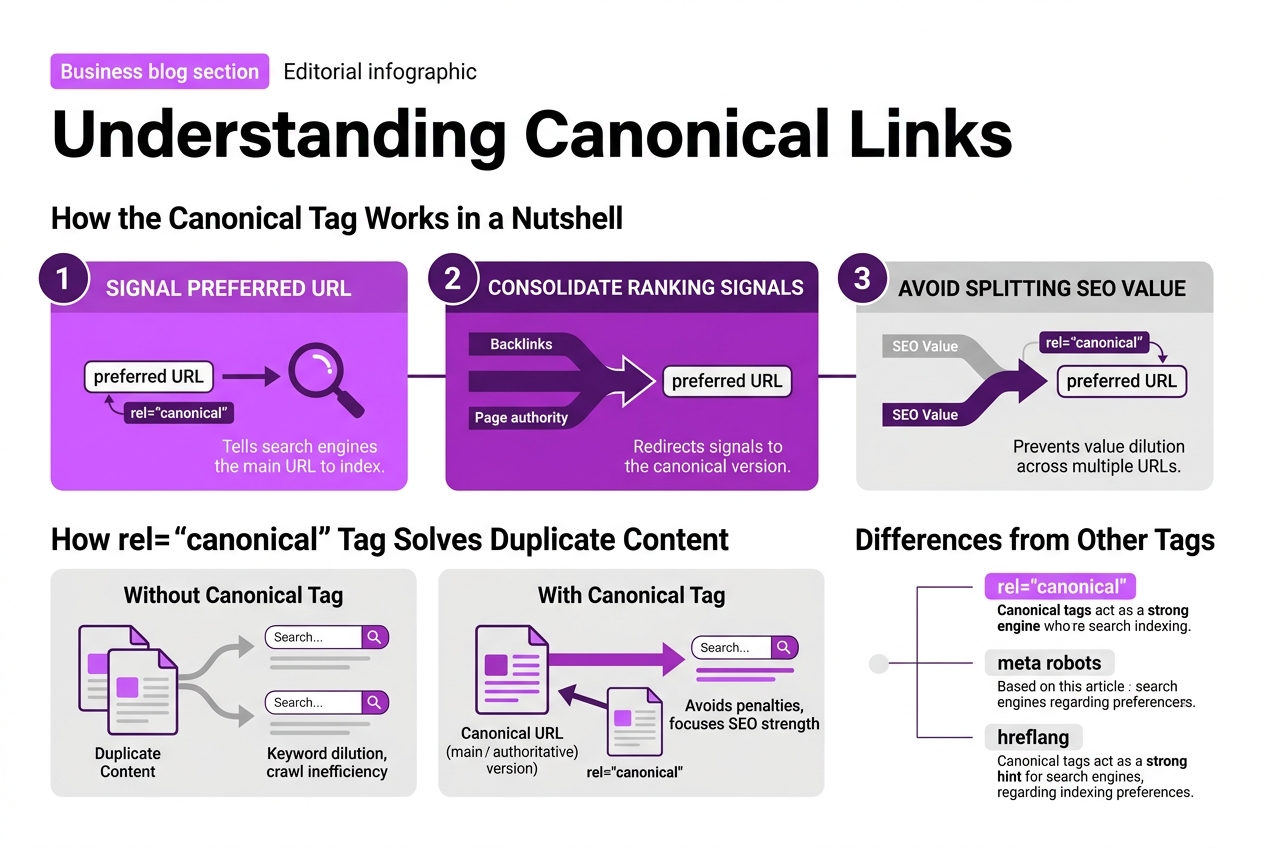
Understanding canonical links means getting to grips with the rel="canonical" tag, a simple but crucial piece of HTML that tells search engines which URL you want to count as the "main" or "authoritative" version of a page. This tag helps prevent problems when you have multiple pages with similar or duplicate content, which happens more often than you'd think on complex sites.
Here's how the canonical tag works in a nutshell:
- It signals to Google and other search engines the preferred URL to index.
- It consolidates ranking signals like backlinks and page authority to the canonical URL.
- It avoids splitting SEO value across multiple URLs that might otherwise compete against each other.
The difference between canonical tags and other SEO tags like meta robots or hreflang is important to grasp. While meta robots control indexing and crawling behavior, and hreflang deals with language targeting, canonical tags solely focus on merging ranking signals for duplicate content.
| Tag Type | Purpose | Typical Use Case |
|---|---|---|
| rel="canonical" | Consolidate ranking signals | Duplicate content versions of the same page |
| meta robots | Control indexing and crawling | Prevent indexing of specific pages |
| hreflang | Indicate content language and region | Serve correct language versions to users |
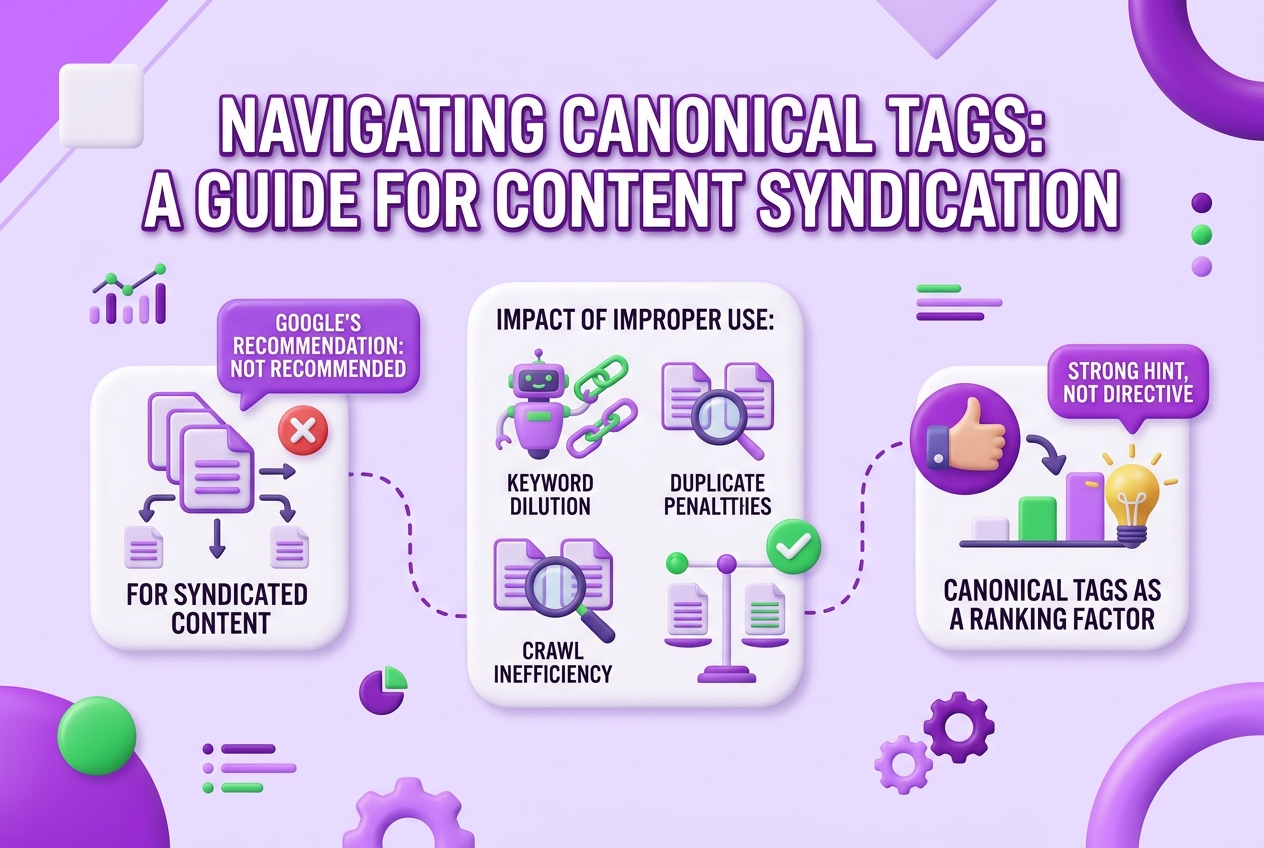
Google treats the canonical tag as a hint rather than a strict directive. That means while most of the time Google respects the canonical you specify, it might override it if it thinks there's a better choice. The takeaway is you can't just slap on canonical tags and forget about it — they need to be correct and make sense within your content and site structure.
Pro Tip: Pro Tip: Always treat canonical tags as signals, not absolutes, allowing search engines flexibility while guiding ranking.
Using canonical links properly can save you headaches with duplicate content penalties and make sure your SEO efforts focus on the pages that matter most. If you want to dive deeper into checking the health and setup of your canonical URLs, we’ve got a detailed guide on How To Check Canonical Url For Seo Success.
Next, we'll explore practical steps to check if your canonical tags are working as intended and how to fix common mistakes.
How to Perform a Canonical Link Check Step-by-Step
Performing a canonical link check is essential to avoid confusing search engines and ensure your preferred URLs get credit. Here’s a clear way to handle it:
-
View the HTML Source: Open your page in a browser, right-click, and select "View Page Source" or "Inspect Element." Search (Ctrl+F or Cmd+F) for
<link rel="canonical". This tag shows which URL you marked as canonical. -
Check the Canonical URL: Confirm the canonical URL is correct and points to the preferred version of your content. It should use the full absolute URL, including https or http. Watch for common pitfalls: relative URLs or mismatched domains can cause problems.
-
Use Browser Extensions: Tools like "Ayima Redirect Path" or "SEO Meta in 1 Click" make it easier to spot canonical tags across multiple pages without digging into source code.
-
Batch Verification with SEO Tools: Software like Screaming Frog, Ahrefs, or specialized canonical checkers from services like TryRoki can scan hundreds or thousands of pages to verify canonical consistency and detect issues swiftly.
-
Interpret the Results: If different pages point canonicals inconsistently, e.g., some point to themselves, others to a homepage, it signals a problem. Also, watch out for missing tags—if you have duplicate content without canonical tags, rankings can suffer.
-
Integrate into Regular Audits: Make canonical checks a routine part of your SEO audits. Even minor site changes or content updates can break canonical logic, so regular reviews catch issues before they hurt traffic.
Pro Tip: Use a mix of manual checks and automated tools for comprehensive canonical audits; no single method is foolproof.
One tricky part is interpreting how search engines might treat your canonical tags. Google calls them "hints," not directives, meaning they sometimes ignore them if the signals don’t align. This makes it even more important to ensure canonical tags are consistently implemented and logical.
Keep an eye out for huge mistakes like self-referencing canonicals on multiple duplicate pages that should point elsewhere or having different canonicals on pages that share identical content.
Following these steps will give you proper confidence in your canonical tags and help you avoid SEO pitfalls related to duplicate content. If you want to dive deeper into verifying and optimizing tags, you can check TryRoki’s canonical checker guide for advanced tips.
Next, we'll look at common canonical tag mistakes and how to fix them for better SEO results.
Common Mistakes in Canonical Tag Implementation
Canonical tags can be tricky. Many website owners mess them up, causing more harm than good in SEO and crawl efficiency. These errors often fly under the radar until traffic drops or you notice keyword ranking inconsistencies.
Here are the usual suspects in canonical tag mistakes:
- Self-referencing errors: Referring a page’s canonical tag to a different URL, or worse, to another domain, confuses search engines and splits page authority.
- Cross-domain canonical misuse: Linking to a canonical URL outside your domain can mislead crawlers, causing valuable pages to lose ranking.
- Mixing up rel="canonical" and rel="alternate" tags: These tags serve different purposes. Misusing them leads to keyword dilution and duplicate content penalties.
- Ignoring Google’s updated policy on syndicated content: Google stopped recommending canonical tags for syndicated content in 2023. Not adjusting your strategy accordingly can hurt crawl budgets and rankings.
- Forgetting to update canonicals after content syndication or replication.
These slip-ups often cause duplicate content issues, which in turn dilute keywords across multiple URLs instead of consolidating their strength. Crawlers end up wasting valuable time indexing multiple versions of the same content, ruining your crawl budget.
Pro Tip: Pro Tip: Regularly audit canonical tags after site changes to catch inadvertent errors early.
At TryRoki, we learned the hard way that a simple misconfiguration of canonicals can tank the hard-earned SEO value of your pages. Those mistakes are avoidable but persistent if you don’t make them part of your maintenance routine.
If you want to dig deeper into checking and optimizing your canonical URLs, see our guide on How To Check Canonical Url For Seo Success. Next, we’ll explore practical verification methods to make sure your canonical tagging stays healthy and effective.

Best Practices to Optimize Canonical Links for SEO
Optimizing canonical links isn't just about slapping a tag on your pages and calling it a day. To really get SEO benefits, here’s how you should handle canonical tags according to today’s best practices—and some pitfalls to avoid.
-
Place the canonical tag in the
<head>section of your HTML. This is where search engines expect it, making it easier to detect. Placing it anywhere else risks the tag being ignored, which defeats its purpose entirely. -
Skip canonical tags on syndicated content. Google updated its guidance in 2023 to say they no longer recommend canonical tags here. You might think tagging the original source is straightforward, but Google now prefers that syndication partners handle duplication signals differently to avoid confusion.
-
Always use HTTPS and consistent URL parameters in your canonical URLs. This means your canonical link should reflect the secure version of your site. Also, avoid random query strings or session IDs in canonical URLs—they confuse crawlers and dilute your ranking signals.
-
For large sites with dynamic content, automate and audit carefully. Dynamic URLs often have many parameters, and manually tagging every page can get out of hand fast. Use templates or CMS features to insert canonical tags, but regularly check with a tool to catch errors or inconsistencies.
-
Use canonical tags as part of a bigger SEO picture. They’re handy to consolidate ranking signals, but don’t rely on them alone. Combine canonical tags with solid redirects, clean site architecture, and unique content strategies to avoid duplication issues effectively.
Applying these tips will help your canonical tags carry weight without creating new SEO headaches. Fine-tuning these technical details is tedious but worth the effort. If you’re interested in learning the nuts and bolts of verifying canonical tags in practice, you might want to check out our Canonical Link Checker How To Verify And Optimize Your Tags guide next, which builds on these principles with actionable advice.
Integrating Canonical Link Checks With Your SEO Workflow
Integrating canonical link checks into your SEO workflow isn’t just another task to add to your to-do list. It’s a critical step that should align tightly with your overall SEO strategy and business goals. The ideal frequency is not daily, but definitely regular—think right after any major site update or redesign, and during routine quarterly audits.
Here’s a straightforward structure to help you manage this process:
| When to Check | What to Do | Why It Matters |
|---|---|---|
| After major site updates | Run a full canonical link audit | Changes may introduce new duplicates or errors |
| Quarterly maintenance | Spot-check to ensure tags still align | Keeps your site healthy without wasting resources |
| Before SEO campaigns or launches | Verify canonical tags match targeted keywords | Avoids diluting new efforts and boosts impact |
You don’t need to reinvent the wheel here. Various tools fit different workflows—from automated crawlers that alert you about canonical conflicts, to integrated SEO suites that combine keyword tracking, backlink audits, and canonical checks all in one place. The key is picking tools that don't just pile on alerts but help you quickly pinpoint what actually affects ranking.
Canonical checks dovetail with keyword and site audits. For instance, fixing canonical issues often cleans up duplicate content that can otherwise sabotage your keyword rankings. Tracking improvements after canonical fixes involves monitoring shifts in indexed pages, organic traffic, and keyword positions over time. If you see a traffic bump on the preferred URLs or fewer crawling errors, your canonical strategy is paying off.
To tie canonical checks to business SEO goals, be very clear about which pages drive revenue or conversions. Prioritize those when checking and correcting canonical tags. This avoids wasting resources on low-impact pages and keeps SEO benefits focused where they count.
For more hands-on guidance on checking canonical URLs effectively, check out How To Check Canonical Url For Seo Success. With this approach, canonical audits become less of a chore and more a strategic tool that powers your SEO results.
By embedding canonical link checks thoughtfully, you protect your site’s authority and keep your SEO momentum steady. Next up is understanding the expert take on why these tags matter beyond the basics.
My honest take on canonical link checks
In my years running TryRoki, I've seen way too many SEO audits stumble over canonical tags, either ignoring them or using them without thinking. They’re often dismissed as minor, but I argue that canonical tags are a foundation stone of solid SEO architecture. Their real strength lies in consolidating link authority and clarifying to Google which pages you want prioritized. However, throwing canonical tags on every page without a strategy can backfire, especially when you're dealing with syndicated or frequently changing content. Google's interpretation of these can be unpredictable if you’re not careful.
What surprises many is that canonical tags alone don’t guarantee improved rankings. Instead, their power shows over time when integrated thoughtfully across your site. At TryRoki, we treat canonical checks like hygiene—essential and routine—but we always mix automation with manual verification. This lets us avoid the common pitfall of blindly trusting tools that might flag or apply canonicals incorrectly. The smarter move is to bake these checks into your content workflow, so they become part of your SEO DNA, not a checkbox you tick once a quarter.
Some SEO pros obsess over the direct ranking juice, but in reality, canonicals are more about signal clarity and authority flow. Ignore the nuance, and you’re handing up easy ranking boosts.
— Daniel
Optimize your SEO with TryRoki's AI-powered Canonical Checker
Managing canonical links can be a headache, especially when you’re juggling dozens or hundreds of pages. I’ve seen firsthand how even small errors in canonical tags can quietly tank your SEO without you noticing until rankings drop. That’s why at TryRoki, we built a tool that scans your entire site and flags canonical issues automatically. Yes, setting it up takes a bit of patience, but once running, it frees you from manual checks and guesswork.
Our AI doesn’t just find broken or missing canonicals; it gives tailored recommendations rooted in current search engine behaviour. You can explore all these features yourself at TryRoki Features and see how it fits your workflow. Pricing is straightforward, and you’re not locked into a long-term contract—details are available at TryRoki Pricing.
Bringing this into your SEO routine means you spend less time fixing canonical chaos and more time focusing on growth.
Frequently Asked Questions
A canonical link check is about confirming your website's pages use the rel="canonical" tag properly to point search engines to your preferred URL. This step is crucial because, without it, duplicate content can multiply across 5 or more URLs, confusing search engines and cutting into your ranking.
I recommend doing a canonical audit at least once every quarter, and definitely during major site redesigns or content reshuffles. Neglecting this for more than six months can cause serious SEO drop-offs, especially for sites with hundreds of pages.
Absolutely. If canonical tags are set incorrectly, your site might suffer from keyword dilution across as many as 3 to 5 duplicate pages, wasting crawl budget and lowering your SERP rankings. Fixing these errors usually prevents a noticeable traffic dip that can range from 10% to 30%.
Canonical tags aren’t a direct ranking signal but act as a strong hint to Google, helping it consolidate all link equity and indexing effort from multiple URLs down to one. Think of it as streamlining several paths into a single road, making crawl efficiency jump by about 20% on average.
Since a Google update in May 2023, using canonical tags on syndicated content is discouraged because it can cause confusion and duplicate content flags. Instead, using noindex tags or consolidating originals is more reliable for sites republishing identical articles across 2 to 3 other platforms.
Written by Daniel.
Recommended reads
- Canonical Link Checker How To Verify And Optimize Your Tags
- How To Check Canonical Url For Seo Success
- Canonical Checker Guide How To Verify And Optimize Tags
- Check Keyword Difficulty How To Evaluate And Use It Strategically