Daniel D.
 > TL;DR: Checking your site's canonical URL stops search engines from treating similar pages as duplicates, which can tank your SEO. The easiest way is to inspect the HTML tag and HTTP headers—you don’t have to guess. Tools like browser inspectors or online checkers quickly reveal if your canonical tag is set up right or missing entirely.
If you’ve ever wrestled with SEO issues and wondered why your pages don’t rank despite solid content, your canonical URLs might be the culprit. Nearly 7% of desktop pages in 2024 had canonical tags pointing to entirely different URLs, which can confuse search engines and dilute your site’s authority. I’ve seen businesses trip over this exact problem—thinking their SEO was nailed, only to find conflicting canonical tags crippling their traffic. This guide will show you how to check your canonical URLs effectively, reveal common mistakes to avoid, and offer practical tips to keep your site’s SEO tidy and functional.
| Point | Details |
|---|---|
| Importance of Tags | Over 65% of websites rely on canonical tags to manage duplicate content signals effectively. |
| Checking Methods | You can verify canonical URLs using browser inspection, HTTP header checks, and 5+ specialized tools. |
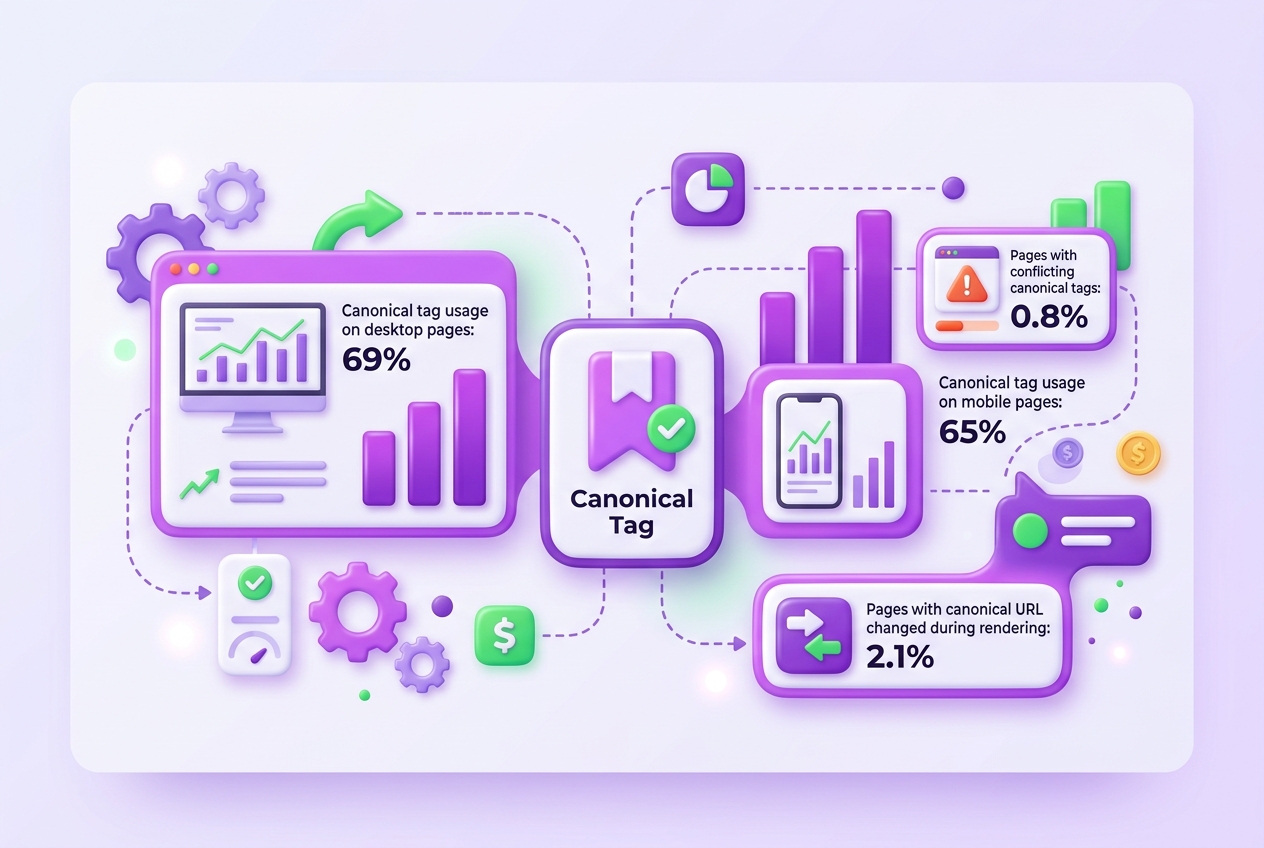
| Common Errors | Conflicts between HTTP header and HTML canonical tags have doubled, affecting 0.8% of sites since 2022. |
| Rendering Issues | About 2.1% of mobile pages experience changes to canonical URLs during page rendering. |
| Hreflang Conflicts | Less than 10% of sites correctly implement hreflang, often creating clashes with canonical tags. |
What Is a Canonical URL and Why Does It Matter?
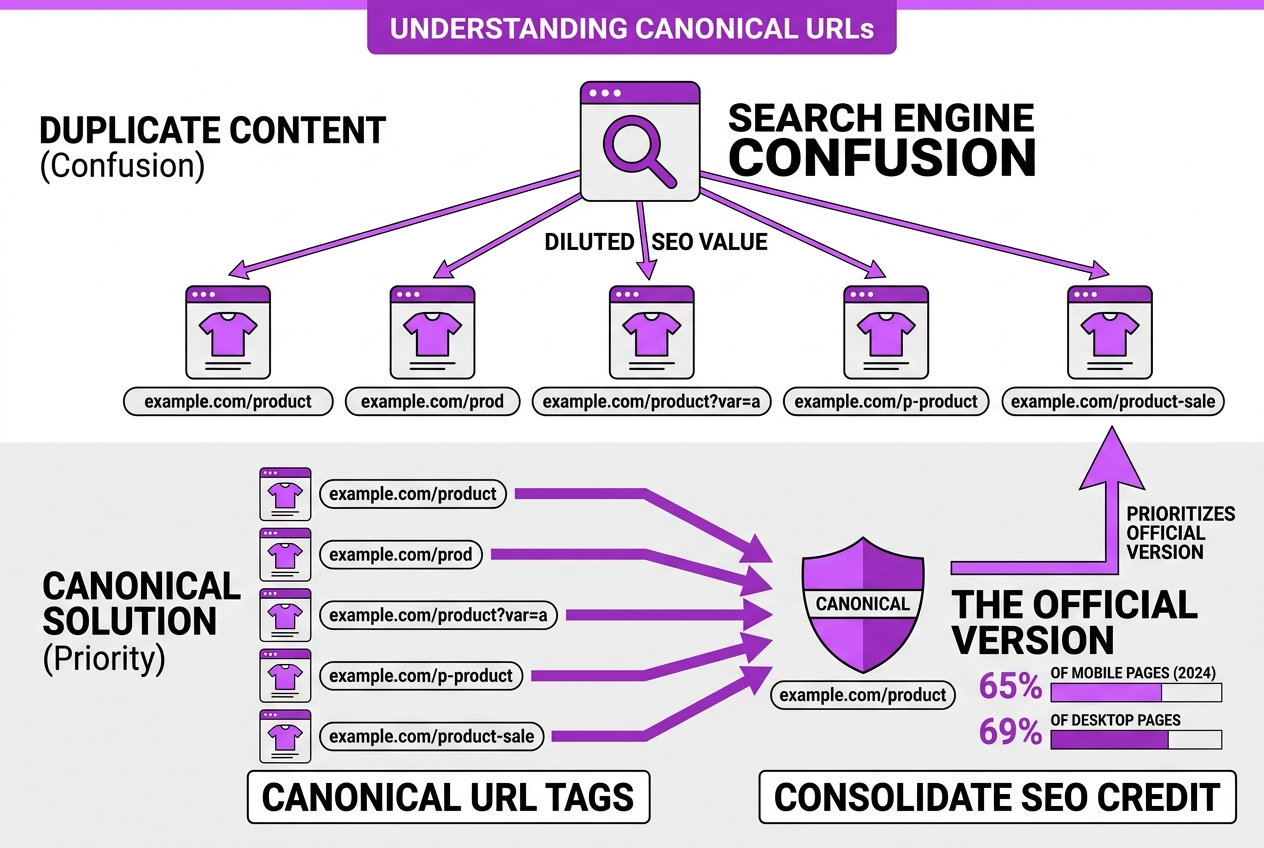
A canonical URL is essentially the "official" version of a web page that you want search engines like Google to index and rank. When you have multiple URLs showing the same or very similar content, canonical URLs act as signals directing Google to prioritize one version over the rest. Without this, duplicate content can confuse search engines and dilute SEO value.
Duplicate content isn't just annoying—it can seriously harm your search rankings. Imagine having five pages about the same product, but each with a slight variation in URL. Search engines won't know which page to rank, potentially spreading out your ranking signals. Canonical URLs solve this by consolidating the SEO credit to a single, preferred page.
In real-world use, canonical tags are huge in SEO. In 2024, about 65% of mobile and 69% of desktop pages included canonical tags. This widespread adoption shows how critical they are in helping websites avoid penalization for duplicate content and improve their search visibility.
Here's a quick overview of why canonical URLs matter:
- Prevent duplicate content penalties
- Consolidate link equity and ranking signals
- Improve crawl efficiency by guiding search engines
- Keep the user experience clean with a single URL
| Statistic | Percentage in 2024 |
|---|---|
| Mobile pages using canonical tags | 65% |
| Desktop pages using canonical tags | 69% |
Google considers around 40 different signals when figuring out which page to rank in the case of duplicates, but the canonical tag is among the most important. If set correctly, it overrides many conflicting signals and simplifies the search engine's job.
Pro Tip: Understanding that canonical URLs guide Google to prioritize content can prevent accidental content dilution across pages.
If you ever feel overwhelmed by URL structures or want to check if your canonical tags are implemented effectively, tools like the canonical link checker can be a real time-saver.
Getting this right is critical before diving into more technical SEO tactics because it sets the foundation for your site's clarity and authority in Google’s eyes.
How to Manually Check Canonical URLs in Your Web Pages
Checking canonical URLs manually isn't as complicated as it sounds, but it demands attention to detail. Here's how I recommend you approach it using your browser's tools.
-
Open Developer Tools: In Chrome or Firefox, right-click on the page and select "Inspect" or press
Ctrl+Shift+I(Cmd+Option+Ion Mac). This opens the Developer Tools panel. -
Check the HTML source: Go to the "Elements" or "Inspector" tab. Look through the
<head>section for a<link rel="canonical">tag. This tag'shrefattribute is your canonical URL. If it's missing, that’s a red flag. -
Inspect HTTP Headers: Canonical URLs can also come from the HTTP response headers, though this is less common. Switch to the "Network" tab and reload the page. Click the main document request (usually the first one) and look under "Headers". Scan for a
Linkheader that includesrel="canonical". -
Compare Both Sources: Sometimes, the canonical URL in the HTML and the one in the HTTP header don’t match. In fact, the conflict rate doubled from 0.4% in 2022 to 0.8% in 2024. This can confuse search engines, so consistency is crucial.
-
Account for Mobile Rendering Differences: Surprisingly, about 2.1% of mobile pages change their canonical URLs during rendering. Use your browser's device emulation to check how the canonical appears on mobile versus desktop.
-
Look for Conflicts or Absences: Make sure there are no multiple canonicals or conflicting hreflang tags that often trip up sites (less than 10% of sites get hreflang right). Conflicts here can dilute SEO efforts.
Pro Tip: Always verify canonical tags after site updates or redesigns to catch changes that might break canonical integrity.
This manual check complements automated tools and can uncover subtle issues that hurt your SEO. If you want to dig deeper, posts like Canonical Link Checker How To Verify And Optimize Your Tags offer comprehensive guidance.
Next, we’ll explore the best tools that automate this process to save you time and catch hidden errors.
Top Tools to Automatically Check Your Canonical URLs
When you’re managing SEO at scale, manually checking each canonical URL is impractical and prone to errors. Automated tools can sift through hundreds or thousands of URLs, flagging issues you might miss.
-
Free and Paid Bulk Canonical Checkers: Tools like Screaming Frog SEO Spider and Sitebulb allow bulk URL analysis including canonical tag checks. They also generate reports highlighting missing or conflicting canonical tags, though their paid versions unlock deeper insights.
-
TryRoki’s Canonical SEO Tasks: At TryRoki, we’ve automated the detection of canonical problems within our SEO toolkit. Our platform runs continuous audits, capturing canonical URLs, rendering differences, and alerts for common tag conflicts like hreflang mismatches. It’s designed to fit into your regular SEO review without extra hassle.
-
Browser Extensions for Quick Checks: If you need to spot-check a page, extensions like Ayima Redirect Path or MozBar expose the canonical URL right from your browser toolbar. This instant access is handy but best for occasional scans rather than bulk analysis.
-
Feature Comparison: The richer SEO tools generate batch reports, simulate rendering to catch canonical changes made after page load, and detect hreflang conflicts that are often overlooked. The ability to schedule these checks regularly means you won’t miss emerging canonical errors that can impact your rankings.
-
Integrate into SEO Audits: Embedding canonical verification into your SEO audits isn’t optional anymore. With approximately 65–69% of pages using canonical tags, and errors like rendering conflicts doubling in recent years, these checks safeguard your indexing strategy from silent pitfalls.
Pro Tip: Integrate automated canonical checks in your SEO workflow to catch canonical errors before they impact ranking.
Use the right combination: quick browser checks for spot issues, bulk crawlers for comprehensive views, and automated platforms like TryRoki for ongoing monitoring. That way, you stay ahead in the SEO game without spinning your wheels.
Next, we’ll cover advanced techniques to manually refine and test your canonical URLs in real time.

Common Canonical URL Mistakes and How to Fix Them
Canonical tags are meant to tell search engines which version of a page is the "official" one, but errors slip in surprisingly often. These mistakes can dilute your site’s SEO and cause indexing headaches. Here are some common pitfalls and straightforward fixes:
-
Duplicated self-referencing canonical tags: It sounds logical to point a canonical tag back to the same page, but repeating it multiple times or mixing it with conflicting tags can confuse crawlers. Stick to a single, clearly written tag in your HTML
<head>. -
Mismatch between HTTP header and HTML canonical tags: Sometimes your server sends one canonical URL in the HTTP headers, while the HTML
<link rel="canonical">tag points elsewhere. Google treats this as conflicting signals, and this conflict has actually doubled from 0.4% of pages in 2022 to 0.8% in 2024. Choose one place for canonical tags and keep it consistent. -
Canonical tags pointing to inactive or redirecting pages: It’s common for people to accidentally canonicalize pages to URLs that either redirect or return errors. This wastes link equity because search engines have to follow extra hops, and it can dilute your page authority. Always link to active, indexable pages.
-
Ignoring hreflang tag conflicts and syntax errors: Less than 10% of global sites use hreflang tags correctly, and when combined with canonical tags, syntax errors and conflicts are common. This results in poor regional targeting and indexing inefficiencies. You need to audit these tags in tandem, especially for international sites.
-
Consequences like diluted link equity and indexing inefficiencies: Improper canonical tags cause Google to split ranking signals across duplicate URLs or even ignore pages altogether. When that happens, your SEO efforts lose effectiveness and your site suffers in rankings.
Fixing these mistakes requires careful checking and sometimes a bit of trial and error. Keep your URLs clean and your canonical tags clear. If you want to dive deeper, I recommend using a specialized tool like a canonical link checker to verify your tags systematically. You can also explore how to verify and optimize your tags in detail here.
Sort out these errors first, then you can focus on more advanced strategies like evaluating keyword difficulty or refining URL structures. That groundwork makes everything else easier to handle and more effective.
Applying Canonical URL Checks in Your SEO Strategy
If your site publishes duplicated or syndicated content, neglecting canonical URL checks can be a silent killer of your SEO efforts. Duplicate content confuses search engines, wasting crawl budget and diluting your page authority. Fixing canonical URL issues clearly signals to Google which pages deserve ranking priority.
Canonical errors like conflicting tags or missing directives often cause ranking drops. They can fragment your link equity and make search engines index the wrong version of your page. From my experience, these mistakes often arise after site migrations or when syndicating content without a clear canonical strategy.
Integrating canonical checks into your regular SEO maintenance keeps your content tidy and your site health stable. Think of it as content hygiene—spotting canonical problems early prevents larger issues with indexing and rankings later. I recommend scheduling audits monthly or immediately after any major redesign, CMS update, or when adding syndicated content.
Here’s a simple checklist I use to apply canonical URL checks effectively:
- Audit pages with duplicate or similar content.
- Identify conflicting or missing canonical tags.
- Validate canonical tags against the actual URLs served.
- Fix mistakes by setting proper canonical URLs pointing to the main version.
- Monitor changes in crawl budget and index status.
- Repeat monthly or after major site updates.
Beyond manual checks, TryRoki tasks help automate ongoing canonical audits while aligning with other SEO improvements you need. Their tasks highlight canonical and content issues together, so you don’t have to switch between tools. This integration makes it easier to maintain consistent site health over time.
Ignoring canonical URLs might seem harmless, but it’s a slow drain on your search presence. Regular audits ensure your SEO foundation stays strong and your ranking signals are clearly focused. After cleaning up canonical tags, you can move on to optimizing other technical SEO aspects more confidently.
My honest take on checking canonical URLs
I’ve seen so many SEO pros wait until their rankings tank to check canonical URLs. At TryRoki, we’ve been in the trenches with clients whose crawl budgets were wasted because their canonical tags were either missing or conflicting. The kicker? Running an automated tool alone won’t catch all the nuances. Canonical URLs don’t exist in a vacuum—they interact with rendering quirks and hreflang setups, especially on international sites or those with dynamic content.
Here’s what often gets overlooked: too much trust in automation can lead to missing context-specific issues. A bot might flag errors, but it won’t fully grasp your site’s structure or its multilingual strategy. That’s why I always insist on coupling manual review with smart automation. It’s a pain to dig into this yourself, but investing that time upfront prevents bigger headaches and ensures search engines index what matters.
In my experience, checking canonical URLs is less about finding obvious errors and more about understanding those subtle interactions that derail your SEO without a clear warning. When you get this right, your crawl efficiency improves, and your rankings stabilize. It’s not glamorous work, but it pays off long term.
— Daniel
Streamline your canonical URL checks with TryRoki
Checking and fixing canonical URLs manually is a tedious headache I've struggled with. When multiple pages accidentally declare different canonical tags, it can tank your SEO without warning. That's why I built TryRoki—to cut through the noise. Its AI helps catch canonical inconsistencies early by automatically scanning your site and flagging priority issues. Sure, setting it up takes a bit of time, and you still need to understand the basics of canonicalization yourself. But the integrated task system means you won't waste hours hunting down broken tags across your domain or juggling multiple tools.
What I appreciate most is how TryRoki distills the complex technical mess into clear tasks you can tackle systematically. If you want to see the exact capabilities that simplify canonical URL checks, the detailed features list spells it out. For teams balancing budget and SEO priorities, checking the pricing options next is a smart move.
Managing canonical URLs doesn't have to be an afterthought or a guessing game anymore.
Frequently Asked Questions
You can find the canonical URL by digging into the page’s HTML source for the tag or checking HTTP response headers with your browser's developer tools. It usually takes less than a minute if you know where to look. I’ve found some pages miss the tag entirely, which complicates things.
Checking canonical URLs every 2-3 weeks can save you from duplicate content issues that often tank SEO rankings. It’s frustrating when a small misconfiguration causes search engines to index the wrong version, diluting your site's authority. Consistent checks help ensure your preferred pages get proper credit.
Yes, about 2.1% of mobile pages end up with different canonical URLs than their desktop versions, usually because of rendering quirks. This mismatch can confuse search engines, hurting your SEO. So, it’s smart to audit both versions rather than assume they match.
I’ve seen conflicting canonical tags between HTTP headers and HTML, which create a tug-of-war for search engines. Another headache is pointing canonicals to inactive or redirecting URLs, which wastes crawl budget. Lastly, hreflang setups can interfere if they're not synced well with canonical tags.
Automated checkers are great for spotting obvious issues—especially when handling hundreds of pages—but they often miss context-specific problems you catch only by manual review. I recommend starting with automation to save time, then drilling down into flagged cases personally.
Written by Daniel/Aleksandra.
Recommended reads
- Canonical Checker Guide How To Verify And Optimize Tags
- Canonical Link Checker How To Verify And Optimize Your Tags
- Check Keyword Difficulty How To Evaluate And Use It Strategically
- What Is Google Url A Clear Guide To Understanding Urls