
Etsy Tools for Sellers: A Practical Guide
TL;DR: Etsy tools help you find keywords, improve listings, track shop performance, and decide where to spend limited time and budget. Start with keyword research and listing checks, then review traffic, conversion rate, and sales every 7 days; tools such as Roki AI can also provide 3–10 tasks per week to support broader search visibility.
Etsy gives you plenty of ways to improve a shop, but I’ve seen sellers lose hours jumping between keyword tools, listing checkers, dashboards, and ad screens without gaining better visibility or sales. The competition is real: more than 100 million items were available for sale on Etsy in 2025. Choose each Etsy tool for a specific decision, not for a growing software collection. This guide covers keyword research, listing optimization, analytics, advertising, fees, and ongoing measurement, with Roki AI positioned as part of a wider content and SEO operating system, not a replacement for Etsy’s own search data and Shop Stats.
Table of Contents
- What Counts as an Etsy Tool?
- Which Etsy Tools Should You Use First?
- How to Build an Etsy Tools Workflow
- How to Measure Whether Etsy Tools Work
- Common Etsy Tool Mistakes to Avoid
- My Honest Take on Etsy Tools
- Turn Etsy Research Into a Repeatable Growth System
- Frequently Asked Questions
- Recommended reads
Key Takeaways
| Point | Details |
|---|---|
| Start With Keywords | Use keyword tools to identify buyer language before changing titles, tags, or descriptions. |
| Improve Listing Quality | Prioritize relevance, complete listing information, strong photos, and customer experience instead of chasing one ranking metric. |
| Track Etsy Data | Review visits, orders, conversion rate, and revenue in Etsy Shop Stats at least once every 7 days. |
| Control Tool Costs | Include Etsy’s $0.20 listing fee and 6.5% transaction fee when judging paid tools or campaigns. |
| Build A Workflow | Review research, listing changes, and results on a fixed 30-day schedule so you test improvements instead of guessing. |
What Counts as an Etsy Tool?
An Etsy tool is any feature or software that helps you make a better shop decision. That includes Etsy’s own Shop Stats and search guidance, not just paid keyword software. I have seen sellers collect five dashboards and still avoid the one decision that matters: which listing to change next.
Use the category to match the tool to the job:
| Tool category | Seller decision it should support |
|---|---|
| Etsy-native features | What is happening inside your shop and which listing needs attention |
| Keyword research tools | What to sell and which buyer phrases to target |
| Listing optimization tools | How to describe, tag, photograph, and structure a product |
| Analytics tools | What to promote and whether visits turn into orders |
| Broader SEO platforms | How to attract traffic beyond Etsy and build demand elsewhere |
For example, a keyword tool can suggest “personalized wedding favor,” but it cannot tell you whether you can produce the item profitably or ship it on time. A listing optimizer may flag a missing phrase, yet its rewrite can sound robotic and make the product less appealing. That friction is normal. The seller still has to judge intent, margin, competition, and customer expectations.
Etsy search does not rank listings on keywords alone. Etsy says its search system considers title and tag relevance, listing quality, customer and marketplace experience, recency, shop location, and shop diversity. No Etsy tool guarantees a ranking or a sale. Tools provide clues; testing and judgment turn those clues into changes.
When I assess a tool, I use five filters:
- Data quality: Is the information current, Etsy-specific, and based on enough searches?
- Ease of use: Can you act on the result without learning a new system for three hours?
- Cost: Does the likely improvement justify the monthly fee?
- Etsy relevance: Does it reflect Etsy’s fields, limits, and buyer behavior?
- Actionability: Will the output change a title, tag, photo, price, promotion, or product decision?
Pro Tip: Judge a tool by the number of useful decisions it helps you make each month, not by the number of features listed on its pricing page.
For a closer look at search terms, compare this framework with an Etsy keyword research guide. Next, separate keyword ideas from keywords that can actually earn clicks.
Which Etsy Tools Should You Use First?
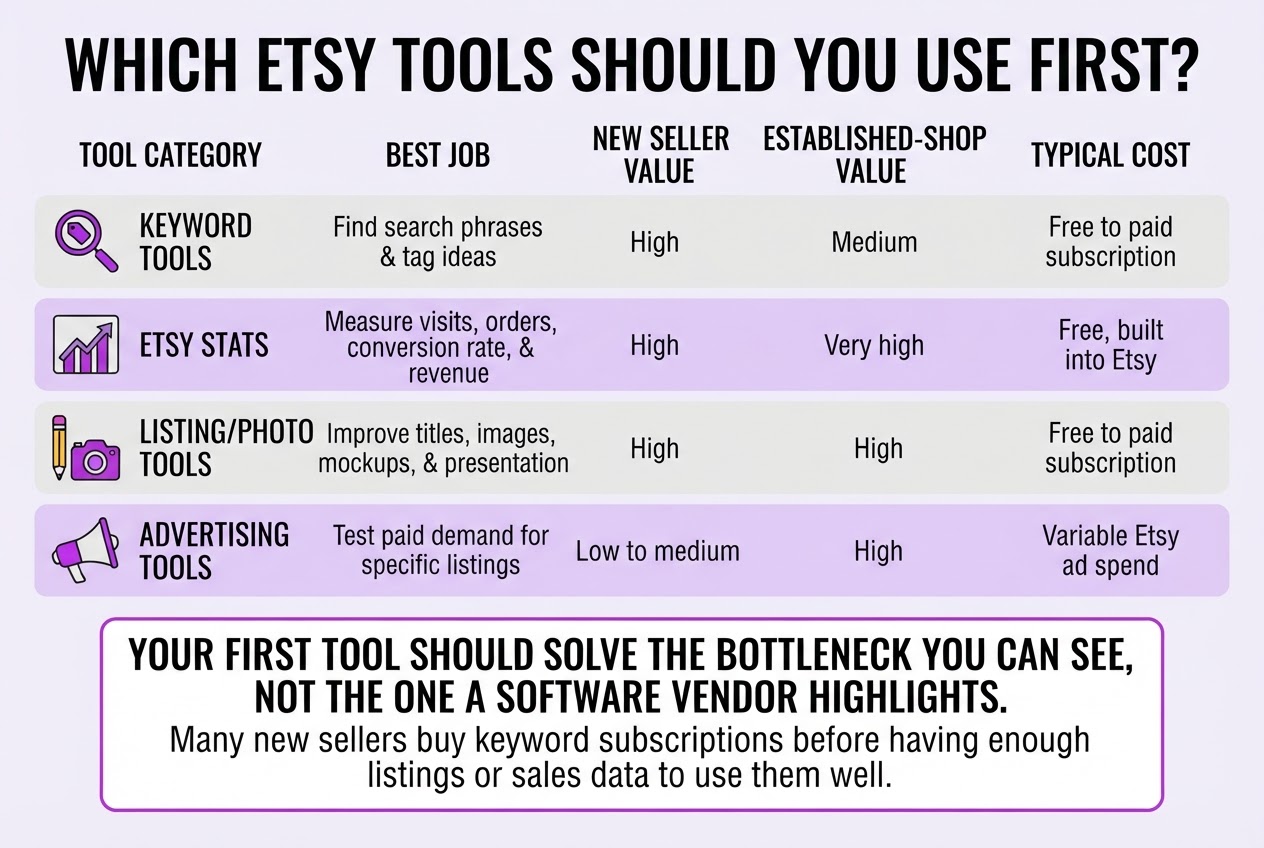
Your first tool should solve the bottleneck you can see, not the one a software vendor highlights. When I review Etsy shops, I usually find that new sellers buy a keyword subscription before they have enough listings or sales data to use it well.
| Tool category | Best job | New seller value | Established-shop value | Typical cost |
|---|---|---|---|---|
| Keyword tools | Find search phrases and tag ideas | High | Medium | Free to paid subscription |
| Etsy Stats | Measure visits, orders, conversion rate, and revenue | High | Very high | Free, built into Etsy |
| Listing/photo tools | Improve titles, images, mockups, and presentation | High | High | Free to paid subscription |
| Advertising tools | Test paid demand for specific listings | Low to medium | High | Variable Etsy ad spend |
| Fee calculators | Check profit after fees, shipping, and costs | Very high | High | Usually free |
| External SEO/content tools | Build Google traffic and supporting content | Low | Medium to high | Free to paid subscription |
For a new shop, start with Etsy’s free data, one keyword workflow, and a fee calculator. Etsy permits up to 13 tags per listing, so use a keyword tool to build a focused list, then apply the phrases yourself. Add a listing or photo tool only when it fixes a specific problem, such as weak thumbnails or inconsistent mockups.
Etsy-native data wins when you need to know what happened inside Etsy. Shop Stats reports visits, orders, conversion rate, and revenue, so it is the source I trust for actual shop performance. Third-party tools estimate search volume, competition, or competitor activity. Those estimates help you see the wider market, but they are not proof that a phrase will produce sales for your products.
Once your shop has steady traffic, review trends in Etsy Stats before paying for more research software. External SEO and content tools become useful when you want Google traffic beyond Etsy, although that work takes weeks or months and often distracts sellers from improving listings that already attract clicks.
Keep the bill honest. Free tools and Etsy-native features are not the same as paid subscriptions, while Etsy fees and ads vary with your activity. Etsy charges $0.20 per listing and a 6.5% transaction fee, and Etsy Ads can start at a $1 minimum daily budget, making a $7 test over seven days possible, but not automatically profitable.
Pro Tip: Start with one tool for discovery, one for measurement, and one workflow for implementation; adding more software before proving that loop usually increases noise.
After you choose the lean stack, match each tool to a repeatable weekly workflow.
How to Build an Etsy Tools Workflow
Treat listing optimization like a controlled operating routine, not a burst of editing after a slow week. When I review seller workflows, the biggest problem is usually not a lack of Etsy tools. It is changing five things at once, then guessing which edit helped.
-
Define the product, buyer, and intent. Write down exactly what you sell, who buys it, and what they want to do when they search. “Personalized ceramic mug for a wedding gift” has clearer commercial intent than “cute mug.” Do this before opening a keyword tool, or the tool will pull you toward phrases that attract browsers instead of buyers.
-
Collect and map phrases. Gather language from Etsy search suggestions, competing listings, customer messages, and an Etsy keyword research guide. Choose one primary topic for the listing, then add supporting phrases that describe the material, recipient, style, size, or use case. Do not force every related phrase into one listing. Map “personalized wedding mug” to one product and “bridesmaid coffee cup” to another when the buyer and offer differ.
-
Update the listing without rewriting reality. Place the primary topic naturally in the title, then use relevant supporting language in tags and the description. Complete accurate attributes, check category choices, and replace weak photos only when the new images show the product more clearly. Etsy permits 13 tags per listing, with a maximum of 20 characters per tag, so treat those slots as scarce. A clipped phrase or misleading tag wastes space and can attract the wrong shopper.
-
Capture a baseline before editing. Record the edit date, listing URL, visits, orders, conversion rate, and revenue. Etsy Shop Stats reports visits, orders, conversion rate, and revenue, but its numbers are useless for comparison if you do not save the starting point. I also note stock levels, price changes, promotions, and unusual holidays because those factors can distort the result.
Pro Tip: Keep a simple change log with the listing URL, edit date, keyword target, and result; it prevents you from mistaking seasonal demand for an optimization win.
- Review after a fixed window and isolate the change. Choose a consistent observation period, such as 28 days, then compare the same metrics with the baseline. If visits rise but conversion falls, the title may be attracting the wrong intent or the photos may not answer buyer questions. Change one meaningful variable at a time, wait through another comparable window, and keep the edit only when the evidence supports it.
This workflow gives your Etsy tools a job, which makes the next round of tool selection far less arbitrary.

How to Measure Whether Etsy Tools Work
A ranking report can make a bad month look productive. I judge Etsy tools by whether they help you earn more profit, not by whether a keyword moves from position 18 to position 9.
Start with a scorecard that connects activity to money:
- Visibility: Record visits, search terms, and the listings receiving traffic before you change titles, tags, photos, or descriptions. More visits show improved visibility, but not necessarily better business.
- Shopping behavior: Track orders and conversion rate. Calculate average order value by dividing revenue by orders, then compare it with the previous period.
- Economics: Subtract Etsy’s $0.20 listing fee, its 6.5% transaction fee, payment processing, materials, shipping subsidies, advertising, and software costs. The number left is closer to profit than the revenue figure shown in a dashboard.
- Decision: Keep a tool when it contributes to more profitable orders, a higher average order value, or less manual work. Pause it when traffic rises but orders, margin, or both stay flat.
That distinction matters. A keyword tool may increase visits after you rewrite a title, which is a visibility improvement. It becomes a commercial improvement only when those visits produce more orders or revenue without consuming the extra margin in ads, fees, or discounts. I would rather have 200 visits that produce 10 profitable orders than 1,000 visits from shoppers who never buy.
Use Etsy Shop Stats for the shop-level picture. It includes visits, orders, conversion rate, and revenue, while this Etsy analytics guide can help you interpret the numbers without staring at rankings all day. Etsy states that sellers can view Shop Stats data from November 2017 to the present, which gives mature shops useful historical context.
Review changes on this schedule:
- Day 0: Record the listing’s visits, orders, conversion rate, revenue, costs, and profit estimate.
- Day 30: Check for early movement, but avoid declaring a winner from one noisy week.
- Each month: Compare results with the date of every listing edit or campaign launch.
- Each quarter: Decide whether to keep, replace, pause, or expand each tool.
The next section turns those measurements into a practical system for choosing what to do when results disagree.
Common Etsy Tool Mistakes to Avoid
After reviewing sellers’ experiments with Etsy tools, I see the same mistakes repeatedly. The software rarely causes the damage by itself. The problem starts when a report replaces judgment about the product, customer, or margin.
Common mistakes include:
- Copying competitor keywords blindly. A phrase that brings traffic to a competitor may not fit your product, buyer intent, materials, size, or use case. Check every keyword against what you actually sell. Irrelevant clicks waste time and can make your listing feel misleading.
- Treating estimates as Etsy facts. Third-party tools calculate search volume from their own data, models, or samples. They do not show Etsy’s private internal demand numbers. Use them to compare ideas, then test one focused change and review your shop’s visits, orders, conversion rate, and revenue in Etsy Stats. This practical Etsy keyword research guide is useful for that distinction.
- Changing every listing at once. Rewrite five or ten listings, and you will not know which title, tag, photo, or description affected the result. Start with a small group and leave enough time to compare similar traffic periods.
- Ignoring the cost of optimization. Include Etsy’s $0.20 listing fee and 6.5% transaction fee in every margin calculation. Add subscriptions, Etsy Ads, design time, and the cost of repeatedly republishing or updating listings. A keyword tool that costs $30 monthly must help produce more than $30 in additional profit, not merely more impressions.
- Publishing generic AI copy or unsupported claims. Repetitive descriptions make several listings sound identical. Claims such as “hypoallergenic,” “sustainable,” or “handmade” need evidence. If you cannot verify a statement, remove it.
- Letting keywords crowd out useful information. Buyers still need clear dimensions, materials, care instructions, delivery details, and honest photos. Etsy allows up to 10 listing photos, so use them to answer purchase questions rather than repeating the same keyword in every image caption.
Fix these errors before buying another subscription or rewriting another batch of listings. The next step is deciding which tool results deserve action and which should stay as unverified clues.
My Honest Take on Etsy Tools
I run Roki AI, and I see Etsy tools as an operating advantage, not a replacement for product judgment. A tool can show you phrases buyers use, but it cannot tell you whether your product deserves the click, whether the photos answer obvious questions, or whether your margin survives shipping and fees. Those decisions still belong to you.
My contrarian advice is to delay paid keyword software longer than most sellers expect. If you have 12 listings and only a few visits each week, another dashboard will mostly create work. Start with Etsy’s own performance data, customer messages, and one dependable way to research buyer language. Use those inputs to improve a title, photo, description, or offer, then watch what changes. Fancy reports do not fix weak product-market fit or thin margins.
I also would not build an Etsy shop that depends only on Etsy discovery. Useful supporting content can bring attention from Google, AI search, and relevant communities, but forced promotion usually backfires. Roki AI helps me create that content consistently and surfaces Reddit conversations where a genuinely useful answer fits. It sends three to ten improvement tasks each week, while Etsy remains the source of truth for shop results. The goal is a repeatable loop from customer language to listing changes to measurable sales, not a collection of subscriptions.
— Daniel
Turn Etsy Research Into a Repeatable Growth System
Once you have used Etsy tools to identify promising topics, the harder part is turning those insights into consistent website content. I built Roki AI’s autopilot content workflow for that gap. It drafts supporting articles for your site, then gives you 3 to 10 weekly tasks aimed at improving visibility in Google and AI search engines. It can also surface relevant Reddit discussions where a genuinely useful answer can mention your website. That part needs judgment. A forced promotional comment will usually hurt more than help.
Roki AI does not replace Etsy Stats, your product knowledge, or listing tests. Use Etsy tools for marketplace decisions, then use Roki AI to extend those findings into content you own. The setup still needs editing, especially for product details and voice, but it gives you a repeatable workflow instead of another abandoned spreadsheet.
Frequently Asked Questions
Are Etsy tools worth paying for?
They can be worth paying for when they help you make a decision that produces more profitable orders, improves conversion rate, or saves measurable time. For example, if a tool costs $19 per month, it needs to help generate enough extra profit to cover that $19, not merely provide interesting charts.
What is the best Etsy tool for beginners?
For most beginners, Etsy Shop Stats paired with a simple keyword research process is the right starting point. I would wait until you have at least 10 listings and some traffic before paying for software, because thin data often leads to confident but bad decisions.
How do I find keywords for my Etsy listings?
Start with the words buyers use for the product, recipient, style, material, size, and intended use, then check those ideas with an Etsy-focused keyword tool. Keep the phrases accurate and place them naturally across Etsy’s title, 13 tags, and relevant attributes instead of stuffing every field with awkward variations.
How often should I update my Etsy listings?
Review performance once a month, but avoid making several small edits every few days because you will not know which change mattered. Record each substantial update and give it a consistent 30-day evaluation period before judging the result.
Can Etsy tools increase sales automatically?
No tool can guarantee sales or turn a weak product into a consistent seller, since demand, pricing, product quality, customer service, and marketplace conditions still control the outcome. Tools can make research and measurement faster, but you still have to make the final decisions and act on them.
Written by Daniel/Aleksandra.
Recommended reads
- Etsy Seo Tools Guide Boost Your Shop Visibility Effectively
- Etsy Keyword Research A Practical Guide
- Etsy Analytics Tool How To Use One Well
- Best Free Etsy Keyword Tool 2026 Guide