Daniel D.
Google alternatives include DuckDuckGo, Startpage, Brave Search, Ecosia, and Bing, each trading off privacy, independent results, sustainability, or AI answers differently. Pick one based on your priority, test it with recurring searches, and publish useful content that can show up in both traditional and AI search; tools such as Roki AI provide 3-10 weekly tasks to help improve that visibility.
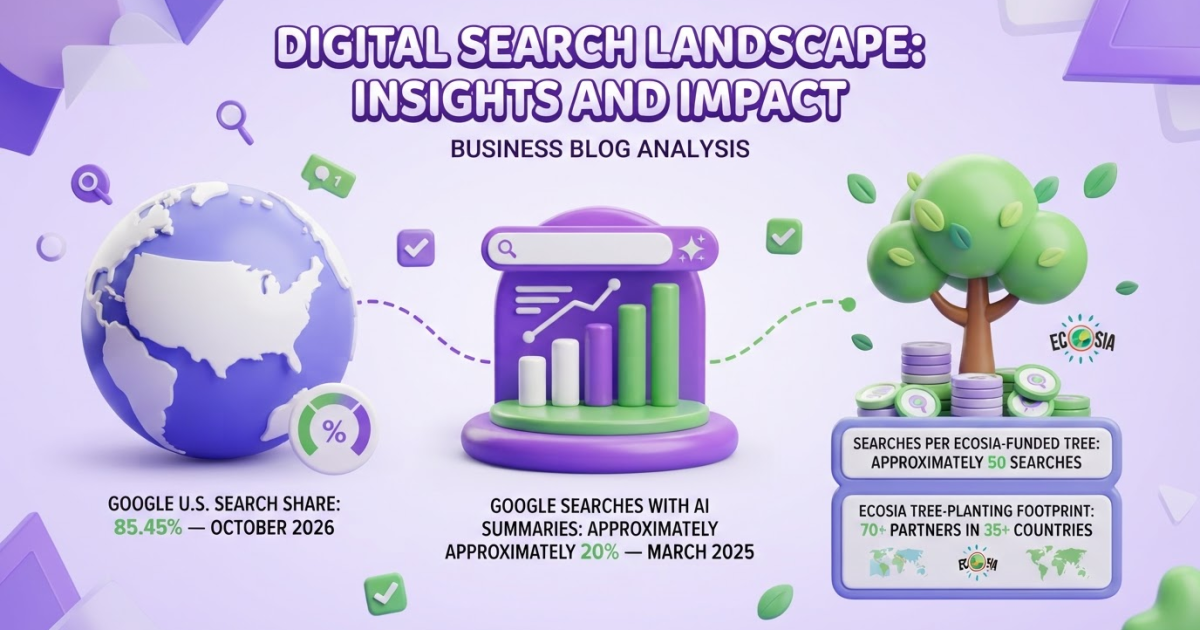
If you are tired of seeing the same crowded results, privacy trade-offs, or AI-written answers, looking beyond Google makes practical sense. Google still dominates, holding 85.45% of U.S. search-engine market share in October 2026, but your searches are no longer confined to one gatekeeper: privacy-focused engines, independent indexes, and AI-assisted answers now shape how people find information. This guide compares the leading Google alternatives, matches each one to a specific need, shows you how to switch your default and test result quality, and explains how to adapt website visibility efforts beyond Google without treating any platform as a guaranteed replacement.
| Point | Details |
|---|---|
| Match Your Priorities | Privacy, independence, sustainability, and AI citations point you toward different Google alternatives rather than one universal winner. |
| Test Before Switching | Run at least 10 recurring searches across 2 or 3 engines before changing your default. |
| Protect Your Privacy | DuckDuckGo says it does not save or share your search, chat, or browsing history. |
| Track Wider Visibility | Measure branded searches, referral traffic, citations, and conversions across more than 1 search ecosystem. |
| Keep Creating Value | Useful, well-structured content remains the foundation for visibility in conventional results and AI-generated answers. |
Why Look Beyond Google?
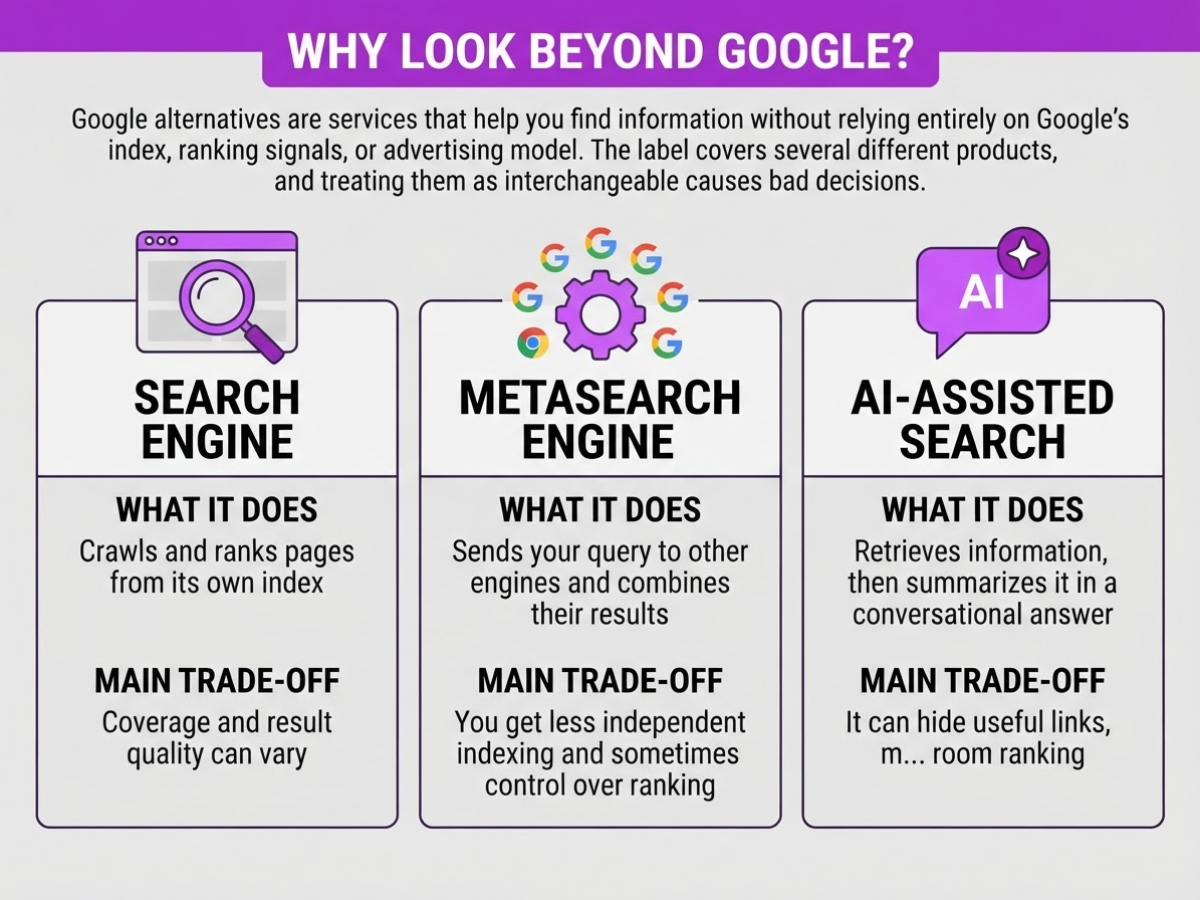
Google alternatives are services that help you find information without relying entirely on Google’s index, ranking signals, or advertising model. The label covers several different products, and treating them as interchangeable causes bad decisions. I have seen teams switch browsers for privacy, then wonder why their website traffic did not change at all.
| Type | What it does | Main trade-off |
|---|---|---|
| Search engine | Crawls and ranks pages from its own index | Coverage and result quality can vary |
| Metasearch engine | Sends your query to other engines and combines their results | You get less independent indexing and sometimes less control over ranking |
| AI-assisted search | Retrieves information, then summarizes it in a conversational answer | It can hide useful links, misread a source, or give you an answer without enough context |
People usually look beyond Google for one of five reasons:
- Privacy: DuckDuckGo says it does not save or share your search, chat, or browsing history.
- Less personalization: A less personalized result page can show what other users see instead of reflecting your previous searches, location, and profile.
- Independent indexes: Brave Search, for example, explains how much its results rely on third-party sources through an independence score.
- Sustainability: Ecosia connects search revenue with environmental projects, although its impact per search is modest and not a substitute for checking result quality.
- Source transparency: AI-assisted products such as Copilot Search display citations, which makes it easier to inspect where an answer came from, even when the summary itself is incomplete.
Pro Tip: Separate a search engine’s privacy promise from its actual result quality; users often need both evaluated independently.
Google still matters. It held 85.45% of U.S. search-engine market share in October 2026, so ignoring it would be careless. But that figure does not make Google the only channel worth monitoring, especially when customers search through Bing, Brave, YouTube, Reddit, maps, or AI answers.
Your personal choice and your publishing strategy are separate decisions. You might use Startpage for sensitive queries while tracking how your pages appear across several ecosystems. For that work, this practical SEO guide to Google search competitors is a useful starting point. Next, compare the leading alternatives by privacy, index ownership, features, and audience fit.
The Best Google Alternative for Each Search Goal
Choosing a Google alternative gets easier when you start with the job, not the brand. I would shortlist two engines for a week, then compare the actual answers you receive. No option wins every query, and pretending otherwise usually leads to a frustrating switch back to Google.
| Search engine | Best fit | Main trade-off | Publisher angle |
|---|---|---|---|
| DuckDuckGo | Privacy-focused everyday searches | Results can feel less locally tailored | Less personalisation, but still a chance to earn a click |
| Startpage | Google-like results with a privacy layer | It depends on an external results source | Familiar rankings, with fewer user signals available |
| Brave Search | Independent-index searching | Some queries have thinner coverage | Its independence score makes the index mix easier to judge |
| Ecosia | Searches tied to environmental funding | Result quality varies by query and region | Visibility can come from a less crowded channel |
| Bing | AI-assisted answers and broad coverage | AI summaries may satisfy users without a site visit | Cited sources can create referral opportunities |
DuckDuckGo is the cleanest starting point if you dislike search histories following you around. Its privacy policy says it does not save or share your search, chat, or browsing history, but the trade-off is familiar: local businesses and highly personalised searches may need more manual refinement. Startpage feels closer to Google in result quality and layout, which makes it the least disruptive choice when you want privacy positioning without learning a completely different search experience.
Brave Search deserves attention if index independence matters more than polished familiarity. It builds its own index and shows an independence score that indicates how often third-party results enter the results page. That score is useful, but do not treat it as a quality grade. A high score tells you where results come from, not whether a niche technical answer is accurate.
Ecosia suits people who will accept occasional ranking differences to support environmental projects funded by search advertising. I like the model, but it is easy to overstate the benefit: your searches do not plant a tree instantly, and impact varies with location, timing, and revenue. Bing is the more practical pick when you want AI-assisted summaries, especially because Microsoft says Copilot Search displays the sources used to generate its answers.
Pro Tip: Use the same five test queries—local, commercial, technical, news, and branded—when comparing engines so the results are genuinely comparable.
For a publisher, the distinction matters. Privacy reduces behavioural targeting, independent indexes change what gets discovered, and AI answers can reduce clicks even when your page is cited. Before changing your SEO priorities, compare Google search competitors in a practical SEO workflow, then choose one engine for users and another for monitoring referral opportunities. The next step is checking which alternative fits your privacy and research habits day to day.
How to Switch Your Default Search Engine
Pick one primary alternative before changing any settings. Base the choice on the things you actually care about: result relevance, privacy, citations, local coverage, shopping results, or fewer ads. Write down a seven-day test period and avoid switching engines halfway through it. If you need help comparing the options, this practical guide to alternative search engines gives you a useful starting point.
-
Choose your primary engine and save your test list. Include five recurring queries in each category: research, shopping, local intent, troubleshooting, and branded searches. For example, test “best project management software for a small team,” “running shoes under $120,” “plumber near me,” a specific printer error, and your company name. Use the same wording every time.
-
Change the default on your desktop browser. Open the browser’s Settings or Preferences, find Search engine or Address bar search, select your chosen service, and close the settings. Chrome, Edge, Firefox, Safari, and other major browsers use slightly different labels, so do not rely on an identical menu path. If the engine is missing, look for an option to add a custom search engine by URL.
-
Repeat the setting on every mobile device. Phone browsers often keep their own search preference instead of copying the desktop choice. Open the mobile browser menu, go to Settings, select Search or Search engine, and choose the same provider. Check tablets too. This is an easy step to forget, especially when your phone opens links from another browser.
-
Run the test list on days one, four, and seven. Record whether the first page answers the question, how many ads appear, whether privacy controls are clear, and whether an answer includes useful citations. Also measure the minutes needed to reach a source you would trust. A result that looks polished but makes you open six tabs has not saved you time.
-
Keep a fallback engine. One service may handle technical research well but miss nearby businesses, current store inventory, or niche regional terms. Save a second engine in your browser and switch only when the primary results fail your threshold. That small compromise usually works better than demanding one service win every search.
Pro Tip: Do not judge an alternative after one unusual query; save your recurring searches and compare the same queries after one week.
After seven days, use your notes rather than habit to decide which engine stays primary and which one handles the exceptions.

How Website Owners Should Adapt Beyond Google
Your publishing plan should assume that readers may discover one page through several paths, not just a Google result. I still care about conventional rankings, but I also track whether an answer is cited, whether a visitor arrives from Bing or DuckDuckGo, and whether that visit produces a signup, sale, or qualified inquiry.
The fundamentals remain pleasantly boring: answer the question near the top, name your sources, use descriptive headings, connect related pages with useful internal links, and keep important text in crawlable HTML. A clean structure helps a search crawler understand the page and gives an AI system smaller, clearer passages to evaluate. Thin introductions, buried answers, and unsupported claims create problems everywhere, not only on Google. I use this practical SEO guide for Google search competitors when reviewing coverage across engines.
Build the work around these milestones:
-
Weeks 1–2: establish a baseline. Record branded searches and non-branded rankings in Google, Bing, and the privacy-focused engines your audience uses. In analytics, separate referral traffic from Bing, DuckDuckGo, Brave, Startpage, Ecosia, AI tools, and partner sites. Also record conversions, assisted conversions, and email signups, because traffic volume alone is a poor victory condition.
-
Weeks 3–6: publish answer-led pages. Collect customer questions from sales calls, support tickets, Reddit discussions, and search suggestions. Publish pages that answer one clear question, show evidence, and link to the next useful action. Check titles, canonicals, robots rules, and rendering before assuming an engine can read the page.
-
Every month: inspect citations and mentions. Microsoft’s AI Performance reporting shows when your URLs appear in Microsoft Copilot, Bing AI-generated summaries, and selected partner integrations. Review which pages get cited, which questions produce no citations, and whether cited pages send visitors. AI visibility without branded searches or qualified referrals may be interesting, but it is not yet a business result.
-
Every 6–8 weeks: repair weak sections. Compare pages that earn mentions with pages that do not. Add missing examples, replace vague claims with sources, tighten headings, and update stale facts. Track branded search growth, referral sessions, citation URLs, conversion rate, and revenue by source.
I built Roki AI around the repetitive part of this workflow. It can keep content production moving and surface 3–10 Reddit opportunities each week, but I expect the owner to reject irrelevant prompts, check every claim, and decide whether a comment genuinely helps. Automation saves a planning hour; it does not excuse careless publishing.
That measurement discipline gives you the evidence needed to choose which alternative search channels deserve more investment next.
Common Mistakes When Leaving Google
The switch usually goes wrong when you treat it as a clean break instead of a change in your search toolkit. I have seen teams change one setting, hit a few disappointing results, and conclude that every Google alternative is inferior. The real problem was usually a mismatch between the tool and the task.
- Expecting one engine to replace Google everywhere. A privacy-focused engine may work well for research, while another handles news, technical documentation, or shopping better. Keep a backup for queries that depend on a large specialized index.
- Confusing privacy with relevance. DuckDuckGo or Startpage can reduce tracking, but that does not guarantee more useful results or fewer commercial pages. Privacy changes how your data is handled, not the quality of every ranking.
- Changing only the desktop default. Check your browser profile, phone, voice assistant, address-bar search, and workplace-managed devices. Otherwise, you will keep bouncing between engines without realizing it, which gets irritating fast.
- Ignoring local and vertical search. Restaurants, maps, product feeds, images, jobs, and niche databases often behave differently outside Google. Test the exact workflows you use each week before making a permanent switch.
- Publishing thin content to chase every engine. Generic AI pages rarely earn trust, and careless Reddit comments that merely drop your URL can make your company look desperate. If you use AI, edit it with firsthand details, evidence, and a clear point of view. Our guidance on optimizing AI content for search algorithms covers the quality checks teams commonly skip.
- Measuring rankings alone. A lower position can still produce better business if visitors are more qualified. Track referral sessions, citations, email signups, leads, sales, and conversion rate alongside rankings. Search visibility means little if nobody contacts you.
The sensible approach is to test alternatives by query type for 30 days, then keep the mix that produces useful answers and measurable business results. Next, we will look at the signals that show whether your new search strategy is actually working.
My honest take on Google alternatives
I run TryRoki, and my contrarian view is that most businesses should not try to abandon Google completely. Its reach, buying intent, and commercial importance are still too large to ignore. The smarter goal is to reduce dependence on one gatekeeper by learning where your customers search, which sources AI systems cite, and how privacy-focused or independent indexes change user behavior.
I have also seen teams treat search diversification as a publishing contest. That usually creates more thin pages, more maintenance, and very little business value. The work that holds up is less glamorous: identify topics worth owning, publish pages that answer the real question, earn relevant mentions, then review impressions, referrals, citations, and conversions on a regular schedule. Even our own workflows can feel repetitive when a task uncovers a topic that looks promising but has no clear audience.
Switching search engines will not rescue weak content, vague positioning, or a checkout path that loses buyers. If someone cannot understand what you offer in ten seconds, changing their default browser is beside the point. I see search diversification as an operating habit, not a one-time settings change. You keep testing where attention moves, then adjust what you publish and how you get found.
— Daniel/Aleksandra
Build a broader search visibility workflow with Roki AI
If you are comparing Google alternatives, you still need a practical way to keep publishing and improving your visibility across search engines. I built Roki AI’s content workflow to handle the repetitive part: drafting website content on autopilot and giving you 3 to 10 focused tasks each week for Google and AI search engines.
It also surfaces relevant Reddit posts where your website could add useful context. That does not mean dropping a promotional comment everywhere. I review the post, decide whether our experience genuinely helps, and edit every draft before publishing. The same caution applies to AI-generated content. Roki can save time, but it cannot replace your judgment about expertise, relevance, or tone. If you want to see what the platform actually includes, explore the available Roki AI features and start with the tasks that fit your strategy.
Frequently Asked Questions
No single search engine wins every query. DuckDuckGo and Startpage suit privacy-focused users, Brave Search emphasizes its own index, Ecosia ties searches to environmental projects, and Bing offers AI-assisted answers with citations, so test at least 3 options against the searches you make most often.
DuckDuckGo and Startpage are sensible options if limiting search tracking is your main concern, but you should read each privacy policy rather than trust a simple “private” label. Run 10 real searches on both, then compare the results, ads, settings, and convenience before changing your default.
DuckDuckGo combines several sources and maintains its own crawler and index for parts of its search service, so it is not simply Google with a different interface. Its privacy policy says it does not save or share your search, chat, or browsing history, although results can still vary by query.
Yes, they can create extra discovery and referral opportunities, but traffic still depends on content quality, crawl access, search demand, and user behavior. Track referrals, branded searches, leads, and conversions for at least 30 days, because a ranking increase that produces no qualified visits is mostly a vanity metric.
Publish accurate pages with clear headings, direct answers, and credible sources supporting important claims. Monitor citations and referrals for at least 30 days when your tools provide that data, since an AI answer may mention your site without sending a conventional click.
Written by Daniel/Aleksandra.
Recommended reads
- Alternative Search Engines A Practical Guide
- What Search Engine Is Better Than Google
- Google Search Competitors Practical Seo Guide
- Optimizing Ai Content For Google S 2026 Algorithms
Sources
- Search Engine Market Share United States Of America | Statcounter Global Stats
- Do people click on links in Google AI summaries?
- DuckDuckGo Privacy Policy
- Our Privacy Policy
- What is Brave Search?
- Impact Calculator
- Introducing Copilot Search in Bing
- Introducing AI Performance in Bing Webmaster Tools Public Preview