Daniel D.
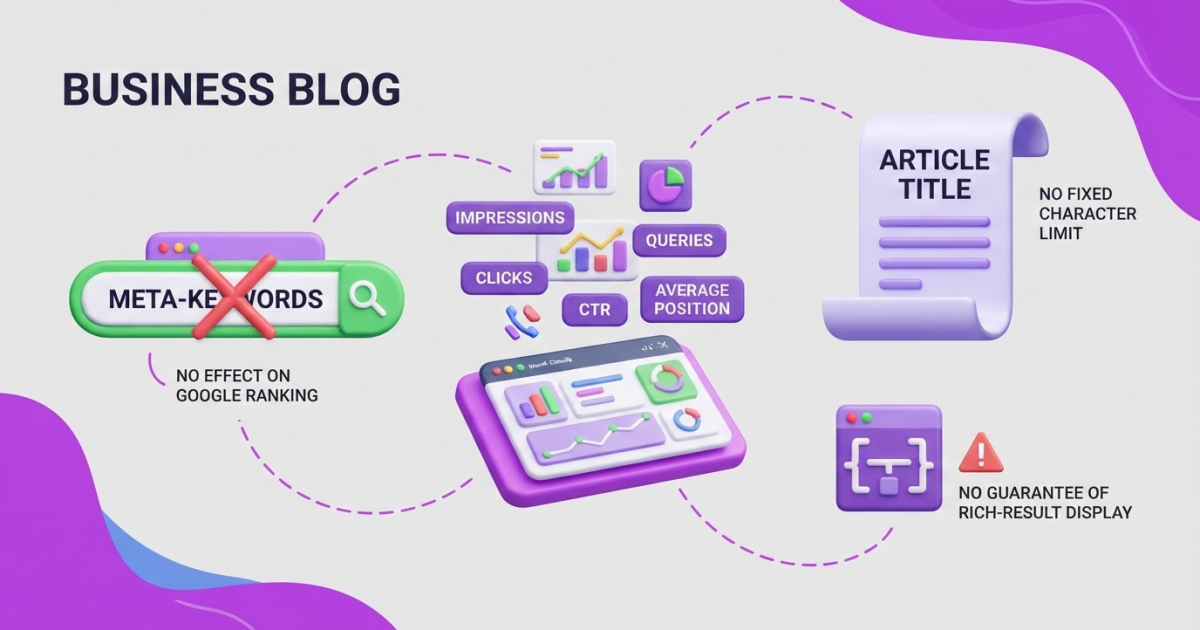
A metadata keywords generator can help you find and organize relevant phrases, but the old meta-keywords tag has 0 practical ranking value in Google. Use those insights in your visible content, titles, descriptions, URLs, internal links, and page structure instead.
If you have been adding keyword lists to a page’s HTML metadata and waiting for rankings to move, you are fixing the wrong lever. A metadata keywords generator is more useful as a planning tool than as a ranking shortcut: Google says it ignores the meta-keywords tag for indexing and ranking. The real work is deciding which ideas deserve attention, removing vague or repetitive terms, and assigning useful language to the right page. This guide shows you how to generate, filter, map, and implement keyword ideas, then turn the output into people-first content and measurable SEO improvements.
| Point | Details |
|---|---|
| Tag is obsolete | Google ignores the meta-keywords tag for indexing and ranking, so adding a list of 10 or 20 terms will not improve visibility. |
| Generate topic ideas | Use a generator to organize related phrases, questions, and search intents around 1 primary topic. |
| Map keywords naturally | Assign 1 primary intent to each page and add related terms only when they clarify the content. |
| Optimize visible elements | Prioritize useful copy, title elements, descriptions, headings, URLs, and internal links over hidden keyword fields. |
| Measure real queries | Review Google Search Console data every 2 to 4 weeks to compare generated ideas with the queries bringing users to your site. |
What a Metadata Keywords Generator Actually Does
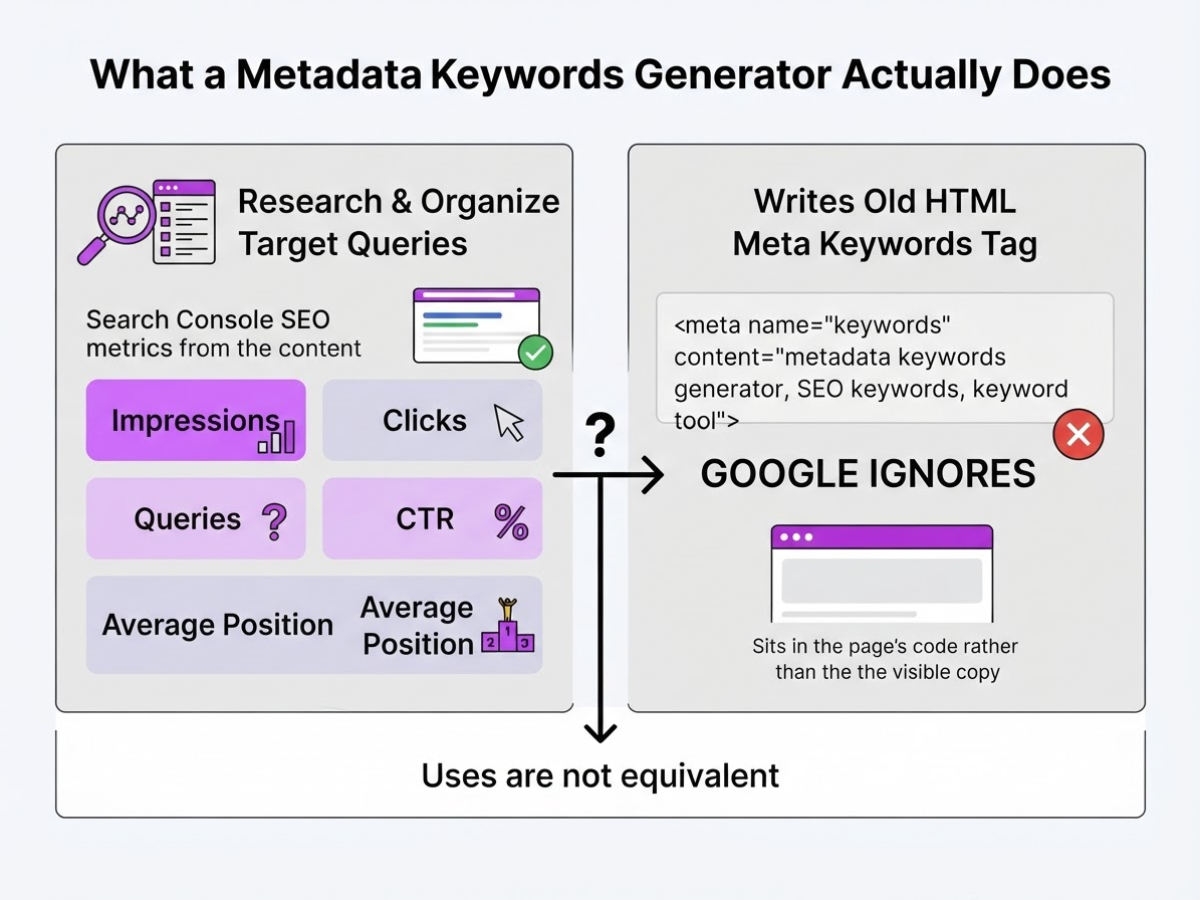
When people search for a metadata keywords generator, they often mean two different things. In my work with website owners, I see the phrase used for a tool that researches and organizes target queries, but some people still mean a tool that writes an old HTML meta keywords tag. Those uses are not equivalent.
The old tag looked like this:
<meta name="keywords" content="metadata keywords generator, SEO keywords, keyword tool">
It sits in the page’s code rather than in the visible copy. Google ignores the meta-keywords tag for indexing and ranking, so adding dozens of phrases there will not improve a page’s position. That is one of the most persistent SEO distractions I still see during site reviews.
A useful generator should help you plan the parts that search engines and readers can actually evaluate:
| Element | What it does | How a generator can help |
|---|---|---|
| Meta keywords tag | Stores hidden phrases in HTML | Usually, nothing useful today |
| Meta description | Summarizes a page in search results | Suggests a concise, relevant description |
| Title element | Defines the page title used for search-result links | Recommends a clear primary topic and angle |
| Visible page content | Answers the visitor’s question | Groups related terms and supporting topics |
The real output is not a magic list to paste everywhere. It is a working plan that connects a query to search intent, topical relevance, and one specific page. For example, “metadata keywords generator” may signal that someone wants a tool, while “what are meta keywords” signals a definition. Those searches deserve different pages or sections.
I prefer tools that cluster close variations, suggest related subtopics, and show which page should target each group. A target keywords guide can help you make that mapping before writing. Do not force every generated phrase into the copy either. Google can understand related wording, and awkward repetition can make a page worse for humans.
Pro Tip: Treat every generated phrase as a hypothesis to validate against search intent and your audience, not as a term that must appear on the page.
With that distinction clear, the next step is to examine which metadata fields still deserve your attention.
How to Use a Metadata Keywords Generator in 6 Steps
Before I open a generator, I decide what the page must achieve. A product page may need qualified demo requests, while a guide may need to answer a beginner’s question and earn an email signup. That decision keeps a long list of attractive but useless phrases from driving the brief.
-
Define the page’s job and search intent. Write down the audience, business goal, and one sentence describing what the searcher expects to find. Label the intent as informational, commercial, navigational, or transactional. If you cannot explain why this page should exist, keyword research will not fix the problem.
-
Enter one clear seed topic. Use a plain phrase that describes the page, such as “metadata keywords generator” or “accounting software for freelancers.” Generate related phrases, questions, modifiers, synonyms, and longer variations. Expect some nonsense: tools often return terms that are popular but aimed at a different audience or problem.
-
Sort the suggestions by intent. Put “what is metadata” under informational, “best metadata tool” under commercial, a brand name under navigational, and “buy metadata software” under transactional. This grouping shows whether one page can satisfy the demand or whether you are mixing four different journeys.
-
Clean the list before writing. Remove duplicates, unrelated industries, misleading modifiers, misspellings that change the meaning, and phrases your page cannot answer honestly. Also mark terms that deserve separate pages. A page about generating keyword ideas should not stretch into a full tutorial on technical SEO just because the generator suggested it.
Pro Tip: Keep a rejected-keyword column in your research sheet; it prevents the same irrelevant suggestions from resurfacing in future content briefs.
-
Choose a primary phrase and supporting concepts. Select one phrase that matches the page’s purpose, audience, and realistic competition. Add a manageable group of supporting ideas, usually the questions and subtopics needed to give a complete answer. Our team finds that target keyword research works better when you choose a clear topic boundary instead of forcing 30 near-identical phrases onto one URL.
-
Assign terms naturally, then measure the result. Use the primary phrase where it reads normally in the title, opening copy, a relevant heading, URL, internal-link anchor, and description. Use supporting concepts where they clarify the page, not in every paragraph. Google does not use the old meta-keywords tag for ranking, and exact repetition can make copy awkward or spammy. After publication, Google Search Console reports impressions, clicks, and the queries bringing users to your site. Compare those queries with your plan after several weeks, then update gaps that reflect real visitors rather than stuffing in every new variation.
The next step is turning that cleaned keyword set into page metadata that earns attention without promising more than the content delivers.
Where Generated Keywords Belong on a Page
The page itself should carry most of the keyword work. When I review a generated list, I first ask where a real reader would expect to see each phrase, not which hidden field can hold the most terms.
| Page location | Useful job | Common mistake |
|---|---|---|
| Visible body copy | Answers the query with relevant detail and examples | Repeating the same phrase until the writing sounds robotic |
<meta name="keywords"> | No useful Google ranking role | Spending time filling an ignored field |
| Title element | States the page topic in search results and the browser tab | Chasing a fixed character count that does not exist |
| Meta description | Sets a clear result preview when Google uses it | Treating it as a guaranteed snippet |
| URL and headings | Clarify page structure and topic | Turning every heading into a keyword list |
| Alt text and internal anchor text | Describe images and tell users what linked pages contain | Writing alt text or anchors for crawlers instead of people |
| Structured data | Labels entities, products, reviews, or FAQs for eligible features | Assuming markup guarantees a rich result |
The visible copy deserves priority because it has to satisfy the search intent after the click. Google ignores the meta-keywords tag for indexing and ranking, so a hidden list cannot rescue thin content or a page aimed at the wrong audience. It can also create a nasty editing habit: teams polish metadata while leaving the answer vague.
A title should identify the subject and, when useful, the audience or outcome. Google has no fixed character limit for title elements, though it may truncate the title link to fit the device. I use a free SEO title generator for variations, then remove anything that sounds inflated.
A meta description can explain why a result fits the query, but Google primarily builds snippets from visible page content and may replace your description. Descriptive URL words, useful headings, accurate alt text, and specific internal anchor text each serve different readers and systems. Structured data adds machine-readable context; it is not a second keyword container.
Pro Tip: Write the description for the searcher who sees the result, then check whether the page itself delivers the same promise before publishing.
I also use a metadata description generator for first drafts and an alt tag generator when an image library gets messy. These tools save time, but judgment still decides placement. Next, the focus shifts from placement to checking whether generated terms match the page’s real search intent.

Five Mistakes That Make Keyword Generators Less Useful
After reviewing generated keyword lists for client pages, I have found that the tool is rarely the real problem. The trouble starts when someone treats suggestions as instructions instead of clues about audience needs, page purpose, and search intent.
Common mistakes include:
-
Publishing a comma-separated list in a meta-keywords tag. Google ignores the
meta name="keywords"tag for indexing and ranking, so adding “metadata keywords generator, SEO keywords, keyword tool” gives you no ranking benefit. Put your effort into visible, useful content and a clear page title instead. -
Forcing every variation onto one page. A page does not need the exact phrases “keyword generator,” “SEO keyword generator,” and “metadata keyword tool” repeated in every heading. Google can connect related wording without seeing every variation, while awkward copy makes the page harder to read. Use a practical guide to target keywords to choose a focused primary topic and a sensible group of supporting terms.
-
Treating related terms as separate intents. “How to generate keywords” may need an educational guide, while “free metadata keywords generator” may signal someone ready to use a tool. If the answers, formats, or next actions differ, create separate pages rather than cramming both intents together.
-
Sorting by volume alone. A high-volume phrase can attract the wrong audience or face competition you cannot realistically overcome. Check relevance, ranking difficulty, audience value, and conversion intent. A lower-volume query from someone comparing tools may be worth more than thousands of casual searches.
-
Assuming markup or keyword density guarantees visibility. Structured data can help search engines interpret a page, but correct implementation does not guarantee a rich result. Likewise, stuffing phrases into headings, paragraphs, or hidden text can lead to lower rankings or removal from Google Search. Build for the reader first, because Google recommends people-first content, not pages created mainly to manipulate rankings.
Once you remove these habits, the generator becomes a planning aid rather than a copy machine. The next section covers how to judge whether its suggestions are actually worth pursuing.
Turn Keyword Output Into a Content System
A useful keyword list becomes valuable only after you attach each phrase to a decision. I keep a keyword-to-page map with the search intent, funnel stage, URL, primary phrase, supporting concepts, owner, and status. A spreadsheet is enough, but an owner must maintain it or it turns into another abandoned SEO file.
I use this timeline to move from ideas to repeatable work:
-
Day 1: Map the opportunity. Group related phrases into clusters and assign one main page to each meaningful intent. This exposes missing comparison pages, supporting articles, and internal-link opportunities. I would rather publish one useful cluster than five isolated posts that compete with each other. My guide to target keywords covers the distinction between choosing a phrase and choosing a page.
-
Days 2-3: Write the brief. Each brief records the audience’s real questions, the evidence you can provide, your unique experience, the desired action, and on-page requirements such as the title, headings, URL, links, and relevant schema. Do not force every variation into the copy. Google can understand related queries and keyword variations without requiring every exact phrase, so repetition usually makes writing worse, not safer.
-
Weeks 1-2: Publish and connect. Link the new page to its cluster hub and relevant product or service pages. Then check that the page answers the searcher’s next question, not just the phrase that appeared in the generator.
-
Weeks 4-8: Review the evidence. Search Console shows impressions, clicks, and the queries bringing visitors to your site. I compare those queries with the brief, then expand missed intents, improve weak sections, or merge pages that overlap. Rankings alone are too noisy to drive every decision.
Roki AI helps me keep this cadence by producing content drafts and assigning three to ten weekly SEO tasks, including work aimed at Google and AI search visibility. It saves planning time, but I still decide whether a claim is sound, whether the angle fits our audience, and whether a page deserves to exist. Automation cannot repair a thin idea or invented expertise.
The next step is to apply this system without falling back into the common generator mistakes that waste good keyword research.
My honest take on metadata keywords generators
I see metadata keywords generators as useful only when you define “metadata” broadly. The valuable output is not a list to paste into an old meta-keywords tag. It is a set of ideas that helps you decide what a page should promise, which questions it must answer, and where it fits in your site.
Here’s the contrarian part: the strongest workflow often involves less keyword optimization, not more. I would rather see a page target three clear concepts with useful examples, credible evidence, sensible internal links, and a direct conversion path than chase 30 near-identical phrases. Exact-match suggestions can create bloated headings and awkward copy, while giving customers less of what they came to find.
At TryRoki, I treat automation as a way to remove repetitive research and publishing work, not as a substitute for judgment. Generators can surface ideas and clusters, but they cannot reliably decide whether a topic matches your product, your customers, or your reputation. That review still belongs to the business owner.
I also would not include the old meta-keywords tag in a modern SEO checklist. Generate a focused plan, publish genuinely helpful content, then use Search Console data to refine it. That is slower than chasing a tool’s ranking promise, but it holds up better when search behavior changes.
— Daniel/Aleksandra
Use Roki AI to Turn SEO Ideas Into Consistent Action
Once your keyword research confirms a topic, the harder part is publishing useful work consistently. I built Roki AI to turn validated topics into website content while keeping the wider SEO process moving with 3 to 10 weekly tasks. It can also surface relevant Reddit discussions where a genuinely helpful comment may mention your website naturally.
That does not make Roki AI a shortcut around search quality guidelines, and it will not make the obsolete meta-keywords tag useful. You still need to review drafts, check claims, add firsthand insight, and decide which opportunities deserve your time. The first setup can feel fiddly, and not every suggested task will fit your business. Still, a steady workflow beats another month of collecting keywords without publishing. Explore the available SEO tools and use them to track practical progress, not guaranteed rankings.
Frequently Asked Questions
No. Google has ignored the meta-keywords tag for indexing and ranking for more than 15 years, so adding phrases to that hidden field will not improve a page’s position. Use keyword research to shape useful content, headings, and page structure instead.
No tool improves SEO by itself. A metadata keywords generator can produce 10 or 100 ideas in seconds, but you still need to judge search intent, write genuinely useful content, and measure performance after publication.
There is no universal number, but one primary search intent plus a focused group of closely related terms usually works better than 50 disconnected phrases. Cover the topic completely, and do not force every generated keyword into the copy.
Use your research to improve visible content, title elements, headings, descriptive URLs, internal links, image alt text, and meta descriptions when they help users choose a result. Treat these as user-facing elements, not a hidden storage field for 20 keywords.
Google Search Console shows the queries connected with your site’s impressions and clicks in Google Search. Review the data after at least 28 days, then use it to refine pages, find content gaps, and update your keyword map.
Written by Daniel/Aleksandra.
Recommended reads
- Target Keywords A Practical Seo Guide
- Meta Description Generator Write Better Seo Snippets
- Lsi Keywords Generator A Practical Seo Guide
- Seo For Llms A Practical Optimization Guide
Sources
- Meta Tags and Attributes that Google Supports | Google Search Central | Documentation | Google for Developers
- How to Write Meta Descriptions | Google Search Central | Documentation | Google for Developers
- Influencing Title Links in Google Search | Google Search Central | Documentation | Google for Developers
- SEO Starter Guide: The Basics | Google Search Central | Documentation | Google for Developers
- SEO Starter Guide: The Basics | Google Search Central | Documentation | Google for Developers
- General Structured Data Guidelines | Google Search Central | Documentation | Google for Developers
- Using Search Console and Google Analytics Data for SEO | Google Search Central | Documentation | Google for Developers
- Spam Policies for Google Web Search | Google Search Central | Documentation | Google for Developers
- Google Search Essentials | Google Search Central | Documentation | Google for Developers